




Sparkamek is an app for Windows, Linux and MacOS. Kamek is a tool that allows you to add custom code to New Super Mario Bros. Wii. Sparkamek allows you to create, edit and build Kamek projects with ease. Everything is done in a simple and easy to use TUI.
Sparkamek Terminal is a lite version of Sparkamek that only contains the Kamek compiler. It is available for Windows, Linux and MacOS.
Note
If you're interested in a more complex version of Sparkamek Terminal including additional tools, check Sparkamek.
- Windows 7 or later
- VC++ 2015 Redistributable
- All Linux distributions supported by Python 3.11 or later
- MacOS 10.14 (Mojave) or later
- Python 3.11 or later
- Dependencies (use
pip install -r requirements.txtin the project root folder to install them)
- Dependencies (use

- Download the latest release from the releases page and extract into the folder of your choice, but it's recommended to place it in the
toolsfolder of your Kamek project for the sake of simplicity.
With this app, you'll find a config.json file at the root of the folder you extracted the app. This file contains the settings of the app.
You'll notice that there is a projects key containing a list. This is because each item of this list is a project. If you have multiple projects, a selector will appear when you start the app to select the project you want to compile.
You can edit it to change the starting YAML file, the compiler mode, the compiler options, etc.
Doing a lot of NSMBW modding, I found myself using Kamek a lot as it is used to compile the code. However, I found it very annoying to use as it for debugging for multiple reasons:
- No colors, so it's hard to read
- When using the fasthack option, it doesn't show the correct line number of the errors / warnings (it shows the line number of the fasthack instead, which is about 50 000 lines so good luck scrolling to the correct line, even with the search function)
- It doesn't show the file name of the errors / warnings
- No spacing, everything is cramped together
- When you have an error, it generates so much garbage that it's hard to find the error itself, because it's at the very top of the log
Okay, so if this didn't convince you, let me tell you a short story.
So one day I just wanted to test how much garbage the compiler gives, so I just remove a single ; from a file called boss.h, and the rest of the code had no error. Now, if I compile this, we should in theory have a single error.
You know what, it threw me 1041 errors, in 24 different files.
Like wtf, just for a single missing ; ? And the worst part is that this represents 4 243 lines of garbage, and the correct error is at the very top of the log, under a lot of warnings, so good luck finding it on the command line with no color.
By the way, if you want to check the output for yourself, here it is, with all the warnings and the top of the log removed for your mental health: error.log.
And here is the output of Sparkamek for the same error:
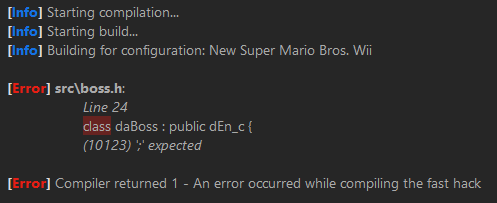
Much better, right?
Sparkamek is a improved Terminal for Kamek. It has colors, spacing, the correct line number for the errors / warnings, the file name of the errors / warnings, and it doesn't generate a lot of garbage.
With this tool, you can compile the code for the game. The compiler has 2 modes: simple and complete.
The complete mode is the same as the Kamek one, but with colors, spacing and the correct line number for the errors / warnings whereas the simple mode is a lot more compact and only shows essential information.
To compile, just run main.py when running from source code or the Sparkamek Terminal executable when running from a release.
You can start it from anywhere, it will automatically set the current directory to the tools folder of your Kamek project as long as you set the path in the config.json file to the NewerProject.yaml file (or whatever it's called) of your Kamek project.
This section contains known issues with the app and how to fix them.
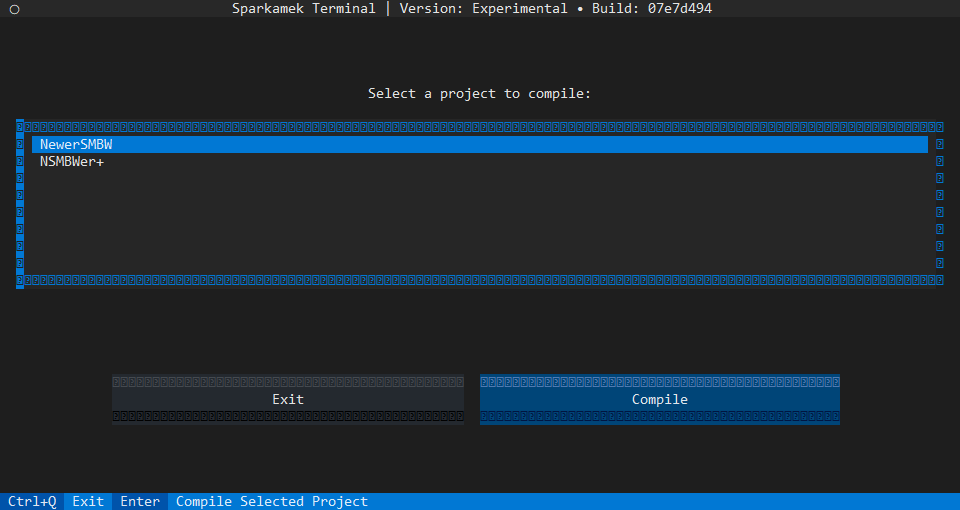
This is a known issue with the Windows Command Line. To fix this, you can right click on the title bar, go to Properties, then Font and select Cascadia Mono SemiBold as the font (or any font that support special characters). Some special characters will still be missing, but it's better than nothing.
Alternatively, you can use a different terminal like Windows Terminal or any other terminal that supports special characters.