ODYSAFE CTI is an open-source, local-first Cyber Threat Intelligence platform designed to bring collection, analysis, investigation, memory, STIX, MITRE ATT&CK, IOC management, and reporting into a single workspace.
It is intended for analysts who want to keep their intelligence data under their own control while reducing fragmentation between collection, context, investigation, operationalization, and reporting.
Local-first • Analyst-driven • Open source • No mandatory cloud dependency
ODYSAFE CTI provides a unified workspace for the main stages of a CTI workflow:
- collect intelligence from files, text, URLs, STIX bundles, and CTI resources;
- extract and manage indicators at scale;
- organize sources and investigation context;
- preserve analyst notes, entities, and relationships in local Memory;
- analyze STIX objects and MITRE ATT&CK behavior;
- explore ransomware and community CTI resources;
- prepare structured operational Flash Reports;
- export intelligence for further analysis, hunting, detection, or sharing.
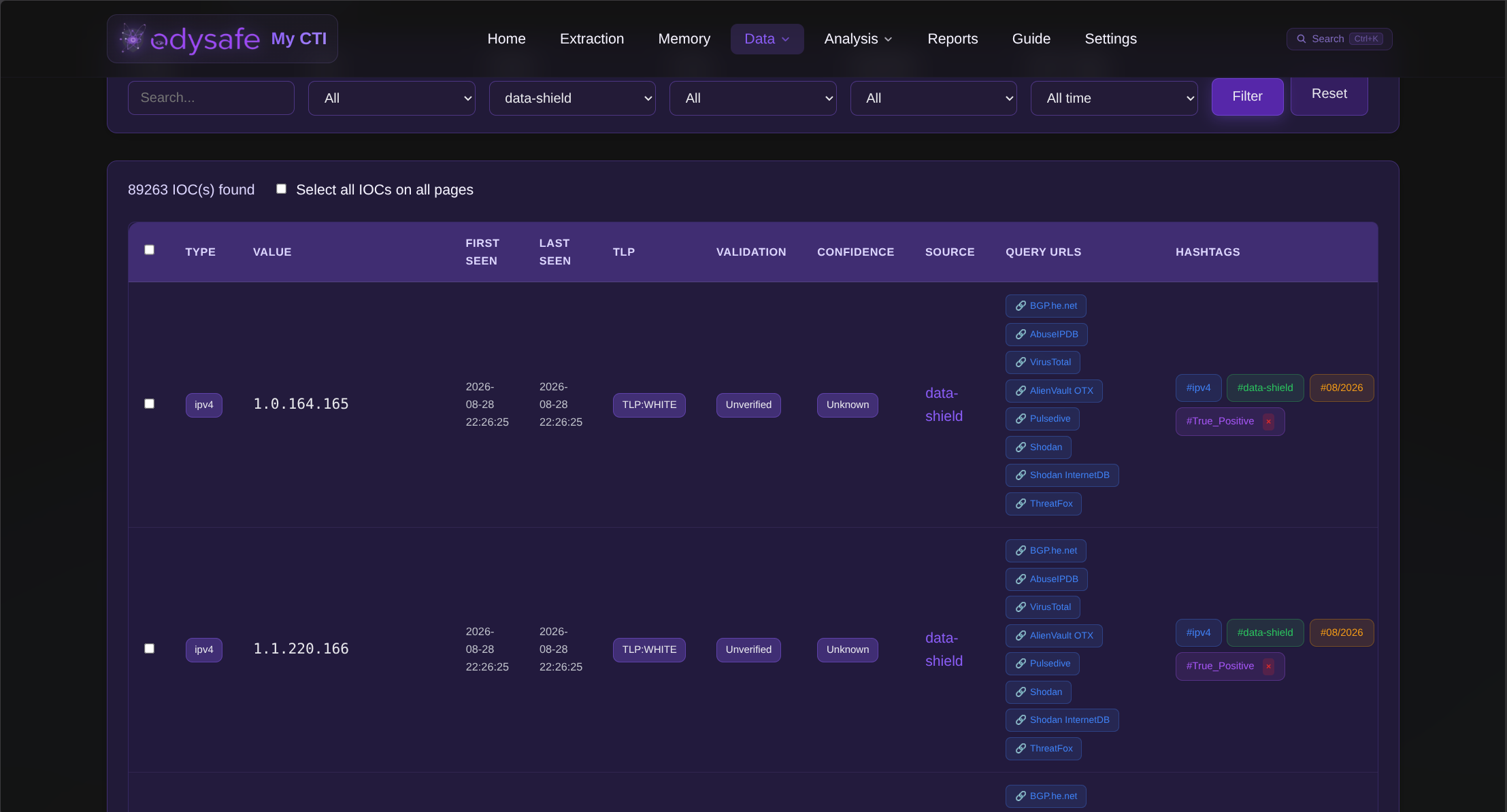
ODYSAFE centralizes extracted indicators in a searchable workspace.
It supports more than 50 IOC and observable types, including network indicators, hashes, CVEs, ATT&CK techniques, identifiers, communication artifacts, blockchain addresses, and other structured values.
Indicators can be filtered, grouped, validated, contextualized, linked to external analysis resources, and reused throughout the platform.
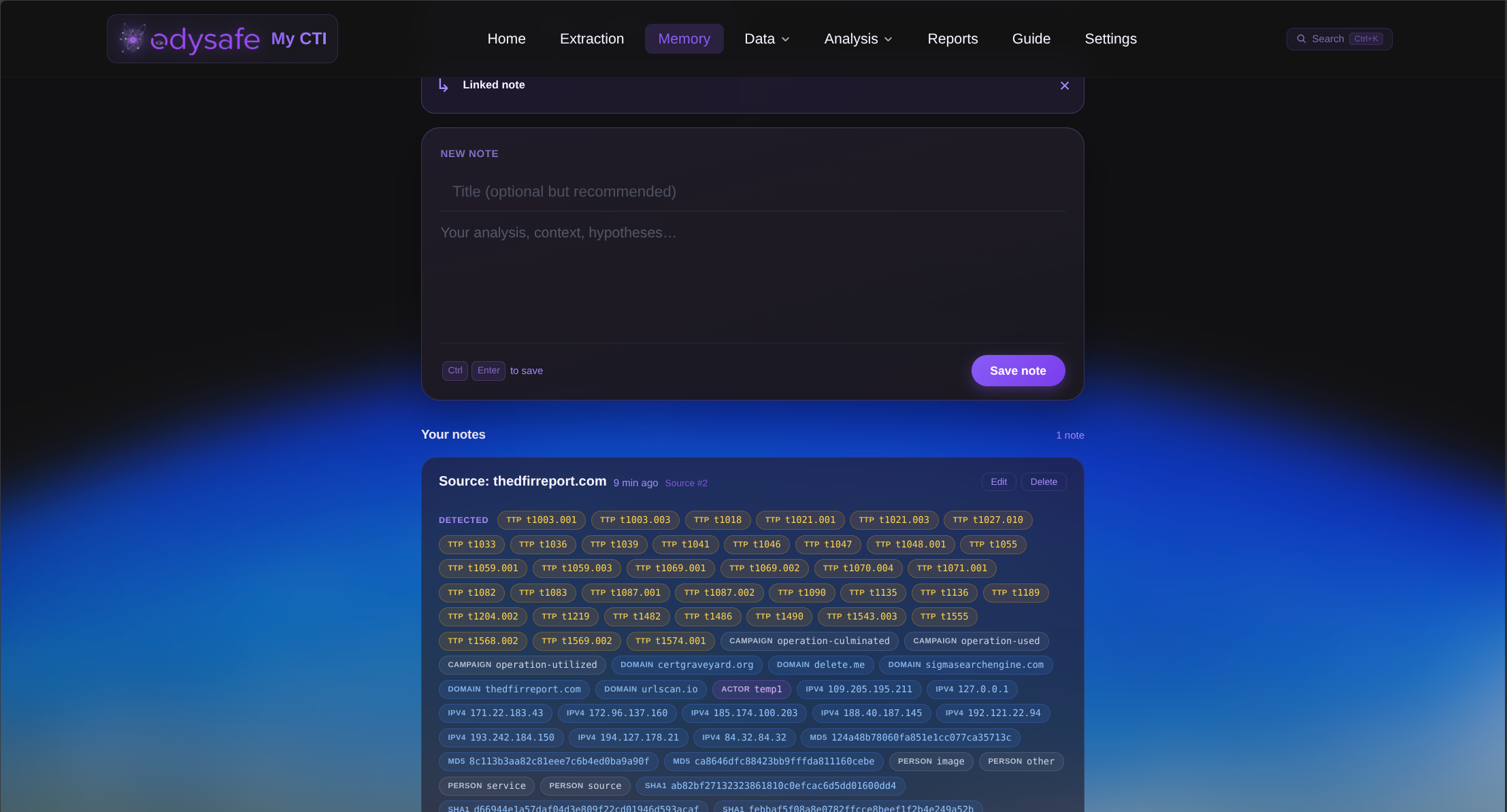
The Memory workspace provides a local analyst knowledge layer for notes, IOCs, TTPs, sources, entities, hypotheses, and investigation context.
It is designed to help analysts recover previous observations, reconnect related information, and preserve useful context across investigations.
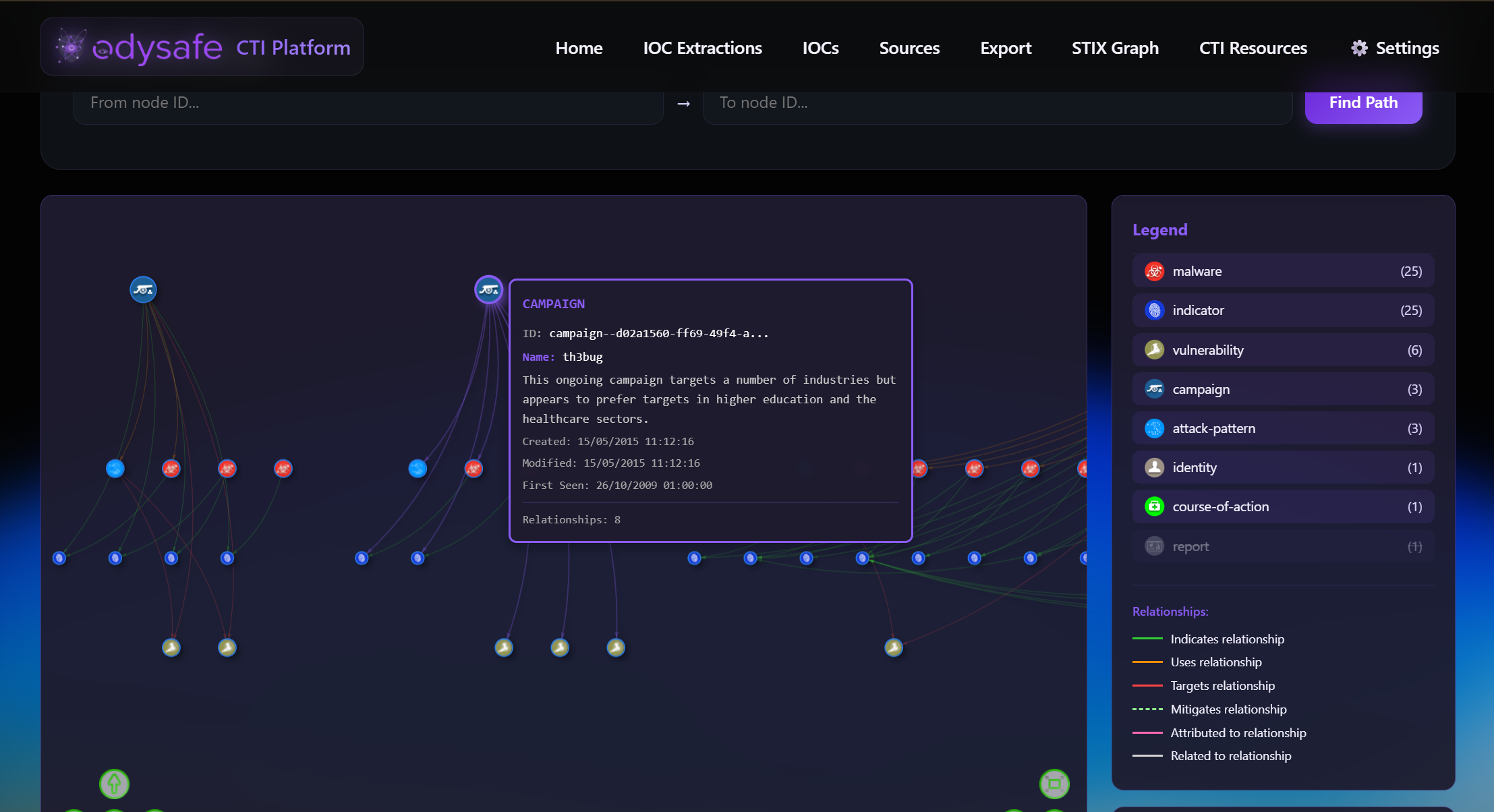
ODYSAFE combines several CTI analysis capabilities in the same workspace.
The analysis area includes:
- STIX Graph for visual exploration of STIX 2.0 / 2.1 objects and relationships;
- MITRE ATT&CK for techniques, groups, behavior mapping, and IOC relationships;
- DeepDarkCTI for browsing community CTI resources;
- Ransomware Tool Matrix for ransomware tooling, group profiles, intelligence resources, and defensive research;
- local IOC, source, and Memory context reusable during investigations.
STIX content can be imported, explored, connected to observables, saved, validated, and exported again.
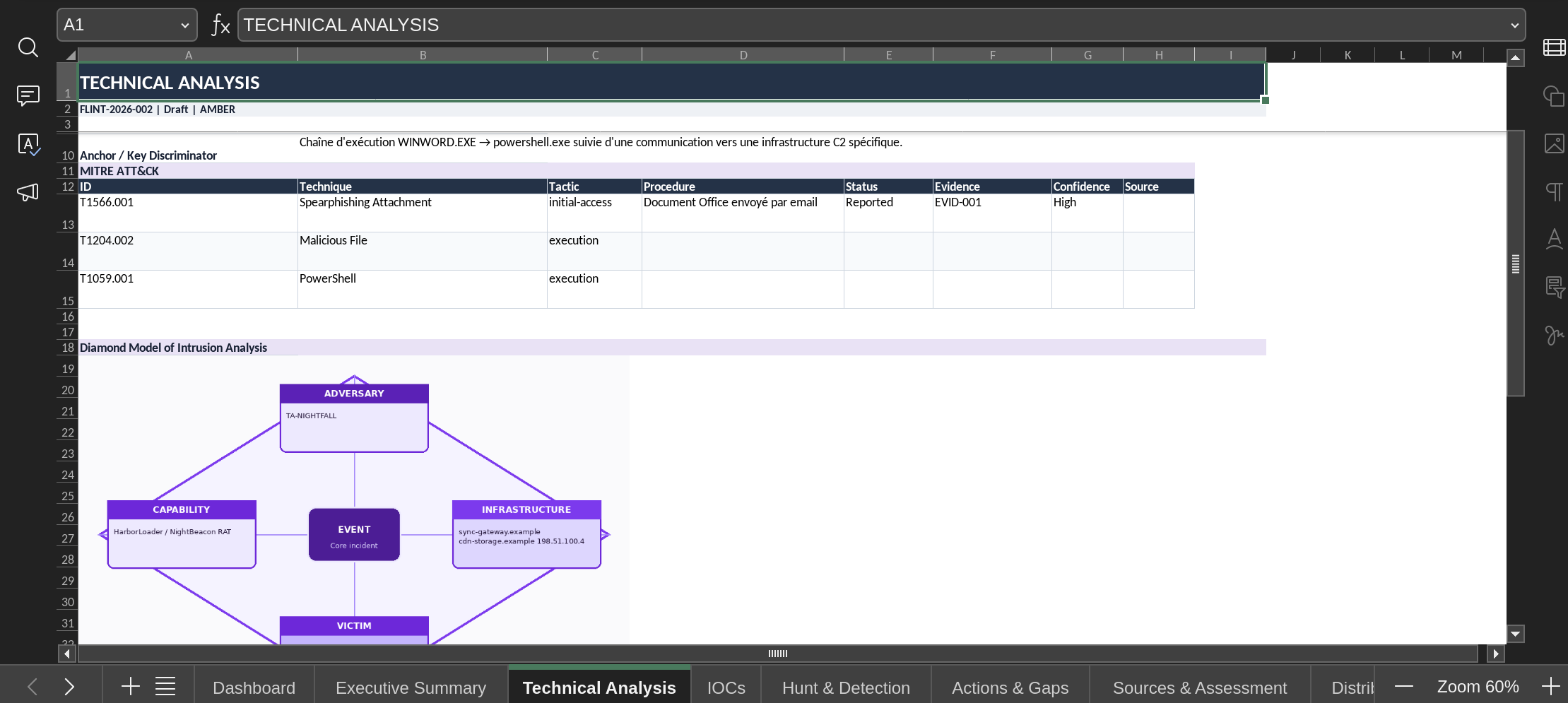
ODYSAFE includes a structured Flash Report workspace for turning collected intelligence into an operational CTI product.
A report can bring together:
- metadata and intelligence requirements;
- threat or activity classification;
- executive summary and key judgements;
- timeline and technical analysis;
- MITRE ATT&CK procedures and attack sequence;
- IOCs and operational context;
- detection content, telemetry requirements, hunt leads, and hunt results;
- actions and intelligence gaps;
- analytic assessment and confidence;
- sources, provenance, and distribution instructions.
Reports can be saved, restored, reused, and exported to Excel.
ODYSAFE is designed to run on-premise and keep operational CTI data under local control.
Application data, analyst context, reports, IOC exports, STIX bundles, uploads, and runtime resources remain inside the local installation environment.
The platform does not require a hosted ODYSAFE backend or mandatory telemetry service.
Clone the repository:
git clone https://github.com/Odysafe/ODYSAFE-CTI.git
cd ODYSAFE-CTI
ODYSAFE provides a standard installation path and an optional service-management path.
Make the installer executable:
chmod +x install.shRun it:
./install.shThen start ODYSAFE:
chmod +x start.sh
./start.sh
By default, ODYSAFE uses port 5001.
When HTTPS is enabled:
https://localhost:5001
The service script is not mandatory.
It is useful when you want ODYSAFE to run as a managed service instead of launching it manually with ./start.sh.
Make the script executable:
chmod +x scripts/install-service.shThen install the service:
./scripts/install-service.sh installThe script automatically detects the available service mechanism:
- systemd on supported Debian/Ubuntu hosts;
- SysV / service in environments where systemd is unavailable, including compatible containers.
The service script expects the ODYSAFE Python environment to already exist. If venv/ has not yet been created, run ./install.sh first.
Manage the service with:
./scripts/install-service.sh status
./scripts/install-service.sh restart
./scripts/install-service.sh logs
./scripts/install-service.sh remove
On SysV-compatible environments, the generated service can also be controlled with:
service odysafe-cti start
service odysafe-cti stop
service odysafe-cti restart
service odysafe-cti statusRecommended environment:
- Linux
- Python 3.10+
pipgitopenssllibmagic
The standard installer prepares the Python environment, dependencies, runtime directories, TLS material, and optional CTI datasets used by the platform.
Runtime data is stored under the local installation directory, including:
cti-platform/database/
cti-platform/uploads/
cti-platform/outputs/iocs/
cti-platform/outputs/stix/
cti-platform/outputs/reports/
cti-platform/ssl/
Operational databases, generated certificates, analyst notes, uploaded intelligence, reports, logs, backups, caches, and other runtime data should not be committed to the public repository.
ODYSAFE-CTI/
├── cti-platform/
│   ├── app.py
│   ├── database.py
│   ├── modules/
│   ├── static/
│   ├── templates/
│   ├── uploads/
│   └── outputs/
├── docs/
│   └── images/
│       ├── exemple-report.png
│       ├── IOCs.png
│       ├── Memory.png
│       └── stix graph.png
├── scripts/
│   ├── install-service.sh
│   ├── requirements.txt
│   ├── requirements.lock
│   └── pinned_sources.json
├── install.sh
├── start.sh
├── uninstall.sh
├── README.md
├── LICENSE
└── COPYING
Before publishing or redistributing a deployment, review the repository for:
- API keys and credentials;
.envfiles;- private keys and certificates;
- local databases;
- analyst notes;
- uploaded intelligence;
- generated reports;
- logs and backups;
- temporary files;
- Python caches such as
__pycache__and*.pyc.
Private operational data should remain outside version control.
ODYSAFE CTI is distributed as an open-source project.
Repository:
https://github.com/Odysafe/ODYSAFE-CTI
Contributions, testing, issue reports, and improvements are welcome.