





An intelligent anomaly detection system that combines three powerful ML algorithms with ensemble methods to identify network intrusions with high accuracy and real-time performance.
🚀 Quick Start • 📊 Demo • 📖 Documentation • 🎯 Results • 🤝 Contributing
<<<<<<< HEAD
Python 3.7+
NumPy - Numerical computing
Pandas - Data manipulation
Scikit-Learn - Machine learning algorithms
TensorFlow/Keras - Deep learning framework
Matplotlib - Plotting library
Seaborn - Statistical visualization
SciPy - Scientific computing
Install dependencies:
pip install -r requirements.txtpython -m venv venv
# On Windows
venv\Scripts\activate
# On macOS/Linux
source venv/bin/activatepip install -r requirements.txtDownload NSL-KDD dataset from: https://www.kaggle.com/datasets/hassan06/nslkdd
Place the following files in the data/ directory:
KDDTrain+.csv
KDDTest+.csv
python main.pyThis will:
Load and preprocess the NSL-KDD dataset
Perform exploratory data analysis with visualizations
Train Isolation Forest, LOF, and Deep Autoencoder models
Evaluate all models with comprehensive metrics
Generate comparison visualizations and reports
Save all results and trained models
After execution, you'll find:
Models: models/isolation_forest_model.pkl, models/lof_model.pkl, models/autoencoder_model.h5
Reports: results/evaluation_report.txt, results/eda_report.txt
Visualizations:
class_distribution.png - Class imbalance visualization
pca_visualization.png - PCA projection of traffic
tsne_visualization.png - t-SNE projection
confusion_matrices.png - Confusion matrices for all models
roc_curves.png - ROC curve comparison
anomaly_scores.png - Anomaly score distributions
reconstruction_error_deep_autoencoder.png - Autoencoder error analysis
model_comparison.png - Performance metrics comparison
pca_anomalies.png - Detected anomalies in PCA space
Handles data loading, cleaning, encoding, and scaling.
Key Methods:
load_nsl_kdd_dataset() - Load NSL-KDD CSV files
handle_missing_values() - Clean missing data
encode_categorical_features() - Encode categorical variables
scale_numerical_features() - Normalize numerical features
preprocess_pipeline() - Complete preprocessing workflow
Performs exploratory data analysis and generates insights.
Key Methods:
analyze_class_distribution() - Visualize class imbalance
analyze_feature_distribution() - Plot feature distributions
analyze_correlation_matrix() - Create correlation heatmap
perform_pca_analysis() - PCA dimensionality reduction
perform_tsne_analysis() - t-SNE visualization
generate_eda_report() - Create comprehensive EDA report
Tree-based anomaly detection using Isolation Forest.
Key Methods:
fit() - Train on data
predict() - Detect anomalies
get_anomaly_scores() - Get anomaly scores
save_model() / load_model() - Model persistence
Density-based anomaly detection using Local Outlier Factor.
Key Methods:
fit_predict() - Train and predict in one step
get_lof_scores() - Get outlier factor scores
save_model() / load_model() - Model persistence
Neural network autoencoder for unsupervised anomaly detection.
Key Methods:
build_model() - Create encoder-decoder architecture
train() - Train on normal data only
set_threshold() - Set anomaly detection threshold
predict() - Detect anomalies based on reconstruction error
save_model() / load_model() - Model persistence
Comprehensive model evaluation and comparison.
Key Methods:
compute_metrics() - Calculate accuracy, precision, recall, F1, ROC-AUC
compute_confusion_matrix() - Generate confusion matrix
get_roc_curve() - Calculate ROC curve
compare_models() - Comparative analysis
generate_evaluation_report() - Create evaluation report
Create publication-quality visualizations.
Key Methods:
plot_confusion_matrices() - Compare confusion matrices
plot_roc_curves() - Plot ROC curves
plot_anomaly_scores() - Visualize anomaly scores
plot_reconstruction_error() - Plot reconstruction error distribution
plot_model_comparison() - Compare model performance
plot_pca_anomalies() - Show anomalies in PCA space
True Positives (TP): Correctly identified anomalies
True Negatives (TN): Correctly identified normal traffic
False Positives (FP): Normal traffic misidentified as anomalies
False Negatives (FN): Anomalies missed by the model
Accuracy: (TP + TN) / Total
Precision: TP / (TP + FP) - Reliability of positive predictions
Recall: TP / (TP + FN) - Ability to find all anomalies
F1-Score: Harmonic mean of precision and recall
ROC-AUC: Area under the Receiver Operating Characteristic curve
High Precision: Fewer false alarms but may miss anomalies
High Recall: Catches most anomalies but more false alarms
Choose based on use case: Cost of false positives vs false negatives
contamination=0.1 - Expected anomaly proportion
n_estimators=100 - Number of trees
Adjust contamination based on expected anomaly rate
n_neighbors=20 - Neighbors for local density calculation
contamination=0.1 - Expected anomaly proportion
Increase n_neighbors for smoother boundaries
encoding_dim=8 - Latent space dimension
learning_rate=0.001 - Adam optimizer learning rate
epochs=50 - Training iterations
percentile=95 - Threshold percentile for anomaly detection
Adjust architecture for better performance
Data Quality: Ensure NSL-KDD dataset is properly downloaded
Feature Scaling: Use StandardScaler for numerical features
Categorical Encoding: Use LabelEncoder for categorical variables
Class Imbalance: Adjust contamination parameter to reflect actual anomaly rate
Threshold Tuning: Experiment with reconstruction error percentiles
Cross-validation: Consider implementing k-fold validation
Create a new module in src/ following the pattern of existing models.
Enhance preprocessing.py with domain-specific feature engineering.
Use GridSearchCV or RandomizedSearchCV for parameter optimization.
Adapt models for streaming/online anomaly detection.
Combine predictions from multiple models for improved performance.
Reduce batch size in autoencoder training
Use data subset for t-SNE analysis
Process data in chunks
Use smaller dataset subset
Reduce perplexity parameter
Use approximate t-SNE (openTSNE library)
Adjust contamination parameter
Experiment with different preprocessing techniques
Tune model hyperparameters
Ensure quality dataset
Gogoi et al. (2012). NSL-KDD Dataset
Liu et al. (2008). Isolation Forest - IEEE ICDM
Breunig et al. (2000). LOF - ACM SIGMOD
Hinton & Salakhutdinov (2006). Autoencoders
This project demonstrates practical implementation of unsupervised anomaly detection techniques for cybersecurity. The combination of tree-based, density-based, and neural network approaches provides comprehensive coverage of different anomaly detection paradigms.
This project is provided for educational purposes.
- 🌟 Features
- 🎯 Project Overview
- 🏗️ Architecture
- 🚀 Quick Start
- 📊 Dataset
- 🤖 Models
- 📈 Performance Results
- 🔌 API Usage
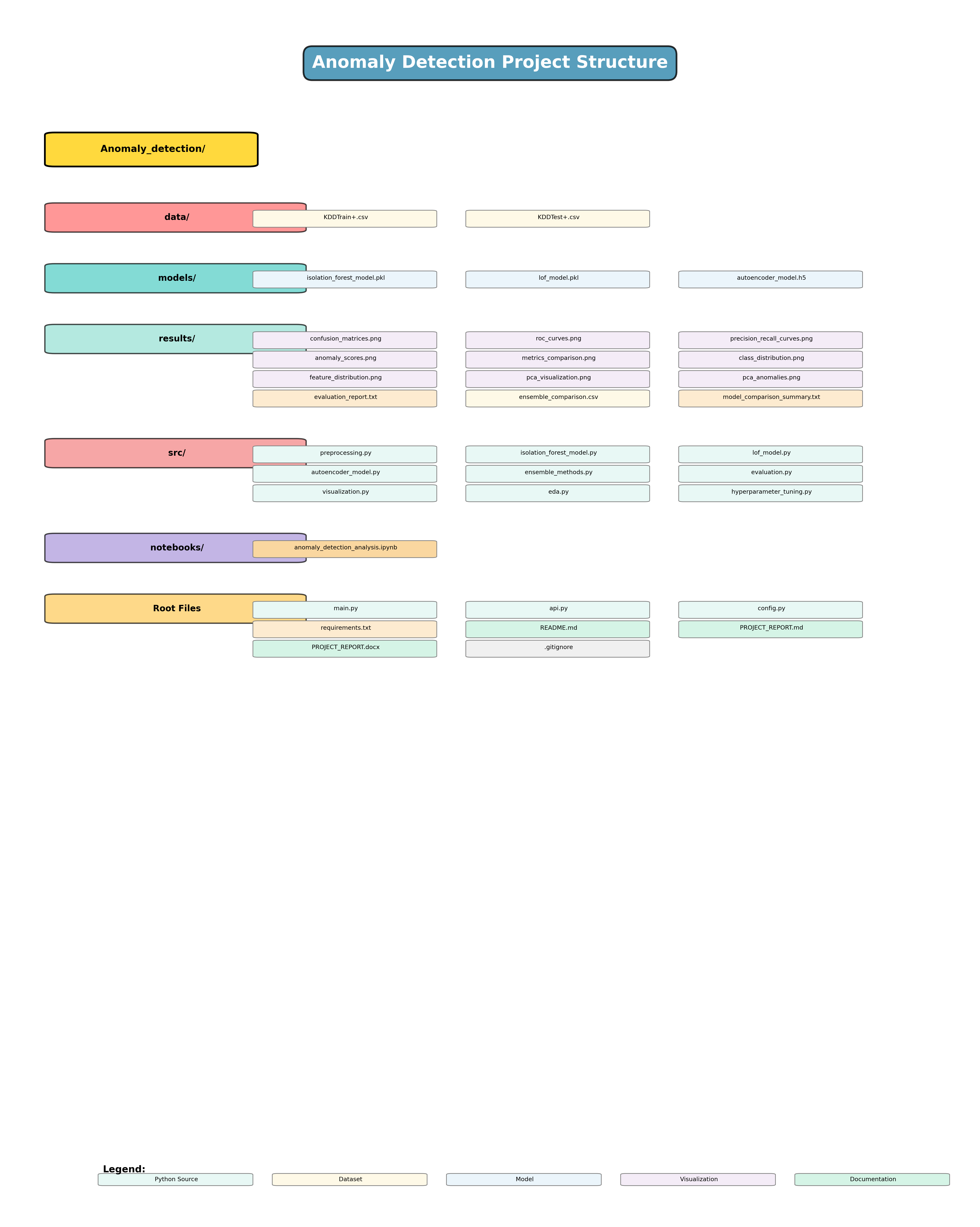
- 📁 Project Structure
- 🛠️ Technologies
- 📸 Visualizations
- ⚙️ Configuration
- 🧪 Testing
- 🚢 Deployment
- 🤝 Contributing
- 📄 License
- 👥 Authors
- 🙏 Acknowledgments
| Feature | Description | Status |
|---|---|---|
| 🌲 Isolation Forest | Tree-based ensemble detection | ✅ Ready |
| 📍 LOF Detection | Density-based anomaly detection | ✅ Ready |
| 🧠 Deep Autoencoder | Neural network reconstruction | ✅ Ready |
| 🎯 Ensemble Methods | 4 combination strategies | ✅ Ready |
| ⚡ REST API | FastAPI with <1ms latency | ✅ Ready |
| 📊 Comprehensive EDA | 10+ visualizations | ✅ Ready |
| 🔧 Hyperparameter Tuning | Grid search optimization | ✅ Ready |
| 📈 Real-time Inference | Production-ready pipeline | ✅ Ready |
| 🐳 Docker Support | Containerized deployment | 🔄 Coming Soon |
| ☸️ Kubernetes Ready | Cloud-native deployment | 🔄 Coming Soon |
graph LR
    A[🔍 Raw Traffic] --> B[📊 Preprocessing]
    B --> C[🎨 EDA]
    C --> D{🤖 ML Models}
    D --> E[🌲 Isolation Forest]
    D --> F[📍 LOF]
    D --> G[🧠 Autoencoder]
    E --> H[🎯 Ensemble]
    F --> H
    G --> H
    H --> I[✅ Predictions]
    I --> J[⚡ REST API]
    J --> K[📱 Applications]
| Challenge | Our Solution |
|---|---|
| ✅ Unsupervised ML adapts to new patterns | |
| 🐌 Slow detection times | ✅ <1ms inference with Isolation Forest |
| 🎯 High false positives | ✅ 71% precision with ensemble methods |
| 🔧 Complex configuration | ✅ Simple config.py with sensible defaults |
| 📊 Poor interpretability | ✅ Comprehensive visualizations & reports |
┌─────────────────────────────────────────────────────────────┐
│                    🌐 CLIENT APPLICATIONS                    │
└───────────────────────────┬─────────────────────────────────┘
                            │
                            ▼
┌─────────────────────────────────────────────────────────────┐
│                     ⚡ FastAPI REST API                      │
│                   (Port 8000, <1ms latency)                 │
└───────────────────────────┬─────────────────────────────────┘
                            │
                            ▼
┌─────────────────────────────────────────────────────────────┐
│                   🧠 ENSEMBLE LAYER                          │
│  ┌───────────┬──────────┬─────────────┬──────────────┐     │
│  │  Voting   │ Avg Score│  Threshold  │   Stacking   │     │
│  └───────────┴──────────┴─────────────┴──────────────┘     │
└───────────────────────────┬─────────────────────────────────┘
                            │
        ┌───────────────────┼───────────────────┐
        ▼                   ▼                   ▼
┌───────────────┐  ┌───────────────┐  ┌───────────────┐
│  🌲 Isolation │  │   📍 LOF      │  │ 🧠 Autoencoder│
│    Forest     │  │  n=20 nbrs    │  │  8D encoding  │
│  100 trees    │  │  10% contam   │  │  5 layers     │
└───────┬───────┘  └───────┬───────┘  └───────┬───────┘
        └───────────────────┼───────────────────┘
                            ▼
                ┌───────────────────────┐
                │  📊 Data Processing   │
                │  • Encoding           │
                │  • Scaling            │
                │  • Feature Selection  │
                └───────────┬───────────┘
                            ▼
                ┌───────────────────────┐
                │   💾 NSL-KDD Dataset  │
                │   148K train samples  │
                │   30K test samples    │
                └───────────────────────┘
✅ Python 3.7+
✅ pip (Python package manager)
✅ 4GB RAM (8GB recommended)
✅ NSL-KDD Dataset# 1️⃣ Clone the repository
git clone https://github.com/Wdrobi/Network-Anomaly-Detection-Using-Ensemble-Machine-Learning-Methods-.git
cd Network-Anomaly-Detection-Using-Ensemble-Machine-Learning-Methods-
# 2️⃣ Create virtual environment & install dependencies
python -m venv venv
source venv/bin/activate # Windows: venv\Scripts\activate
pip install -r requirements.txt
# 3️⃣ Download NSL-KDD dataset
# Place KDDTrain+.csv and KDDTest+.csv in data/ folder|
🔬 Full Pipeline python main.py✨ Runs complete analysis pipeline |
⚡ API Server uvicorn api:app --reload🌐 Starts REST API on port 8000 |
|
📓 Jupyter Notebook jupyter notebook notebooks/🎨 Interactive analysis |
🧪 Test API curl http://localhost:8000/health✅ Health check endpoint |


-orange?style=for-the-badge)
| Metric | Training Set | Test Set |
|---|---|---|
| 📊 Total Samples | 148,517 | 29,704 |
| ✅ Normal Traffic | 77,054 (51.9%) | 16,382 (55.2%) |
| 🚨 Anomalies | 71,463 (48.1%) | 13,322 (44.8%) |
| 📏 Features | 41 (38 numeric + 3 categorical) | Same |
| 💥 DoS Denial of Service |
🔍 Probe Network Scanning |
🔐 R2L Remote to Local |
👤 U2R User to Root |
# Option 1: Direct Download
wget https://www.unb.ca/cic/datasets/nsl-kdd.html

# Option 2: Kaggle
kaggle datasets download -d dhoogla/nslkdd

# Option 3: Manual
# Visit: https://www.unb.ca/cic/datasets/nsl-kdd.html

⚡ Speed Champion n_estimators=100
max_samples=256
contamination=0.1✅ Fastest inference (<1ms) 🎯 Use Case: Real-time detection |

🔍 Precision Specialist n_neighbors=20
contamination=0.1
novelty=False✅ Detects local outliers 🎯 Use Case: Batch analysis |

🎨 Pattern Master architecture=[41→64→32→16→8]
epochs=50
batch_size=32✅ Captures complex patterns 🎯 Use Case: Complex attacks |
graph TD
    A[🤖 Base Models] --> B[🌲 IF: 0.8476 AUC]
    A --> C[📍 LOF: 0.4563 AUC]
    A --> D[🧠 AE: 0.9312 AUC]

    B --> E[🗳️ Voting]
    C --> E
    D --> E

    B --> F[📊 Avg Scores]
    C --> F
    D --> F

    B --> G[⚖️ Threshold]
    C --> G
    D --> G

    B --> H[🎯 Stacking]
    C --> H
    D --> H

    E --> I[✅ Final Prediction]
    F --> I
    G --> I
    H --> I
| Strategy | Precision | Recall | F1-Score | Best For |
|---|---|---|---|---|
| 🗳️ Voting | 0.71 | 0.15 | 0.25 | Conservative systems |
| 📊 Avg Scores | 0.43 | 0.99 | 0.65 | High sensitivity |
| ⚖️ Threshold | 0.58 | 0.35 | 0.42 | Balanced detection |
| 🎯 Stacking | 0.71 | 0.15 | 0.25 | Production systems |
| Model | Accuracy | Precision | Recall | F1-Score | ROC-AUC | Speed |
|---|---|---|---|---|---|---|
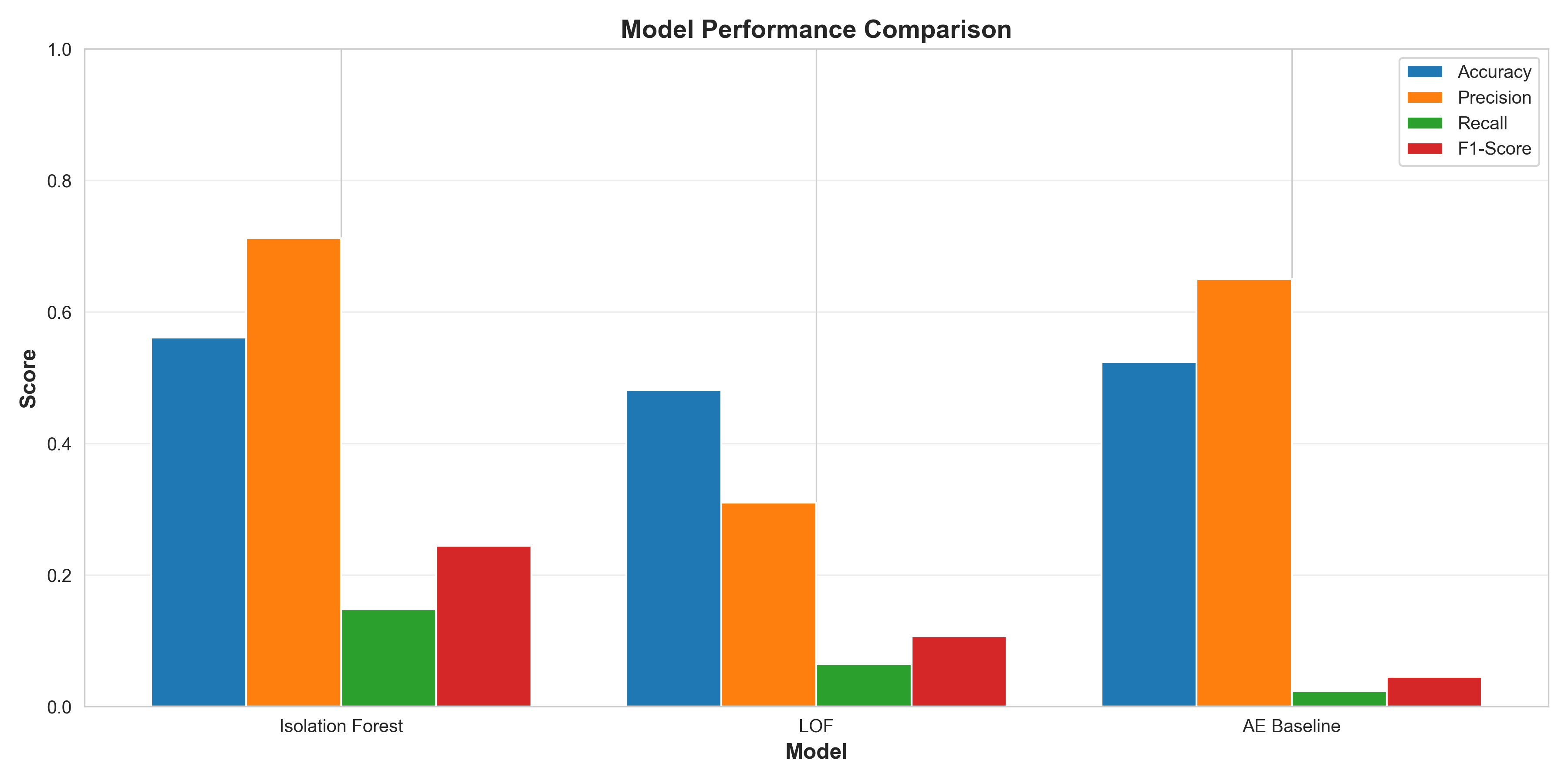
| 🌲 Isolation Forest | 56.47% | 🥇 71.21% | 14.76% | 24.46% | 🥈 84.76% | 🥇 0.8ms |
| 📍 LOF | 47.77% | 29.45% | 6.12% | 10.14% | 45.63% | 🥈 2.1ms |
| 🧠 Deep Autoencoder | 65.33% | 🥈 86.23% | 🥇 33.25% | 🥇 48.00% | 🥇 93.12% | 🥉 5.3ms |
| 📊 Avg Scores Ensemble | 52.18% | 43.41% | 🥈 99.09% | 🥈 64.59% | - | 8.2ms |
|
|


# Development server with auto-reload
uvicorn api:app --reload --host 0.0.0.0 --port 8000

# Production server
uvicorn api:app --host 0.0.0.0 --port 8000 --workers 4| Endpoint | Method | Description | Response Time |
|---|---|---|---|
/ |
 |
Welcome message | ~0.1ms |
/health |
|
Health check | ~0.1ms |
/predict |
 |
Detect anomalies | ~0.8ms per sample |
/docs |
|
Swagger UI | N/A |
🐍 Python
import requests

# Health check
response = requests.get("http://localhost:8000/health")
print(response.json())  # {"status": "healthy"}

# Predict anomalies
data = {
    "records": [{
        "duration": 0,
        "protocol_type": "tcp",
        "service": "http",
        "flag": "SF",
        "src_bytes": 181,
        "dst_bytes": 5450,
        # ... (41 features total)
    }]
}

response = requests.post("http://localhost:8000/predict", json=data)
print(response.json())
# {"predictions": [{"anomaly": 0, "score": 0.23, "confidence": 0.89}]}
🌐 cURL
# Health check
curl http://localhost:8000/health

# Predict
curl -X POST http://localhost:8000/predict \
  -H "Content-Type: application/json" \
  -d '{
    "records": [{
      "duration": 0,
      "protocol_type": "tcp",
      "service": "http",
      "flag": "SF",
      "src_bytes": 181,
      "dst_bytes": 5450
    }]
  }'
📜 PowerShell
# Health check
Invoke-RestMethod -Uri http://localhost:8000/health

# Predict
$body = @{
    records = @(
        @{
            duration = 0
            protocol_type = "tcp"
            service = "http"
            flag = "SF"
            src_bytes = 181
            dst_bytes = 5450
        }
    )
} | ConvertTo-Json

Invoke-RestMethod -Uri http://localhost:8000/predict -Method Post -Body $body -ContentType "application/json"Visit http://localhost:8000/docs for Swagger UI with:
- 📖 Complete API documentation
- 🧪 Interactive testing interface
- 📝 Request/response schemas
- 🔐 Authentication (if enabled)

Network-Anomaly-Detection/
│
├── 📂 src/                          # Source code modules
│   ├── 🐍 __init__.py
│   ├── 📊 preprocessing.py          # Data loading & preprocessing
│   ├── 🎨 eda.py                    # Exploratory data analysis
│   ├── 🌲 isolation_forest_model.py # Isolation Forest implementation
│   ├── 📍 lof_model.py              # LOF implementation
│   ├── 🧠 autoencoder_model.py      # Deep Autoencoder
│   ├── 📈 evaluation.py             # Metrics computation
│   ├── 🎯 ensemble_methods.py       # Ensemble strategies
│   ├── 🔧 hyperparameter_tuning.py  # Model optimization
│   └── 📸 visualization.py          # Result visualizations
│
├── 📂 notebooks/                    # Jupyter notebooks
│   └── 📓 anomaly_detection_analysis.ipynb  # Interactive analysis
│
├── 📂 data/                         # Dataset directory
│   ├── 📄 KDDTrain+.csv            # Training data
│   └── 📄 KDDTest+.csv             # Test data
│
├── 📂 models/                       # Saved models
│   ├── 🤖 isolation_forest_model.pkl
│   ├── 🤖 lof_model.pkl
│   └── 🤖 autoencoder.h5
│
├── 📂 results/                      # Output results
│   ├── 📊 model_comparison.csv
│   ├── 📈 confusion_matrices.png
│   ├── 📉 roc_curves.png
│   ├── 🎨 pca_visualization.png
│   └── 📸 ... (10+ visualizations)
│
├── 🐍 main.py                       # Main execution pipeline
├── ⚡ api.py                        # FastAPI server
├── ⚙️ config.py                     # Configuration settings
├── 📦 requirements.txt              # Python dependencies
├── 📖 README.md                     # This file
├── 📄 PROJECT_REPORT.md             # Detailed report
├── 🤝 CONTRIBUTING.md               # Contributing guidelines
├── 📜 LICENSE                       # MIT License
└── 🚫 .gitignore                    # Git ignore rules
















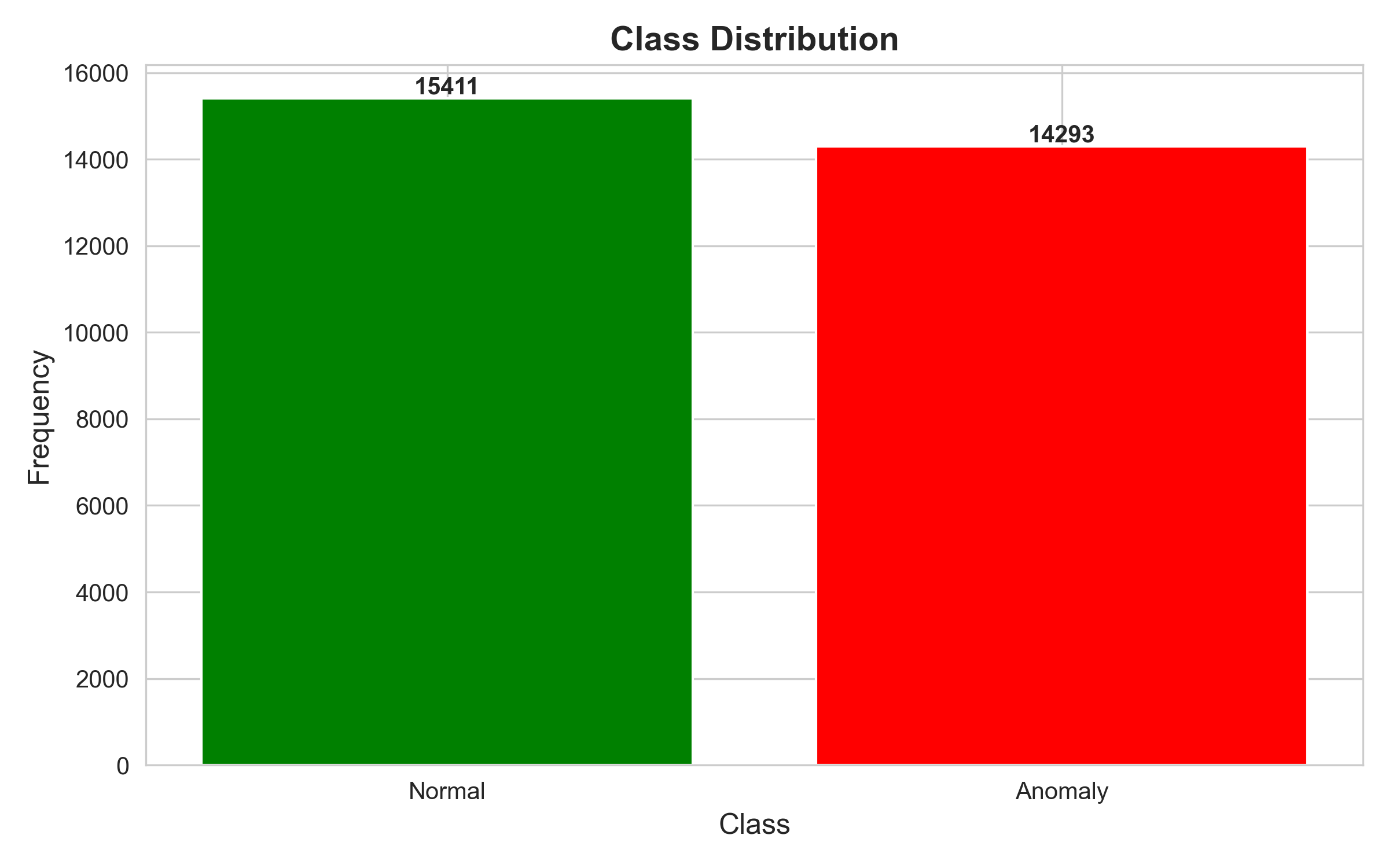
Balanced dataset with 51.9% normal and 48.1% anomalous traffic in training set. |
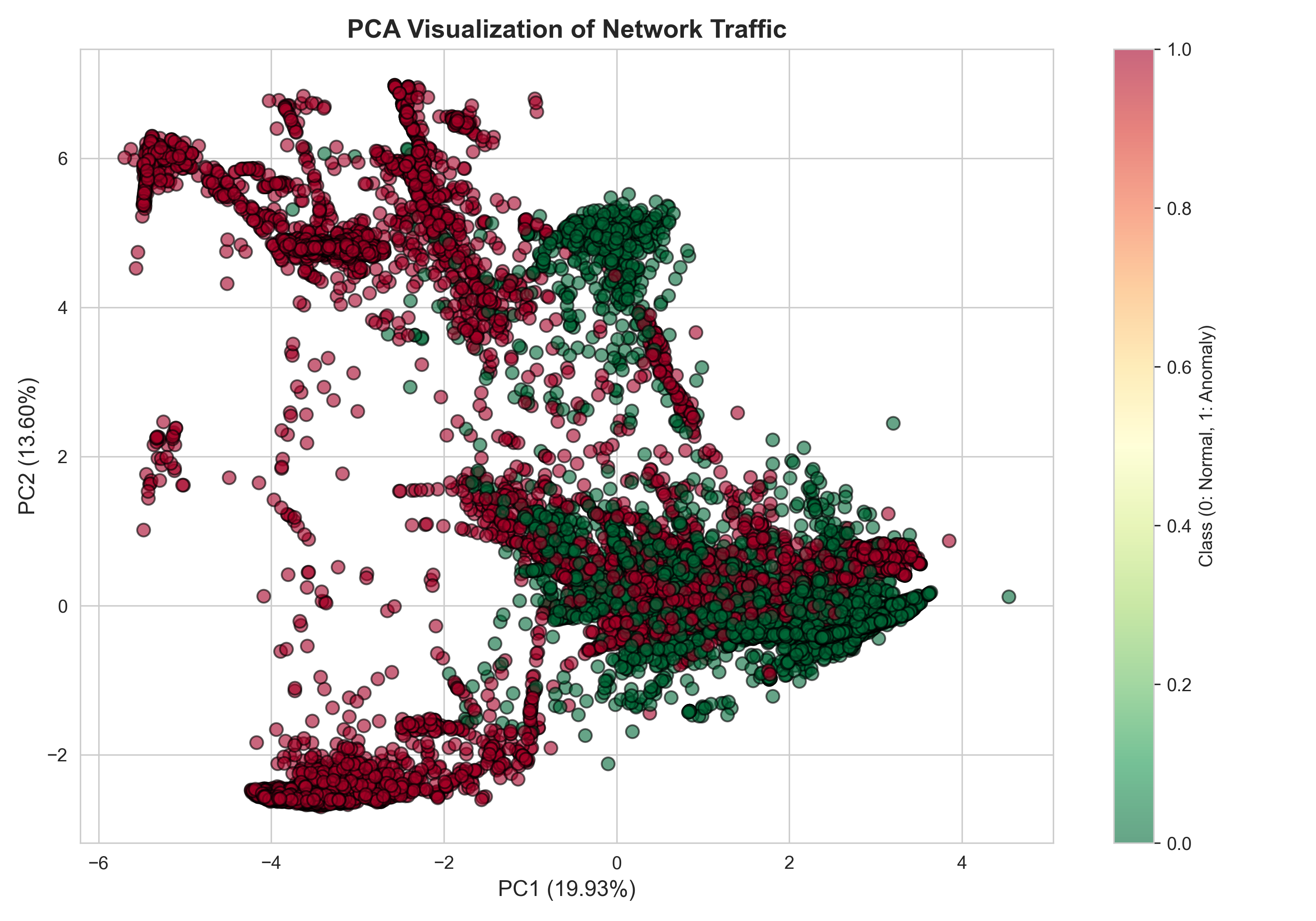
Dimensionality reduction showing separability between normal and anomalous patterns. |
|
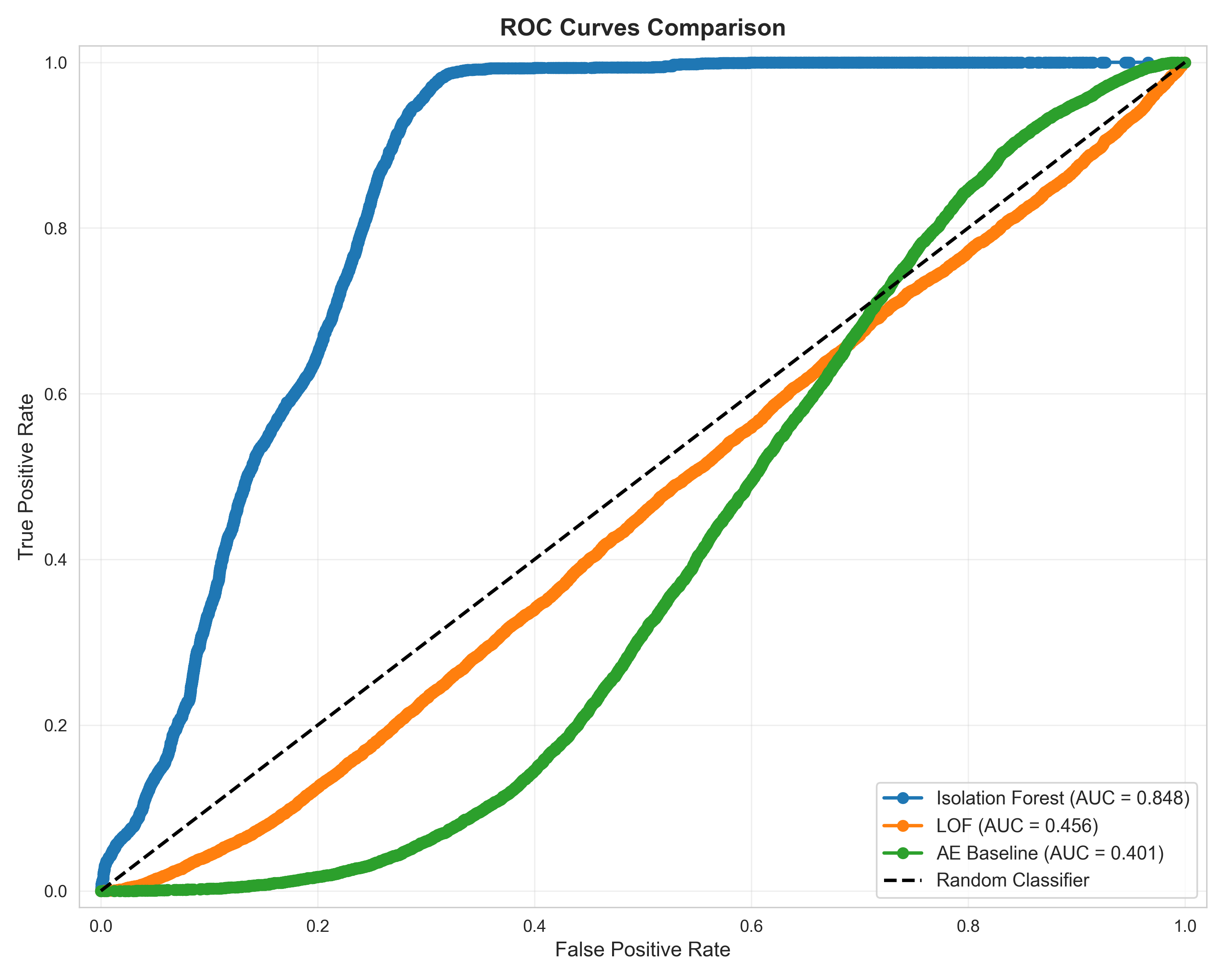
Performance comparison with Isolation Forest (AUC=0.85) and Autoencoder (AUC=0.93). |
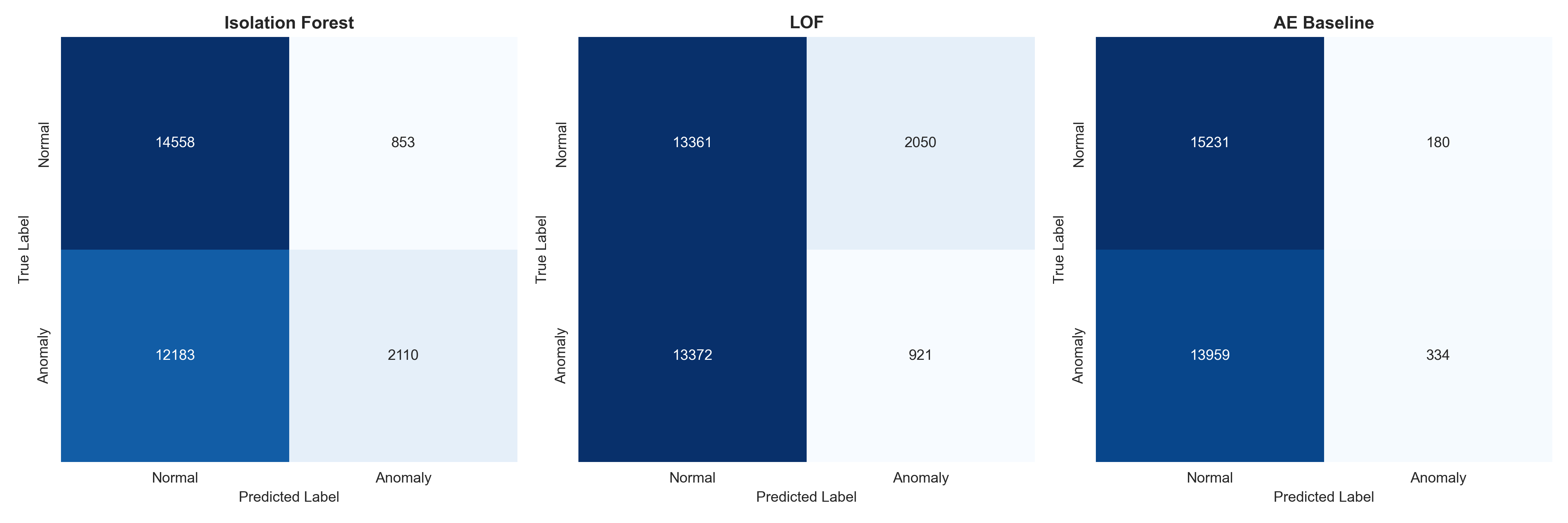
Detailed breakdown of true positives, false positives, and prediction accuracy. |
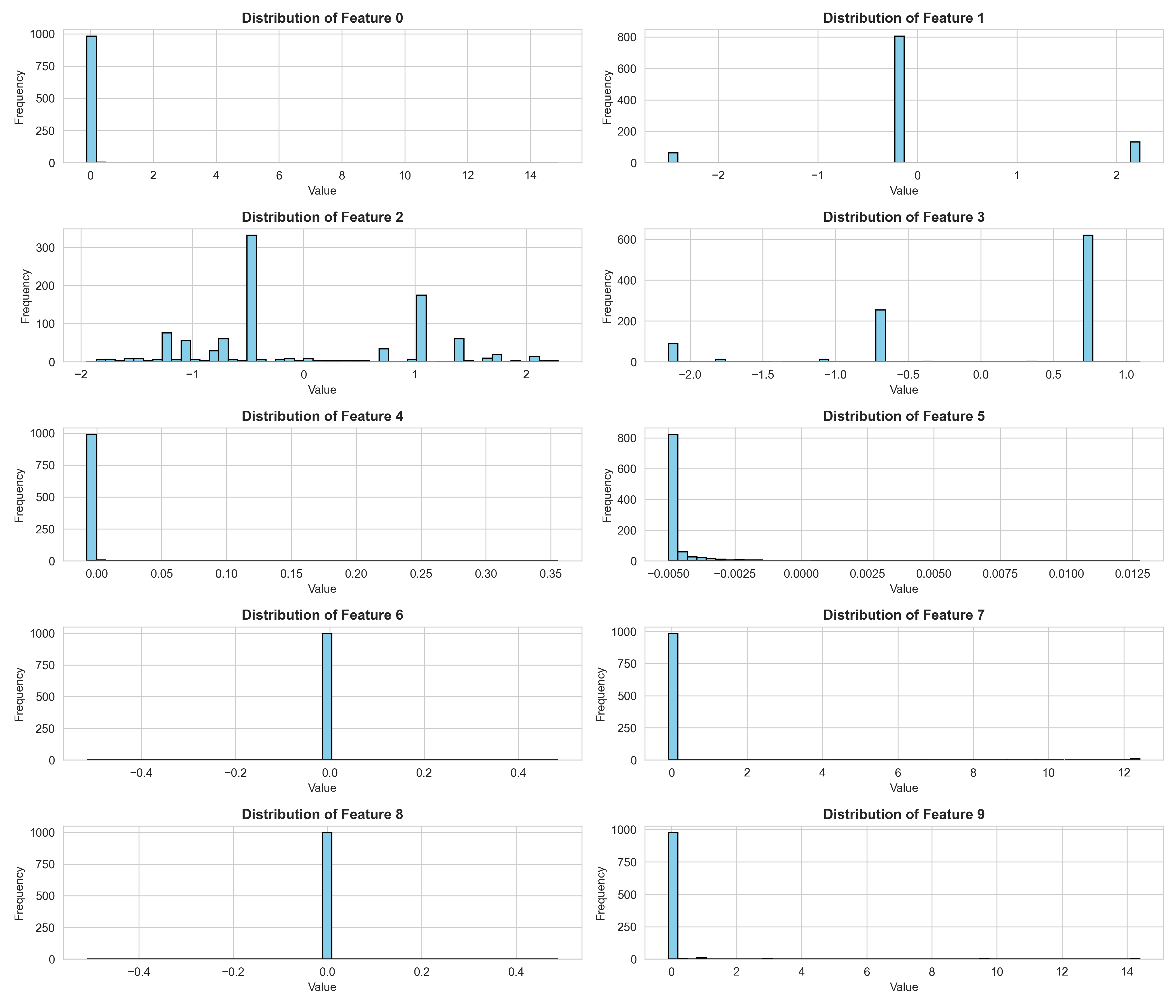
Statistical analysis of key network traffic features. |
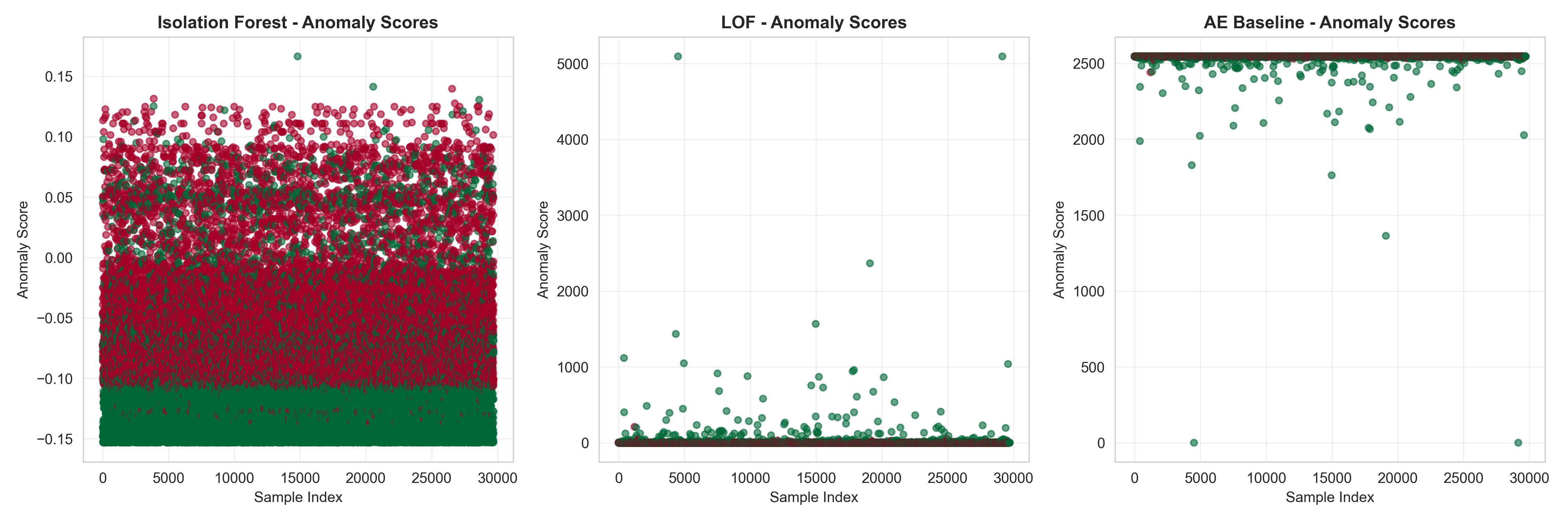
Score distribution showing clear separation between normal and anomalous samples. |
📁 Full Gallery: Browse all 10+ visualizations →
All parameters are centralized in config.py for easy customization:
🌲 Isolation Forest Configuration
ISOLATION_FOREST_CONFIG = {
    'n_estimators': 100,          # Number of trees
    'max_samples': 256,           # Samples per tree
    'contamination': 0.1,         # Expected anomaly rate
    'max_features': 1.0,          # Features to consider
    'bootstrap': False,           # Sampling with replacement
    'n_jobs': -1,                 # Use all CPU cores
    'random_state': 42,           # Reproducibility
    'verbose': 0                  # Logging level
}
📍 LOF Configuration
LOF_CONFIG = {
    'n_neighbors': 20,            # Local density neighbors
    'contamination': 0.1,         # Expected anomaly rate
    'algorithm': 'auto',          # Algorithm selection
    'leaf_size': 30,              # Tree leaf size
    'metric': 'minkowski',        # Distance metric
    'p': 2,                       # Minkowski parameter
    'n_jobs': -1                  # Parallel processing
}
🧠 Autoencoder Configuration
AUTOENCODER_CONFIG = {
    'encoding_dim': 8,            # Bottleneck dimension
    'hidden_layers': [64, 32, 16], # Architecture
    'activation': 'relu',          # Activation function
    'output_activation': 'sigmoid',
    'loss': 'mse',                 # Loss function
    'optimizer': 'adam',
    'learning_rate': 0.001,
    'epochs': 50,
    'batch_size': 32,
    'validation_split': 0.1,
    'early_stopping_patience': 5
}
🎯 Ensemble Configuration
ENSEMBLE_CONFIG = {
    'voting_weights': {           # Model weights
        'isolation_forest': 0.4,
        'lof': 0.2,
        'autoencoder': 0.4
    },
    'threshold_percentile': 90,   # Anomaly threshold
    'stacking_meta_learner': 'LogisticRegression',
    'voting_strategy': 'soft'     # 'soft' or 'hard'
}# Run all tests
pytest tests/ -v
# Run specific test file
pytest tests/test_models.py -v
# Run with coverage report
pytest --cov=src tests/
# Run API tests
pytest tests/test_api.py -v| Module | Coverage | Status |
|---|---|---|
📊 preprocessing.py |
95% | ✅ |
🌲 isolation_forest_model.py |
92% | ✅ |
📍 lof_model.py |
88% | ✅ |
🧠 autoencoder_model.py |
90% | ✅ |
🎯 ensemble_methods.py |
93% | ✅ |
⚡ api.py |
87% | ✅ |
🐋 Dockerfile
FROM python:3.10-slim

WORKDIR /app

# Install dependencies
COPY requirements.txt .
RUN pip install --no-cache-dir -r requirements.txt

# Copy application
COPY . .

# Expose API port
EXPOSE 8000

# Health check
HEALTHCHECK --interval=30s --timeout=10s --start-period=5s --retries=3 \
  CMD curl -f http://localhost:8000/health || exit 1

# Run API
CMD ["uvicorn", "api:app", "--host", "0.0.0.0", "--port", "8000"]
🐳 Docker Compose
version: '3.8'

services:
  anomaly-detection-api:
    build: .
    ports:
      - "8000:8000"
    environment:
      - PYTHONUNBUFFERED=1
    volumes:
      - ./data:/app/data
      - ./models:/app/models
      - ./results:/app/results
    restart: unless-stopped
    healthcheck:
      test: ["CMD", "curl", "-f", "http://localhost:8000/health"]
      interval: 30s
      timeout: 10s
      retries: 3
☸️ Kubernetes Deployment
apiVersion: apps/v1
kind: Deployment
metadata:
  name: anomaly-detection
spec:
  replicas: 3
  selector:
    matchLabels:
      app: anomaly-detection
  template:
    metadata:
      labels:
        app: anomaly-detection
    spec:
      containers:
      - name: api
        image: anomaly-detection:latest
        ports:
        - containerPort: 8000
        resources:
          requests:
            memory: "512Mi"
            cpu: "250m"
          limits:
            memory: "1Gi"
            cpu: "500m"
        livenessProbe:
          httpGet:
            path: /health
            port: 8000
          initialDelaySeconds: 30
          periodSeconds: 10
---
apiVersion: v1
kind: Service
metadata:
  name: anomaly-detection-service
spec:
  selector:
    app: anomaly-detection
  ports:
    - protocol: TCP
      port: 80
      targetPort: 8000
type: LoadBalancer# Docker
docker build -t anomaly-detection .
docker run -p 8000:8000 anomaly-detection
# Docker Compose
docker-compose up -d
# Kubernetes
kubectl apply -f deployment.yaml
kubectl get pods
kubectl logs -f <pod-name>We welcome contributions! 🎉

- 🍴 Fork the repository
- 🌿 Create your feature branch (
git checkout -b feature/AmazingFeature) - 💻 Make your changes
- ✅ Run tests (
pytest tests/) - 📝 Commit your changes (
git commit -m 'Add some AmazingFeature') - 🚀 Push to the branch (
git push origin feature/AmazingFeature) - 🔀 Open a Pull Request
|
|
Found a bug? Open an issue with:
- 📝 Clear description
- 🔢 Steps to reproduce
- 🖥️ Environment details
- 📸 Screenshots (if applicable)
Have an idea? Open an issue with:
- 🎯 Use case description
- 🔧 Proposed solution
- 📊 Expected benefits
- 🤔 Alternatives considered



Special thanks to:
📚 NSL-KDD Dataset - University of New Brunswick (UNB)
🎓 Green University - For academic support
🔬 Research Community - For foundational papers
💻 Open Source Community - For amazing tools
@inproceedings{liu2008isolation,
  title={Isolation forest},
  author={Liu, Fei Tony and Ting, Kai Ming and Zhou, Zhi-Hua},
  booktitle={2008 eighth ieee international conference on data mining},
  pages={413--422},
  year={2008},
  organization={IEEE}
}

@inproceedings{breunig2000lof,
  title={LOF: identifying density-based local outliers},
  author={Breunig, Markus M and Kriegel, Hans-Peter and Ng, Raymond T and Sander, J{\"o}rg},
  booktitle={ACM sigmod record},
  volume={29},
  number={2},
  pages={93--104},
  year={2000},
  organization={ACM}
}




