
English | 中文






🚀 Quickstart | 🏠 Home | 📚 Docs | 📊 Benchmarks | 🔎 DeepWiki | 🎮 Discord | 🐦 X (Twitter)
Zvec is an open-source, in-process vector database — lightweight, lightning-fast, and designed to embed directly into applications. Battle-tested within Alibaba Group, it delivers production-grade, low-latency and scalable similarity search with minimal setup.
Important
🚀 v0.8.0
- Broader platform support: Added Intel Mac and Windows ARM64 builds, wheels, and SDKs; extended DiskANN to Windows, Android, and iOS, and RaBitQ to Windows x86_64.
- Chinese FTS ready to use: Embedded the default Jieba dictionary and HMM model, so Chinese tokenization needs no separate dictionary files or path configuration.
- Lower index build costs: Reduced peak memory during IVF / DiskANN builds and merges, and accelerated HNSW RaBitQ construction through vector reuse and batched lookups. Build and nested training tasks now enforce configured thread limits more strictly.
- Faster distance computation: Extensively refactored quantizers and distance calculations to benefit multiple quantization types and metrics, with major improvements to INT4 kernels and Linux ARM64 performance.
- Faster search: Added faster Uniform quantizers and optimized Vamana graph layout and prefetching. Uniform quantization avoids per-point score reconstruction, though a shared min/max range can increase quantization error and reduce recall.
- Bug fixes and improvements: Added more flexible UTF-8 document IDs up to 1,024 bytes; fixed concurrent reads during segment switches, index rebuilding with deleted rows, and correctness issues in LIKE and floating-point range filters.
- Blazing Fast: Searches billions of vectors in milliseconds.
- Simple, Just Works: Install and start searching in seconds. Pure local, no servers, no config, no fuss.
- Dense + Sparse Vectors: Support dense and sparse embeddings, multi-vector queries, and a rich selection of vector index types that scale from memory to disk.
- Full-Text Search (FTS): Native keyword-based full-text search — query string fields with natural-language or structured expressions.
- Hybrid Search: Fuse vector similarity, full-text search, and structured filters in a single query for precise results.
- Durable Storage: Write-ahead logging (WAL) guarantees persistence — data is never lost, even on process crash or power failure.
- Concurrent Access: Multiple processes can read the same collection simultaneously; writes are single-process exclusive.
- Runs Anywhere: As an in-process library, Zvec runs wherever your code runs — notebooks, servers, CLI tools, or even edge devices.
Zvec offers official SDKs across multiple languages:
- Python:
pip install zvec(requires 64-bit Python 3.10–3.14) - Node.js:
npm install @zvec/zvec - Go: High-performance Go bindings.
- Rust:
cargo add zvec-rust - Dart/Flutter:
flutter pub add zvec
Searching code or documents? Try zvec-grep (zg) — a local-first search CLI that unifies ripgrep, BM25, and vector search, built for humans and AI agents.
Prefer a visual tool? Try Zvec Studio to browse data and debug queries — no code required.
Linux · macOS · Windows · Android · iOS
Zvec supports all major platforms — from servers and desktops to mobile devices.
For more details, please see the platform support documentation.
If you prefer to build Zvec from source, please check the Building from Source guide.
import zvec

# Define collection schema
schema = zvec.CollectionSchema(
    name="example",
    vectors=zvec.VectorSchema("embedding", zvec.DataType.VECTOR_FP32, 4),
)

# Create collection
collection = zvec.create_and_open(path="./zvec_example", schema=schema)

# Insert documents
collection.insert([
    zvec.Doc(id="doc_1", vectors={"embedding": [0.1, 0.2, 0.3, 0.4]}),
    zvec.Doc(id="doc_2", vectors={"embedding": [0.2, 0.3, 0.4, 0.1]}),
])

# Search by vector similarity
results = collection.query(
    zvec.Query(field_name="embedding", vector=[0.4, 0.3, 0.3, 0.1]),
    topk=10
)

# Results: list of {'id': str, 'score': float, ...}, sorted by relevance
print(results)Zvec delivers exceptional speed and efficiency, making it ideal for demanding production workloads.
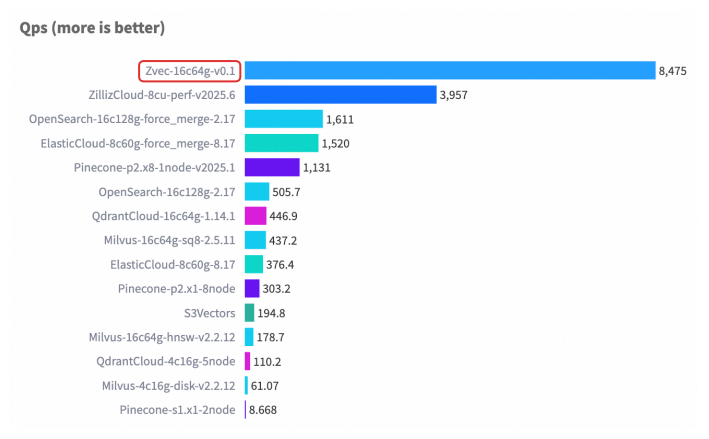
For detailed benchmark methodology, configurations, and complete results, please see our Benchmarks documentation.
| 💬 DingTalk | 🎮 Discord | X (Twitter) | |
|---|---|---|---|
 |
 |
 |
 |
| Scan to join | Scan to join | Click to join | Click to follow |
We welcome and appreciate contributions from the community! Whether you're fixing a bug, adding a feature, or improving documentation, your help makes Zvec better for everyone.
Check out our Contributing Guide to get started!