





Smart Screen Unlocker Recovery is an advanced, automation-driven forensic and accessibility framework. It is specifically engineered to help mobile technicians, forensic experts, and everyday users recover access to Android devices with completely broken displays, dead touch digitizers, or inaccessible screens locked by Pattern, PIN, or Password credentials.
By injecting raw kernel-level touch gestures or executing automated secure credential actions via an authorized ADB (Android Debug Bridge) interface, this tool acts as a synthetic hardware digitizer or secure bypass client, allowing you to bypass your lock screen and recover your data.
⚠️ CRITICAL NOTICE: This is NOT a cracking, brute-forcing, or bypassing tool. It requires the device to have USB Debugging enabled, an authorized RSA fingerprint with the host PC, and the user MUST know the correct lock screen pattern, PIN, or password.
- 🔑 Multi-Credential Support (Pattern, PIN, Password): Fully expanded GUI interface offering dedicated recovery options for patterns (interactive drawer), numeric PINs, and alphanumeric passwords.
- 🌐 Unicode & Layout Safety: Restricts simulated screen typing for Unicode (non-ASCII) passwords (such as Arabic or Chinese) to prevent keystroke drop errors caused by layout mismatches, cleanly offering OS-level clearing (
Clear Lock) instead. - 🛡️ Multi-State Awareness (AFU/BFU): Dynamically detects if the device is in Before First Unlock (BFU) or After First Unlock (AFU) states and adjusts the vertical matrix geometry accordingly.
- 📐 Smart XML Container Bypassing: Intelligently ignores fake, full-screen transparent containers deployed by modern security patches (e.g., Samsung OneUI 8+) to locate the true lock screen grid.
- 🎨 Interactive Visual GUI: Features a sleek, terminal-spawned graphical canvas allowing the technician to visually draw the pattern using a mouse, mirroring physical device interaction.
- ⏱️ Auto-Timeout Prevention: Automatically boosts the device's
screen_off_timeoutduring the operation to prevent screen sleep, seamlessly restoring the original settings post-injection. - 💻 Dynamic CLI Portrait Scaling (745x900): Automatically sizes the terminal window at launch with a fallback ladder (
93x56->93x48->85x45) to adapt safely to various screen resolutions and DPI scaling without shell errors. - 🔁 Persistent Main Loop: The script stays alive after each operation, prompting the technician to return to the main menu without restarting the program.
- ✅ Deep Kernel Verification: Interrogates the Android OS (
dumpsys window&dumpsys keyguard) to mathematically verify a successful unlock without relying on visual screen feedback.
| 📱 Select Recovery Method | 🔢 PIN & Password Entry | ⚙️ Dynamic Action Choice |
|---|---|---|
 |
 |
 |
| 🎛️ Live Interactive Drawer | 📊 Deep Telemetry & Execution Log |
|---|---|
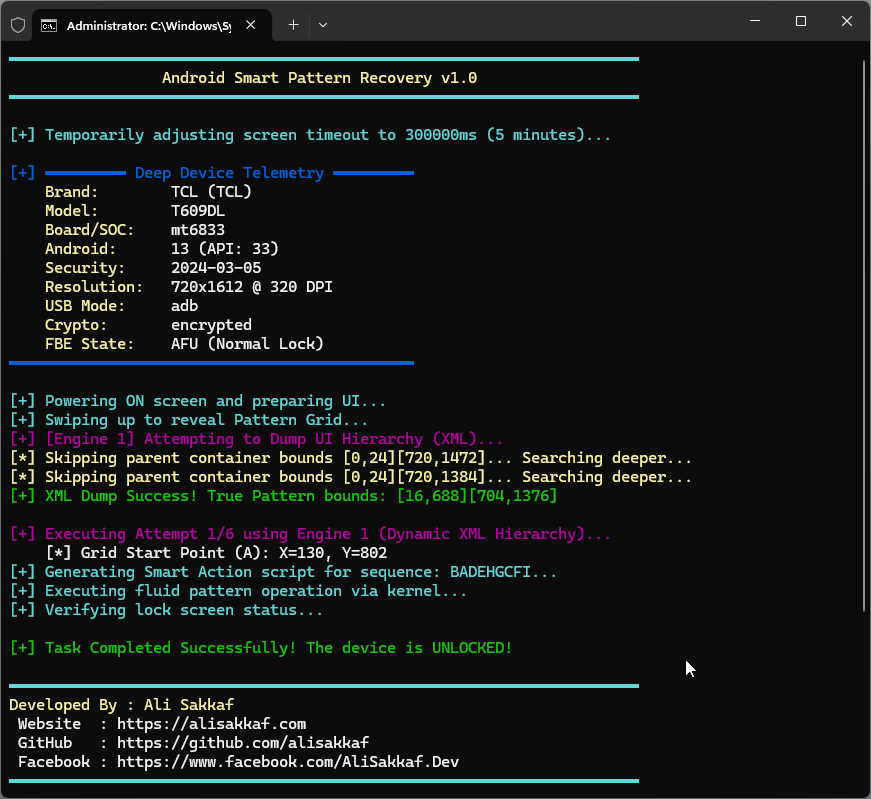 |
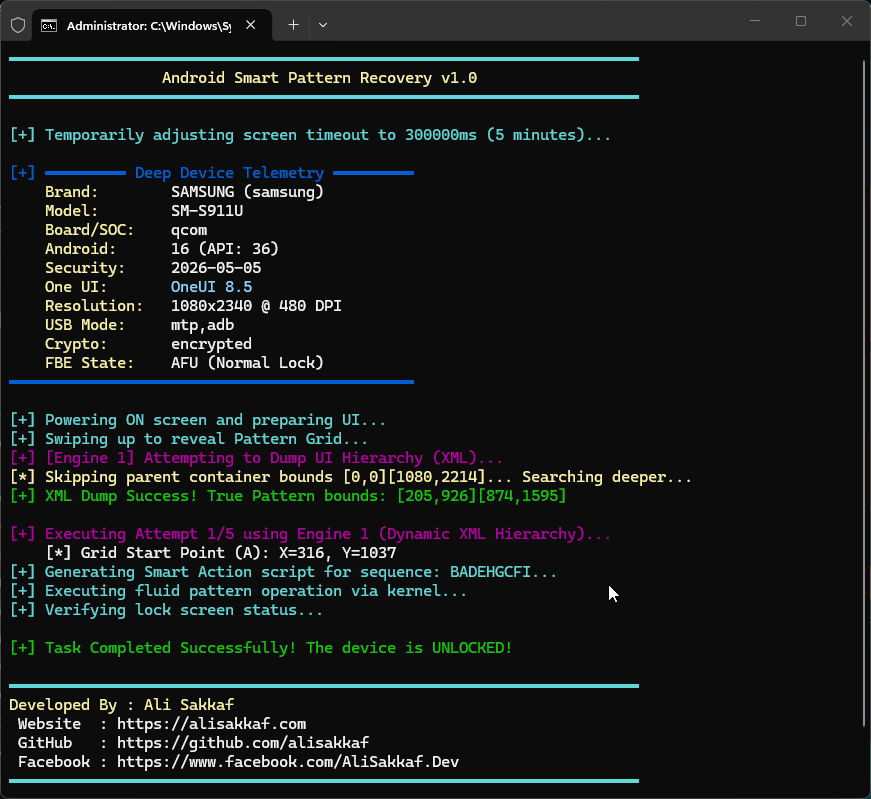 |
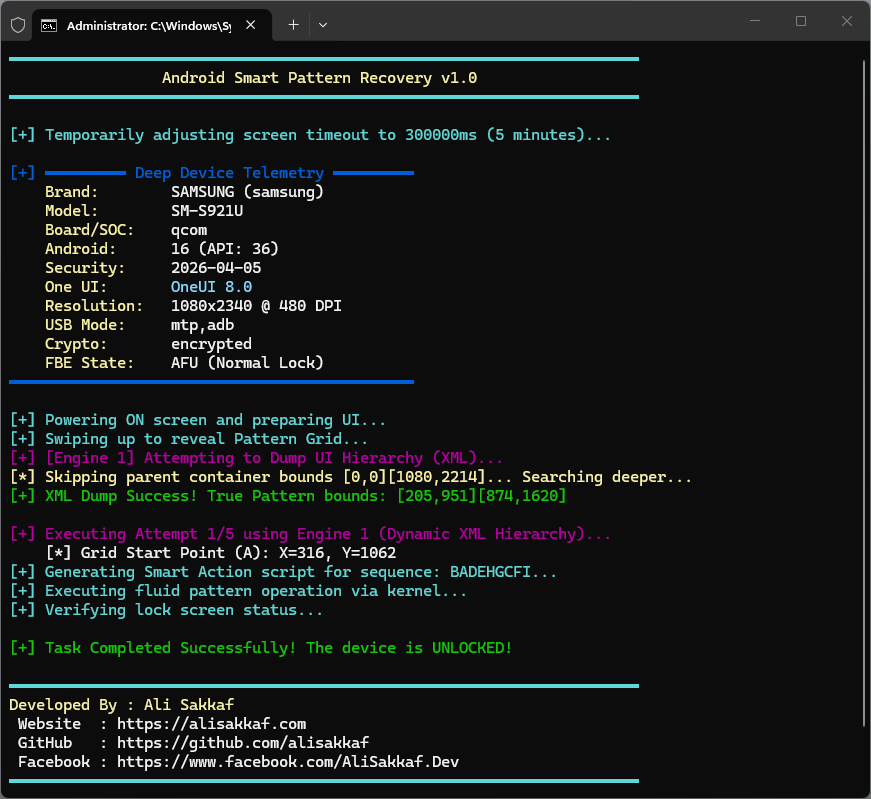 |
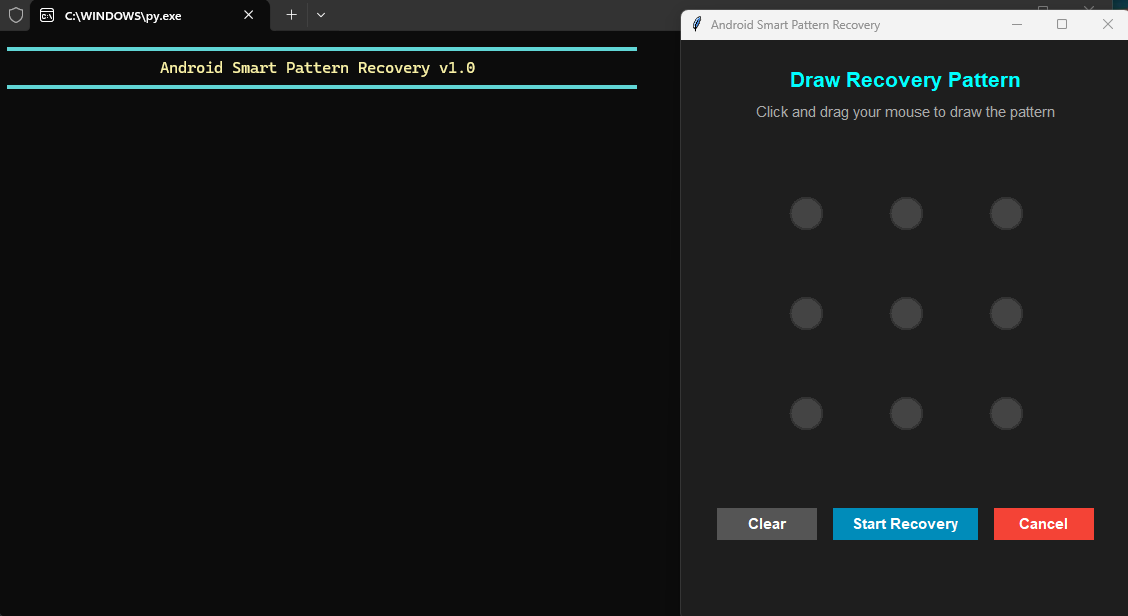 |
This tool features a highly secure, automated verification and bypass framework for PIN and Password recovery:
- Secure OS Verification: Rather than simulating clicks blindly, the script uses the device's secure lock settings API:
- Modern command:
adb shell cmd lock_settings verify --old <credential> - Legacy command:
adb shell locksettings verify --old <credential>This determines with 100% mathematical certainty if the entered credential is correct.
- Modern command:
- Precision Injector (
type_password_safe): Pure alphanumeric strings are typed instantly as a single block. Special symbols and spaces are typed character-by-character with automatic%sspace mapping and shell parameter escaping. - Action Choice Menu: After successful verification, the technician selects their desired action via a customized Tkinter GUI:
- Unlock Phone (Keep Password): Wakes up the screen using non-toggling wakeup keys (
KEYCODE_WAKEUP/ keyevent 224), dismisses the keyguard swipe bouncer, types the correct verified password, and presses Enter. - Remove Password Completely (Clear Lock): Issues
cmd lock_settings clear --old <credential>to permanently remove the lock screen security database (setting lock to None/Swipe), facilitating quick backups. - No Action: Simply outputs the correct verified lock screen code in the terminal logs and exits.
- Unlock Phone (Keep Password): Wakes up the screen using non-toggling wakeup keys (
- Unicode & Language Safety Filter: ADB keyboard simulation maps keys based on the active device virtual keyboard layout (e.g. Gboard/Samsung Keyboard). Non-ASCII credentials (e.g. Arabic
علي1or Chinese你好) often fail to type correctly because the active layout maps key inputs differently (e.g., Gboard Arabic translates key injections to Arabic-Indic digits١instead of ASCII1).- To prevent input threshold lockouts and ensure absolute safety, the script automatically parses the credential layout. If it contains non-ASCII characters, the Unlock Phone (Keep Password) option is hidden entirely from the GUI. The user is allowed only to select Remove Password Completely (Clear Lock) (which operates safely at the programmatic system database level) or No Action.
To account for fragmentation across Android OEMs, DPI scaling, and custom UIs, this tool utilizes a sequential cascade of mathematical engines. If one fails, the script dynamically adjusts its geometry and fires the next!
| Engine | Strategy Name | Description | Target Devices |
|---|---|---|---|
| 1 | Dynamic XML Hierarchy |
Attempts to pull the exact pixel bounds directly from the UI Automator tree. | Universal (If not blocked) |
| 2 | Golden Ratio Base Matrix |
Uses empirical OEM aspect ratios to calculate a mathematically perfect square or rectangle grid. | Samsung & Generic AOSP |
| 3 | DPI Shifted Matrix |
Compensates for users who have altered their display scaling (Small/Large UI sizes). | Universal |
| 4 | Custom High Matrix |
Targets shifted notification shade layouts, commonly found in Android 13+ environments. | Samsung & Custom ROMs |
| 5 | Custom Extreme Matrix |
Built from extreme-case hardware telemetry for unique screen resolutions. | Tall Aspect Ratios (21:9) |
| 6 | Cross-Over Failsafe |
Tests BFU matrices on AFU states (and vice-versa) in case of Knox or SystemUI desynchronization. | Universal |
This framework calculates screen matrices dynamically, making it theoretically compatible with any Android device. However, it has been rigorously tested and optimized for the following architectures:
| OEM / Brand | Tested Models (Examples) | UI Environment | Success Rate |
|---|---|---|---|
| Samsung | Galaxy S24 (SM-S921U), Galaxy S23 (SM-S911U) | OneUI 5.0 - 8.5 | 🟢 100% |
| TCL | T609DL, 30 SE, 40 XL | TCL UI / AOSP 12-13 | 🟢 100% |
| Xiaomi / POCO | Redmi Note 12, POCO X5 | MIUI 14 / HyperOS | 🟢 High |
| Motorola | Moto G Stylus, Edge series | MyUX / AOSP | 🟢 High |
| Pixel 6, Pixel 7, Pixel 8 | Pixel UI | 🟢 High |
You do not need Python installed. Simply download the standalone .exe from the Releases tab.
- Ensure USB Debugging is enabled on the target Android device.
- Connect the device to your PC and authorize the connection.
- Run
Smart_Screen_Unlocker.exe. - Draw your pattern on the interactive GUI and watch the terminal automate the injection!
# Clone the repository
git clone [https://github.com/alisakkaf/Smart-Screen-Unlocker-Recovery.git](https://github.com/alisakkaf/Smart-Screen-Unlocker-Recovery.git)
cd Smart-Screen-Unlocker-Recovery

# Install build dependencies (optional, for compiling)
pip install -r requirements.txt

# Execute the script
python main.py
Once Smart Screen Unlocker Recovery successfully injects the kernel gestures and bypasses the secure BFU/AFU lockscreen state, your Android device is now fully unlocked and responsive to external display utilities.
You can immediately transition to scrcpy to achieve full low-latency screen mirroring, audio forwarding, and peripheral control to safely back up your system data.
- Keep your device connected via the authorized USB/Wireless ADB interface.
- Download and extract the latest version of
scrcpyonto your host machine. - Execute the following terminal commands depending on your recovery workflow:
# Standard high-performance mirroring with the physical device screen off
scrcpy --always-on-top --turn-screen-off --stay-awake

# Advanced forensic stream optimized for backup operations
scrcpy --max-fps=30 --video-bit-rate=4M --audio-bit-rate=128k --window-title="Recovered Device Screen"

---

## 🛠️ Compiling to .exe (For Developers)

To bundle the utility into a portable runtime executable with your custom icon (`6437133.png`), execute this command in your PowerShell/CMD:

```powershell
python -c "from PIL import Image; img = Image.open('6437133.png'); img.save('icon.ico', format='ICO')" ; pyinstaller --noconfirm --onefile --console --icon="icon.ico" --name="Smart_Screen_Unlocker" --clean main.py If this digital forensics asset saved your data or assisted your mobile repair workflow, please consider giving the repository a ⭐ Star to increase its distribution visibility across developer channels!
- Lead Engineer: Ali Sakkaf
- 🌐 Official Website: alisakkaf.com
- 💻 GitHub: @alisakkaf
- 🟦 Facebook: AliSakkaf.Dev
| Crypto Asset | Network | Wallet Address (Copy) | Quick Scan |
|---|---|---|---|
 |
TRC20 | TYLBeDA5aGNcc3WkVqf3xWPHXmsZzs2p28 |
 |
|
BEP20 | 0x67cf27f33c80479ea96372810f9e2ee4c3b095c5 |
|
 |
Bitcoin | bc1q97dr37h37npzarmmrv0tjz2nm50htqc7pfpzj6 |
|
 |
ERC20 | 0x67cf27f33c80479ea96372810F9e2EE4C3b095C5 |
|
 |
Solana | Cbesgr4tvo4T1inNMFe46GSym2qMYjkmofbXFc77rDNK |
|
 |
ERC20 | 0x67cf27f33c80479ea96372810f9e2ee4c3b095c5 |
|
|
SPL | Cbesgr4tvo4T1inNMFe46GSym2qMYjkmofbXFc77rDNK |
|
|
BEP20 | 0x67cf27f33c80479ea96372810F9e2EE4C3b095C5 |
|
Developed By : Ali Sakkaf © 2026. All Rights Reserved.