Repository navigation
failed to activate virtual environment #73


|
Hi again
thanks for your help. David |
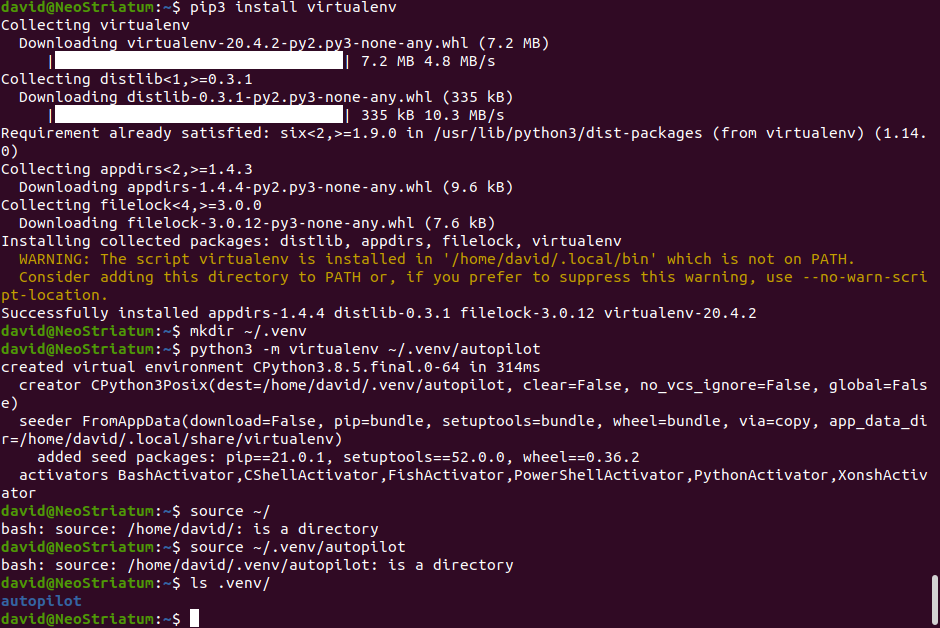
Replies: 2 comments 3 replies

|
Hi David if that doesn't work, try to find where 'activate' is in the .venv directory and execute it |

|
this is correct, that was a mistake in the docs. it's been corrected here: e82dfc2 |

|
ok thanks, it works now |

|
Thanks for pointing out this problem with the docs! Virtualenvs can feel very mysterious, so the confusion is understandable. One surprisingly direct way to see how they work is to just look at what's in the VIRTUAL_ENV='/path/to/some/venv'
export VIRTUAL_ENV
_OLD_VIRTUAL_PATH="$PATH"
PATH="$VIRTUAL_ENV/bin:$PATH"
export PATH
# unset PYTHONHOME if set
if ! [ -z "${PYTHONHOME+_}" ] ; then
_OLD_VIRTUAL_PYTHONHOME="$PYTHONHOME"
unset PYTHONHOME
fi
if [ -z "${VIRTUAL_ENV_DISABLE_PROMPT-}" ] ; then
_OLD_VIRTUAL_PS1="${PS1-}"
if [ "x" != x ] ; then
PS1="${PS1-}"
else
PS1="(`basename \"$VIRTUAL_ENV\"`) ${PS1-}"
fi
export PS1
fi
# Make sure to unalias pydoc if it's already there
alias pydoc 2>/dev/null >/dev/null && unalias pydoc || true
pydoc () {
python -m pydoc "$@"
}
# This should detect bash and zsh, which have a hash command that must
# be called to get it to forget past commands. Without forgetting
# past commands the $PATH changes we made may not be respected
if [ -n "${BASH-}" ] || [ -n "${ZSH_VERSION-}" ] ; then
hash -r 2>/dev/null
fi
|
|
It does! thanks |


Hi David
I'm also still trying to figure out virtual environments.
maybe try something like this
source ~/.venv/autopilot/bin/activate
if that doesn't work, try to find where 'activate' is in the .venv directory and execute it
-Mike