Adaptive Lighting is a custom component for Home Assistant that intelligently adjusts the brightness and color of your lights 💡 based on the sun's position, while still allowing for manual control.
Download and install directly through HACS (Home Assistant Community Store):

By automatically adapting the settings of your lights throughout the day, Adaptive Lighting helps maintain your natural circadian rhythm 😴, which can lead to improved sleep, mood, and overall well-being. Experience cooler color temperatures at noon, gradually transitioning to warmer colors at sunset and sunrise.
In addition to its regular mode, Adaptive Lighting also offers a "sleep mode" 🌜 which sets your lights to minimal brightness and a very warm color, perfect for winding down at night.
🌈 Visualize Adaptive Lighting's settings with the 🌞 Adaptive Lighting Simulator WebApp 🌛
adaptive-lighting.mp4
[ToC]
When initially turning on a light that is controlled by Adaptive Lighting, the light.turn_on service call is intercepted, and the light's brightness and color are automatically adjusted based on the sun's position.
After that, the light's brightness and color are automatically adjusted at a regular interval.
Adaptive Lighting provides four switches (using "living_room" as an example component name):
switch.adaptive_lighting_living_room: Turn Adaptive Lighting on or off and view current light settings through its attributes.switch.adaptive_lighting_sleep_mode_living_room: Activate "sleep mode" 😴 and set custom sleep_brightness and sleep_color_temp.switch.adaptive_lighting_adapt_brightness_living_room: Enable or disable brightness adaptation 🔆 for supported lights.switch.adaptive_lighting_adapt_color_living_room: Enable or disable color adaptation 🌈 for supported lights.
Adaptive Lighting is designed to automatically detect when you or another source (e.g., automation) manually changes light settings 🕹️.
When this occurs, the affected light is marked as "manually controlled," and Adaptive Lighting will not make further adjustments until the light is turned off and back on or reset using the adaptive_lighting.set_manual_control service call.
This feature is available when take_over_control is enabled.
Additionally, enabling detect_non_ha_changes allows Adaptive Lighting to detect all state changes, including those made outside of Home Assistant, by comparing the light's state to its previously used settings.
The adaptive_lighting.manual_control event is fired when a light is marked as "manually controlled," allowing for integration with automations 🤖.
With expand_light_groups: false, manual control belongs to the group. A direct member change cannot pause adaptation for only that member; use group-level manual control or enable expansion for individual tracking.
Explicit member targets in Adaptive Lighting services stay individual targets and do not mark or command the whole group.
Changing expansion at runtime discards tracking and pending adaptation for targets no longer used by any profile.
The Adaptive Lighting switch exposes these read-only attributes for its lights:
manual_control: lights with any attribute marked as manually controlled.manual_control_brightness: lights with brightness marked as manually controlled.manual_control_color: lights with color marked as manually controlled.
These lists report manual-control flags. Actual adaptation also depends on take_over_control_mode and the brightness/color adaptation switches. For example, under the default pause_all mode, manually changing only brightness leaves manual_control_color empty while pausing both brightness and color adaptation. Under pause_changed, color can continue adapting.
The attributes are absent when the Adaptive Lighting switch is off. Use a fallback when checking them in templates:
{{ 'light.bedroom' in (state_attr('switch.adaptive_lighting_bedroom', 'manual_control_brightness') or []) }}
⚠️ Caution: Some lights might falsely indicate an 'on' state, which could result in lights turning on unexpectedly. Disabledetect_non_ha_changesif you encounter such issues.
- ⚙️ Configuration
- 🤖 Automation examples
- Additional Information
- 🆘 Troubleshooting
- 📊 Graphs!
- 👀 See also
- 👥 Contributors
- Translating Adaptive Lighting
Adaptive Lighting supports configuration through both YAML and the frontend (Settings -> Devices and Services -> Adaptive Lighting, Adaptive Lighting -> Options), with identical option names in both methods.
# Example configuration.yaml entry
adaptive_lighting:
  lights:
    - light.living_room_lights
If you configure Adaptive Lighting through the UI, no adaptive_lighting: entry is needed in configuration.yaml. Instances configured through YAML must be edited in YAML.
Transform your home's atmosphere with Adaptive Lighting 🏠, and experience the benefits of intelligent, sun-synchronized lighting today!
All of the configuration options are listed below, along with their default values. The YAML and frontend configuration methods support all of the options listed below.
| Variable name | Description | Default | Type |
|---|---|---|---|
lights |
List of light entity_ids to be controlled (may be empty). 🌟 | [] |
list of entity_ids |
interval |
Frequency to adapt the lights, in seconds. 🔄 | 90 |
int > 0 |
transition |
Duration of transition when lights change, in seconds. 🕑 | 45 |
float 0-6553 |
initial_transition |
Duration of the first transition when lights turn from off to on in seconds. ⏲️ |
1 |
float 0-6553 |
min_brightness |
Minimum brightness percentage. 💡 | 1 |
int 1-100 |
max_brightness |
Maximum brightness percentage. 💡 | 100 |
int 1-100 |
min_color_temp |
Warmest color temperature in Kelvin. 🔥 | 2000 |
int 1000-10000 |
max_color_temp |
Coldest color temperature in Kelvin. ❄️ | 5500 |
int 1000-10000 |
prefer_rgb_color |
Whether to prefer RGB color adjustment over light color temperature when possible. 🌈 | False |
bool |
sleep_brightness |
Brightness percentage of lights in sleep mode. 😴 | 1 |
int 1-100 |
sleep_rgb_or_color_temp |
Use either "rgb_color" or "color_temp" in sleep mode. 🌙 |
color_temp |
one of ['color_temp', 'rgb_color'] |
sleep_color_temp |
Color temperature in sleep mode (used when sleep_rgb_or_color_temp is color_temp) in Kelvin. 😴 |
1000 |
int 1000-10000 |
sleep_rgb_color |
RGB color in sleep mode (used when sleep_rgb_or_color_temp is "rgb_color"). 🌈 |
[255, 56, 0] |
RGB color |
sleep_transition |
Duration of transition when "sleep mode" is toggled in seconds. 😴 | 1 |
float 0-6553 |
transition_until_sleep |
When enabled, Adaptive Lighting will treat sleep settings as the minimum, transitioning to these values after sunset. 🌙 | False |
bool |
sunrise_time |
Set a fixed time (HH:MM:SS) for sunrise. 🌅 | None |
str |
min_sunrise_time |
Set the earliest virtual sunrise time (HH:MM:SS), allowing for later sunrises. 🌅 | None |
str |
max_sunrise_time |
Set the latest virtual sunrise time (HH:MM:SS), allowing for earlier sunrises. 🌅 | None |
str |
sunrise_offset |
Adjust sunrise time with a positive or negative offset in seconds. ⏰ | 0 |
int |
sunset_time |
Set a fixed time (HH:MM:SS) for sunset. 🌇 | None |
str |
min_sunset_time |
Set the earliest virtual sunset time (HH:MM:SS), allowing for later sunsets. 🌇 | None |
str |
max_sunset_time |
Set the latest virtual sunset time (HH:MM:SS), allowing for earlier sunsets. 🌇 | None |
str |
sunset_offset |
Adjust sunset time with a positive or negative offset in seconds. ⏰ | 0 |
int |
brightness_mode |
Brightness mode to use. Possible values are default, linear, and tanh (uses brightness_mode_time_dark and brightness_mode_time_light). 📈 |
default |
one of ['default', 'linear', 'tanh'] |
brightness_mode_time_dark |
(Ignored if brightness_mode='default') The duration in seconds to ramp up/down the brightness before/after sunrise/sunset. 📈📉 |
900 |
int |
brightness_mode_time_light |
(Ignored if brightness_mode='default') The duration in seconds to ramp up/down the brightness after/before sunrise/sunset. 📈📉. |
3600 |
int |
take_over_control |
Pause adaptation of individual lights and hand over (manual) control to other sources that issue light.turn_on calls for lights that are on. 🔒 |
True |
bool |
take_over_control_mode |
The adaptation pausing mode when other sources change brightness and/or color of lights. pause_all always pauses both brightness and color adaptation. pause_changed pauses the adaptation of only the changed attributes and continues adapting unchanged attributes, e.g., continues color adaptation when only brightness was changed. |
pause_all |
one of ['pause_all', 'pause_changed'] |
detect_non_ha_changes |
Detects and halts adaptations for non-light.turn_on state changes. Needs take_over_control enabled. 🕵️ Caution: homeassistant.update_entity every interval! Disable this feature if you encounter such issues. |
False |
bool |
autoreset_control_seconds |
Automatically reset the manual control after a number of seconds. Set to 0 to disable. ⏲️ | 0 |
int 0-31536000 |
only_once |
Adapt lights only when they are turned on (true) or keep adapting them (false). 🔄 |
False |
bool |
adapt_only_on_bare_turn_on |
When turning lights on initially. If set to true, AL adapts only if light.turn_on is invoked without specifying color or brightness. ❌🌈 This e.g., prevents adaptation when activating a scene and marks the light as manually controlled. If false, AL adapts regardless of the presence of color or brightness in the initial service_data. Needs take_over_control enabled. 🕵️ |
False |
bool |
manual_control_on_external_turn_on |
Treat turn-ons without a matching Home Assistant light.turn_on context as manual control. Normal manual-control resets apply. Still allows detect_non_ha_changes for already-on lights. Needs take_over_control enabled. 🕵️ |
False |
bool |
reset_manual_control_on_sleep_mode_change |
Reset manual control when the sleep mode switch is toggled. Set to false to preserve manual control across sleep mode changes. 😴 |
True |
bool |
separate_turn_on_commands |
Use separate light.turn_on calls for color and brightness, needed for some light types. 🔀 |
False |
bool |
send_split_delay |
Delay (ms) between separate_turn_on_commands for lights that don't support simultaneous brightness and color setting. ⏲️ |
0 |
int 0-10000 |
adapt_delay |
Wait time (seconds) between light turn on and Adaptive Lighting applying changes. Might help to avoid flickering. ⏲️ | 0 |
float > 0 |
skip_redundant_commands |
Skip sending adaptation commands whose target state already equals the light's known state. Minimizes network traffic and improves the adaptation responsivity in some situations. 📉Disable if physical light states get out of sync with HA's recorded state. | False |
bool |
intercept |
Intercept and adapt light.turn_on calls to enabling instantaneous color and brightness adaptation. 🏎️ Disable for lights that do not support light.turn_on with color and brightness. |
True |
bool |
multi_light_intercept |
Intercept and adapt light.turn_on calls that target multiple lights. ➗light.turn_on call into multiple calls, e.g., when lights are in different switches. Requires intercept to be enabled. |
True |
bool |
include_config_in_attributes |
Show all options as attributes on the switch in Home Assistant when set to true. 📝 |
False |
bool |
expand_light_groups |
Expand light groups to their members (true, default). Set false to send commands to the group and track manual control for the group. Explicit member targets in services stay individual targets. |
True |
bool |
Full example:
# Example configuration.yaml entry
adaptive_lighting:
- name: "default"
  lights: []
  prefer_rgb_color: false
  transition: 45
  initial_transition: 1
  interval: 90
  min_brightness: 1
  max_brightness: 100
  min_color_temp: 2000
  max_color_temp: 5500
  sleep_brightness: 1
  sleep_color_temp: 1000
  sunrise_time: "08:00:00"  # override the sunrise time
  sunrise_offset:
  sunset_time:
  sunset_offset: 1800  # in seconds or '00:30:00'
  take_over_control: true
  detect_non_ha_changes: false
  only_once: false
adaptive_lighting.apply applies Adaptive Lighting settings to lights on demand.
Provide a switch in entity_id, a list of lights, or both.
| Service data attribute | Description | Required | Type |
|---|---|---|---|
entity_id |
The entity_id of the switch with the settings to apply. 📝 |
❌ | list of entity_ids |
lights |
A light (or list of lights) to apply the settings to. 💡 | ❌ | list of entity_ids |
transition |
Duration of transition when lights change, in seconds. 🕑 | ❌ | float 0-6553 |
adapt_brightness |
Whether to adapt the brightness of the light. 🌞 | ❌ | bool |
adapt_color |
Whether to adapt the color on supporting lights. 🌈 | ❌ | bool |
prefer_rgb_color |
Whether to prefer RGB color adjustment over light color temperature when possible. 🌈 | ❌ | bool |
turn_on_lights |
Whether to turn on lights that are currently off. 🔆 | ❌ | bool |
adaptive_lighting.set_manual_control can mark (or unmark) whether a light is "manually controlled", meaning that when a light has manual_control, the light is not adapted.
Provide a switch in entity_id, a list of lights, or both.
| Service data attribute | Description | Required | Type |
|---|---|---|---|
entity_id |
The entity_id of the switch in which to (un)mark the light as being manually controlled. 📝 |
❌ | list of entity_ids |
lights |
entity_id(s) of lights, if not specified, all lights in the switch are selected. 💡 | ❌ | list of entity_ids |
manual_control |
Whether to add ("true") or remove ("false") all adapted attributes of the light from the "manual_control" list, or the name of an attribute for selective addition. 🔒 | ❌ | bool or one of ['brightness', 'color'] |
adaptive_lighting.change_switch_settings (new in 1.7.0) Change any of the above configuration options of Adaptive Lighting (such as sunrise_time or prefer_rgb_color) with a service call directly from your script/automation.
Warning
These settings will not be written to your config and will be reset on restart of Home Assistant! You can see the current settings in the switch.adaptive_lighting_XXX attributes if include_config_in_attributes is enabled.
| Service data attribute | Required | Description |
|---|---|---|
use_defaults |
❌ | (default: current for current settings) Choose from factory, configuration, or current to reset variables not being set with this service call. current leaves them as they are, configuration resets to initial startup values, factory resets to default values listed in the documentation. |
| all other keys (except the ones in the table below |
❌ | See the table below for disallowed keys. |
The following keys are disallowed:
| DISALLOWED service data | Description |
|---|---|
entity_id |
You cannot change the switch's entity_id, as it has already been registered. |
lights |
You may call adaptive_lighting.apply with your lights or create a new config instead. |
name |
You can rename your switch's display name in Home Assistant's UI. |
interval |
The interval is used only once when the config loads. A config change and restart are required. |
Replace every entity ID below with the IDs from your Home Assistant instance. Fresh Adaptive Lighting profiles use child IDs such as switch.adaptive_lighting_living_room_sleep_mode; profiles created before the device-based entity change may retain older IDs.
Blocks that begin with - alias are entries for automations.yaml. Blocks with a top-level script: or adaptive_lighting: key are complete configuration.yaml examples. If your configuration uses script: !include scripts.yaml, omit that outer key and place its contents in scripts.yaml.
Five examples also have blueprints with selectors, so you can configure them without editing YAML:
| Blueprint | Purpose | Import |
|---|---|---|
| Sleep mode | Synchronize several profiles with one sleep-mode helper. |  |
| Minimum brightness | Turn one light off when its target crosses down to the minimum. | |
| Pause at minimum | Pause brightness through manual control, using its existing reset behavior. | |
| Schedule profile | Apply brightness and color temperature from Schedule helper blocks. | |
| Daylight limit | Lower maximum brightness in strong daylight. | |
Click a blueprint's import badge, confirm the import in Home Assistant, then create an automation and select your entities. You can also copy its source link into Settings → Automations & scenes → Blueprints → Import Blueprint. Read the matching example below for setup and behavior. Each blueprint is tested through Home Assistant alongside its YAML example. The built-in manual-control timeout needs no automation; the scripts below remain useful as actions in your own automations.
change_switch_settings updates a profile while its main switch is off, but lights are adapted only while that switch is on. It preserves manual-control flags, so manually controlled lights remain paused.
Automatically reset manual control after one hour.
Use the built-in timeout so every new manual change renews a single timer for that light:
adaptive_lighting:
  - name: "Living Room"
    lights:
      - light.living_room
    autoreset_control_seconds: 3600
This is a top-level configuration.yaml example. The timer clears manual control and immediately readapts a light when both it and the Adaptive Lighting switch are on.
Toggle multiple Adaptive Lighting switches to "sleep mode" using an input_boolean.sleep_mode.
Also available as a blueprint. Select an input boolean and the sleep-mode switches it should control.
- alias: "Adaptive lighting: toggle 'sleep mode'"
  mode: restart
  trigger:
    - platform: state
      entity_id: input_boolean.sleep_mode
    - platform: homeassistant
      event: start  # apply the helper's restored state
  variables:
    sleep_mode: "{{ states('input_boolean.sleep_mode') }}"
  conditions:
    - condition: template
      value_template: "{{ sleep_mode in ['on', 'off'] }}"
  actions:
    - action: "switch.turn_{{ sleep_mode }}"
      target:
        entity_id:
          - switch.adaptive_lighting_living_room_sleep_mode
          - switch.adaptive_lighting_bedroom_sleep_mode
Turn a light off when its adaptive brightness target reaches the minimum.
Prefer a form over editing YAML? Import the blueprint in Home Assistant under Settings → Automations & scenes → Blueprints → Import Blueprint. Select your profile, its matching adapt brightness switch, one light managed by that profile, and its minimum brightness percentage. Create one automation per light. If you change the profile's minimum later, update the automation too. The blueprint and YAML example below have the same behavior.
The Adaptive Lighting switch already exposes its calculated brightness_pct target. Use its state changes to choose a power policy in an automation; no custom event is needed. This example assumes min_brightness: 1. Change minimum_pct to match your profile, and replace the switch and light entity IDs with your own.
The comparison uses the same rounded 0–255 brightness as an adaptation command. Comparing floating-point percentages for exact equality can miss the minimum between updates. This detects the calculated target reaching its minimum command, not the bulb finishing a transition or reaching its physical dimming limit.
- alias: "Adaptive lighting: turn off at minimum brightness"
  mode: single
  triggers:
    - trigger: state
      entity_id: switch.adaptive_lighting_living_room
      attribute: brightness_pct
  conditions:
    - condition: state
      entity_id:
        - switch.adaptive_lighting_living_room
        - switch.adaptive_lighting_living_room_adapt_brightness
      state: "on"
    - condition: template
      value_template: >-
        {% set minimum_pct = 1 %}
        {% set minimum = (minimum_pct * 255 / 100) | round(0) %}
        {% set before = trigger.from_state.attributes.get('brightness_pct')
                        if trigger.from_state else none %}
        {% set after = trigger.to_state.attributes.get('brightness_pct')
                       if trigger.to_state else none %}
        {{ is_number(before) and is_number(after)
           and (before | float * 255 / 100) | round(0) > minimum
           and (after | float * 255 / 100) | round(0) <= minimum }}
    - condition: state
      entity_id: light.living_room
      state: "on"
    - condition: template
      value_template: >-
        {{ 'light.living_room' not in
           (state_attr('switch.adaptive_lighting_living_room', 'manual_control') or []) }}
  actions:
    - action: light.turn_off
      target:
        entity_id: light.living_room
This runs once when a valid target crosses down into the minimum range. It skips lights currently marked as manually controlled, does not repeatedly turn them off while the target remains low, and does not turn them back on later. Startup or re-enabling the profile while already at the minimum is not a new crossing. Sleep mode can also cause a crossing if its brightness is at or below the chosen minimum. Changing sleep mode clears manual control by default; set reset_manual_control_on_sleep_mode_change: false if you want to preserve it. For a bedtime-only policy, trigger directly on the sleep-mode switch changing to on instead.
Pause brightness at the minimum using manual control.
Use the blueprint to mark an individual light's brightness as manually controlled when the calculated target reaches its minimum. The light stays on and the adaptation switches stay enabled. Set take_over_control_mode: pause_changed on the profile to keep adapting color; the default pause_all pauses both attributes.
Select the profile, its adapt-brightness switch, and a light managed by it. Match the minimum percentage to the profile's min_brightness. This YAML example assumes min_brightness: 1; change minimum_pct and the entity IDs to match your setup.
- alias: "Adaptive lighting: pause brightness at minimum"
  mode: single
  variables:
    minimum_pct: 1
    minimum: "{{ (minimum_pct * 255 / 100) | round(0) }}"
  triggers:
    - trigger: state
      entity_id: switch.adaptive_lighting_living_room
      attribute: brightness_pct
  conditions:
    - condition: state
      entity_id:
        - switch.adaptive_lighting_living_room
        - switch.adaptive_lighting_living_room_adapt_brightness
      state: "on"
    - condition: template
      value_template: >-
        {% set before = trigger.from_state.attributes.get('brightness_pct')
                        if trigger.from_state else none %}
        {% set after = trigger.to_state.attributes.get('brightness_pct')
                       if trigger.to_state else none %}
        {{ is_number(before) and is_number(after)
           and (before | float * 255 / 100) | round(0) > minimum
           and (after | float * 255 / 100) | round(0) <= minimum }}
    - condition: state
      entity_id: light.living_room
      state: "on"
    - condition: template
      value_template: >-
        {{ 'light.living_room' not in
           (state_attr('switch.adaptive_lighting_living_room', 'manual_control_brightness') or []) }}
  actions:
    - variables:
        light_session: "{{ states.light.living_room.last_changed.isoformat() }}"
        profile_session: "{{ states.switch.adaptive_lighting_living_room.last_changed.isoformat() }}"
        brightness_session: "{{ states.switch.adaptive_lighting_living_room_adapt_brightness.last_changed.isoformat() }}"
    - wait_template: >-
        {% set target = state_attr('switch.adaptive_lighting_living_room', 'brightness_pct') %}
        {{ not is_state('light.living_room', 'on')
           or not is_state('switch.adaptive_lighting_living_room', 'on')
           or not is_state('switch.adaptive_lighting_living_room_adapt_brightness', 'on')
           or states.light.living_room.last_changed.isoformat() != light_session
           or states.switch.adaptive_lighting_living_room.last_changed.isoformat() != profile_session
           or states.switch.adaptive_lighting_living_room_adapt_brightness.last_changed.isoformat() != brightness_session
           or not is_number(target) or (target | float * 255 / 100) | round(0) > minimum
           or 'light.living_room' in
               (state_attr('switch.adaptive_lighting_living_room', 'manual_control_brightness') or [])
           or (state_attr('light.living_room', 'brightness') | float(256)) <= minimum }}
      timeout: "00:05:00"
      continue_on_timeout: false
    - condition: template
      value_template: >-
        {% set target = state_attr('switch.adaptive_lighting_living_room', 'brightness_pct') %}
        {{ is_state('light.living_room', 'on')
           and is_state('switch.adaptive_lighting_living_room', 'on')
           and is_state('switch.adaptive_lighting_living_room_adapt_brightness', 'on')
           and states.light.living_room.last_changed.isoformat() == light_session
           and states.switch.adaptive_lighting_living_room.last_changed.isoformat() == profile_session
           and states.switch.adaptive_lighting_living_room_adapt_brightness.last_changed.isoformat() == brightness_session
           and is_number(target) and (target | float * 255 / 100) | round(0) <= minimum
           and (state_attr('light.living_room', 'brightness') | float(256)) <= minimum
           and 'light.living_room' not in
               (state_attr('switch.adaptive_lighting_living_room', 'manual_control_brightness') or []) }}
    - action: adaptive_lighting.set_manual_control
      data:
        entity_id: switch.adaptive_lighting_living_room
        lights: light.living_room
        manual_control: >-
          {{ true if 'light.living_room' in
             (state_attr('switch.adaptive_lighting_living_room', 'manual_control_color') or [])
             else 'brightness' }}
The comparison uses the rounded 0–255 target, so it does not depend on sampling an exact floating-point minimum. It waits up to five minutes for the light to report that minimum before marking manual control, so the final dimming command can complete. Reported brightness does not prove physical fade completion. If the light, profile, or adapt-brightness switch is toggled, the target rises, brightness is marked manually controlled elsewhere, or brightness never reaches the minimum, the attempt is abandoned. Lights that cannot report the configured minimum will not be paused. Existing manual color flags are preserved, and lights whose brightness is already manually controlled are left alone. Manual-control state is shared for lights managed by multiple profiles, so their existing takeover policies still apply.
The usual resets apply: turning the light off, the configured autoreset_control_seconds timeout, clearing manual control through its service, and existing profile/sleep-switch reset behavior. After a reset, normal adaptation can increase brightness again. This runs once per downward crossing; resetting while the target remains at its minimum does not immediately mark the light again. Startup at the minimum is not a crossing either.
This pauses further dimming as well as brightening. To pause brightness immediately after a brightness change made through Home Assistant, use take_over_control_mode: pause_changed with take_over_control: true; that needs no additional automation.
Set sunrise and sunset from an alarm.
Call this script from your alarm automation. It sets one Adaptive Lighting profile's sunrise to the current time and its sunset to 12 hours later on the local clock.
script:
  set_adaptive_lighting_alarm_times:
    alias: "Adaptive lighting: set times from alarm"
    variables:
      alarm_time: '{{ now().strftime("%H:%M:%S") }}'
    sequence:
      - action: adaptive_lighting.change_switch_settings
        data:
          entity_id: switch.adaptive_lighting_alarm_lights
          sunrise_time: "{{ alarm_time }}"
          sunset_time: >
            {{ (strptime(alarm_time, "%H:%M:%S") + timedelta(hours=12))
               .strftime("%H:%M:%S") }}
Use a Schedule helper as a step-based custom lighting profile.
Also available as a blueprint. Select the main profile switch and your Schedule helper.
Create a Schedule helper named Adaptive Lighting Profile. Add time blocks with Additional data like this:
brightness_pct: 20
color_temp_kelvin: 2500
Use different values for each block. The automation below applies the active block whenever the schedule state or its attributes change. Setting both brightness limits and both color temperature limits to the same value keeps each block at its setpoint. Outside a block, the configured Adaptive Lighting settings are restored.
- alias: "Adaptive lighting: apply scheduled profile"
  triggers:
    - trigger: state
      entity_id: schedule.adaptive_lighting_profile
    - trigger: homeassistant
      event: start
  actions:
    - choose:
        - conditions:
            - condition: state
              entity_id: schedule.adaptive_lighting_profile
              state: "on"
          sequence:
            - action: adaptive_lighting.change_switch_settings
              data:
                entity_id: switch.adaptive_lighting_living_room
                min_brightness: >
                  {{ state_attr('schedule.adaptive_lighting_profile', 'brightness_pct') | int(1) }}
                max_brightness: >
                  {{ state_attr('schedule.adaptive_lighting_profile', 'brightness_pct') | int(1) }}
                min_color_temp: >
                  {{ state_attr('schedule.adaptive_lighting_profile', 'color_temp_kelvin') | int(2000) }}
                max_color_temp: >
                  {{ state_attr('schedule.adaptive_lighting_profile', 'color_temp_kelvin') | int(2000) }}
      default:
        - action: adaptive_lighting.change_switch_settings
          data:
            entity_id: switch.adaptive_lighting_living_room
            use_defaults: configuration
  mode: restart
This creates step changes at block boundaries. It does not interpolate between schedule points. Runtime settings also reset when Home Assistant restarts, so the startup trigger reapplies the active block. The default branch restores every configured setting; restore only the four fields explicitly if other automations also change runtime settings.
Reduce daytime brightness when an illuminance sensor detects strong daylight.
Also available as a blueprint. Select the profile and sensor, then set the lux thresholds and brightness limits. The high lux threshold must exceed the low threshold; the blueprint does nothing if they are reversed or equal.
Keep a low configured min_brightness for late night and let an automation lower max_brightness while the room has ample daylight. Use a sensor that is not significantly affected by the controlled lights to avoid a feedback loop.
- alias: "Adaptive lighting: limit brightness in daylight"
  triggers:
    - trigger: numeric_state
      entity_id: sensor.living_room_illuminance
      above: 300
    - trigger: numeric_state
      entity_id: sensor.living_room_illuminance
      below: 200
    - trigger: homeassistant
      event: start
      id: startup
  actions:
    - if:
        - condition: trigger
          id: startup
      then:
        - wait_template: >
            {{ is_number(states('sensor.living_room_illuminance')) }}
          timeout: "00:05:00"
          continue_on_timeout: false
    - choose:
        - conditions:
            - condition: numeric_state
              entity_id: sensor.living_room_illuminance
              above: 300
          sequence:
            - action: adaptive_lighting.change_switch_settings
              data:
                entity_id: switch.adaptive_lighting_living_room
                max_brightness: 30
        - conditions:
            - condition: numeric_state
              entity_id: sensor.living_room_illuminance
              below: 200
          sequence:
            - action: adaptive_lighting.change_switch_settings
              data:
                entity_id: switch.adaptive_lighting_living_room
                max_brightness: 100
  mode: restart
The separate 200 and 300 lux thresholds add hysteresis. After a restart, the automation waits for a numeric sensor state before evaluating it. If the initial value is between the thresholds, Adaptive Lighting keeps its configured maximum. Replace 30 and 100 with your desired daytime limit and normal maximum.
min_brightness and max_brightness are the solar-midnight and daytime endpoints of the brightness curve. Setting min_brightness higher than max_brightness is supported and creates an inverted curve that is brighter at night and dimmer during the day. If you only want a daytime limit, keep the reduced maximum at or above the configured minimum.
Turn on Hue-controlled lights with the current Adaptive Lighting values.
For a Hue button exposed to Home Assistant, call this script from the button automation. It turns on the listed lights directly with the current Adaptive Lighting brightness and color.
script:
  living_room_adaptive_lighting:
    alias: "Living room: adaptive lighting"
    sequence:
      - action: adaptive_lighting.apply
        data:
          entity_id: switch.adaptive_lighting_living_room
          lights:
            - light.living_room_ceiling
            - light.living_room_table
          turn_on_lights: true
          transition: 0
This requires Home Assistant to receive the button event. The one-shot apply call works while the main Adaptive Lighting switch is off, turns on the listed lights, and applies values even if a light is marked as manually controlled. It leaves the profile switch and manual-control state unchanged.
Adaptive Lighting does not update scenes stored on the Hue Bridge, so scenes activated only inside Hue cannot use this script and retain Hue's operation when Home Assistant is unavailable.
Use a fixed RGB stage before sleep mode.
This script starts sleep mode with a fixed dim red color, waits 30 minutes, and then restores the configured Adaptive Lighting settings. The main profile switch and the light must already be on.
script:
  adaptive_lighting_bedtime:
    alias: "Adaptive lighting: bedtime"
    mode: restart
    sequence:
      - action: adaptive_lighting.change_switch_settings
        data:
          entity_id: switch.adaptive_lighting_bedroom
          sleep_rgb_or_color_temp: rgb_color
          sleep_rgb_color: [255, 56, 0]
          sleep_brightness: 20
      - action: switch.turn_on
        target:
          entity_id: switch.adaptive_lighting_bedroom_sleep_mode
      - delay: "00:30:00"
      - action: adaptive_lighting.change_switch_settings
        data:
          entity_id: switch.adaptive_lighting_bedroom
          use_defaults: configuration
The light must support RGB color. The first stage uses a fixed brightness rather than following the normal brightness curve. When sleep mode changes from off to on, the default reset_manual_control_on_sleep_mode_change: true returns manually controlled lights to Adaptive Lighting control so they receive the stage. If you disable that option, manually controlled lights remain paused. Restoring configuration defaults resets every runtime setting on this Adaptive Lighting switch, so restore only the sleep fields explicitly if other automations also change runtime settings.
Stopping this script or reloading scripts during the delay prevents the final action, leaving the runtime overrides active. To recover, call adaptive_lighting.change_switch_settings for the profile with use_defaults: configuration. A Home Assistant restart reloads the configured settings.
Run a fixed virtual day across midnight.
Fixed virtual sunrise and sunset times can cross midnight. This configuration ramps an indoor garden from its minimum at 16:00 to its maximum at 22:00, then back to its minimum at 04:00.
adaptive_lighting:
  - name: "Indoor Garden"
    lights:
      - light.indoor_garden
    sunrise_time: "16:00:00"
    sunset_time: "04:00:00"
    min_brightness: 10
    max_brightness: 100
    brightness_mode: linear
    brightness_mode_time_dark: 0
    brightness_mode_time_light: 21600  # 6 hours
Adaptive Lighting changes brightness and color while a light is on; it does not manage the light's power schedule. This separate automation turns the example light on and off:
- alias: "Indoor garden: power schedule"
  triggers:
    - trigger: time
      at: "16:00:00"
      id: turn_on
    - trigger: time
      at: "04:00:00"
      id: turn_off
    - trigger: homeassistant
      event: start
      id: startup
  actions:
    - choose:
        - conditions:
            - condition: trigger
              id: turn_on
          sequence:
            - action: light.turn_on
              target:
                entity_id: light.indoor_garden
        - conditions:
            - condition: trigger
              id: startup
            - condition: time
              after: "16:00:00"
              before: "04:00:00"
          sequence:
            - action: light.turn_on
              target:
                entity_id: light.indoor_garden
      default:
        - action: light.turn_off
          target:
            entity_id: light.indoor_garden
Use min_sunrise_time, max_sunrise_time, min_sunset_time, or max_sunset_time instead when you want to constrain astronomical sunrise or sunset to an earliest or latest time rather than replace it.
For more details on adding the integration and setting options, refer to the documentation of the PR and this video tutorial on Reddit.
Adaptive Lighting was initially inspired by @claytonjn's hass-circadian_lighting, but has since been entirely rewritten and expanded with new features.
Encountering issues? Enable debug logging in your configuration.yaml:
logger:
  default: warning
  logs:
    custom_components.adaptive_lighting: debug
After the issue occurs, create a new issue report with the log (/config/home-assistant.log).
For support, use Home Assistant's Download diagnostics action on the Adaptive Lighting config entry. The download is an on-demand snapshot of the profile's current switches and currently tracked light targets. It does not refresh group membership or predict targets a disabled profile would use after being enabled. It does not create live sensors; existing switch attributes remain the interface for automations. The reported last adaptation values are the shared manager's latest retained value for each attribute. They can come from different commands and do not represent one sent command or the current desired state.
If lights stop adapting after you turn them on with a physical switch or a Zigbee-bound remote, check the Adaptive Lighting switch's manual_control attribute. With take_over_control: true and detect_non_ha_changes: false, a turn-on without a matching Home Assistant light.turn_on call marks the light as manually controlled. Reloading clears that state, but the next physical turn-on can trigger it again.
To adapt these turn-ons while still detecting later manual changes, enable detect_non_ha_changes and leave manual_control_on_external_turn_on disabled. This requires the light integration to report its state reliably. If you want Adaptive Lighting to keep adapting regardless of manual changes, disable take_over_control along with the options that require it: detect_non_ha_changes, adapt_only_on_bare_turn_on, and manual_control_on_external_turn_on.
This explains the physical-switch case in #1056, but not every report in that thread. If the light is not listed in manual_control, include diagnostics and debug logs from the failed turn-on when reporting it. Lights returning from unavailable after a power cut are a separate case from an off to on state change.
Adaptive Lighting sends more commands to lights than a typical human user would. If your light control network is unhealthy, you may experience:
- Laggy manual commands (e.g., turning lights on or off).
- Unresponsive lights.
- Home Assistant reporting incorrect light states, causing Adaptive Lighting to inadvertently turn lights back on.
Most issues that appear to be caused by Adaptive Lighting are actually due to unrelated problems. Addressing these issues will significantly improve your Home Assistant experience.
In case lights are suddenly turning on by themselves, this is most likely due to the light incorrectly reporting an "on" state to Home Assistant, leading to an undesired Adaptive Lighting action.
To prevent adapting in cases where the state of the light is suddenly "on" and only adapt if there is an associated light.turn_on service call, set detect_non_ha_changes: false.
To keep detecting manual changes to lights that are already on while leaving unmatched off to on state events unchanged, enable manual_control_on_external_turn_on. Matching uses the exact context of the most recently recorded light.turn_on call. Some integrations replace or omit that context, so Adaptive Lighting cannot distinguish every physical versus Home Assistant turn-on source.
Ensure your light bulbs have a strong WiFi connection. If the signal strength is less than -70dBm, the connection may be weak and prone to dropping messages.
Mesh networks typically require powered devices to act as routers, relaying messages back to the central coordinator (the radio connected to Home Assistant). Most modern lights function as routers, very early models may not. If devices become unresponsive or fail to respond to commands, Adaptive Lighting can exacerbate the issue. Use network maps (available in ZHA, zigbee2mqtt, deCONZ, and ZWaveJS UI) to evaluate your network health. Smart plugs can be an affordable way to add more routers to your network.
For most Zigbee networks, using groups is essential for optimal performance. For example, if you want to use Adaptive Lighting in a hallway with six bulbs, adding each bulb individually to the Adaptive Lighting configuration could overwhelm the network with commands. Instead, create a group in your Zigbee software (not a regular Home Assistant group) and add that single group to the Adaptive Lighting configuration. This sends a single broadcast command to adjust all bulbs, improving response times and keeping the bulbs in sync.
As a rule of thumb, if you always control lights together (e.g., bulbs in a ceiling fixture), they should be in a Zigbee group. Expose only the group (not individual bulbs) in Home Assistant Dashboards and external systems like Google Home or Apple HomeKit.
⚠️ If you control lights individually,manual_controlcannot behave correctly! If you need to control lights individually as well, use a Home Assistant Light Group.
When mixing group types, avoid nesting: do not add integration-level groups (e.g., Zigbee2MQTT groups) to a Home Assistant Light Group that is managed by Adaptive Lighting, and do not nest Home Assistant Light Groups inside each other. Adaptive Lighting cannot expand an integration-level group into its member lights, and nested groups make it unpredictable which entity Adaptive Lighting tracks and adapts, which can prevent lights from being adapted at all (see #1378). Instead, add the individual light entities or a single Zigbee group directly to the Adaptive Lighting configuration. Also note that bulbs turned on via a Zigbee group broadcast may briefly flash their last (cached) brightness and color before the adapted values arrive; this happens inside the bulbs and cannot be prevented by Home Assistant or Adaptive Lighting.
Bulbs from different manufacturers or models may have varying color temperature specifications. For instance, if you have two Adaptive Lighting configurations—one with only Philips Hue White Ambiance bulbs and another with a mix of Philips Hue White Ambiance and Sengled bulbs—the Philips Hue bulbs may appear to have different color temperatures despite having identical settings.
To resolve this:
- Include only bulbs of the same make and model in a single Adaptive Lighting configuration.
- Rearrange bulbs so that different color temperatures are not visible simultaneously.
These lights are known to exhibit disadvantageous behaviour due to firmware bugs, insufficient functionality, or hardware limitations:
- Sengled Z01-A19NAE26
- Unexpected turn-ons: If Adaptive Lighting sends a long transition time (like the default 45 seconds), and the bulb is turned off during that time, it may turn back on after approximately 10 seconds to continue the transition command. Since the bulb is turning itself on, there will be no obvious trigger in Home Assistant or other logs indicating the cause of the light turning on. To fix this, set a much shorter
transitiontime, such as 1 second. - Heat sensitivity: Additionally, these bulbs may perform poorly in enclosed "dome" style ceiling lights, particularly when hot. While most LEDs (even non-smart ones) state in the fine print that they do not support working in enclosed fixtures, in practice, more expensive bulbs like Philips Hue generally perform better. To resolve this issue, move the problematic bulbs to open-air fixtures.
- Unexpected turn-ons: If Adaptive Lighting sends a long transition time (like the default 45 seconds), and the bulb is turned off during that time, it may turn back on after approximately 10 seconds to continue the transition command. Since the bulb is turning itself on, there will be no obvious trigger in Home Assistant or other logs indicating the cause of the light turning on. To fix this, set a much shorter
- Ikea Tradfri bulbs/drivers (and related Ikea smart light products)
- Unsupported simultaneous transition of brightness and color: When receiving such a command, they switch the brightness instantly and only transition the color. To get smooth transitions of both brightness and color, enable
separate_turn_on_commands. - Unresponsiveness during color transitions: No other commands are processed during an ongoing color transition, e.g., turn-off commands are ignored and lights stay on despite being reported as off to Home Assistant. The default config with long transitions thus results in long periods of unresponsiveness. To work around this, disable transitions by setting
transitionto0, and increase the adaptation frequency by settingintervalto a short time, e.g.,15seconds, to retain the impression of smooth continuous adaptations. Keeping theinitial_transitionis recommended for a smooth fade-in (lights are usually not turned off momentarily after being turned on, in which case a short period of unresponsiveness is tolerable).
- Unsupported simultaneous transition of brightness and color: When receiving such a command, they switch the brightness instantly and only transition the color. To get smooth transitions of both brightness and color, enable
- Lonsonho ZB-RGBCW
- Some Zigbee2MQTT/eWeLight firmware combinations do not turn the bulb on when the initial
light.turn_oncall includes brightness or color, although later adjustments work. Disableinterceptfor affected bulbs.
- Some Zigbee2MQTT/eWeLight firmware combinations do not turn the bulb on when the initial
These graphs were generated using the values calculated by the Adaptive Lighting sensor/switch(es).




Enhance your control over brightness transitions during sunrise and sunset with brightness_mode (click here to learn more 🧠).
With Adaptive Lighting, you can set a brightness_mode to specify how the brightness changes during sunrise and sunset. The brightness_mode can be set to "default" (as illustrated in other graphs above), "linear", or "tanh". If you choose to deviate from the "default" mode, you can adjust brightness_mode_time_dark and brightness_mode_time_light to further customize the lighting transitions.
When brightness_mode is set to "linear":
- During sunset, the brightness begins to gradually decrease from
max_brightnessstarting attime=sunset_time - brightness_mode_time_light, until it reachesmin_brightnessattime=sunset_time + brightness_mode_time_dark. - During sunrise, the brightness begins to gradually increase from
min_brightnessstarting attime=sunrise_time - brightness_mode_time_dark, until it reachesmax_brightnessattime=sunrise_time + brightness_mode_time_light.
When brightness_mode is set to "tanh", it uses the smooth transition of a hyperbolic tangent function:
- During sunset, the brightness starts to decrease from 95% of
max_brightnessstarting attime=sunset_time - brightness_mode_time_light, until it reaches 5% ofmin_brightnessattime=sunset_time + brightness_mode_time_dark. - During sunrise, the brightness starts to increase from 5% of
min_brightnessstarting attime=sunrise_time - brightness_mode_time_dark, until it reaches 95% ofmax_brightnessattime=sunrise_time + brightness_mode_time_light.
Notice the values of brightness_mode_time_light and brightness_mode_time_dark in the text box.


Check out the interactive webapp on https://basnijholt.github.io/adaptive-lighting/ to play with the parameters and see how the brightness changes!
- Sleep better with Adaptive Lighting in Home Assistant by Florian Wartner on 2023-02-23 (blog post 📜)
- Automatic smart light brightness and color based on the sun by Home Automation Guy on 2022-08-31 (YouTube video 📺)
- Adaptive Lighting Blew My Mind in Home Assistant - How to set it up by Smart Home Junkie on 2022-06-26 (YouTube video 📺)


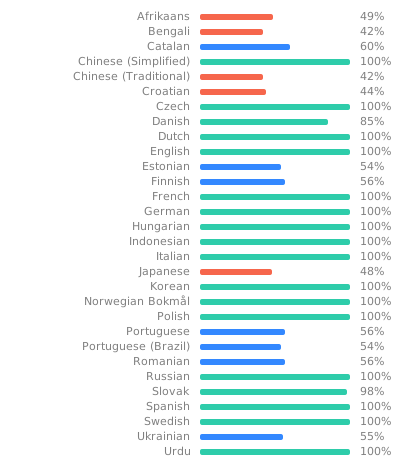
Help to translate Adaptive Lighting into your language on Hosted Weblate!
Translating can be done from your webbrowser, no programming knowledge is needed!