Repository navigation
Home

v3.0.0
"The only writing software I use." -Virginia Woolf
WareWoolf is designed for one thing: writing fiction. It is intentionally simplified: beyond a choice of typeface and line spacing for the manuscript, a typeface for the sidebars, and light or dark, there is nothing to fiddle with--no colors, no styles. But it has everything you need to organize, edit, and revise a novel--and you don't even need a mouse.
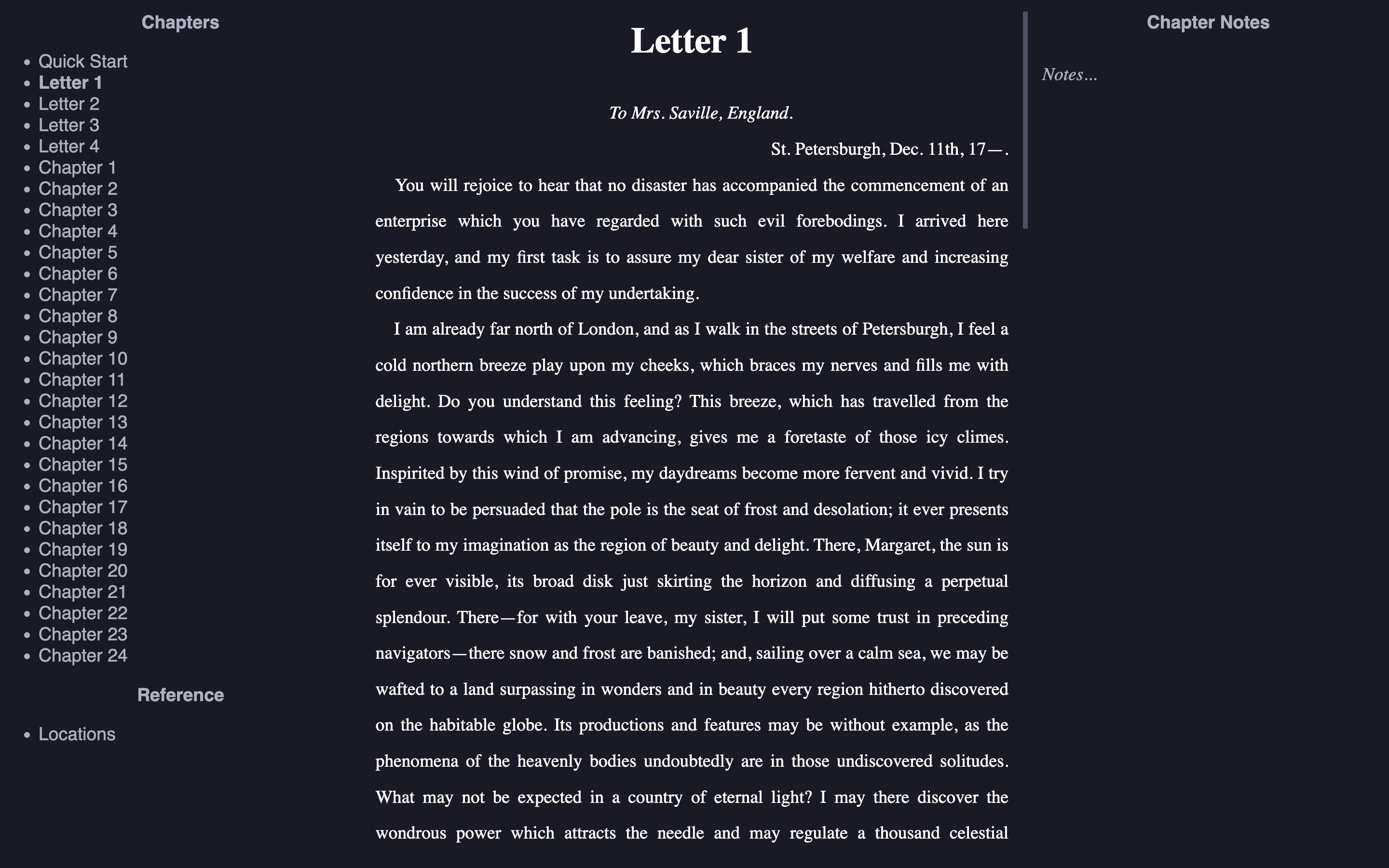
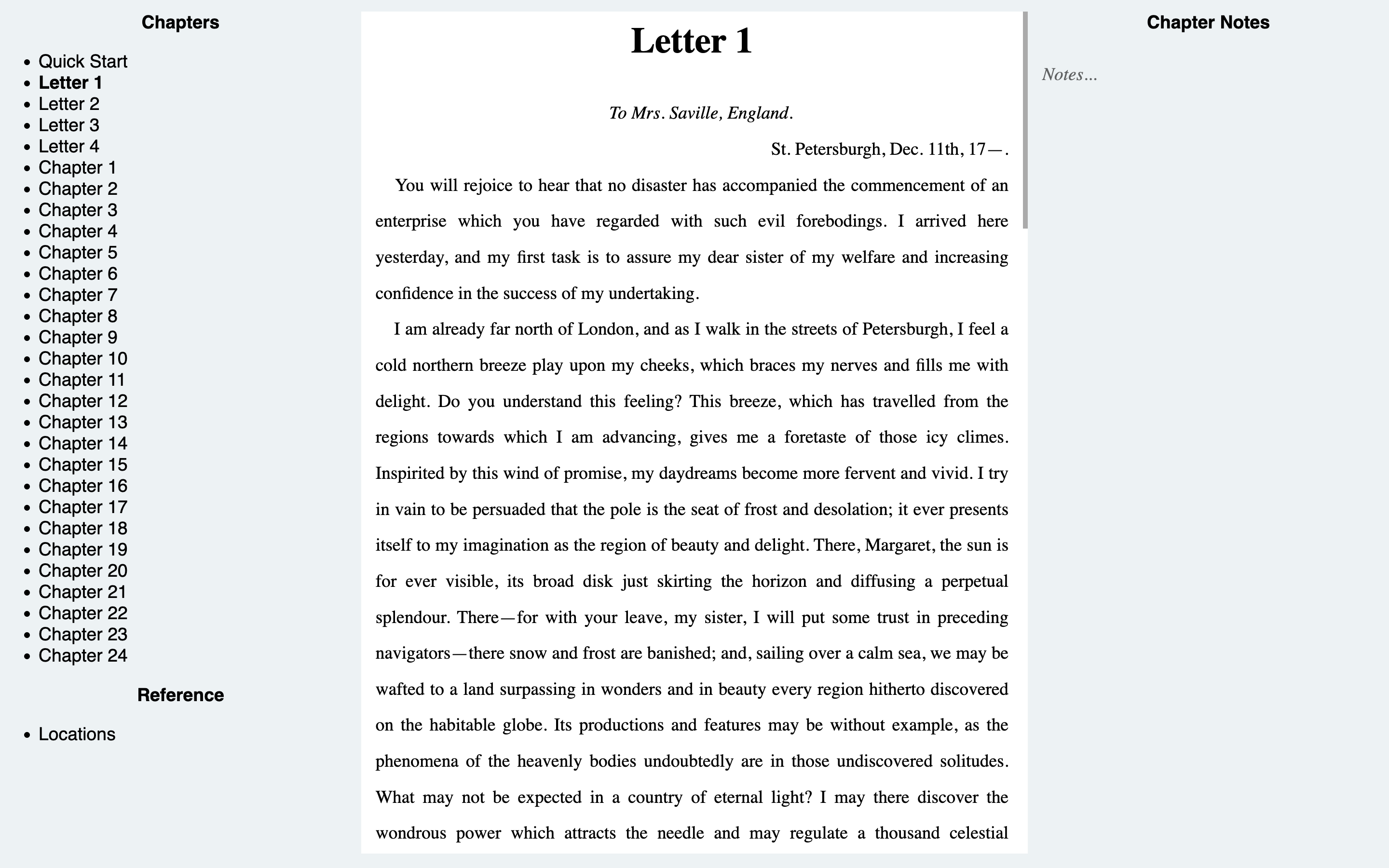
It is composed of three simple text-based panels with no icons: Chapters, Editor, and Notes.
That's it. There is no toolbar with twenty buttons cluttering the screen. There isn't even a file menu unless you summon it by pressing Alt. All formatting is done with shortcuts. (But don't worry, there aren't many to memorize, and you can always press CTRL + H to show them all in the Shortcut Helper--where you can also change any of them to keys you prefer. It's not like you do a lot of formatting when writing fiction anyway.)
What it does have is an array of tools for importing plaintext and docx files and converting them into proper manuscript format, as well as features such as self-emailing drafts at the press of a button, a built-in file manager, and a wi-fi manager for easy use in standalone writing devices ("writerDecks") without access to any other software.
Dark Mode:
 Light Mode:
These pages are the same text as the Help doc that ships inside WareWoolf (Ctrl+H, or the Help menu).
Getting started
- Basics / Quickstart
- Shortcut Helper
- Where to Download and Install WareWoolf
- How To Build From Source Code
Writing and editing
Planning and organizing
Getting work in and out
- Importing Plaintext Files
- Importing HTML and EPUB
- Break Headings Into Chapters
- Tab-Indent Paragraphs
- Exporting and Compiling
- Send Via Email
- Backup & Auto-Backup
Files and formats
writerDecks
- All-keyboard navigation designed for pleasant use without a mouse.
- Distraction-free writing: Each of the three panels can be toggled on/off at the press of a button. Write with only your manuscript visible.
- Separate Chapter Notes and Project Notes, toggleable side-by-side with the editor.
- Plain text, .docx, HTML and EPUB import/conversion tools
- Options to parse a simplified version of Markdown (MarkdownFic) or interpret custom markers for detecting italics, headings, etc.
- Detect custom strings marking chapter breaks, or break a document into chapters at each heading (plaintext or .docx).
- HTML and EPUB import: split an HTML book at a chosen heading level or at horizontal rules, or split an EPUB by the book's own table of contents (so Moby-Dick arrives as 141 chapters, not eleven files).
- Supports bullet and numbered lists, alongside the usual headings, bold/italic/underline/strikethrough, blockquotes, and footnotes.
- Customizable keyboard shortcuts: pick any shortcut in the Shortcut Helper and press the keys you want, including the odd keys a custom writerdeck keyboard sends.
- Automatic substitutions as you type--curly quotes, em dashes, ellipses--switchable off in whole or rule by rule, plus a tool to run them over an older manuscript.
-
Footnotes in the editor, numbered and renumbered automatically, exported as real Word footnotes, linked HTML/EPUB notes, or
[^1]markers in Markdown. - Dictionaries: tick any number at once, import your own (Hunspell .aff/.dic or a bare word list), edit your personal dictionary, and keep a per-project word list for character and place names.
- Find/Replace with regex, case sensitivity, whole-word matching, and replacement across the whole project.
- Tab-Indent Paragraphs: indent a whole manuscript properly, correcting tabs that should not be there and optionally closing up blog-style blank lines.
- Easily re-order chapters and automatically re-number them in headings after doing so ("Chapter One," "Chapter Two," etc.)
- Reference section for material (character notes, research, deleted scenes, etc.) you want to keep in the project but excluded from word counts and compiling.
- Corkboard: a visual index-card planning tool with colors, checkmarks, and configurable board divisions (acts, parts, etc.), saved as a plain-text outline you can edit by hand.
- Compile chapters into a single manuscript or export into individual files for each chapter, in .docx, .txt, .mdfc, .md, .html, or .epub.
- Send Via Email: Email drafts of individual chapters or the entire manuscript to yourself at the press of a button. Saved email passwords are protected by your OS's system keystore, with an optional passphrase for an extra layer.
- Built In File Manager: Rename, delete, copy, move, and organize files within WareWoolf (for use in a writerDeck).
- Built In Wi-Fi Manager: turn wi-fi on/off, connect to new networks, etc. (Linux only, for use in a writerDeck).
- Battery Display: shows remaining charge in the corner of the screen (Linux only, for use in a writerDeck).
- Word Counts / Goal: See total count, chapter count, session count, and set a goal to see a progress bar showing how close you are to completion.
- Each chapter is saved as an individual file only loaded when you are working on that chapter. This keeps very long novels from slowing the application at all, even with low-memory computers such as a Raspberry Pi.
- Simple Outliner, listing each chapter's word count and a summary field, spreadsheet-style.
- Adjust width of text editor and how large text is displayed, plus a choice of font for the manuscript and the sidebars and four line spacings for the manuscript.
- Typewriter Mode, holding the line you are writing three-quarters of the way down the editor instead of at the bottom edge.
- Page estimates beside every word count, divided by a Words Per Page figure you set.
- Accessibility: every popup, region, editor and field is named for assistive technology, and both themes meet WCAG 2.1 AA contrast.
- Spellcheck, but it must be run after writing (no form of auto-correct or red squiggles or godawful grammar advice).
- Word .docx support for import/export, including automatic manuscript-format title pages.
- Auto-saving and auto-backup options
- Saves chapters as .txt files with light Markdown-style formatting, so even if WareWoolf disappears you will always be able to read/edit the documents you create with it. This is also widely considered the most "archival" file format, so people will still be able to open your files in 100 years (if people still read then).
Binaries of the current release for Windows, MacOS, Debian AMD64, and Debian ARM64 (Raspberry Pi) are available in the releases page.
Two of those assets are worth explaining:
-
Windows Portable (
warewoolf_<version>_Windows_Portable_x64.zip), alongside the installer. Unzip it and run WareWoolf out of the folder: nothing is installed, nothing is added to the Start Menu or Add or Remove Programs, and deleting the folder removes it. Your projects and settings live outside the folder either way. Check For Updates knows which of the two you are running and offers the matching download. -
MacOS Legacy (
warewoolf_<version>_MacOS_Legacy.dmg) for macOS 10.15 "Catalina" through 12 "Monterey", which the mainline Electron builds no longer support. Same source, packaged against Electron 32; Intel-only, so it runs under Rosetta on Apple Silicon. Electron 32 no longer receives Chromium security updates, so prefer a mainline build if your Mac can run one.
On Windows, Check For Updates can now download and install the update in place: click Install, wait, then Restart To Finish. Linux and Mac still hand you the download.
Note
Minimum OS requirements since v2.4.0: Debian 11 "Bullseye" or newer (including Raspberry Pi OS Bullseye/Bookworm), 64-bit Windows 10 or newer, and macOS 13 "Ventura" or newer--or the MacOS Legacy build for 10.15 through 12. There are no longer builds for 32-bit Windows or 32-bit (armv7l) Raspberry Pi OS.
Warning
The Wi-Fi Manager uses nmcli/NetworkManager. Raspberry Pi OS Bookworm (October 2023) and newer use NetworkManager already; on Bullseye you will have to install network-manager and enable it in raspi-config (Advanced Options > Network Config), updating raspi-config first if that option is missing. The writerDeck setup script can do this for you with --network-manager.
This app was built using Electron Forge. To run it from source...
- You must first have Node.js installed.
- Run "npm install" in the WareWoolf source code directory to install the dependencies using the Node Package Manager, or however you like.
- Then you can simply use command "npm start" to run the program.
- To make a binary, "npm run make". See the Electron Forge documentation for instructions on how to alter the package.json file for making binaries for different systems, but basically in the "makers" property of the "forge" object in the package.json file, there is an array of different makers for producing different binaries. The "@electron-forge/maker-squirrel" is for producing a Windows binary, the maker-deb for Debian, and the maker-rpm for Redhat. To produce one, delete the other two from the file before running "npm run make". You will find the binary in the "out" folder.
A full list of changes for every release is in the CHANGELOG.
2026-09-12: v3.0.0! The largest release so far. Changes made:
- Customizable keyboard shortcuts--rebind anything in the Shortcut Helper, including the odd keys a custom writerdeck keyboard sends
- Automatic substitutions as you type (curly quotes, em dashes, ellipses), plus Tools > Convert Straight Quotes Etc. for older manuscripts
- First-class footnotes in the editor, numbered automatically and exported as real Word footnotes, linked HTML/EPUB notes, or Markdown markers
- Blockquotes, in the editor, MarkdownFic, and .docx export
- File > Dictionaries: multiple dictionaries at once, imported dictionaries, an editable personal dictionary, and a per-project word list
- HTML and EPUB import, split at a heading level, at horizontal rules, or by an ebook's own table of contents
-
Regex in Find/Replace, with
$1backreferences in the Replace box - Page estimates beside every word count, with a Words Per Page setting
- A "Mark scene breaks with a centered #" option in Compile and Export
- Windows in-app updates, and a portable Windows build
- Font and line spacing settings for the manuscript and sidebars
- Tab-Indent Paragraphs, replacing Indent All Paragraphs, with tab correction and blank-line removal
- File > Reboot on Linux, for a writerDeck that boots straight into WareWoolf
- A legacy macOS build for Catalina through Monterey
- Accessibility work throughout: everything named for assistive technology, and WCAG 2.1 AA contrast in both themes
2026-09-07: v2.5.0. The Wi-Fi Manager showed no network names; fixed, along with general security improvements.
2026-09-06: v2.4.0. Electron upgraded from 18.2.3 to 44.2.0 for security and performance, which raised the minimum OS requirements (see Installation above). The Help doc was updated and now opens read-only, and a batch of data-loss and lockup bugs were fixed--corrupted projects freezing the window, Trash restores saving over the wrong file, and the bundled Frankenstein example silently failing to save.
2026-09-05: v2.3.1. Recommended immediate upgrade at the time.
2026-09-03: v2.3.0! Changes made:
- Bullets and numbered lists, in the editor, MarkdownFic, and every export/compile format (.docx, .html, .md, plain text)
- Email passwords are now protected by your OS's system keystore (or an optional passphrase), replacing the old lightweight encryption
- Indent All Paragraphs and Center All Headings tools
- Find/Replace "whole word only" option
- Import can label chapters from the filename or the first line
- Various bug fixes (footnote anchors, docx list numbering, backup dialog)
- Automated GitHub Actions build/release workflow
2025-10-09: v2.2.1 patch. Bug fixes for new-project creation and chapter indexing; backup progress is now shown while it runs.
2025-10-08: v2.2.0! Changes made:
- EPUB export, compile, and email support
- Reference section: chapters you can move out of the main manuscript (excluded from word counts/compiling) without deleting them
- Chapter Notes and Project Notes are now separate, toggleable panels
- Corkboard bug fixes (including a Windows-specific crash) and corkboard export support
- Delete confirmation flow for chapters
2025-09-28: v2.1.0! Changes made:
- Corkboard: a new visual planning tool with index cards, colors, checkmarks, and board divisions
- Markdown and HTML export/compile support
- Battery monitor (Linux), togglable in Settings
- Native file-association opening on Windows/Linux
- Send via Email now supports .md and .html attachments
2024-03-30: v2.0.0! I know that's a quick version jump, but this has some fundamental changes, primarily the switch to saving chapters as plain text .txt files with MarkdownFic markdown for formatting. This is better than the previous ".pup" json files because even if you and WareWoolf both die and your tech illiterate uncle is your executor, he will still be able to open the .txt chapter files of your manuscript and publish it so that history can remember you as the genius no one recognized while you were alive. Also you can edit them in any other text editor and as long you don't change the filename WareWoolf will load them as normal. Changes Made:
- Completely new MarkdownFic parsing algorithm (about 1000x faster)
- Now saves chapters as plain text .txt files with MarkdownFic markup for formatting rather than Delta ".pup" JSON files.
- Can still open legacy files, just will silently save over old file format with new at open.
- Autogenerated subdirectory for chapter files now named "[filename]_chapters" instead of "[filename]_pups".
- Chapter files now saved as "[title].txt" rather than arbitrary numbers. Filename updates when you change chapter titles in WareWoolf.
- Now supports MacOS
- Missing Chapters tool rewritten/expanded
- Can now toggle full screen on Windows/Mac
- Can now export single chapter or all
- Bug fixes
2024-03-16: v1.1.0. Changes made:
- Download and install updates in-app through About screen
- Only checks for updates on user request.
- File Manager filters out hidden files/directories
- Refactored entire codebase to use proper isolated modules for maintainability
- Wi-Fi Manager now shows IP Address
- Bug fixes
2024-03-03: We have reached version 1.0.0! All the basic features I had originally envisioned are now implemented and working. I use it daily for my own novel writing. Features added/changed since last release:
- Built-in Wi-Fi Manager (on Linux) for use as writerDeck
- Import .docx files
- Footnote support (import and export/compile)
- Auto-save at set intervals (if desired)
- Auto-backup with single zip file on close
- Email zipped project file
- Built-in File Manager now can unzip zip files
- Dark Mode support/options
- Markdown improvements
- Docx export drastically improved, with automatic cover page generation, page number headers in Standard Manuscript Format, etc. Can now export ready-to-submit manuscript documents
- Retains more settings user sets for email attachments, etc.
- Replaced native file dialogs with custom in-app for better keyboard-only workflow
- Bug fixes
- 70% less ugly
2023-06-11: Releasing v0.10.0-beta. Improvements: built-in file manager, Properties tool now allows altering project's chapters directory location. About now shows license. Minor fixes.
2023-05-28: After testing and improving the alpha version for almost a year and writing 30,000 words on a new novel with WareWoolf, I have finally decided it is ready for a beta release. I am numbering it v0.9.0. Now I just have to figure out how to go about "releasing" it...
2022-07-09: WareWoolf is currently in the alpha stage, which is to say I'm using it myself and ironing out the bugs I come across. I hope to do a beta release soon.