









AI coding assistant with real-time agent monitoring — VS Code extension and terminal dashboard.
AI coding agents are powerful but opaque — tokens burn silently, context fills up without warning, and everything is lost when a session ends. Sidekick gives you visibility into what your agent is doing, AI features that eliminate mechanical coding work, and session intelligence that preserves context across sessions. Works with Claude Max, Claude API, OpenCode, or Codex CLI.
- 0.26.4: sharper authentication and policy guidance — inference failures that say a login expired or ask to re-authenticate get credential-aware recovery hints, a rejected refresh token is reported as sign-in required even when the message also mentions an expired conversation, and
Permission denied by policy(including HTTP 403) points to execution permissions. - 0.26.3: provider failure diagnosis and status evidence —
sidekick-sharedaddsdiagnoseProviderFailure()(pure, browser-safe) andfetchProviderServiceStatus()(explicit observed/unavailable evidence). The extension and CLI use them so inference failures name the actual problem with a recovery hint, connection tests separate local readiness from authenticated requests, andsidekick status, the dashboards, and Doctor show unavailable or partial public status instead of implying normal operation. - 0.26.2: monitoring recovery — stop/resume keeps dashboard subscriptions and custom session folders; cancelled inline requests stop inference. Empty dashboards offer recovery actions, and tabs and session cards support keyboard navigation.
- Reliable replay and search — complete-line checkpoints preserve Unicode and parser context; live-only CLI runs keep complete-history caches intact. Project search includes database-only OpenCode sessions, and Doctor focuses on the selected provider.
- Usage straight from session logs —
sidekick daily,weekly,monthly, andsessionsreport tokens and cost for every provider without the extension's history store;sidekick blocksshows five-hour billing blocks with burn rate and end-of-block projections;sidekick importbackfills the history store behindstats,today, and the History tab. - One token vocabulary with cost provenance — every total across the CLI, the extension, and reports counts input, output, and both cache buckets, and every cost says whether it was provider-reported or estimated from catalog pricing.
- Official quota from the status line —
sidekick statuslinereads the JSON Claude Code pipes to it and persists the official five-hour and seven-day limits;resolveQuota()givessidekick quota, the MCP server, and both dashboards one resolver (fresh sample → session logs → provider API for Claude and z.ai; API first for one-shot Codex queries), and every quota table names its source and age. state.jsonfor external tools — a public, versioned snapshot of the active account, quota windows with freshness, context usage, session cost, and the active billing block, written by the status line and both dashboards for tmux bars, menu-bar apps, and scripts.- Deeper dashboard — the VS Code History tab gains hourly today, by-model and by-tool series, a project filter, and a previous-period overlay; a new Health tab shows doctor checks, provider diagnostics, and failing-tool trends; quota threshold alerts fire once per reset window; a Billing block card sits beneath the quota gauges.
- Faster hosts — observed sessions are parsed once and re-read only when they change, Codex discovery uses one capped walker, extension activation defers account seeding and git initialisation, and dashboard messages are coalesced.
- Host-safe shared APIs —
sidekick-shared0.25.0 adds async session previews, push-based collector/monitor/account subscriptions, an I/O-free provider factory with structured diagnostics (missingsqlite3is now a diagnostic, not an empty result),findSessionById(), and cross-realm model-catalog transfer with registerable aliases — built for long-lived embedders like desktop apps and extension hosts. - Prompt history —
sidekick historylists your most recent Codex prompts across every workspace, and--pathjumps straight to a session's transcript file.sidekick dump --listand the session picker now read a cheap preview index with a--limitbound, so huge session directories stay fast. - Non-blocking account operations — Codex login probes, account switches, and login polling run off the event loop, so the VS Code extension host and other embedders no longer freeze during account operations. Store writes from the extension and CLI are serialized through locked atomic writers.
- Fast daily workflow —
sidekick statusline,today,doctor, atomic terminal capture, and generic external handoff keep common checks and updates one command away. - Guided VS Code onboarding — a four-step first-run walkthrough plus a
Sidekick: Show Menucommand hub generated from the extension manifest. - Read-only MCP facts — register
sidekick mcpwith Claude Code or Codex so the running agent can inspect quota, burn rate, context pressure, and project stores. - Shared analytics and observed-session V1 — categorized failure history, beta quality trends, code-impact and compaction ledgers, plus versioned provider-neutral contracts for downstream tools.
- Codex reset credits — when Codex quota is refreshed from the API,
sidekick quotaand the VS Code dashboard "Rate Limits" tile now surface available rate-limit reset credits and their expirations. - z.ai Coding Plan quota — when OpenCode routes to a z.ai Coding Plan (GLM), Sidekick shows authoritative 5-Hour / Weekly quota read from z.ai's quota API (with cached-snapshot fallback). z.ai is monitored-only and not yet a selectable inference provider — see limitations.
- Claude Opus 5, Sonnet 5, Fable 5 & Fable 5.1 — recognized everywhere models are interpreted, with 1M-token context windows, accurate pricing (including Fable 5.1's lower cache-read rate and GPT-6 Astra), and "Fable" display labels. Opus 5 and Sonnet 5 are the
powerfulandbalancedtier defaults; Codex tiers map to GPT-5.6 Luna, Terra, and Sol. - Richer conversation view — assistant reasoning, tool calls, and narration now interleave in arrival order (a compact Process + Answer shape) across Claude, Codex, and OpenCode sessions.
- Session asset extraction — pull URLs, file paths, commands, and plans out of recent chats with
sidekick extractor theSidekick: Extract Session Assetscommand. - Quota-history heatmap —
sidekick quota historyrenders a 13-week, per-workspace, GitHub-style view of session-limit utilization. - Multi-account management — save, switch, and remove Claude Code and Codex accounts without manual login/logout cycles.
- Always-current pricing and context sizes — model prices and context window sizes hydrate from the LiteLLM catalog on startup, so new models are costed and gauged correctly without an update.
sidekick-sharedis published to npm for building your own tools.
See the full changelog for everything.
Inline completions, code transforms, commit messages, session monitoring, session asset extraction, and more — all inside VS Code.
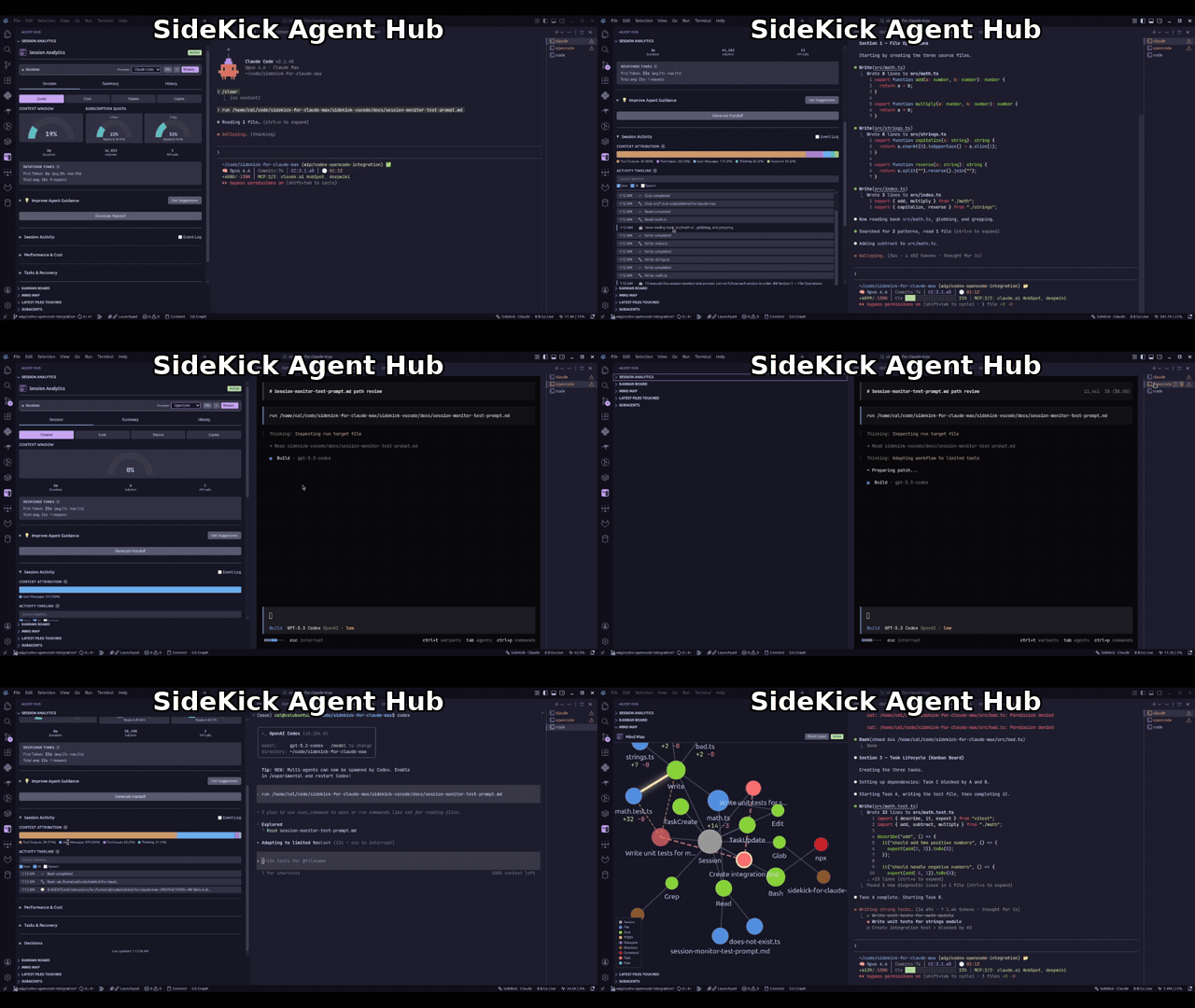
Install from the VS Code Marketplace or Open VSX. See the full feature list in the docs.
Full-screen TUI for monitoring agent sessions — standalone, no VS Code required.
Note: The npm package is
sidekick-agent-hub, but the binary is calledsidekick.
npm install -g sidekick-agent-hub    # requires Node.js 20+
sidekick dashboard
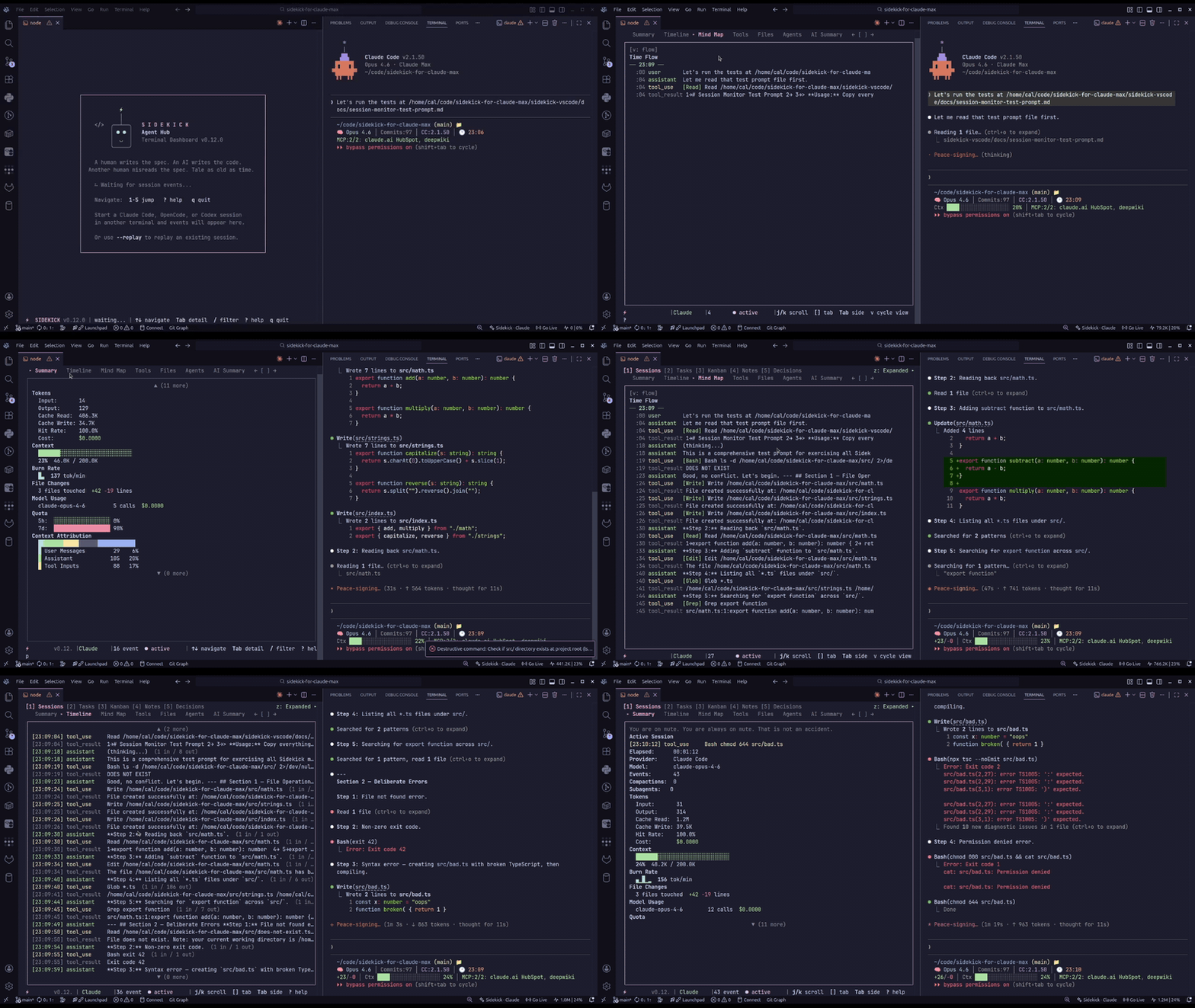
Browse sessions, tasks, decisions, knowledge notes, charts, and live event streams. Auto-detects your project and session provider. See the CLI Dashboard docs for keybindings and full usage.
Eight panels: Sessions, Tasks, Kanban, Notes, Decisions, Plans, Events, and Charts. The Events panel streams live session activity with colored type badges. The Charts panel shows tool frequency bars, event distribution, a 60-minute activity heatmap, and pattern analysis. Press / to filter with substring, fuzzy, regex, or date modes.
Standalone commands jump directly to a specific panel or run one-shot queries, including extracting actionable links, files, commands, and plans from recent Claude Code and Codex chats. VS Code users can run Sidekick: Extract Session Assets for the same asset model in a native QuickPick.
sidekick tasks                                      # open tasks panel
sidekick search "migration"                         # cross-session search
sidekick stats                                      # session statistics
sidekick today                                      # cache-only daily brief
sidekick daily                                      # usage from session logs (also weekly, monthly, sessions)
sidekick blocks                                     # five-hour billing blocks with burn rate and projections
sidekick import                                     # backfill the history store from session logs
sidekick doctor                                     # installation/session diagnostics
sidekick statusline                                 # one-line agent footer
sidekick extract                                    # URLs, files, commands, plans from recent chats
sidekick extract --type url,path --limit 10 --json  # script-friendly filtered extraction
sidekick history                                    # recent Codex prompts across workspaces
sidekick quota                                      # quota / rate-limit check
sidekick quota history                              # 13-week quota-utilization heatmap (per workspace)
sidekick status                                     # API status check (Claude + OpenAI)
sidekick peak                                       # Claude peak-hours check (faster session-limit drain)
sidekick dump --format markdown > session-report.md
sidekick report                                     # HTML report → browser
sidekick mcp                                        # read-only facts server for Claude Code/Codex
Also available: sidekick decisions, sidekick notes, sidekick handoff, sidekick context, sidekick quota, sidekick status, sidekick peak, sidekick account.
On first run, Sidekick auto-registers your active system Claude Code and Codex credentials as a "Default" account — no setup required. Use the flags below only when you want to add a second account or switch between them.
Manage multiple accounts for Claude Code and Codex — save, switch, and remove without manual login/logout cycles:
sidekick account                                    # list saved accounts
sidekick account --provider all                     # list Claude + Codex accounts together
sidekick account --add --label Work                 # save the current Claude Code account
sidekick account --login --label Personal           # sign in and save a NEW account (isolated flow)
sidekick account --switch                           # switch to next account
sidekick account --switch-to personal@gmail.com     # switch to a specific account
sidekick account --remove old@example.com           # remove a saved account
sidekick account --auto-switch 90                   # auto-switch when quota crosses 90% (off to disable)
sidekick account --launcher work                    # create a per-account terminal launcher

# Codex profiles
sidekick account --provider codex                   # list Codex accounts
sidekick account --provider codex --add --label Dev # add a Codex profile (opens login)
sidekick account --provider codex --switch-to Dev   # switch by label, email, or ID

# Combined quota view
sidekick quota --all                                # Claude + Codex quota side by side
In VS Code, account actions are available from the status bar menu and the Command Palette — sign in to a new account, switch across all saved Claude Code and Codex accounts from one picker, and opt into quota-based auto-switching via the sidekick.accounts.autoSwitchThreshold setting. See the Claude Max and Codex provider docs for setup guides.
| Provider | Inference | Session Monitoring | Cost |
|---|---|---|---|
| Claude Max | Yes | Yes | Included in subscription |
| Claude API | Yes | — | Per-token billing |
| OpenCode | Yes | Yes | Depends on provider |
| Codex CLI | Yes | Yes | OpenAI API billing |
OpenCode note: DB-backed OpenCode session monitoring reads
opencode.dband currently expects an executablesqlite3runtime in the host environment.
AI coding agents are the most transformative tools I've used in my career. They can scaffold entire features, debug problems across files, and handle the mechanical parts of software engineering that used to eat hours of every day.
But they're also opaque. Tokens burn in the background with no visibility. Context fills up silently until your agent starts forgetting things. And when a session ends, everything it learned — your architecture, your conventions, the decisions you made together — is just gone. The next session starts from zero.
That bothers me. I want to see what my agent is doing. I want to review every tool call, understand where my tokens went, and carry context forward instead of losing it. Sidekick exists because I think the people using these agents deserve visibility into how they work — not just the output, but the process.
Full documentation is available at the docs site, including:
- Getting Started
- Provider Setup
- CLI Dashboard
- Feature Guide
- Configuration Reference
- Architecture
- Why Am I Building This?
Contributions are welcome! See CONTRIBUTING.md for setup instructions and guidelines.
sidekick-shared — the shared data access library, published as a standalone npm package. Types, parsers, session providers, event aggregation, model pricing, Zod schemas, actionable session-asset extraction, and more — for building your own tools on top of Sidekick session data without depending on the VS Code extension or CLI. Install with npm install sidekick-shared.
Sidekick Docker — a sibling project that brings the same real-time dashboard experience to Docker management. Monitor containers, Compose projects, images, volumes, and networks from a keyboard-driven TUI or VS Code panel. Available as a VS Code extension, Open VSX extension, and CLI.
If Sidekick is useful to you, a star on GitHub helps others find it.
Found a bug or have a feature idea? Open an issue — all feedback is welcome.
The session asset extraction feature — the Sidekick: Extract Session Assets VS Code command and the sidekick extract CLI command — was contributed by Juan Fourie (@B33pBeeps) in #17, adapted from his MIT-licensed trawl project. Thank you, Juan! See CONTRIBUTORS.md and THIRD_PARTY_NOTICES.md for details.
MIT — see LICENSE. Portions of the session asset extraction feature are adapted from the MIT-licensed trawl; see THIRD_PARTY_NOTICES.md.