
A Home Assistant Lovelace card that recreates the mySigen "Home" energy-flow view for the
Sigenergy Local Modbus integration
(sigen domain).
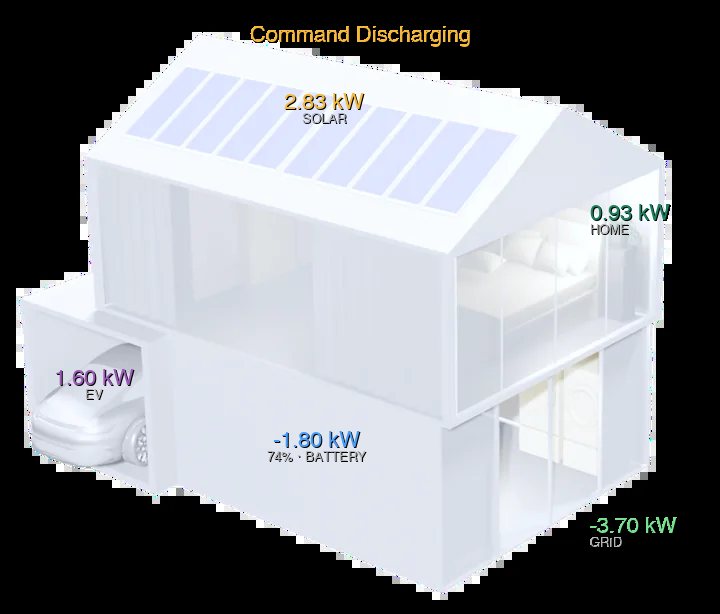
Preview: live values overlaid on the bundled mySigen house render.
Unlike the community YAML dashboards, this is a real custom card:
- No
card-mod/mushroom-legacy-template-carddependency — a native custom element in a Shadow DOM, so Mushroom updates can never break it. - mySigen "Home" look — live values are overlaid on the official Sigenergy house render (solar on the roof, home upper-right, battery/SoC centre, grid lower-right, EV in the garage), exactly like the community dashboards.
- Bundled default background — the mySigen loft render ships inside the card (inlined WebP,
nothing to copy to
/config/www); override it per your setup with theimageoption. - Domain-colored values — solar amber, grid red/green, battery blue, home green, EV violet; idle values dim automatically.
- Autofill config editor — a visual editor with entity pickers that default to the real
sensor.sigen_*entities, one click to fill them in. Works with renamed devices and third-party inverters because every field is overridable. - Tap / hold → more-info — tap any value to open the HA more-info dialog for its primary entity; press-and-hold (500 ms) opens the secondary entity. Keyboard accessible (Tab + Enter).
- Localized (en / de) — node labels and the editor follow
hass.language; English and German ship built in, with an easy path to add more. - Multi-inverter & PV-string breakdown — one Detect click scans for
sigen_inverter_<N>_pv<I>_powerentities and renders a per-inverter, per-string bar breakdown below the flow diagram. Each string bar taps through to more-info. - No-ESS / PV-only mode — the battery node auto-hides when no battery entity is present (e.g.
third-party inverter setups), and the EV node reflows into its place. Force it with
hide_battery.
Status: v0.1 - build-verified. Overlay card on the mySigen render, autofill + detect editor, tap/hold dialogs, en/de localization, multi-inverter breakdown, and no-ESS mode all work.
| Node | Tap (more-info) | Hold (more-info) |
|---|---|---|
| Solar | pv_power |
pv_power_third_party |
| Grid | grid_import_power |
grid_export_power |
| Battery | battery_power |
battery_soc |
| Home | load_power |
ems_mode |
| EV | ev_power |
ev_energy |
A node is only interactive if its entity is configured, and hold falls back silently when no secondary entity is set.
- HACS → ⋮ → Custom repositories
- Add
https://github.com/cjungde/sigenergy-home-card, category Dashboard - Install, then reload resources (or restart the browser).
npm install && npm run build- Copy
dist/sigenergy-home-card.jsto/config/www/ - Add a dashboard resource:
/local/sigenergy-home-card.js, type JavaScript Module.
Add card → search Sigenergy Home Card → Autofill Sigenergy entities. Or in YAML:
type: custom:sigenergy-home-card
title: Energy
entities:
  pv_power: sensor.sigen_plant_photovoltaic_power
  pv_power_third_party: sensor.sigen_plant_third_party_photovoltaic_power
  grid_import_power: sensor.sigen_plant_grid_import_power
  grid_export_power: sensor.sigen_plant_grid_export_power
  battery_power: sensor.sigen_plant_ess_power
  battery_soc: sensor.sigen_plant_ess_soc
  load_power: sensor.sigen_plant_consumed_power
  ems_mode: sensor.sigen_plant_ems_work_mode
  ev_power: sensor.sigen_ac_charger_charging_power
  ev_state: sensor.sigen_ac_charger_system_state
ev_energy: sensor.sigen_ac_charger_total_energy_consumed| Option | Default | Description |
|---|---|---|
title |
– | Card header |
image |
bundled render | Background image URL/path (e.g. /local/sigen/home.png) — overrides the bundled mySigen render |
entities |
see above | Map of overlay → entity_id |
invert_battery |
false |
Set if your ess_power is positive when charging |
idle_threshold_w |
20 |
Watts below which a value is treated as idle (dimmed) |
hide_battery |
false |
Force-hide the battery overlay (no-ESS look); it also auto-hides when no battery entity exists |
show_breakdown |
false |
Show the per-inverter / per-PV-string breakdown below the diagram |
inverters |
– | List of inverters + PV strings (use the editor's Detect button to fill) |
The card ships with the official mySigen loft house render as the default background, inlined
into the bundle. The value overlay positions are tuned to that render. To use a different
background (a dark-theme render, a different house/system layout, or your own screenshot), set
image to any URL or /local/... path — you may then want to nudge the overlay positions (a future
option will expose them).
Renders courtesy of the community image set at vdvmichel/sigen-app-images (Sigenergy artwork).
Open the editor and click Detect inverters & PV strings, or configure manually:
type: custom:sigenergy-home-card
show_breakdown: true
inverters:
  - name: Inverter 1
    pv_power: sensor.sigen_inverter_1_pv_power
    strings:
      - name: PV1
        power: sensor.sigen_inverter_1_pv1_power
      - name: PV2
        power: sensor.sigen_inverter_1_pv2_power
  - name: Inverter 2
    pv_power: sensor.sigen_inverter_2_pv_power
    strings:
      - name: PV1
        power: sensor.sigen_inverter_2_pv1_power
Bars are scaled to the largest string across all inverters. If pv_power is omitted, the
inverter total is summed from its strings.
Entity defaults come straight from the integration source
(custom_components/sigen/{calculated,static}_sensor.py). Values in kW are auto-converted to W.
Battery convention: plant_ess_power positive = discharging, negative = charging (matches
mySigen); flip with invert_battery if your firmware differs.
- mySigen house-render background with value overlays (bundled default +
imageoverride) - Tap/hold →
more-infodialogs per node - Multi-inverter and PV-string breakdown (with auto-detect)
- Third-party-only inverter mode (no ESS) — auto-hide +
hide_battery - Localization (en/de) — add languages in
src/localize.ts
MIT