SDP-META has three ways to use it. Pick the one that matches your role and how far you intend to take it.
| Path | Best for | What you get |
|---|---|---|
| A — Declarative Automation Bundle (recommended) | Real work — dev/prod targets, CI/CD |
Git-tracked pipeline state, dev/prod targets, recipes, static validation |
B — Interactive onboard + deploy CLI |
First-touch exploration | Single workspace, state lives in workspace, no CI/CD |
| C — SDP-META Databricks App | Non-developers, demos, click-driven workflows | Browser UI for onboarding → deploy → monitor |
Long form: docs site.
- Python 3.10, 3.11, or 3.12. The pinned
pyspark==3.5.5test stack does not support Python 3.13+; using 3.13 / 3.14 will surface as cloudpickle / recursion errors at test time. See Troubleshooting below. - Databricks CLI v0.213 or later. See install instructions.
- macOS:

- Windows:
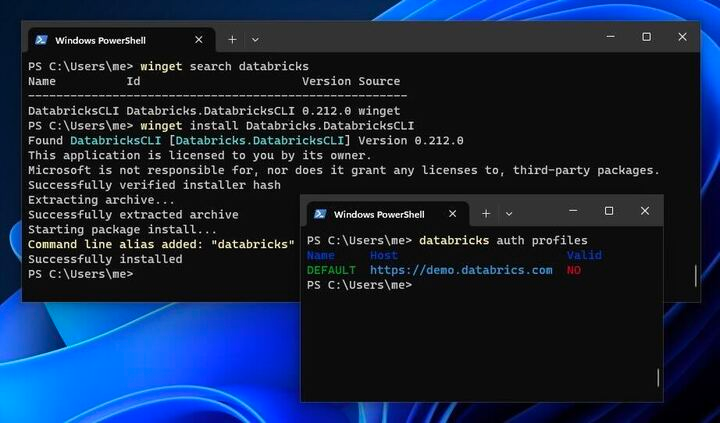
- macOS:
- Authenticate your machine to a workspace:
(Add
databricks auth login --host WORKSPACE_HOST
--debugto any sdp-meta command to enable debug logs.) - Install the labs plugin:
databricks labs install sdp-meta
For developer-onramp and any non-exploration use (multi-target promotion, git-tracked pipeline state, CI/CD), scaffold a bundle:
# Zero-prompt fast path: scaffolds ./my_sdp_meta_pipeline with developer-friendly
# defaults (cloudFiles + bronze_silver + split + pypi). Edit
# resources/variables.yml afterwards to point at your real catalog/schema and
# replace the __SET_ME__ sentinel for sdp_meta_dependency.
databricks labs sdp-meta bundle-init --quickstart

# Or interactive, walking through every knob (recommended the first time):
databricks labs sdp-meta bundle-init

cd <bundle_name>

# Optional: build a local wheel and upload to a UC volume instead of using PyPI.
# Paste the printed /Volumes/... path into resources/variables.yml as the
# default for `sdp_meta_dependency`.
databricks labs sdp-meta bundle-prepare-wheel

# Append flows interactively, or in bulk from CSV / generated by recipes
# (see recipes/README.md inside the bundle).
databricks labs sdp-meta bundle-add-flow

# sdp-meta-specific sanity checks (placeholder values in onboarding *and*
# in databricks.yml, layer/topology consistency, wheel_source vs
# sdp_meta_dependency, dataflow_group references) on top of
# `databricks bundle validate`.
databricks labs sdp-meta bundle-validate

# Deploy + run end-to-end.
databricks bundle deploy --target dev
databricks bundle run onboarding --target dev
databricks bundle run pipelines --target dev
What you get with the bundle path:
- Git-tracked pipeline state — every onboarding row, expectation, transformation, and pipeline definition lives in YAML/JSON files inside the bundle.
devandprodtargets out of the box, with development-mode overrides (single-node clusters, no schedules, prefixed table names) and a commentedrun_as: { service_principal_name: <your-...> }block in prod for CI/CD.pipeline_modeswitch — render bronze + silver as two separate Lakeflow Spark Declarative Pipelines (split, the default) or as a single combined pipeline (combined).- Recipes for programmatically generating onboarding entries from real workspace state:
from_uc.py(existing UC tables),from_volume.py(CSVs in a UC volume),from_topics.py(Kafka / Event Hub topic lists),from_inventory.py(inventory CSV). bundle-validatestatic checks that catch authoring mistakes the upstreamdatabricks bundle validatedoesn't (unedited<your-...>placeholders in either onboarding ordatabricks.yml, mis-typeddataflow_groupreferences,pipeline_modemismatches, sentinel__SET_ME__left in place, wheel_source vs sdp_meta_dependency drift, etc.).
Full reference: DAB_README.md. Runnable end-to-end walkthrough with sample data: demo/README.md#dab-demo.
For first-touch exploration against a single workspace. State lives in the workspace, not in git, and there's no native multi-target promotion — graduate to Path A as soon as you want any of those.
If you want to run the existing demo files, set up the repo first:
-
Clone & enter the repo, create a venv, install dependencies:
git clone https://github.com/databrickslabs/sdp-meta.git
cd sdp-meta

# Use Python 3.11 or 3.12 — pyspark==3.5.5 (pinned in setup.py) does
# not support Python 3.13+ and will surface as cloudpickle / recursion
# errors at test time.
python -m venv .venv && source .venv/bin/activate

# Runtime-only install (mirrors INSTALL_REQUIRES in setup.py):
pip install -r requirements.txt

# Or, for development + running the test suite (also installs the
# project itself in editable mode so `from databricks.labs.sdp_meta...`
# resolves to the working tree):
pip install -r requirements-dev.txt
-
Onboard:
databricks labs sdp-meta onboard

Pushes code+data to your workspace, creates an onboarding job, and opens the job URL in your browser.
-
Deploy:
databricks labs sdp-meta deploy

Deploys the Lakeflow Spark Declarative Pipeline and opens its URL in your browser.
Use the Databricks App when you want a browser-based, human-in-the-loop
workflow for onboarding, deploying, and monitoring SDP-META pipelines. It is
best for demos, exploration, and enabling non-developers to work through the
pipeline lifecycle without running databricks labs sdp-meta locally.
The App documentation is maintained separately to avoid duplicating deployment steps here:
- Deploying / local development / App service-principal permissions:
databricks_app/README.md - First-time App walkthrough:
databricks_app/GETTING_STARTED.md - Panel-by-panel user reference:
databricks_app/USER_GUIDE.md
The App is for exploration, demos, and human-in-the-loop onboarding. For production CI/CD, graduate to Path A (DAB) — the App's onboarding output is fully compatible.
flake8 src tests
python -m coverage run -m pytest tests/ -v
python -m coverage report -m
setup.py is the source of truth for dependency versions. requirements.txt mirrors INSTALL_REQUIRES, requirements-dev.txt mirrors the dev / IT / mcp extras plus -e .. Update all three together when you change a pin.
_pickle.PicklingError: ... RecursionError: Stack overflowon most tests — your venv is on Python 3.13/3.14. The pinnedpyspark==3.5.5doesn't support 3.13+. Rebuild the venv on 3.10, 3.11, or 3.12 (python3.11 -m venv .venv && source .venv/bin/activate && pip install -r requirements-dev.txt).ModuleNotFoundError: No module named 'databricks.labs'at test collection — the venv has the third-party deps but not the project. Runpip install -e .(orpip install -r requirements-dev.txt, which already does this).