

|
I want to create multi page tiff file using a jpeg and a tiff file. The output should be a tiff file with page 1 in jpeg and page 2 in tiff. When I try it with below code page 2 also becomes a jpeg not a tiff. ` ` |

Replies: 3 comments 4 replies

|
Thanks for reporting this. It seems that you found an issue in the Magick.NET library. The settings of the first image are used when the tiff file is writen. But it should be possible to set the compression based on the compression of the image and not it's settings. This is not possible with the current API and I am not planning to make |
|
In the next version of Magick.NET you will be able to write the file with the following code: using (MagickImageCollection images = new MagickImageCollection())
{
MagickImage firstFrame = new MagickImage(@"c:\dips\img1.jpg");
firstFrame.Format = MagickFormat.Tiff;
firstFrame.SetCompression(CompressionMethod.JPEG);
images.Add(firstFrame);
MagickImage secondFrame = new MagickImage(@"c:\dips\img2.tif");
secondFrame.Format = MagickFormat.Tiff;
secondFrame.SetCompression(CompressionMethod.Group4);
images.Add(secondFrame);
images.Write(@"C:\dips\out.tiff", new TiffWriteDefines
{
PreserveCompression = true,
});
} |

|
Thank you very much. Any idea when will be the next release? |

|
The new release has just been published. |
|
Thanks it works now. 🥇 |
|
One small thing... I want the compression of above jpeg to be 'Old-style JPEG (in TIFF)'. Isn't it supported by the library? |
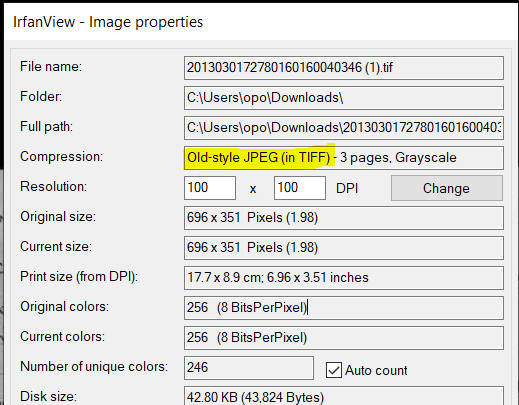
|
We are using the libtiff library and that only supports decoding the files with OJPEG compression. An error will be raised by the library when this is tried: https://gitlab.com/libtiff/libtiff/-/blob/4c750d023832acb6c43d540f36e91d424018f15c/libtiff/tif_ojpeg.c#L913. |


In the next version of Magick.NET you will be able to write the file with the following code: