



Irrigation scheduler for Home Assistant with a built-in dashboard panel — zones, watering cycles & modes.
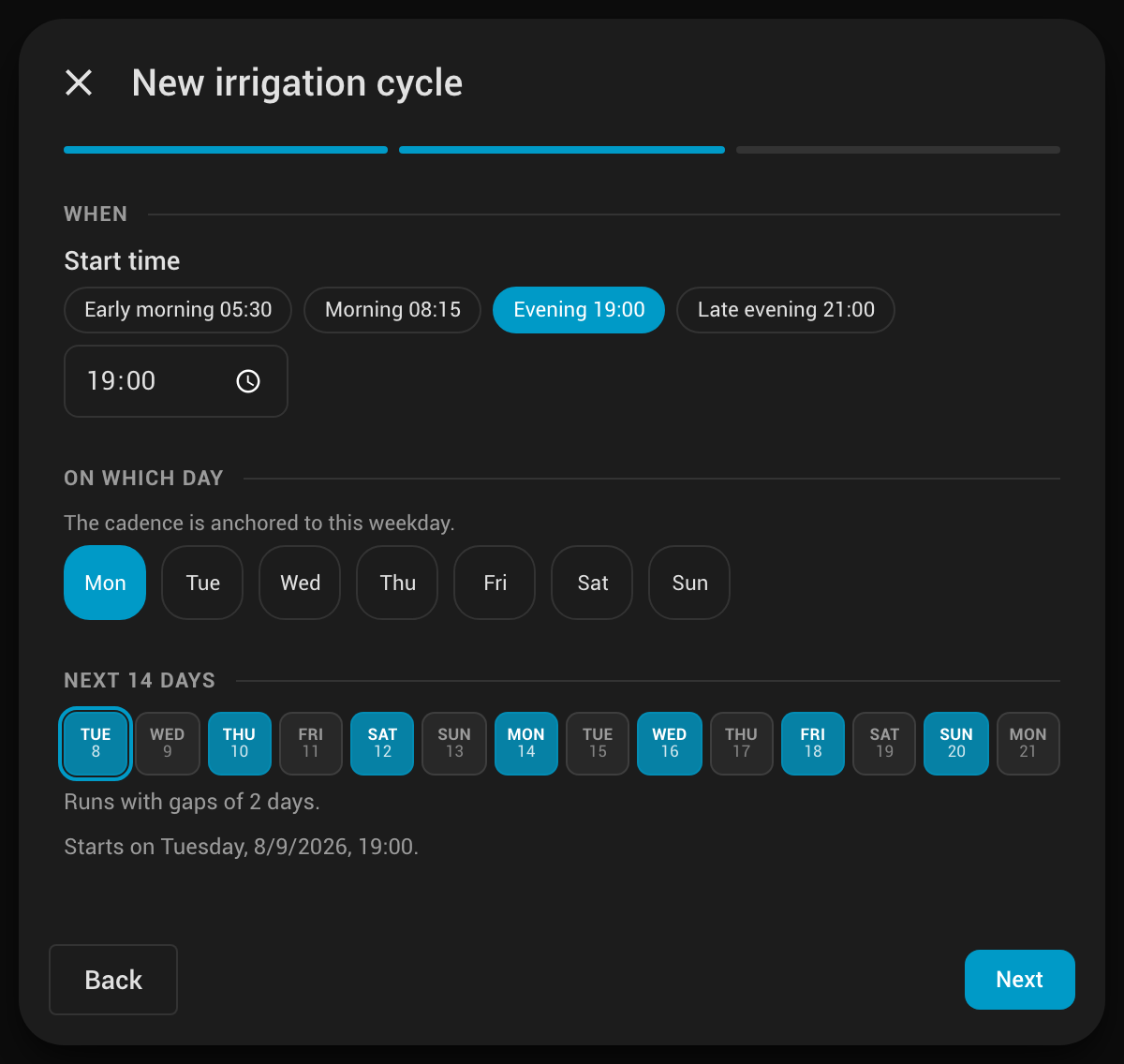
- Watering cycles, not raw cron — a guided wizard turns “every 2 days, evenings” into a working schedule; the panel previews the next 14 days live before you save.
- Three watering modes — Eco / Normal / Extra, switchable by hand or from automations (weather, tank level, season …).
- Smart runs — ordered zones grouped into phases, configurable parallelism, and exclusive zones that always run alone.
- Cycle & Soak — a slot can water in several short passes with rests in between, so the water soaks in instead of running off. Every output is closed while it rests.
- Water use, honestly — litres per run from a meter on the line or a flow rate you measured once, marked as measured or estimated, handed to Home Assistant's statistics and Energy dashboard through plain water sensors.
- Everything in the UI — Overview · Zones · Schedule · Timetable · Settings. No YAML for zones or schedules.
- Multiple gardens — add several installations for different plots or seasonal plans.
Outputs can be any mix of switch, input_boolean, group and valve entities. Zones can also use a duration-aware start service for irrigation integrations such as Rain Bird, Rachio, Hydrawise, B-hyve / Orbit and OpenSprinkler. Optional pre-start outputs (pump / master valve) fire first. Full English, German, Italian, Dutch and French translations. Responsive down to the Home Assistant companion app.
Requirements: Home Assistant 2024.1 or newer.
| Tab | What it does |
|---|---|
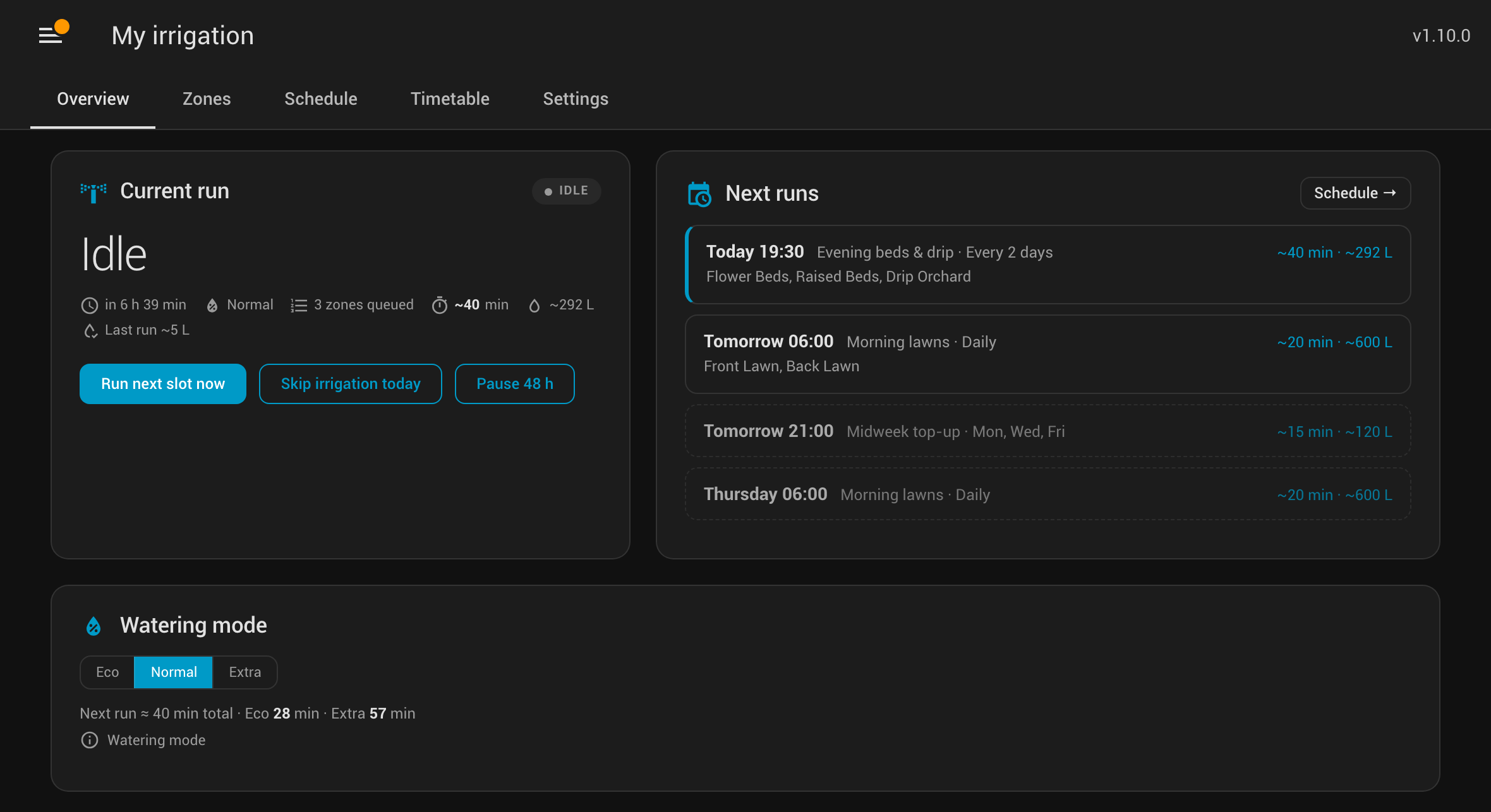
| Overview | Live run state with a countdown to the next run, the next few upcoming runs (duration and expected litres), the active watering mode, water used so far while running, and quick actions: Run next slot now, Skip today, Pause 48 h (plus Stop / Skip phase while running). Shows Soaking with a countdown while a run rests. |
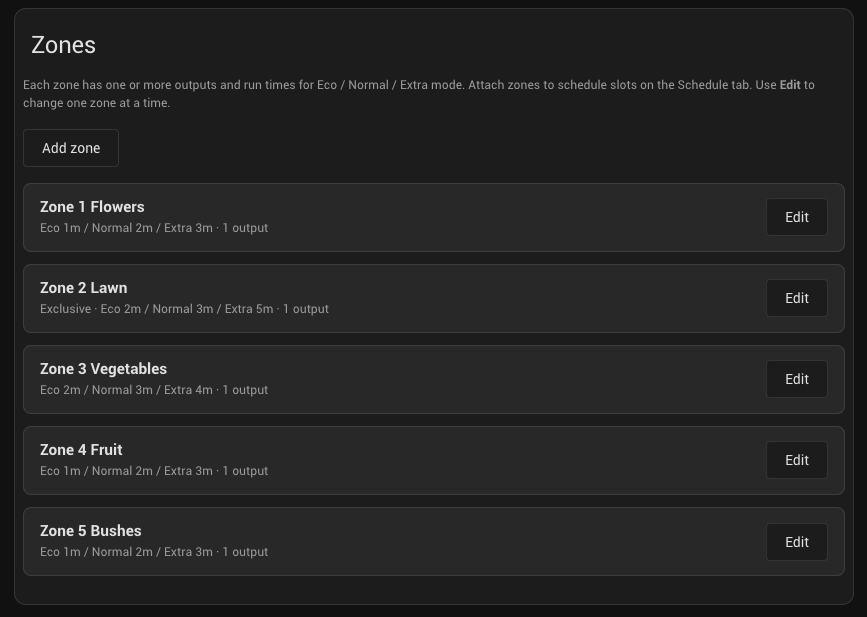
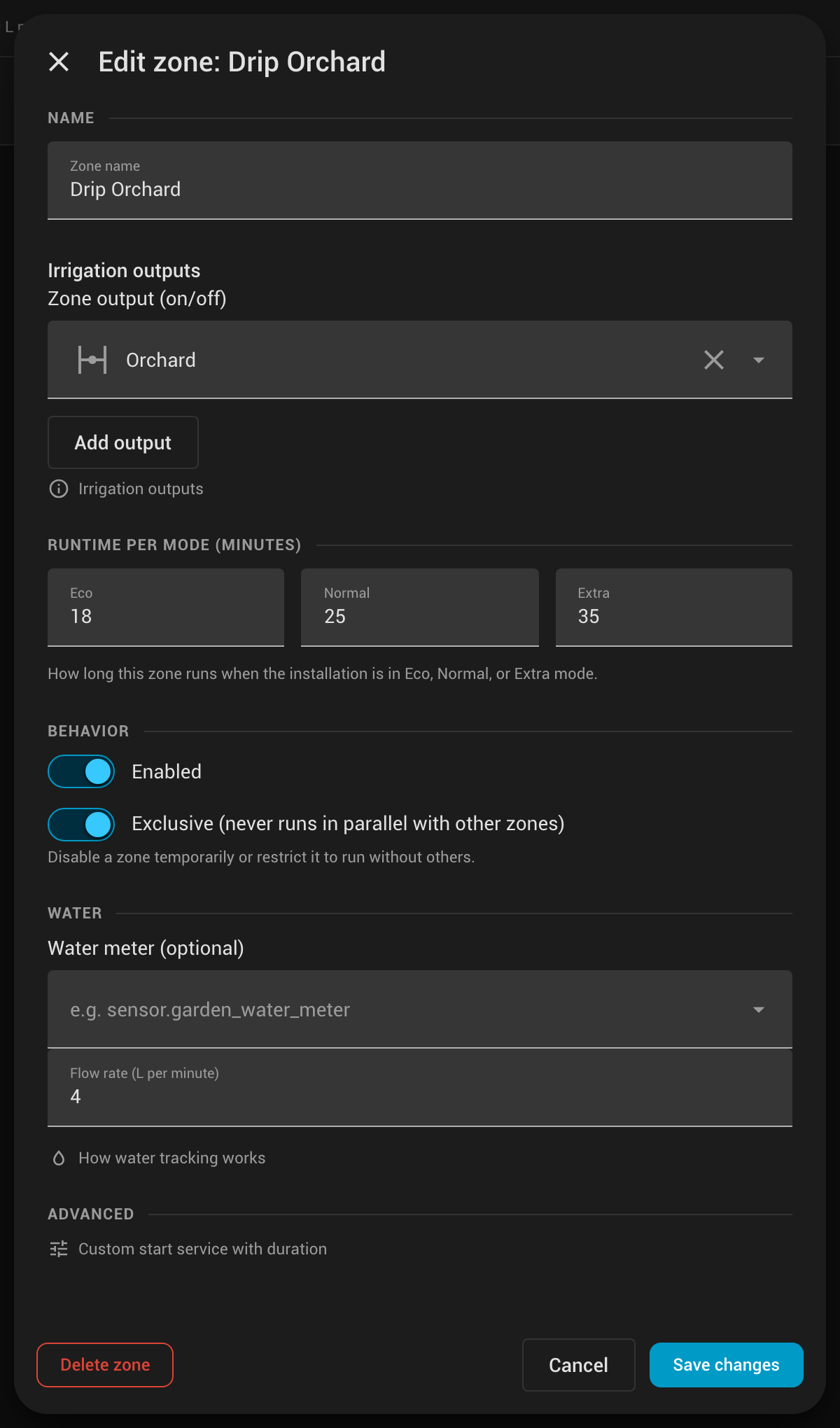
| Zones | Named zones with one or more output entities, Eco / Normal / Extra runtimes, an enabled toggle and exclusive flag. Optional water tracking per zone: a meter entity or a flow rate, shown as litres per run and last run. Advanced settings support integration-specific start services that receive the runtime. Filter by All / Enabled / Issues, run a zone now, see how many cycles use it. |
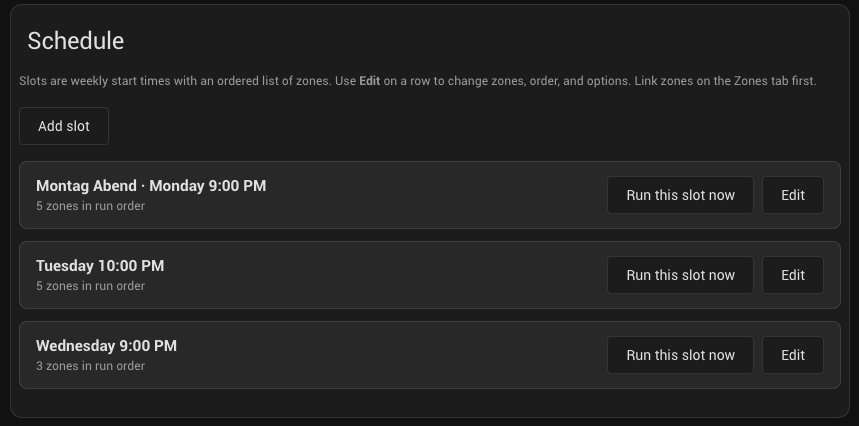
| Schedule | Your watering cycles and single slots. A guided New irrigation cycle wizard (daily, every 2/3 days, x-per-week, weekly, every 2 weeks, custom). Every row expands to a 14-day run strip; multi-slot cycles show their members and can be detached. Per-slot conditions gate a run on soil moisture, rain, tank level or any other entity, per-slot scripts override the installation's pre-start / post-run script, and Cycle & Soak repeats the slot's phases with rests in between. |
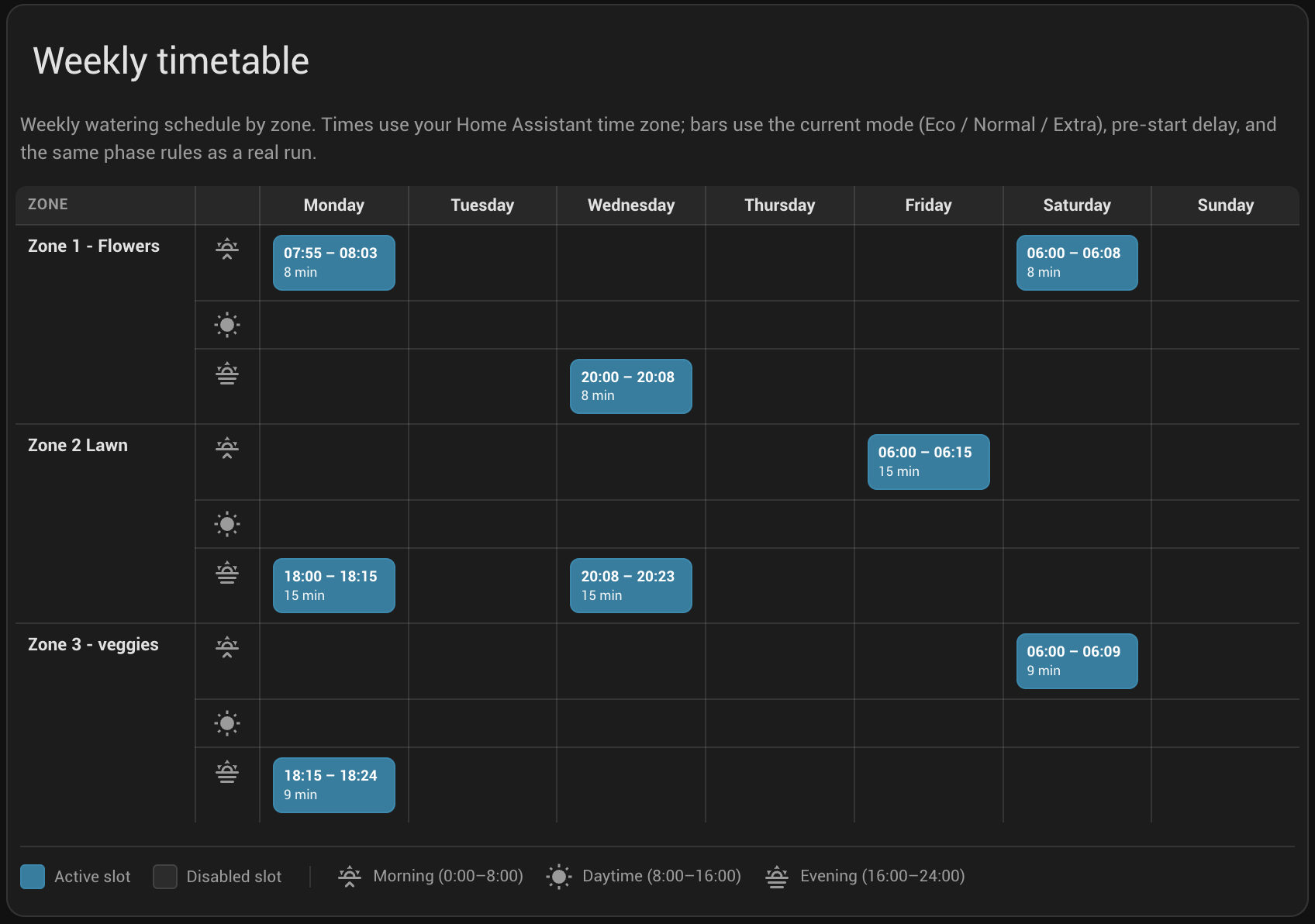
| Timetable | Week-at-a-glance grid (zones × weekdays, morning / daytime / evening) with per-day totals, using the same phase and mode timing as a real run — every Cycle & Soak pass is drawn. On phones it becomes a per-day list. Click a run to jump straight to its editor. |
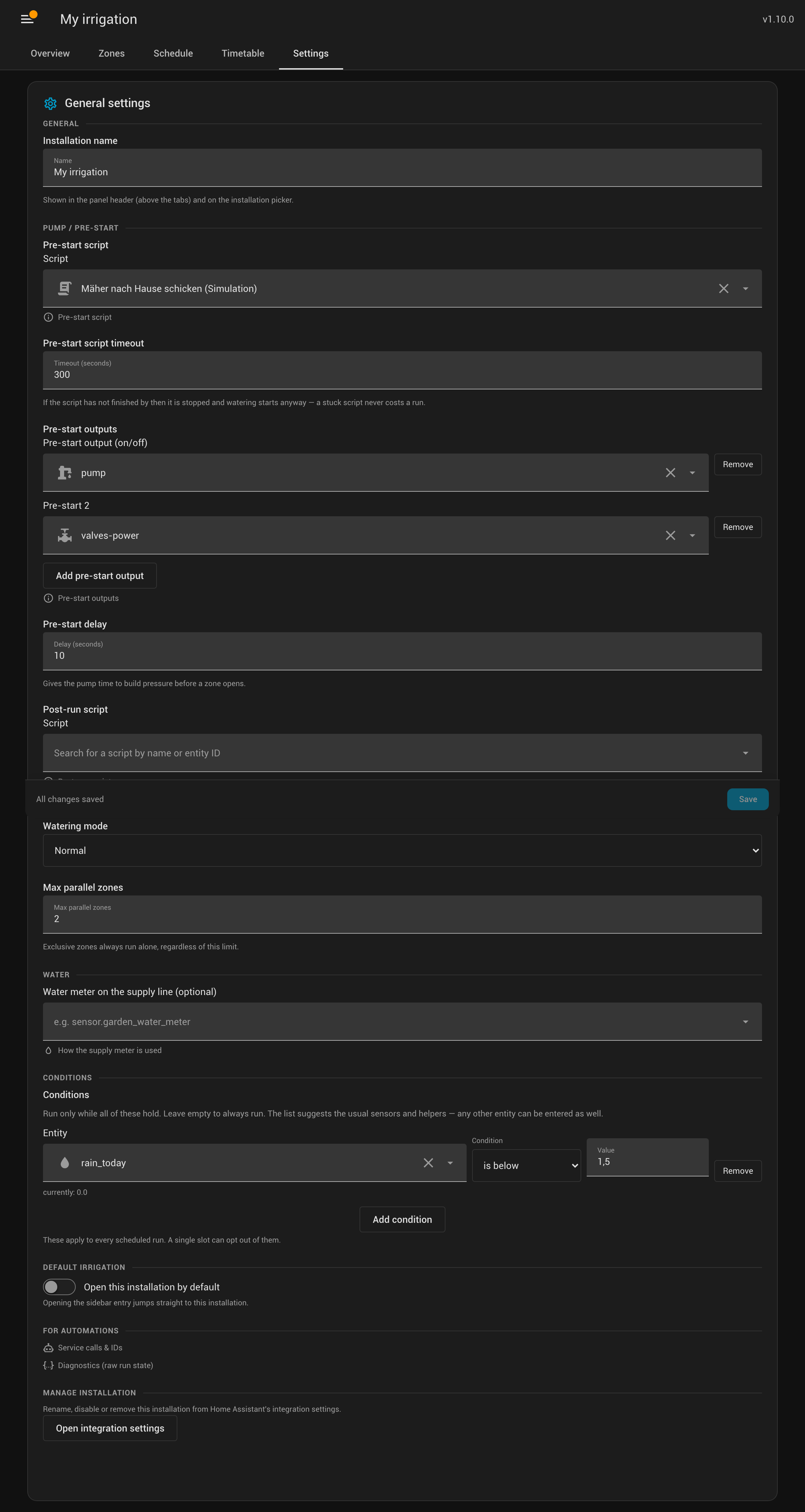
| Settings | Installation name (shown in the panel header), optional pre-start and post-run scripts, pre-start outputs & delay, watering mode, max parallel zones, an optional water meter on the supply line, global conditions, default installation, service reference and raw diagnostics. |
- Open HACS → search Simple Irrigation.
- Click Download and restart Home Assistant.
- Settings → Devices & services → Add integration → search Simple Irrigation.
Copy the folder custom_components/simple_irrigation/ into your Home Assistant configuration directory (next to configuration.yaml), then restart. Add the integration as above.
- Complete the config flow: installation name, optional pre-start outputs, default mode, max parallel zones.
- Open the sidebar entry Simple Irrigation (admin only). If you have several installations, pick one.
- On Zones, add your zones and their output entities; set Eco / Normal / Extra runtimes and mark any exclusive zone.
- On Schedule, click New irrigation cycle and let the wizard build the cadence — the 14-day strip previews exactly when it will run before you create it.
- Use Timetable to see the whole week at a glance; click any run to open its editor.
You can add multiple config entries for separate gardens or seasonal plans (each appears in the panel picker, and its name shows in the panel header).
- Outputs: any mix of
switch,input_boolean,groupandvalveentities. Most useturn_on/turn_off; valves useopen_valve/close_valve. A zone can drive several outputs at once. - Runtimes: three values per zone — Eco / Normal / Extra. The installation’s active mode picks which one is used.
- Exclusive: the zone never runs in parallel with others (high-flow lines, shared supply, drip circuits).
- Issues filter: zones whose output entity is missing or
unavailableare flagged so you can spot broken wiring at a glance.
Some irrigation integrations do not start a zone with a regular turn_on. Instead, their start action requires the watering duration in the same service call. Open a zone, scroll to Advanced and expand Custom start service with duration.
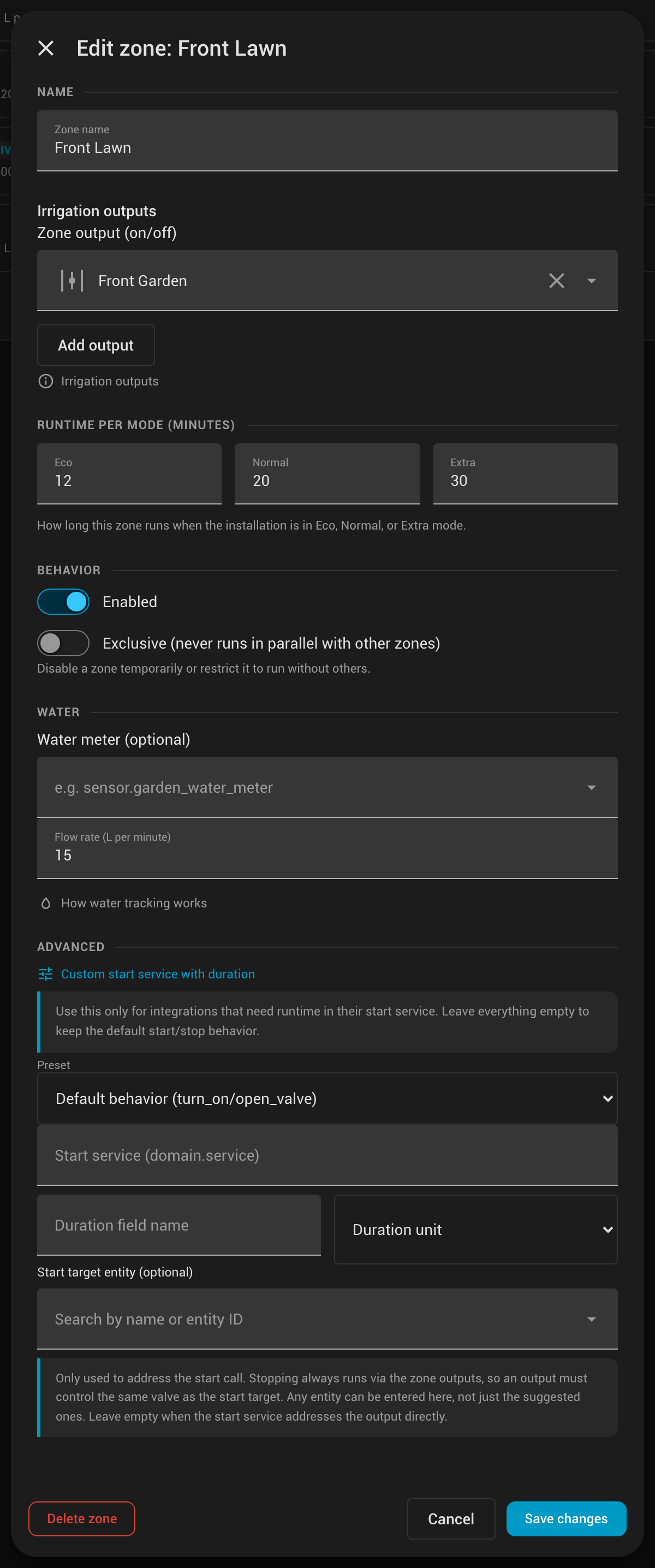
Leave the whole section empty and nothing changes: the zone keeps the normal turn_on / wait / turn_off behavior. Built-in presets fill in the service, duration field and unit for:
| Preset | Service | Duration field | Unit | Start target |
|---|---|---|---|---|
| Rain Bird | rainbird.start_irrigation |
duration |
minutes | leave empty |
| Rachio | rachio.start_watering |
duration |
minutes | leave empty |
| Hydrawise | hydrawise.start_watering |
duration |
minutes | the zone's binary_sensor |
| B-hyve / Orbit | bhyve.start_watering |
minutes |
minutes | leave empty |
| OpenSprinkler | opensprinkler.run |
run_seconds |
seconds | leave empty |
Choose Custom for another integration and enter its domain.service, duration field and whether that field expects minutes or seconds.
- Stopping always runs via the zone outputs. Simple Irrigation waits for the configured mode duration and then sends the normal off/close action to every output, as a safety net against a controller that doesn't stop by itself.
- The optional start target entity only changes what the start call addresses, for integrations whose start service does not target the output. Hydrawise is the case this exists for: it starts via the zone's
binary_sensor, while the water is carried by thevalveentity. Put thevalvein the zone outputs and thebinary_sensorin the start target — closing the valve stops the run. An output has to control the same valve as the start target, otherwise Stop cannot end the run. - All outputs of a zone start together, exactly like the default path, and the zone takes its configured duration regardless of how many outputs it has.
- A failed off action stops the run and is reported, so a potentially open valve cannot go unnoticed while another zone starts. The cleanup that follows still closes every other output.
- The start service has to return once the run has started, which is what all the presets above do. A service that instead blocks for the whole watering time — a script entered under Custom, typically — is given 30 seconds and then dropped, so the zone keeps its own timing. Note that dropping it cancels the call, so put the waiting in Simple Irrigation's duration, not in the start service.
A cycle is a repeating watering cadence. The wizard offers:
| Cadence | Result |
|---|---|
| Daily / Weekly / Every 2 weeks / x days per week / Custom days | a single schedule slot |
| Every 2 days / Every 3 days | a grouped cycle of two linked slots |
Why the split? A slot can water on chosen weekdays and, optionally, only in odd or even ISO calendar weeks. That covers most cadences in one slot — but a true every-2-days rhythm needs two slots on alternating parity (odd weeks Mon/Wed/Fri/Sun, even weeks Tue/Thu/Sat). Only those grouped multi-slot cadences appear as a cycle with member rows and a Detach into single slots action; everything else is a plain, single slot. Either way, every row expands to a 14-day run strip so you can see exactly when it fires.
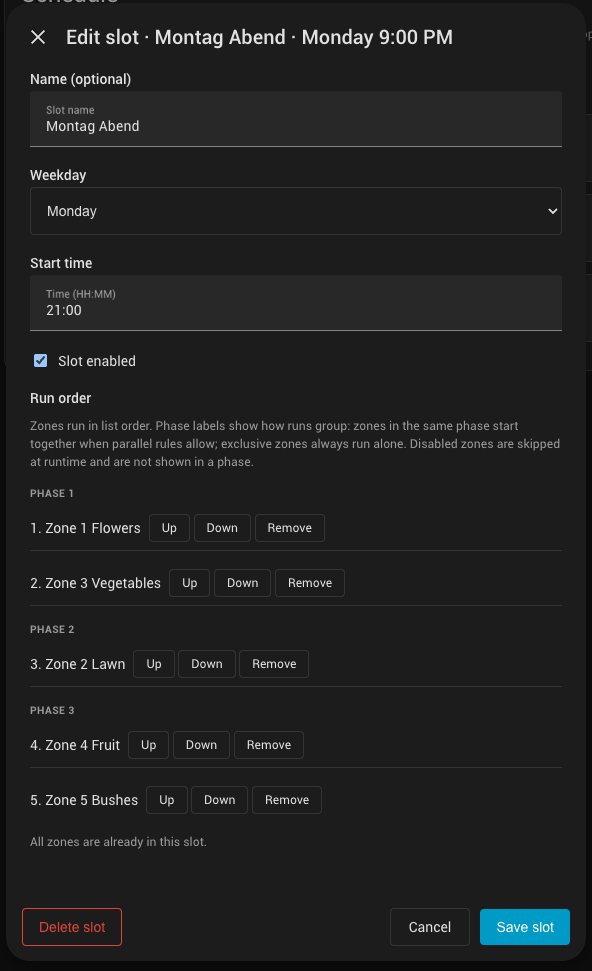
- Run order & phases: the ordered zone list is grouped into phases by the max parallel limit and exclusive flags. The editor shows the phase breakdown live.
- Optimize cycles: detects existing single-day slots that together form a known cadence and offers to merge them into one cycle — no re-entry, nothing runs differently.
- Run now: Run next slot now (Overview), Run this slot now (a schedule row) and Run zone now (Zones) all use the same pre-start and shutdown pipeline as a scheduled run.
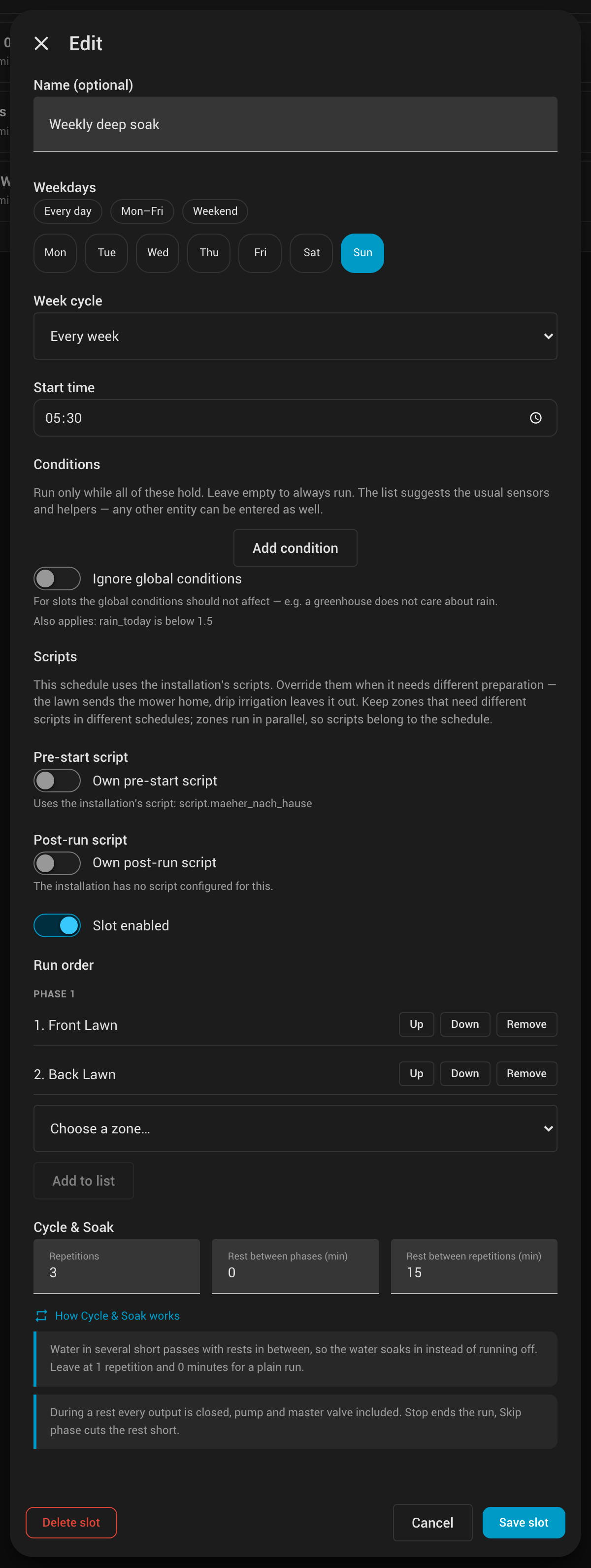
Sloped lawns and clay soil cannot take twenty minutes of water at once — it runs off before it soaks in. Schedule → edit a slot (or the cycle wizard) → Cycle & Soak waters the slot in several short passes instead:
| Setting | Effect |
|---|---|
| Repetitions | How often the slot's phases run, in order. 1 is a plain run. |
| Rest between phases | Minutes every output stays closed between two phases of the same pass. |
| Rest between repetitions | Minutes between the last phase of one pass and the first of the next. |
Example — one lawn zone, 3 repetitions of its 10-minute mode duration, 15 minutes rest between repetitions: it waters 10 min, rests 15, waters 10, rests 15, waters 10. The slot's estimated duration on Schedule, Overview, Timetable and the card counts the rests, and the Timetable draws every pass.
- A rest is a real pause: every output is closed, pre-start outputs included — a pump must not run against closed valves for a quarter of an hour. Before the next pass they come back up with the usual pre-start delay.
- Stop ends the run, rests included. Skip phase cuts a rest short, and skipping a phase skips the rest after it too — whoever skips wants to see the next zone, not a pause.
- Overview and the card show Soaking with a countdown while the run rests;
binary_sensor.<installation>_runningcarries the end of the rest as itssoak_untilattribute. - Rests are per slot. Several slots due in the same minute run back to back, each with its own rests; a rest with nothing left to water behind it is skipped.
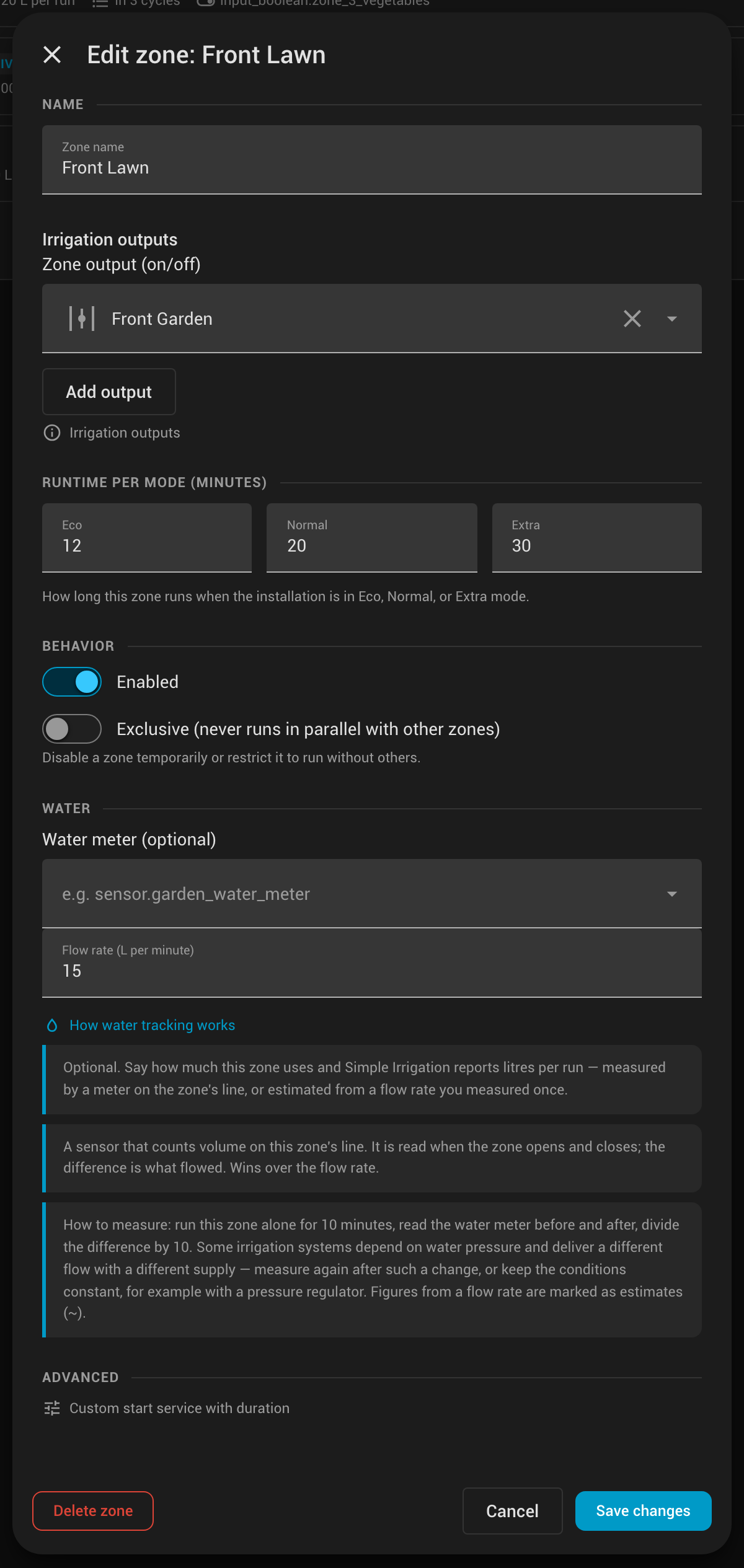
Optional, and honest by design: Simple Irrigation reports litres only where it can back them up. Two sources, per zone under Zones → edit → Water, and one for the whole installation under Settings → Water:
| Source | What it does |
|---|---|
| Flow rate (per zone) | Litres per minute you measured once. Every run of the zone is estimated from its actual watering time and shown with a tilde (~120 L). |
| Water meter (per zone) | A volume sensor on the zone's own line. Read when the zone opens and closes; the difference is measured and wins over the rate. |
| Water meter (installation) | A volume sensor on the supply line. Measures each run as a whole, parallel zones included, and replaces the zones' sum for the run total. |
Any sensor with a volume unit works (L, m³, gal, ft³, …); values are converted. Everything is stored in litres and shown in your Home Assistant unit system — gallons in the US, including the flow-rate field.
How to measure a flow rate: run the zone alone for 10 minutes, read the water meter before and after, divide the difference by 10. Some irrigation systems depend on water pressure and deliver a different flow with a different supply — measure again after such a change, or keep the conditions constant, for example with a pressure regulator. A rate is only as good as the setup it was measured in.
Where the numbers go. No history of its own, no extra tab: the integration books what a run used and hands it to Home Assistant.
sensor.<installation>_waterandsensor.<zone>_wateraretotal_increasingwater sensors (running totals, attributessourceandlast_run_l). That gives you history graphs, long-term statistics, the Energy dashboard's water section and a Utility Meter for daily or monthly figures — the same tools you use for the rest of the house. Both stay unknown until the first run reports water, so nothing shows a bogus zero.- The panel shows the forecast per zone, schedule slot and next run (
~120 L per run), what the current run has used so far, and the last run. The card shows the forecast for the next run, the last run, and a live figure while watering. - Zones without a rate or meter contribute nothing — a forecast for a slot is only shown when at least one of its zones can estimate, and a run total is marked as an estimate as soon as one zone's figure is.
A condition states something that must hold for a scheduled run to start — "water, but only while the soil is dry". Each one is an entity, a comparison and a value:
| Operator | Meaning | Example |
|---|---|---|
| is above / is below | numeric compare (strict) | sensor.cistern_litres is above 200 |
| equals | numeric compare with tolerance | sensor.zones_open equals 2 |
| state is | text compare, case-insensitive | input_select.season state is summer |
| is on / is off | boolean state | binary_sensor.rain is off |
Any numeric entity works — there is no unit restriction, so litres, millimetres, percent and degrees all compare the same way. Rain sensors (binary_sensor), manual overrides (input_boolean) and helpers (input_number, input_select) are just as valid as sensor.
Conditions live in two places and are combined with AND — all must hold:
- Settings → Conditions: apply to every scheduled run. This is where a rain sensor or a cistern level belongs.
- Per schedule slot: added below the start time, on top of the global ones. A slot can also ignore the global conditions — a greenhouse does not care about rain.
Two deliberate behaviours:
- A broken sensor never stops irrigation. If the entity is missing,
unavailable, or its state cannot be read as a number, the run proceeds and a warning is logged. Plants dying because a sensor died is the worse failure. - Conditions are checked at start time only. A blocked run is skipped for that day, not retried later, and the next run times shown in the panel ignore conditions — today's sensor reading says nothing about tomorrow's.
Manual runs (Run now, Run zone now) always start, regardless of conditions.
Stopping a single zone. While a zone waters, its row in Zones shows the remaining time and a stop button (■); the same is available as simple_irrigation.stop_zone. Only that zone ends — its outputs go off, the other zones of the run carry on, and a zone still waiting its turn is taken out of the plan. Stopping the last zone simply lets the run finish normally, post-run script included. The simple_irrigation_zone_finished event carries stopped: true for a zone that was cut short.
- Watering mode (Eco / Normal / Extra): chosen on Overview or Settings, or via
simple_irrigation.set_modefor weather/tank automations. - Max parallel zones: caps concurrency; exclusive zones still run alone.
- Pre-start / post-run scripts: optional scripts run before the pre-start outputs and after the last one goes off — see below.
- Pre-start outputs & delay: outputs turned on before any zone (pump / master valve), with an editable delay to build pressure — both configured on Settings.
- Pause / Skip today / Pause 48 h: affect scheduled starts only; an already-running cycle is stopped from Overview, or one zone at a time from Zones.
Sometimes the garden has to be made ready before a drop of water flows: send the robot mower home, close a window, switch a well pump’s power over — and let it all go back to normal afterwards. Settings → Pump / pre-start takes one script.* entity for each end of the pipeline and runs it to completion:
pre-start script → pre-start outputs on → pre-start delay → zones → all outputs off → post-run script
Because the scripts block, they may wait — that is the part an automation on simple_irrigation_run_started cannot do:
# script.mower_go_home — send the mower back and wait until it has docked
sequence:
  - action: lawn_mower.dock
    target:
      entity_id: lawn_mower.garden
  - wait_for_trigger:
      - trigger: state
        entity_id: lawn_mower.garden
        to: docked
timeout: "00:08:00"- A stuck script never costs a run. When the configured timeout (default 300 s) expires the script is stopped, a warning is logged, and the run continues anyway — the same fail-open rule as conditions.
- You can see what it is waiting for. While a script blocks, Overview says “Waiting for the pre-start script: …” under Preparing (and the same for the post-run script under Stopping…), so a five-minute mower script no longer looks like a hung run. The same detail is on
binary_sensor.<installation>_runningas therun_state,active_zone_idsandactive_scriptattributes, for your own dashboards and automations. - Stop is greyed out while the post-run script runs: the run is already ending, and stopping cannot cut its cleanup short.
- Both run for every start through the pipeline: scheduled runs, Run now, Run this slot now and Run zone now.
- The post-run script runs at the end of every run — finished, failed, or stopped from Overview — so whatever the pre-start script prepared is always undone.
Stop alltherefore waits for it before the run is reported idle. - Use a script, not an automation.
automation.triggerskips the automation’s conditions by default and silently does nothing when the automation is already running insinglemode — a silent no-op at exactly the wrong moment. Scripts also take parameters and are what the built-inscript.<name>blocking call is designed for.
Not every run needs the same preparation: the lawn sprinklers want the mower out of the way, drip irrigation does not care. Schedule → edit a slot (or the cycle wizard) → Scripts overrides either script for that schedule:
| Setting | Effect |
|---|---|
| Switch off (default) | The installation’s script runs. |
| Switch on, entity filled in | That script runs instead of the installation’s, with its own timeout (empty = the installation’s). |
| Switch on, entity empty | No script at all for this schedule — the drip-irrigation case. |
Scripts belong to the schedule, not to the zone: zones run in parallel phases, so a per-zone script would have no single point in the pipeline to run at. Keep zones that need different preparation in different slots rather than mixing them.
When several slots are due in the same minute their zones are merged into one run — and a run has one pre-start and one post-run script. The first overriding slot wins and the disagreement is logged; build slots that do not mix if that matters to you.
- Grid: one row group per zone; columns are weekdays (order follows your HA profile’s week start). Three time-of-day rows per zone (morning 0–8, daytime 8–16, evening 16–24), a total per weekday footer, and the same phase/mode timing as the runtime. Disabled zones/slots render muted.
- Odd/even weeks: a toggle switches between calendar-week parities when any cycle uses them; biweekly runs are drawn dashed.
- Mobile: below ~700 px the grid becomes a per-day list with the day’s runs and total — no horizontal scrolling.
- Deep link: clicking a run opens the Schedule editor for that slot (and expands its cycle).
The integration ships a Lovelace card, custom:simple-irrigation-card, and registers it as a dashboard resource automatically — nothing to add under Settings → Dashboards → Resources. Pick it from the card picker as Simple Irrigation Card.
The card is one card type with a view option. Dropped on a dashboard with no options at all it picks the only installation and shows the status view:
type: custom:simple-irrigation-card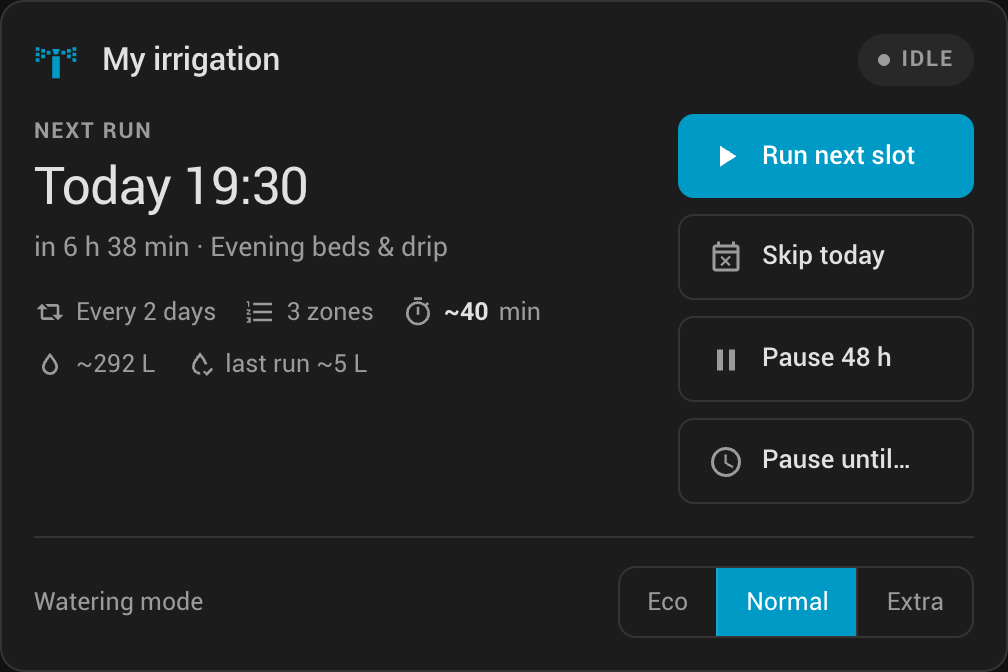
view |
Shows |
|---|---|
status (default) |
What happens next, how long it takes, and the two or three actions worth reaching for. While a run is active it leads with the remaining time of the open zone and lists the queue; during a Cycle & Soak rest it shows Soaking with the countdown. With water tracking it adds the expected litres of the next run, the last run, and a live figure while watering. |
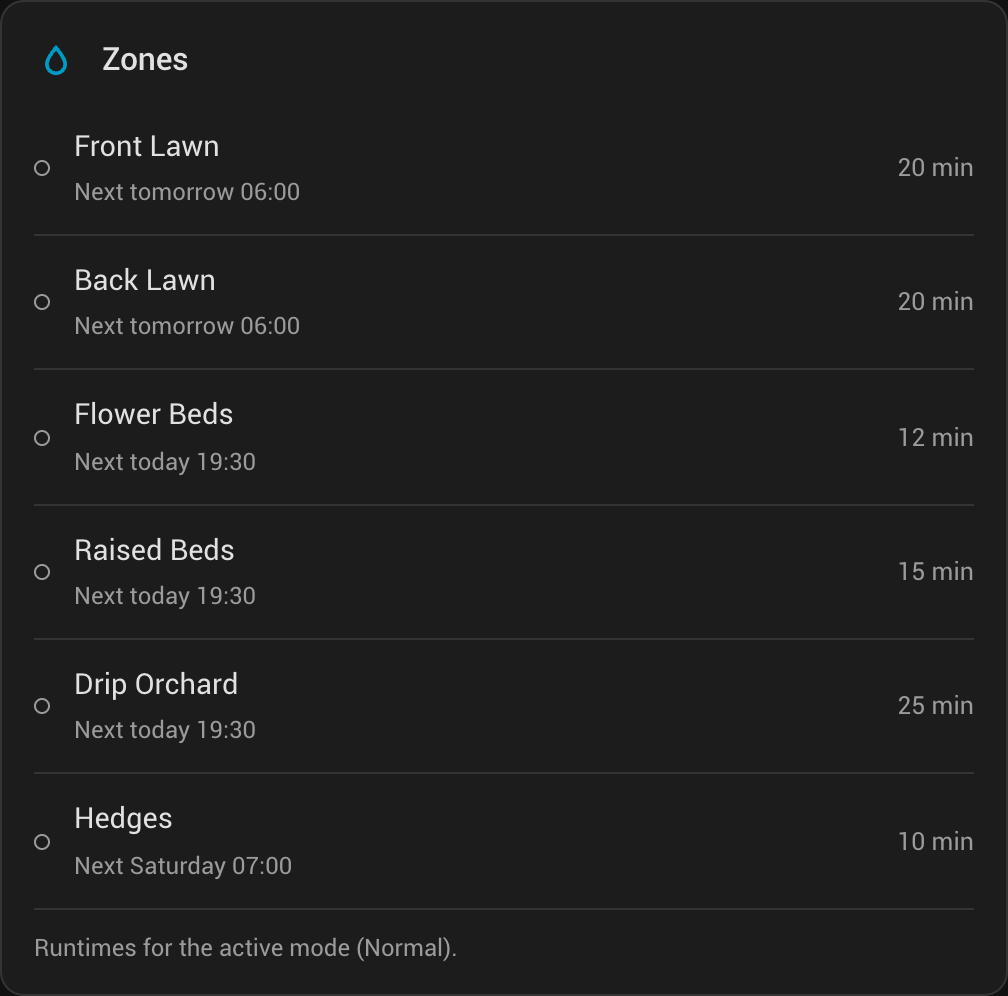
zones |
Every zone with its runtime for the active mode: what is open, what is next, what is broken. |
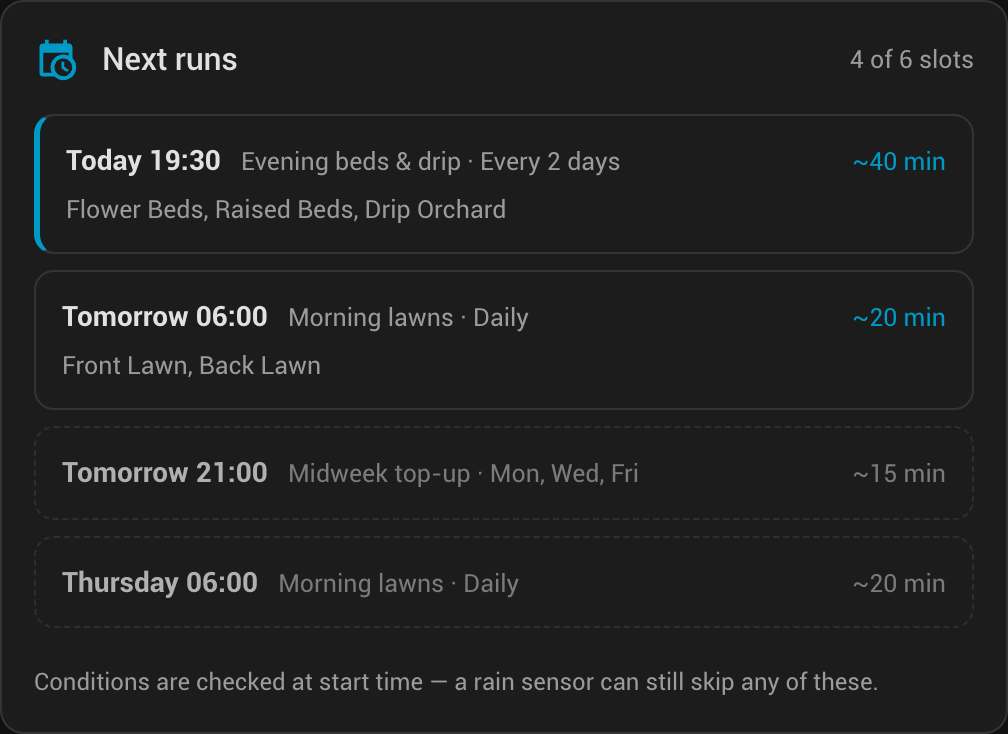
schedule |
The next runs resolved into real dates — no cron rules to decode. |
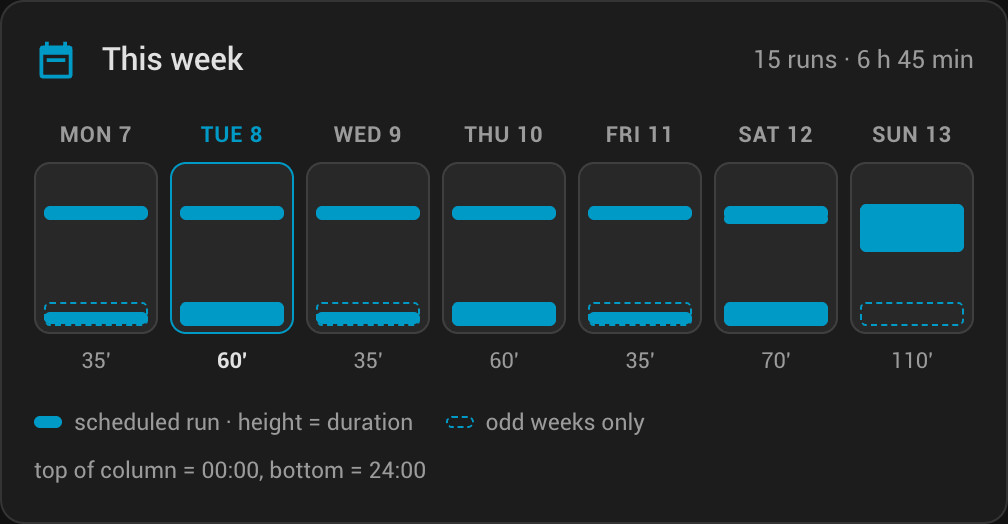
week |
The current week as a timetable; bar height is the run's duration, position its time of day. |
run |
The manual run picker (see below). |
| Option | Default | Meaning |
|---|---|---|
entry_id |
auto | Which installation. Optional — a single installation is picked automatically, and with several the one marked as default wins. |
view |
status |
status · zones · schedule · week · run |
compact |
false |
One tile-style row instead of the full card. In the zones view, a compact zone list. |
show_mode |
true |
Eco / Normal / Extra selector on the status view |
manual_start |
off |
off · zones · slot · both — adds a collapsible Run now section below the card |
manual_duration |
false |
Offer a duration override in the zones picker |
actions |
run_next, skip_today, pause_48h |
Any of run_next · stop · skip_today · pause_48h · pause_until. The first one is the primary button; stop only appears while something is running. |
next_runs |
4 |
How many runs the schedule view lists (1–12) |
zones |
all |
all · active · an explicit list of zone ids |
tap_action / hold_action |
open the entity / open the panel | Header row and, in the compact layout, the whole row |
zone_tap_action / zone_hold_action |
open the zone / open the panel's Zones page | Zone rows in the zones view |
run_tap_action / run_hold_action |
open the run's slot / nothing | Rows in the schedule view and the bars of the week view |
A fully specified card — this is what every option looks like, not what you need:
type: custom:simple-irrigation-card
entry_id: 1a2b3c…
view: status
compact: false
show_mode: true
manual_start: zones
manual_duration: false
actions:
  - run_next
  - stop
  - skip_today
next_runs: 4
zones: all
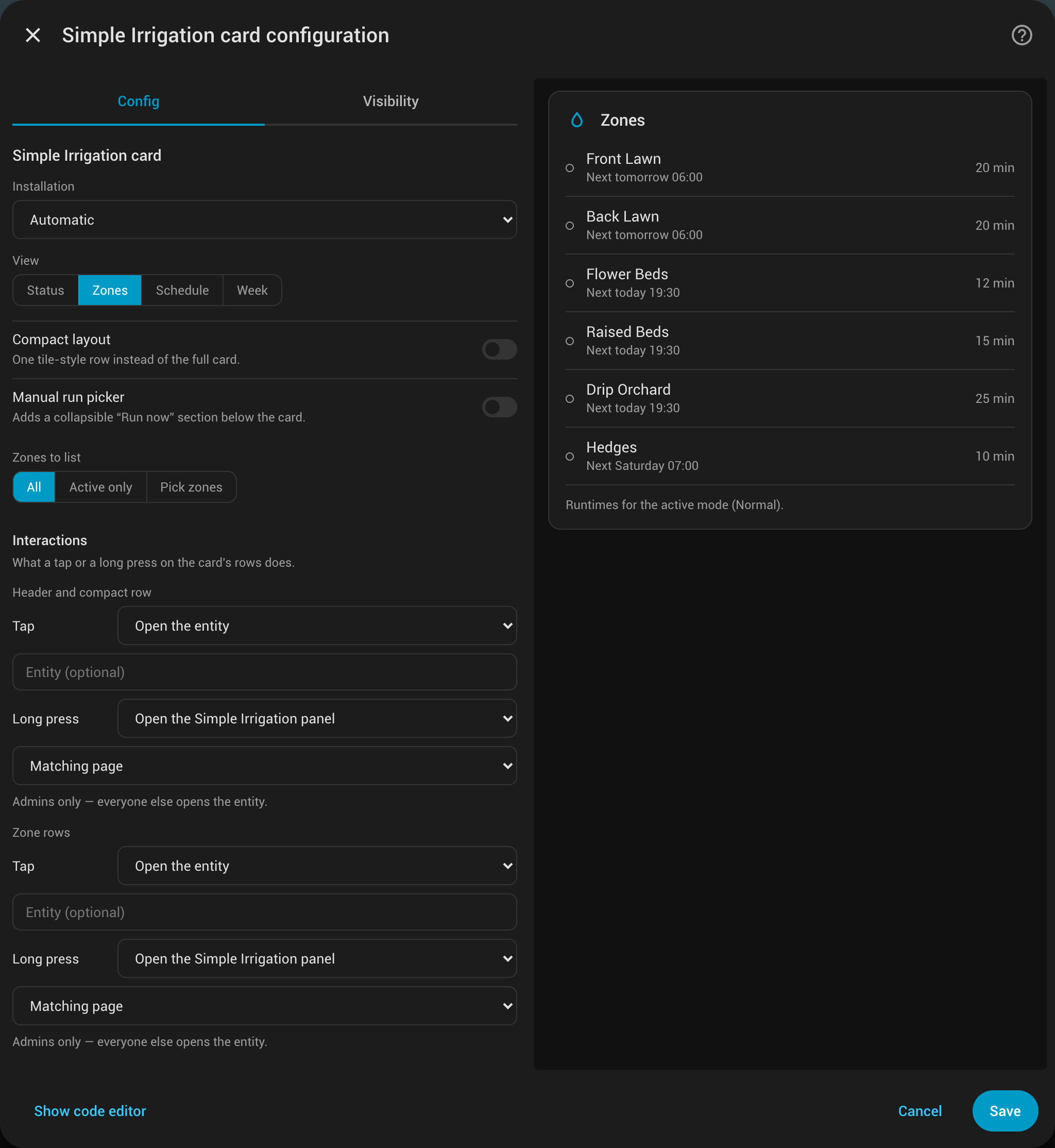
Every row of the card carries a tap and a long press action, configured in the visual editor under Interactions or in YAML. Out of the box a tap opens what the row stands for and a long press opens the panel page it lives on — a zone row opens the zone's entity, holding it opens the panel's Zones page, and a run in the schedule or week view opens its own slot in the Schedule editor.
action |
Does |
|---|---|
more-info |
Open the more-info dialog — the zone's entity on a zone row, the installation's otherwise. entity overrides it. |
panel |
Open the Simple Irrigation panel. panel_page picks overview · zones · schedule · timetable · settings; left out, the row picks the page it belongs to, and a run deep-links to its own slot. |
navigate |
Go to navigation_path, e.g. another dashboard view. |
url |
Open url_path. |
perform-action |
Call perform_action (domain.service) with optional data and target. |
none |
Nothing — the row stops being tappable at all, rather than looking clickable and doing nothing. |
type: custom:simple-irrigation-card
view: zones
zone_tap_action:
  action: perform-action
  perform_action: simple_irrigation.run_zone
  data:
    zone_id: lawn
zone_hold_action:
  action: panel
  panel_page: zones
The panel is registered for administrators only. A panel action falls back to the more-info dialog for everyone else, so a shared dashboard does not send family members to an empty page.
The badge takes the same tap_action and hold_action (YAML only — badges have no visual editor).
Selecting is separated from launching: nothing is watered until the start button is pressed, so a mis-tap on a chip costs nothing.
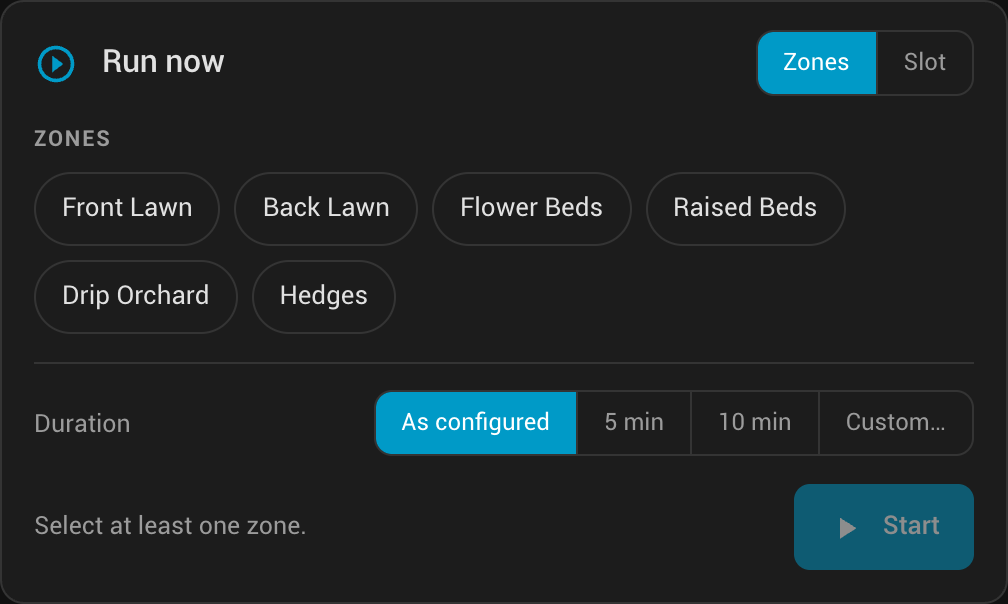
- Zones — pick any number; they are queued in sequence, never in parallel, via
simple_irrigation.run_zone(orrun_zone_with_durationwhen the duration is overridden). A disabled zone stays visible but is not selectable; a zone with a missing output is selectable and fails loudly. - Slot — runs a whole schedule slot through
simple_irrigation.run_schedule_slot, reusing the slot's own zone list and runtimes. A manual slot run normally ignores the slot's conditions; the Apply the slot conditions toggle opts back in, and the run then refuses when a condition is not met.
custom:simple-irrigation-badge puts the same facts in the badge row of a sections dashboard, without a card slot:
type: custom:simple-irrigation-badge
badges:
  - state    # Watering · 7:24, or Idle
  - next     # Next 19:30
  - mode     # Normal
  - pause    # only while paused
- issues # only when a zone output is unusableColours come from the active theme, so the card follows light and dark mode and any custom theme without configuration. The layout reflows on the card's own width, not the screen's: below roughly 300 px the action column drops under the summary and the week view falls back to weekday initials, so the card is at home in a two-column section, a phone view or a full-width slot alike.
The card is readable by every user, not just admins — it uses its own read-only websocket API rather than the admin panel's.
All services accept an optional config_entry_id when you run more than one Simple Irrigation entry (find it in Settings → Devices & services or in diagnostics).
| Service | Typical use |
|---|---|
simple_irrigation.run_zone |
Start one zone with pre-start, duration from the current mode, then off |
simple_irrigation.run_zone_with_duration |
Same pipeline with a fixed duration (minutes) |
simple_irrigation.run_schedule_slot |
Run one slot’s full sequence now (slot_id) |
simple_irrigation.run_due_zones |
Trigger “what’s due now” |
simple_irrigation.stop_all |
Stop the active cycle |
simple_irrigation.stop_zone |
End one zone of the running cycle; the rest carries on (zone_id) |
simple_irrigation.set_mode |
Set eco / normal / extra |
simple_irrigation.set_zone_enabled |
Enable/disable a zone |
simple_irrigation.pause_until |
Pause automatic runs until a datetime (until field) |
simple_irrigation.clear_pause |
Clear the pause |
Example — set mode from an automation:
action: simple_irrigation.set_mode
data:
  mode: eco
  # config_entry_id: abc123...  # if multiple entries
Every schedule slot and per-slot toggle is also exposed as a switch entity, so you can enable/disable individual runs from dashboards and automations. Use Developer tools → Actions to explore fields with translated descriptions.
While a zone is watering, the integration publishes when it is planned to finish:
| Entity | Value |
|---|---|
sensor.<installation>_watering_until |
End of the zones running right now — the last one to finish |
sensor.<zone>_watering_until |
End of that individual zone, useful when zones run in parallel |
Both are timestamps, not a minute counter: the state changes twice per zone run instead of every second, which keeps the recorder small, and the dashboard still renders a live countdown from it. Outside a running cycle both are unknown.
type: entities
entities:
  - entity: sensor.simple_irrigation_watering_until
    name: Watering until
    format: relative   # "in 12 minutes", ticking
The panel’s Overview tab shows the same information as a m:ss countdown per active zone.
With water use configured, two total_increasing sensors per installation hand the litres to Home Assistant:
| Entity | Value |
|---|---|
sensor.<installation>_water |
Running total of the installation, in litres (attributes source, last_run_l) |
sensor.<zone>_water |
Running total of that zone (same attributes) |
Both are water sensors, so they appear in the Energy dashboard's water section, in long-term statistics and in a Utility Meter without further setup. They stay unknown until the first run reports water. binary_sensor.<installation>_running carries soak_until while a Cycle & Soak run rests.
-
Home Assistant log:
logger:
  logs:
    custom_components.simple_irrigation: debug
-
Diagnostics: Settings → Devices & services → Simple Irrigation → Download diagnostics.
-
Panel: the Settings tab has a Diagnostics (raw run state) disclosure and a For automations block with service names and the
config_entry_id.
# Python tests
pip install -r requirements_test.txt
pytest tests/

# Panel and Lovelace card (from repo root) — one build produces both bundles
cd custom_components/simple_irrigation/frontend
npm ci
npm run build

# Regenerate screenshots against a running sandbox (headers of both scripts
# list what the sandbox needs)
cd scripts && npm i && cd ..

# Panel tabs and dialogs
HA_URL=http://localhost:8123 HA_TOKEN=<long-lived-token> SI_ENTRY=<config-entry-id> \
  node scripts/make_screenshots.js

# Lovelace card views and the card editor (needs the "si-card" demo dashboard)
HA_URL=http://localhost:8123 HA_TOKEN=<long-lived-token> \
  node scripts/make_card_screenshots.js
Commit the updated bundles in frontend/dist/ when you change the panel or card sources so HACS users do not need Node.
The version is centrally managed in the VERSION file:
make update-version VERSION=1.0.0   # or: python3 update_version.py 1.0.0
make version                        # show current version
This updates VERSION, manifest.json, frontend/package.json, the panel TypeScript/embedded version, and rebuilds frontend/dist/simple-irrigation-panel.js.
- Issues: GitHub Issues
- License: MIT
Ideas, prototypes and bug reports shape this integration as much as code does. Thank you to: