





Synchronize your Zotero settings, plugin configurations, installed plugins, custom citation styles, and site-specific settings across devices using Zotero's built-in sync. No external accounts or services required. Supports English, Simplified Chinese, and Traditional Chinese.
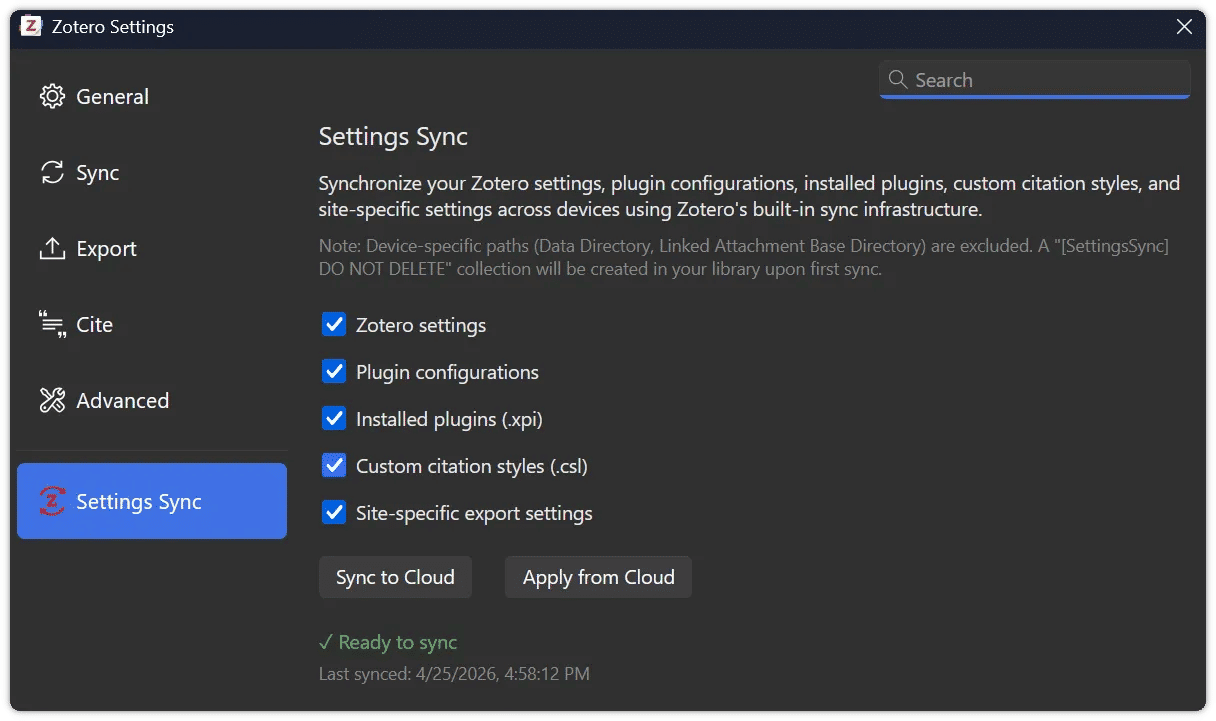
| Category | Details |
|---|---|
| Zotero Settings | Zotero preferences (General, Sync, Export, Cite, Advanced, etc.) |
| Plugin Configurations | Third-party plugin configurations |
| Installed Plugins | Third-party .xpi plugin files |
| Citation Styles | Custom .csl files (built-in Zotero styles are excluded) |
| Site-specific Settings | Per-site Quick Copy export rules |
Each category can be individually toggled on or off. All are enabled by default.
- Device-specific file paths — any file path (e.g., data directory, attachment base directory) is automatically detected and excluded
- Zotero Account Credentials — never included in sync data
The plugin stores your settings in a dedicated collection ([SettingsSync] DO NOT DELETE) in your Zotero library. This collection syncs through Zotero's standard cloud sync, making your settings available on any device.
┌─────────────────────────────────────────────────────────────┐
│                    Your Zotero Library                      │
│  ┌─────────────────────────────────────────────────────┐    │
│  │  [SettingsSync] DO NOT DELETE                       │    │
│  │  ├── settings.json (~3 KB)                          │    │
│  │  ├── custom-style-1.csl                             │    │
│  │  ├── custom-style-2.csl                             │    │
│  │  ├── plugin-name@author.xpi                         │    │
│  │  └── ...                                            │    │
│  └─────────────────────────────────────────────────────┘    │
└─────────────────────────────────────────────────────────────┘
                              ▲
                              │ Zotero Sync
                              ▼
                    ┌─────────────────┐
                    │  Zotero Cloud   │
                    └─────────────────┘
                              ▲
                              │ Zotero Sync
                              ▼
┌─────────────────────────────────────────────────────────────┐
│                   Another Device                            │
└─────────────────────────────────────────────────────────────┘
- Download the latest
.xpifrom Releases - In Zotero: Tools → Plugins → ⚙ → Install Plugin From File
- Select the
.xpifile and click open
- Go to Edit → Settings → Sync and log in with your Zotero account
- Enable "Sync automatically"
- Go to Edit → Settings → Settings Sync and confirm the status shows "Ready"
Click "Sync to Cloud" to save your current settings to Zotero's cloud.
On another device, click "Apply from Cloud" to restore settings. Restart Zotero when prompted.
Use the checkboxes to choose which categories to include. Unchecked categories are skipped in both directions, data from previous syncs is preserved.
- Zotero 7 / 8 / 9 / 10
- Zotero account with sync enabled and "Sync automatically" turned on
Warning Do not delete the
[SettingsSync] DO NOT DELETEcollection — it contains your synced data.
- Some settings require restarting Zotero to take effect
- The plugin will prompt you to restart after applying settings
Built with the Zotero Plugin Template.
# Clone the repository
git clone https://github.com/gaviiiinnnn/zotero-settings-sync.git
cd zotero-settings-sync

# Install dependencies
npm install

# Copy .env.example to .env and fill in your local Zotero paths
cp .env.example .env   # Windows: copy .env.example .env

# Start development server (with hot reload)
npm start

# Build for production
npm run build- Zotero Plugin Template by windingwind
- Zotero team