


Inspect the packet, preview the smallest defensible rewrite, and preserve the original capture as evidence.
Free Community Edition PCAP analyzer and PCAP editor for local packet detail, bounded rewrite previews, checksum repair, and privacy evidence.
Isolate the flow that matters, preview controlled changes, and export a minimal repro or regression fixture without overwriting the source capture.
PCAP Surgery Community Edition is free to download and use. Local capture inspection and validation workflows for small PCAP surgery tasks.
Download Community Edition · Product guide · Help · Report a bug
| Platform | Package | Use it when |
|---|---|---|
| Linux x64 (APPIMAGE) | pcap-surgery-0.1.10-linux-x64.AppImage | Portable Linux desktop package |
| Linux x64 (DEB) | pcap-surgery-0.1.10-linux-x64.deb | Debian, Ubuntu, Mint, and compatible systems |
| Linux x64 (RPM) | pcap-surgery-0.1.10-linux-x64.rpm | Fedora, RHEL, openSUSE, and compatible systems |
| Windows x64 | pcap-surgery-0.1.10-windows-x64-setup.exe | Guided Windows installer |
Checksums, installation notes, and the complete platform matrix live on the official download page.
- Windows: Windows 10 or Windows 11 on x64.
- Linux: a mainstream x64 distribution with glibc 2.35 or newer, such as Ubuntu 22.04+, Debian 12+, Fedora, or openSUSE (AppImage, DEB, and RPM packages).
- Disk space: a few hundred megabytes free for the application and its bundled resources.
A local capture-transformation workbench for the step after Wireshark analysis and before vendor escalation or lab replay. It is not a live sniffer, a full protocol analyzer, or a complete payload-sanitization system.
Edition boundary: The technical sections below describe the complete product surface and can include optional licensed workflows. The exact free Community Edition scope is listed separately below.
PCAP Surgery is a local desktop workbench for opening classic PCAP and basic single-interface Ethernet PCAPNG, narrowing evidence, previewing supported L2-L4 transformations, and exporting a focused classic PCAP. IPv4 header masking is not full payload redaction.
Open classic PCAP and basic single-interface Ethernet PCAPNG, then index packet metadata without uploading capture content.
Filter by protocol, endpoint, direction, packet number, time range, and text while preserving a dense packet table.
Inspect Ethernet, IP, TCP, UDP, DNS, ICMP, ARP, payload bytes, offsets, and copyable evidence for the selected packet.
For the selected full or subset artifact, inventory visible IPv4, IPv6, MAC, DNS, HTTP Host, TLS SNI, and printable payload or unknown exposure. This is a bounded partial review with no decryption, stream reassembly, or safe-to-share verdict.
- Classic PCAP and basic Ethernet PCAPNG import feed a dense packet table with protocol, endpoint, direction, packet number, time range, and text filters.
- Ethernet, IP, TCP, UDP, DNS, ICMP, ARP, offsets, and payload bytes stay tied to the selected packet so edits are grounded in visible evidence.
- The workflow is built for packet-capture evidence review, not a generic capture viewer with edit commands bolted on.
- Community can inspect and preview transformations; Optional licensing unlocks writing edited and subset classic PCAP artifacts.
- Supported edit paths cover fixed-length byte changes, trim/keep decisions, timing changes, IPv4 and MAC rewrites, ports, VLAN fields, and selected TCP/IP fields.
- Supported header rewrites report IPv4/TCP/UDP checksum repairs. Raw byte edits do not receive automatic checksum repair.
- Indexed packet windows stay focused through filters, the evidence map, decoded detail, byte evidence, and export scope rather than forcing every task into CLI notes.
- Subset export helps remove unrelated packets while preserving the sequence and timing evidence needed for DNS, TCP, UDP, ICMP, ARP, and application investigations.
- Classic PCAP export is the optional licensed workflow today, with a focused workflow for trimming, supported header rewrites, timing repair, and minimal reproduction artifacts.
- Use Community for local inspection and transformation previews; use Professional when you need to write edited or subset PCAP artifacts.
- No subscription and no cloud upload are required for customer traces, lab captures, or incident evidence.
- The value is a reviewable path from noisy evidence to a smaller support or regression artifact, without a fragile command-line pipeline.
- Capture metadata review
- Packet evidence inspection
- Filter and detail workflows
Optional licensed workflows are available for people who need the expanded feature set. Licensing details belong on the website; the Community Edition remains the free way to evaluate and use the core product.
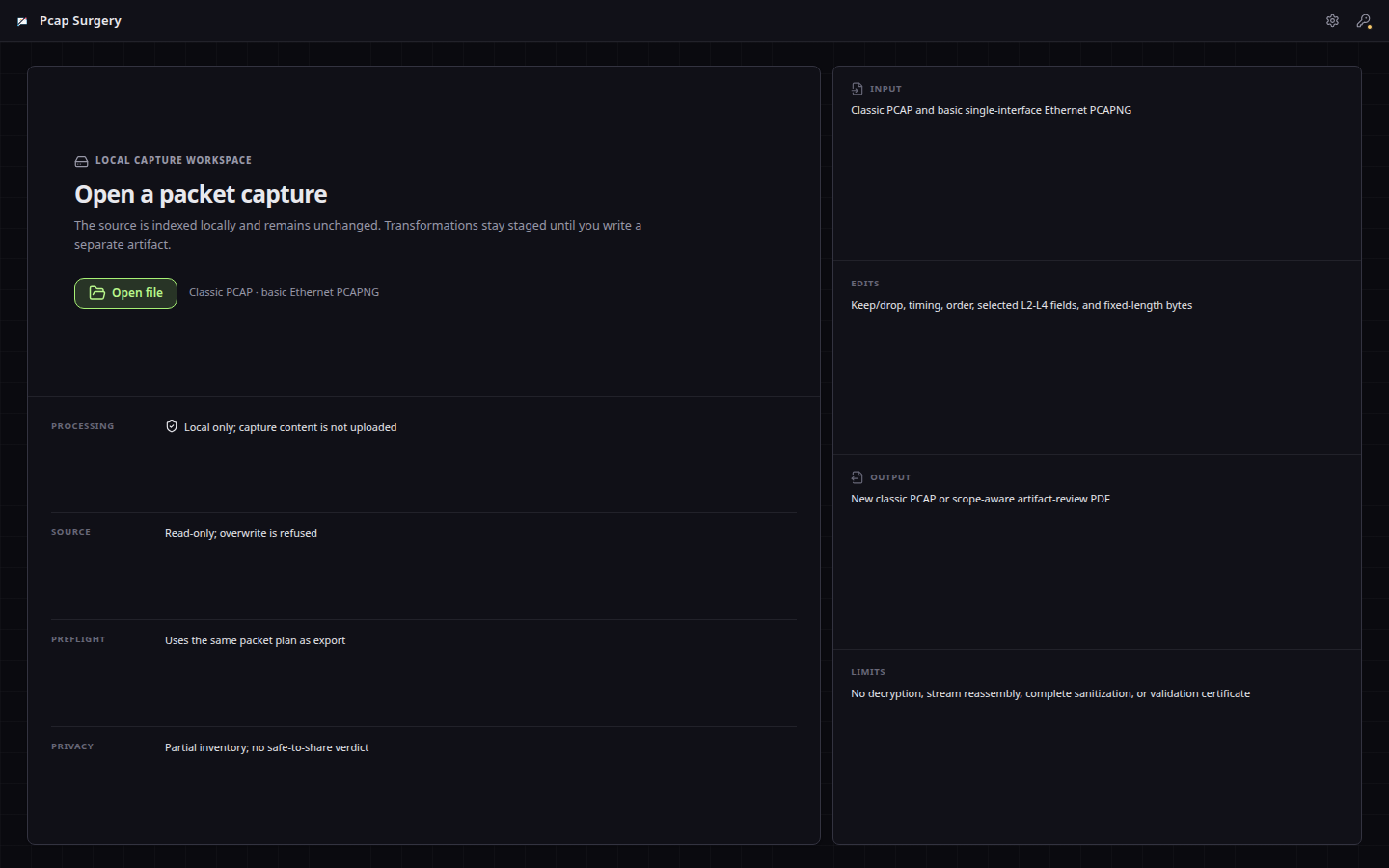
The product opens by explaining the minimal-repro outcome, local processing boundary, and supported formats before exposing the workbench.
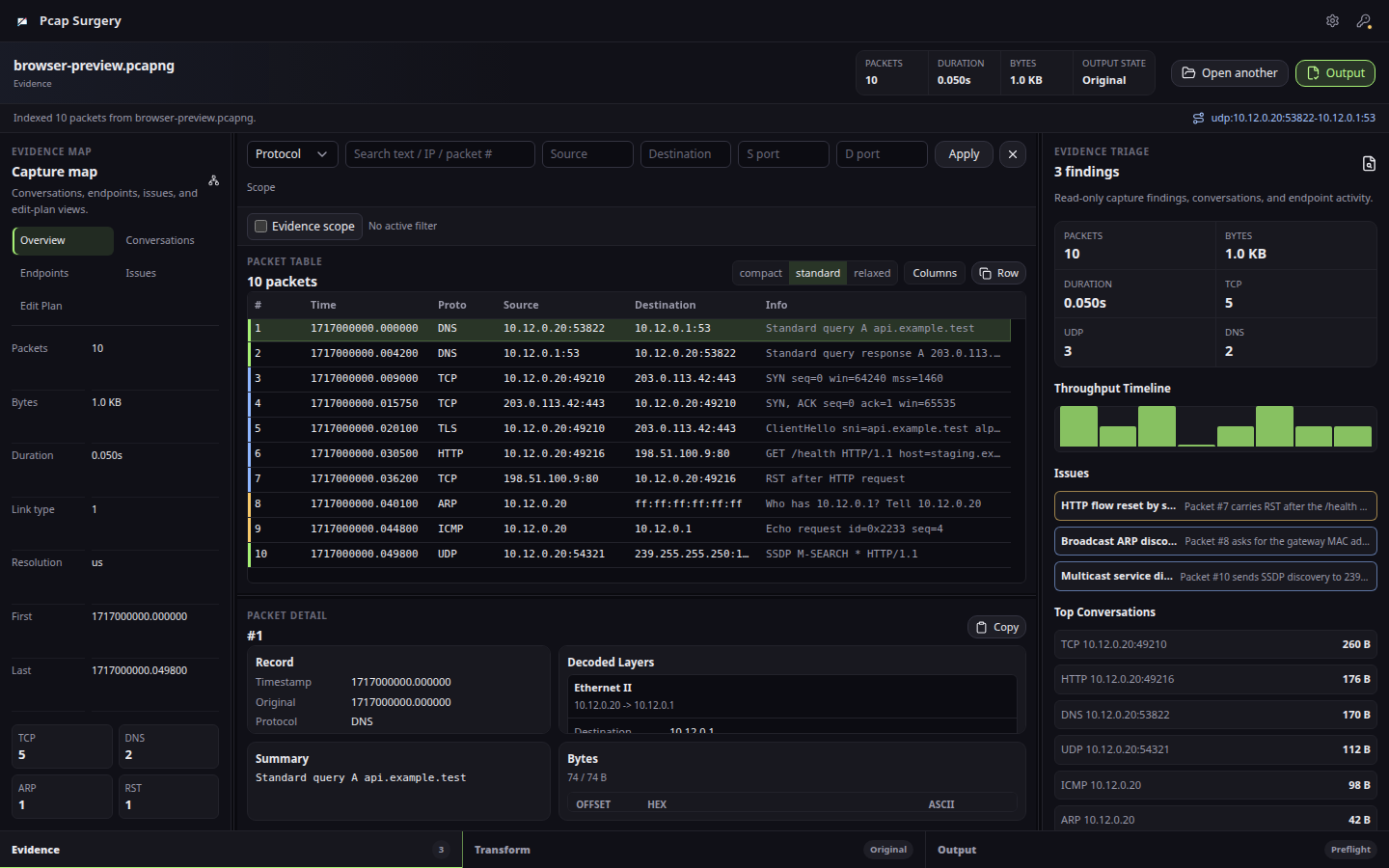
Decoded layers, packet metadata, raw bytes, and selected-packet context.
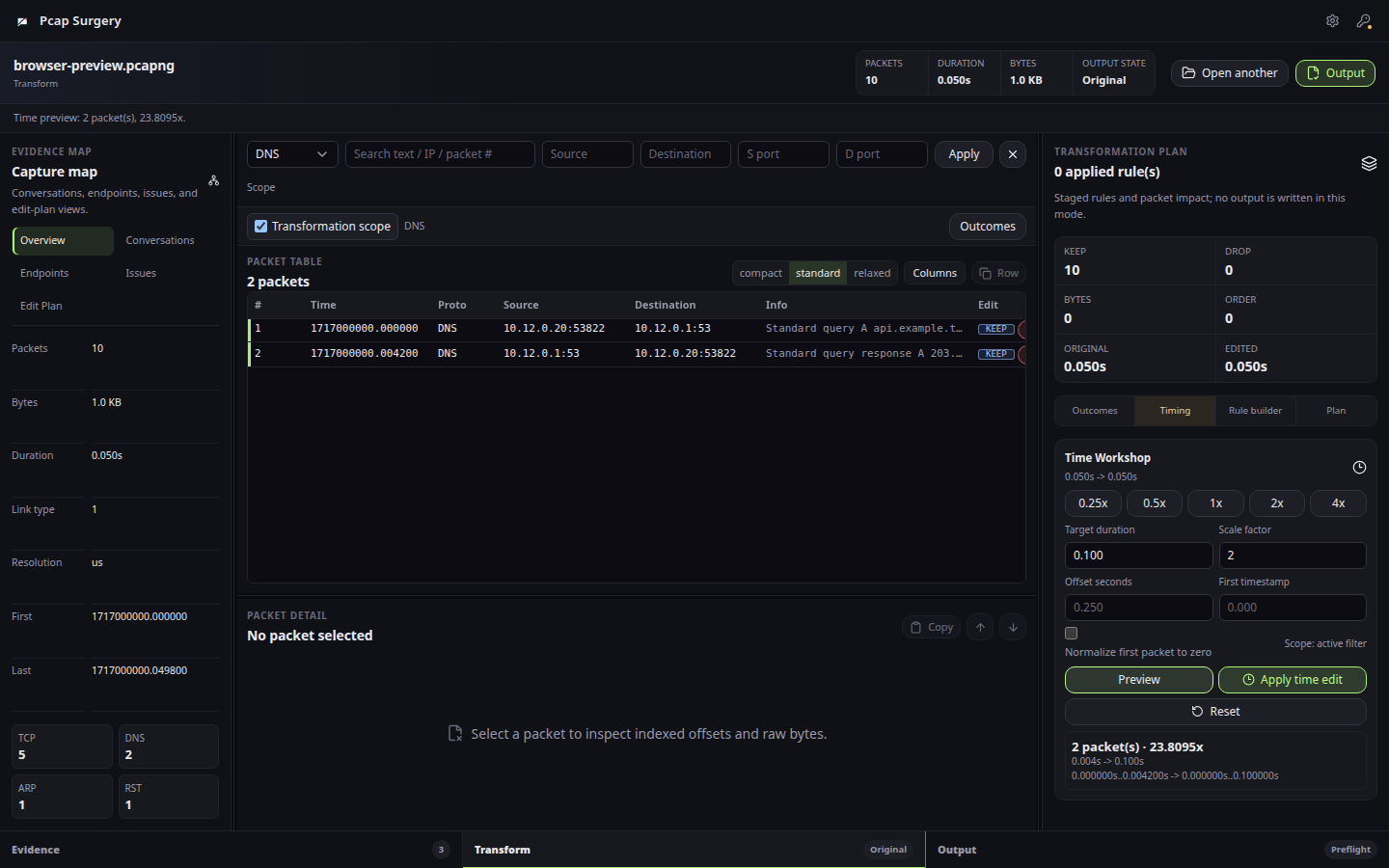
Preview timestamp edits and duration changes before writing a capture.
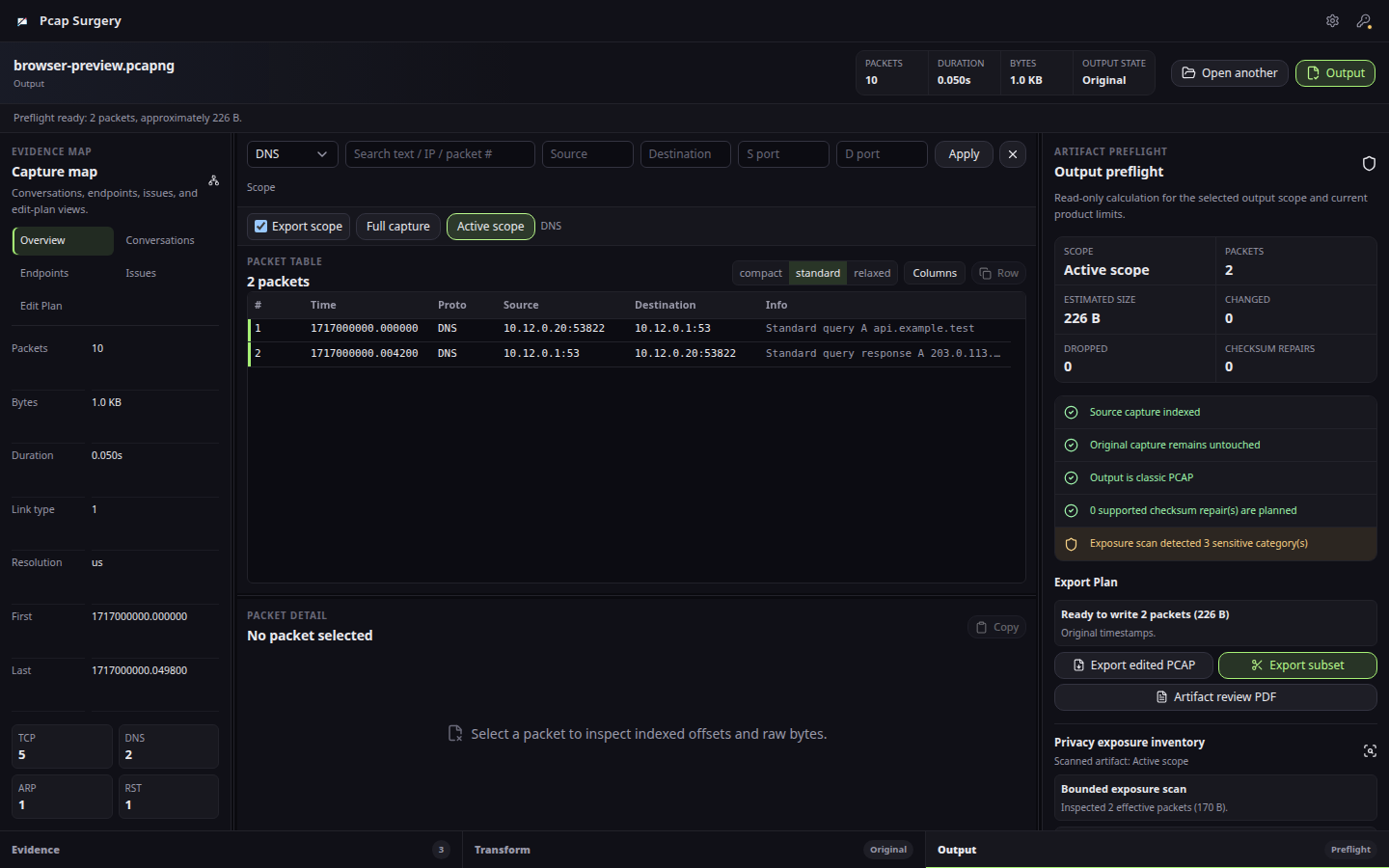
Review artifact scope, supported checksum repairs, privacy limitations, and warnings before writing a file.
PCAP Surgery is a desktop workflow. Your working files stay on the machine unless you deliberately export or share them. The product page documents the exact capability boundary so the focused workflow can be evaluated on real evidence.
Community scope: Community Edition previews supported edits and transformations; writing a modified capture is an optional licensed workflow.
What can PCAP Surgery do that Wireshark and editcap can't?
PCAP Surgery is a visual capture-transformation workbench, not a replacement for either tool. It connects evidence scoping, per-rule impact preview, supported checksum-aware rewrites, and classic PCAP export without requiring a fragile command pipeline. It does not yet strip arbitrary payloads or provide Wireshark-level protocol analysis.
Can I download PCAP Surgery today?
Yes. The download page publishes Linux and Windows packages with sizes and SHA-256 checksums.
Who uses PCAP Surgery?
Tier-3 support engineers, network product QA teams, and lab engineers who need to turn a noisy capture into a focused support case or deterministic regression fixture.
Can Wireshark edit PCAP files the way PCAP Surgery can?
Wireshark remains the broad analysis reference. PCAP Surgery starts after that analysis: choose the evidence scope, preview supported transformations, review limitations, and export a focused classic PCAP artifact.
When is editcap enough instead of PCAP Surgery?
editcap is enough when the transformation is known, scripted, and low risk. Use PCAP Surgery when an operator needs visual evidence context, a packet-impact preview, supported checksum-aware rewrites, and an artifact preflight before export.
Does IPv4 header masking make a PCAP safe to share?
No. Header masking does not remove identifiers from payloads, DNS names, HTTP fields, TLS SNI, credentials, IPv6, or unknown protocols. The current release surfaces this limitation and should not be used as a complete sanitization guarantee.
- Bugs: open a structured bug report
- Ideas: request a focused workflow improvement
- Product help: documentation and troubleshooting
- Private support: support@hannes-software.com
- Security reports: follow SECURITY.md; do not post sensitive files, credentials, patient data, or private captures in public issues.
This is the official public distribution and community repository for PCAP Surgery: verified release links, current screenshots, documentation routes, issue intake, and security guidance. Product development happens in a private workspace; public issues here are the right place to report reproducible product behavior and request focused improvements.