A lightweight WordPress plugin that automatically resizes uploaded images, supports WebP/AVIF conversion, and optimizes website loading speed.
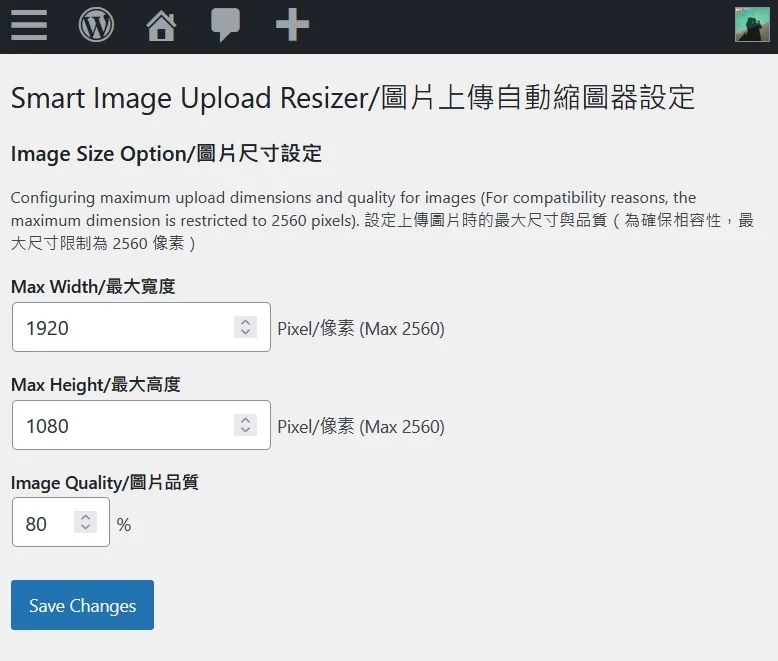
== Description ==
Smart Image Upload Resizer is a simple yet powerful WordPress plugin that automatically adjusts image dimensions and quality during upload, with support for WebP and AVIF formats through WordPress's official advanced image format support plugin. It helps optimize your website's image resources.
= Key Features =
- Automatically reduces uploaded image dimensions
- Customizable maximum width and height (up to 2560 pixels)
- Adjustable image quality (compression rate)
- Supports JPEG, PNG, GIF, WebP, and AVIF formats
- Preserves PNG and GIF transparency during resize
- Compatible with WordPress's official advanced image format support plugin
- Automatically maintains image aspect ratio
- Optimized memory management for low-spec cloud hosting environments
= How to Use =
- Install and activate the plugin through the WordPress plugins page
- Go to "Settings" > "Smart Image Upload Resizer Settings"
- Configure your desired maximum width, height, and image quality
- Start uploading images, the plugin will process them automatically
= Ideal Use Cases =
- Websites needing to limit uploaded image sizes
- Storage space optimization
- Website loading speed optimization
- Websites requiring unified image dimension management
This plugin's functionality is also integrated into Omni Webmaster & SEO Suite (GitHub), an all-in-one webmaster toolkit by the same author. Do not run both at once — the suite automatically yields to this standalone plugin to avoid resizing images twice.
== Installation ==
- Download and install "Smart Image Upload Resizer" from the WordPress plugin directory
- Or upload the zip file via WordPress admin panel
- Activate the plugin
- Go to "Settings" > "Image Resizer Settings" to configure
== Frequently Asked Questions ==
= Will this plugin affect already uploaded images? = No. The plugin only processes new images uploaded after activation.
= What image formats are supported? = JPEG, PNG, GIF, WebP, and AVIF formats are supported. (AVIF requires PHP 8.1+)
= What's the maximum supported image size? = For stability on older cloud hosting specifications, the maximum supported dimension is 2560 pixels.
= How's the image quality after adjustment? = You can customize image quality (1-100%) in settings, default is 80%. This value typically provides a good balance between file size and visual quality. For better visual quality, you can increase it to 85.
= Does the plugin require any PHP extensions? = Yes, the PHP GD extension is required. The plugin will notify you and deactivate automatically if GD is not available at activation time. If GD disappears later (e.g. after a PHP version change), resizing is safely skipped and uploads proceed with the original images.
= What happens if resizing fails? = Since 1.3.0, any failure (unreadable image, missing GD function, save error) lets the upload proceed with the original, untouched image instead of blocking the upload with an error.
== Screenshots ==
- Plugin settings page
- Image upload effect demonstration
== Changelog ==
= 1.4.0 =
- Fixed: WordPress 7.1 silently voided the configured maximum dimensions. Its client-side media processing scales the image in the browser and posts the result back, so the server-side resize was either discarded (the browser's own 2560px copy replaced the main file) or rejected with a 400, because core validates an
originalsideload against the stored dimensions. While GD is available the plugin now keeps the pipeline server-side through thewp_client_side_media_processing_enabledfilter - Fixed: sub-sizes posted back to
/wp/v2/media/{id}/sideloadwere resized a second time despite already being sized by the browser. Sideloads, and media created withgenerate_sub_sizes=false, are now left untouched - Tested against WordPress 7.1
= 1.3.0 =
- Improvement: Fail-safe uploads — if any resize step fails, the original image is now uploaded unchanged instead of the whole upload being aborted with an error
- Improvement: Runtime GD check — if the GD extension disappears after activation, resizing is skipped safely instead of causing a fatal error on upload; a notice is shown on the settings page
- Internationalization: All user-facing strings are now translatable (English base) with a bundled Traditional Chinese (zh_TW) translation
- Cleanup: Fixed invalid plugin header fields and updated license metadata to GPLv2 or later
= 1.2.0 =
- Feature: Added support for AVIF image format (requires PHP 8.1+ and GD AVIF support)
- Fix: Prevent upload failure when uploading unsupported image types (e.g., SVG, ICO) by ignoring them instead of throwing an error
- Improvement: Added
function_existschecks for WebP and AVIF to prevent fatal errors on servers without support
= 1.1.0 =
- Fix: Preserve PNG and GIF transparency during image resize
- Fix: Ensure GD resources are always freed even when an error occurs (memory leak fix)
- Security: Added sanitize_callback to validate and clamp settings values on save
- Security: Added capability check in options page
- Security: Use esc_url() for settings link URL
- Improvement: HTML min/max attributes on settings inputs to match server-side constraints
- Improvement: GD extension check on plugin activation with a clear error message
- Improvement: Render functions now use cached options instead of extra DB queries
- Improvement: Settings link placed first in the plugin action links list
= 1.0.0 =
- Initial release
== Upgrade Notice == = 1.2.0 = This version adds AVIF support and fixes a critical bug where uploading unsupported formats like SVG caused the upload to fail completely. Recommended update.
= 1.1.0 = This version fixes PNG/GIF transparency preservation, patches a memory leak, and adds settings sanitization. Recommended update for all users.
== Additional Info ==
- For optimal performance, it's recommended to configure appropriate settings before uploading images
- If your website uses caching plugins, you may need to clear the cache after changing settings
- Author: Ivan Lin
- Contact Email: ivanusto@gmail.com
- https://yblog.org
Wordpress 是很流行的 CMS 系統,很多網站都採用這個來部署,而市面上也已經有不少避免編輯或商品上稿人員,把沒有縮圖的相機或手機直出大圖檔傳到網站去,造成網友讀取網頁變慢問題的 Wordpress 外掛程式,主要是進行圖片上傳時自動縮圖處理的,但很可惜他們大部分是商用軟體或綁一些比較複雜的功能。我自己寫了一個簡單的超輕量外掛程式(幾KB only),專門處理在用戶、編輯上傳圖片時,自動將圖片尺寸縮小的 作業,除了JPG常見圖片格式外,也支援 WordPress 官方的 WebP 與 AVIF 轉換,最佳化網站載入速度與節省儲存空間。
名稱定為圖片上傳自動縮圖器 | Smart Image Upload Resizer ,是個簡單但功能實用的 WordPress 外掛,能夠在上傳圖片時自動調整其尺寸和品質,並支援 WordPress 官方推出的進階圖片檔案格式支援外掛程式的 WebP 與 AVIF 格式圖片,幫助網站管理員最佳化網站的圖片資源。
目前這個外掛已經在一些上線的網站上進行實裝運用,而 Wordpress官方的審核上架通過則還要等一段時間,拭目以待。
設定相當簡單直覺。
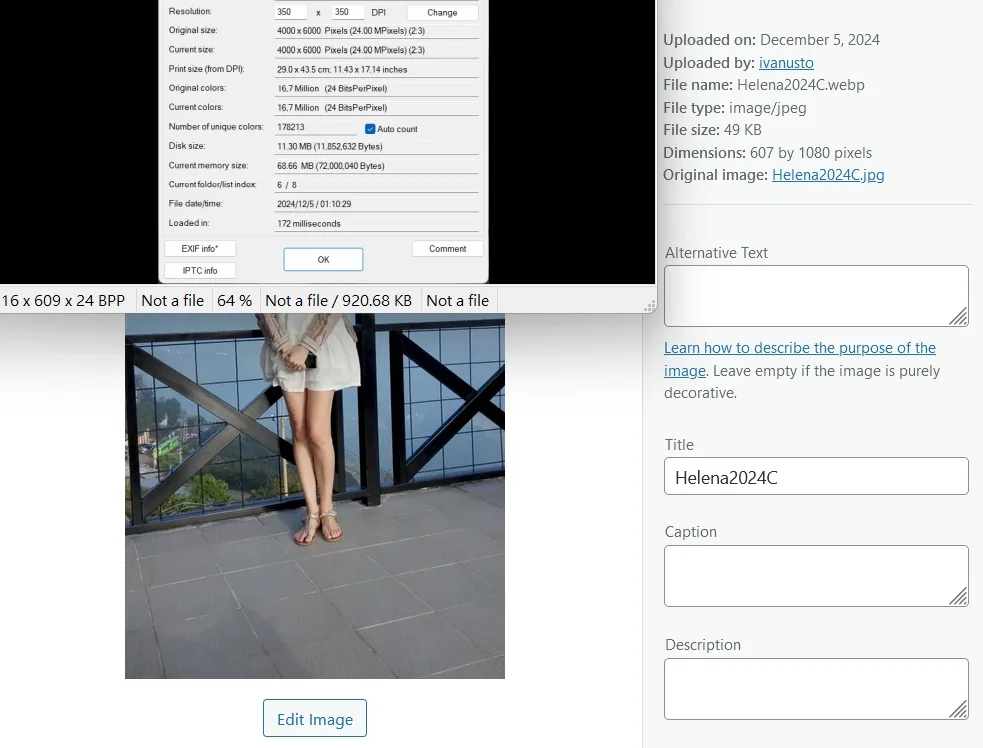
可有效縮小圖片的尺寸,超大圖檔11MB的可以縮小到幾十KB。
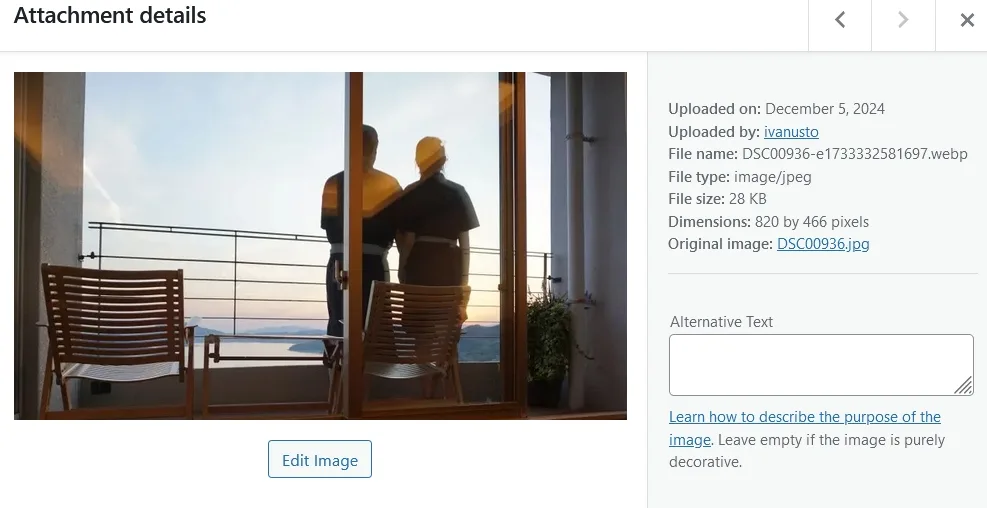
縮圖的品質設定在80%到85%就很不錯了。
= 主要功能 =
- 自動縮減上傳圖片的尺寸
- 可自訂最大寬度和高度(最大支援 2560 像素)
- 可調整圖片品質(壓縮率)
- 支援 JPEG、PNG、GIF、WebP 和 AVIF 格式
- 修正 PNG 和 GIF 縮圖後透明度正確保留
- 與 WordPress 官方推出的進階圖片檔案格式支援外掛程式功能相容
- 自動維持圖片比例
- 調整過的記憶體管理,可在較低規格之雲端主機上運作
= 使用方式 =
- 透過 WordPress 安裝外掛程式頁進行安裝並啟用外掛
- 前往「設定」>「圖片上傳自動縮圖器設定」
- 設定您想要的最大寬度、高度和圖片品質
- 開始上傳圖片,外掛會自動處理
= 適合的使用場景 =
- 需要限制上傳圖片大小的網站
- 想要節省儲存空間
- 需要最佳化網站載入速度
- 需要統一管理圖片尺寸的網站
本外掛的功能也已整合進 Omni Webmaster & SEO Suite(GitHub),同作者的一站式站長工具套件。請勿與本外掛同時啟用——套件偵測到本外掛時會自動停用對應模組,避免圖片被重複縮圖。
== Installation ==
- 從 WordPress 外掛目錄下載並安裝「圖片上傳自動縮圖器」
- 或者在 WordPress 後台上傳 zip 檔案安裝
- 啟用外掛
- 前往「設定」>「圖片縮圖設定」進行設定
== Frequently Asked Questions ==
= 這個外掛會影響已經上傳的圖片嗎? =
不會。本外掛只會處理在啟用後新上傳的圖片。
= 支援哪些圖片格式? =
支援 JPEG、PNG、GIF、WebP 和 AVIF 格式。(AVIF 需主機 PHP 8.1 以上環境支援)
= 最大支援多大的圖片? =
為了確保某些較舊規格雲端共享主機之穩定性,最大僅支援 2560 像素。
= 調整後的圖片品質如何? =
您可以在設定中自訂圖片品質(1-100%),預設為 80%,這個數值通常能在檔案大小和視覺品質之間取得還不錯的平衡,如果你想要好一點的視覺品質,可以改成85。
= 外掛需要任何 PHP 擴充功能嗎? =
需要 PHP GD 擴充功能。若主機未安裝 GD,外掛在啟用時會顯示說明並自動停用。若啟用後 GD 才消失(例如更換 PHP 版本),縮圖會被安全略過、以原圖上傳,不會造成錯誤。
= 縮圖失敗會發生什麼事? =
自 1.3.0 起,任何失敗(圖片無法讀取、GD 功能缺失、儲存錯誤)都會直接以原圖放行上傳,不再中斷上傳並顯示錯誤。
== Screenshots ==
- 外掛設定頁面
- 圖片上傳效果展示
== Changelog ==
= 1.4.0 =
- 修正:WordPress 7.1 會讓設定的最大尺寸失效。它的用戶端媒體處理在瀏覽器裡縮圖後再回傳,導致伺服器端的縮圖結果不是被瀏覽器自己的 2560px 版本覆蓋,就是因為核心會用已儲存的尺寸驗證
originalsideload 而直接回 400。只要 GD 可用,外掛現在會透過wp_client_side_media_processing_enabled濾鏡把流程留在伺服器端 - 修正:回傳到
/wp/v2/media/{id}/sideload的各尺寸縮圖會被重複縮一次,但它們已經由瀏覽器縮好了。現在 sideload 以及帶generate_sub_sizes=false的媒體建立都不再處理 - 已針對 WordPress 7.1 測試
= 1.3.0 =
- 改善:上傳失敗安全機制——任何縮圖步驟失敗時,直接以原圖放行上傳,不再中斷整個上傳流程
- 改善:執行期 GD 檢查——若啟用後 GD 擴充功能消失,縮圖會被安全略過而非在上傳時發生致命錯誤,並在設定頁顯示提示
- 國際化:所有介面文字改為可翻譯(英文為基底),並內建繁體中文(zh_TW)翻譯
- 整理:修正外掛標頭欄位並將授權資訊更新為 GPLv2 or later
= 1.2.0 =
- 新增:支援 AVIF 圖片格式(需主機環境支援 PHP 8.1+ 與 GD AVIF)
- 修正:上傳不支援的圖片格式(如 SVG、ICO)時不再直接報錯,改為略過縮圖處理並放行上傳
- 改善:加入
function_exists檢查 WebP 與 AVIF 功能,避免在不支援的舊環境引發伺服器錯誤
= 1.1.0 =
- 修正:縮放 PNG 和 GIF 時正確保留透明度
- 修正:使用 try/finally 確保 GD 資源在發生錯誤時也能釋放(記憶體洩漏修正)
- 安全性:新增 sanitize_callback 對設定值進行驗證與範圍限制
- 安全性:管理頁面加入 current_user_can() 權限檢查
- 安全性:設定連結改用 esc_url() 輸出
- 改善:設定欄位加入 HTML min/max 屬性,與 server 端限制一致
- 改善:啟用時檢查 GD 擴充功能,缺少時顯示清楚說明
- 改善:Render 函式改用快取選項,減少不必要的資料庫查詢
- 改善:設定連結移至外掛動作連結列表最前方
= 1.0.0 =
- 初始版本發布
== Additional Info ==
- 為確保最佳效能,建議在上傳圖片前先進行適當的設定
- 如果您的網站使用了快取外掛,可能需要在更改設定後清除快取
- 作者: Ivan Lin
- Contact Email: ivanusto@gmail.com
- https://yblog.org
This project is licensed under the GNU General Public License v2.0 or later (GPL-2.0-or-later).