



A Gravity Forms add-on that lets you mark individual columns as required in multi-column List fields — something Gravity Forms doesn't support out of the box.
By default, Gravity Forms only allows you to make the entire List field required (meaning at least one row must be filled). This plugin goes further: you can choose which columns within each row must be filled in before the form can be submitted.
The easiest way to install is directly from the WordPress.org plugin directory:
Or search for "List Column Required for Gravity Forms" under Plugins → Add New in your WordPress dashboard.
When using the Gravity Forms List field with "Enable multiple columns" turned on, there's no way to require specific columns. You can only require the entire field, which passes as long as any cell has a value — even if critical columns like "Email" or "Name" are left blank.
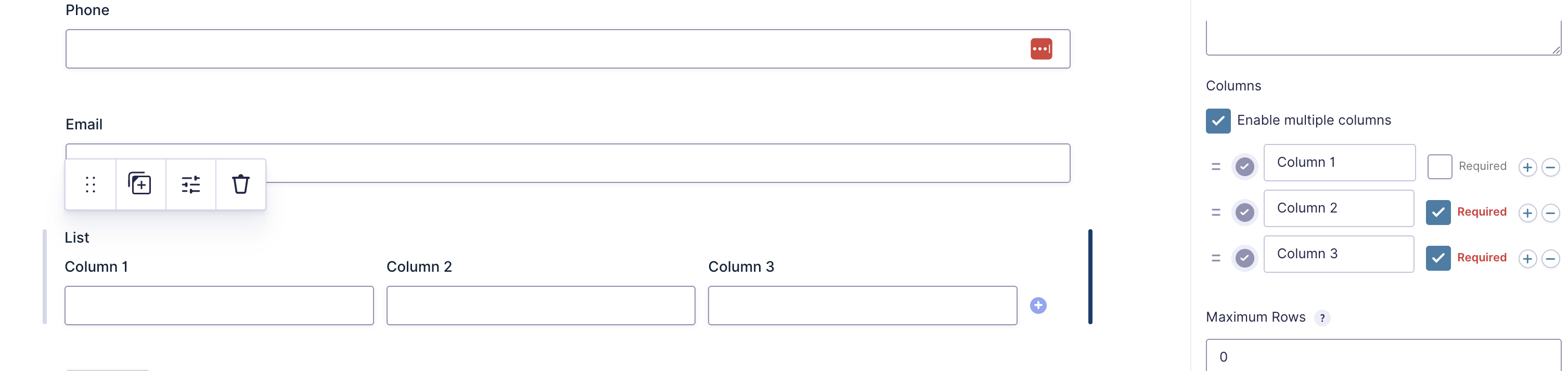
This add-on adds a small "Required" checkbox next to each column in the form editor. Check it, and that column becomes required — with server-side validation, front-end asterisk indicators, and accessible aria-required attributes.
Each column gets a "Required" checkbox. The label turns red when checked so it's easy to spot at a glance.
Required columns display an asterisk (*) in the column header, matching Gravity Forms' native required field styling.

| Layer | What Happens |
|---|---|
| Form Editor | A "Required" checkbox is injected next to each column via GF's gform_append_field_choice_option_list JS callback. The isColumnRequired flag is stored on each choice object and saved automatically with the form JSON. |
| Auto-Require All | When the main field-level "Required" rule is toggled ON, all columns are automatically marked as required too. You can then uncheck individual columns if needed. Toggling the field-level rule OFF does not clear column-level required flags. |
| Server Validation | On submission, the gform_field_validation filter checks every row. If a row has any data at all, all required columns in that row must be filled. If all rows are empty, the first row is still validated — required columns mean "you gotta fill this in." |
| Front-End Rendering | The gform_field_content filter adds a red asterisk to required column headers. The gform_column_input_content filter adds aria-required="true" to inputs for accessibility. |
| Field-Label Indicator | When any column is marked required (and field-level "Required" is off), gform_pre_render / gform_admin_pre_render virtually flag the list field as required at render time only. This makes GF emit its standard label asterisk and the "* indicates required fields" legend at the top of the form — without affecting validation (handled separately by the validator). |
- Row with some data → all required columns in that row must be filled
- All rows empty → the first row's required columns are enforced
- Extra blank rows → skipped (user added a row but didn't start filling it)
- Non-column List fields → completely unaffected
- WordPress 5.8+
- PHP 7.4+
- Gravity Forms 2.5+
- Copy the
list-column-required-for-gravity-formsfolder into yourwp-content/plugins/directory - Activate the plugin in WordPress admin → Plugins
- Edit any form with a List field → enable multiple columns → check "Required" on the columns you want
No configuration pages or global settings needed — it just works at the field level.
list-column-required-for-gravity-forms/
├── list-column-required-for-gravity-forms.php          # Bootstrap: GF dependency check, loader
├── class-list-column-required-for-gravity-forms.php    # Main addon class (extends GFAddOn)
├── includes/
│   ├── class-list-column-validator.php  # Server-side validation (gform_field_validation)
│   └── class-list-column-frontend.php   # Front-end asterisks + aria attributes
└── assets/
    ├── js/
    │   └── admin.js                     # Form editor: "Required" checkbox per column
    └── css/
        └── admin.css                    # Styling for the checkbox in form editor
| Hook | Type | Purpose |
|---|---|---|
gform_loaded |
Action | Bootstrap the addon when GF is ready |
gform_field_validation |
Filter | Server-side per-column required validation |
gform_column_input_content |
Filter | Add aria-required to required column inputs |
gform_field_content |
Filter | Add asterisk to required column headers |
gform_pre_render |
Filter | Virtually flag list fields with required columns as required at render time (frontend) so GF shows the label asterisk + required legend |
gform_admin_pre_render |
Filter | Same as above for admin contexts (entry view, etc.) |
- Column required state is stored as
isColumnRequired(boolean) on each choice object in$field->choices[] - Property name deliberately avoids
isRequiredto prevent conflict with the field-level required flag - No new database tables — everything lives in the existing form JSON
- The JS uses
window["gform_append_field_choice_option_list"]— a type-specific callback called by GF'sGetFieldChoices()function
GPL-2.0-or-later