Repository navigation
Home
This page is meant to document how well WearOS watches function with Juggluco. Everyone can contribute to this wiki. If you have experience with a certain watch, you can add your observations. Please tell with what type of sensor you use the watch (US Libre 2, EU Libre 2 or Libre 3) and how you use the watch. You can describe how it functions with the sensor directly connected with the sensor and when the phone is directly connected with the sensor and the watch receives its data from the phone. Describe the advantages and disadvantages. In general I can see that the watch needs to be from after Android Wear was renamed to WearOS. This means that it runs Android 8 or higher. Juggluco can't use the NFC in the watch and scanning is always done with the phone.
One of the cheapest WearOS watches currently on the market and the Samsung Galaxy watch that works best with Juggluco. When the phone is connected with the sensor and the watch receives the glucose values from the phone, the watch functions without difficulty; nearly always receiving glucose values when available. Sometimes sync or reinit is needed. When the watch is on the same arm as the sensor it functions very well when directly connected with the sensor.
After how long you need to recharge the battery depends on what you do with the watch. Killing and uninstalling other apps helps to extend battery life, see https://xdaforums.com/t/debloat-galaxy-watch-4.4324147. But don’t expect the battery to last more than 24 hour. At the moment it says that 11 h 23 m is left when 53% full. That is 21 h 30 m when 100% full.
When recording an activity the battery empties very fast. A few month ago the watch turned itself off after cycling for three hours, the last time it was after 2 hours and 6 minutes. My watch is about three years old.
Juggluco can be connected with multiple Wear OS watches at the same time, but only when they use a different companion app. Two watches can be used with the Samsung Galaxy Wearable app, but you have to select which one is active at a given time.
Samsung Galaxy Watch7 is good at forming a connection with the glucose sensor, but needs to reconnect every minute for sensors that send every minute a glucose value.
Normally, the Freestyle Libre sensor sends a glucose value every minute and the receiving app only waits. Watch 5-7/ultra somehow isn’t able to receive the second glucose value and disconnects. This means that Juggluco has to reconnect every minute, thereby draining the battery. When the battery is 100% full, the SM-L300 predicts 15 hours remaining when the sensor is directly connected to the watch.

This is only a problem of sensors that send every minute a glucose value: Accu-Check SmartGuide sends only every 5 minute a glucose value, and that value is received very 5 minute without disconnecting. Dexcom G7/ONE+ disconnects also on phones after every glucose value.
This problem is shared by Samsung Galaxy Watch 5 to Ultra.A 30 Euro second hands exemplar functions as well as Watch 4 when directly connected with Libre 2 sensors, except when it is moved very little. When moving very little while I am asleep, Bluetooth of the watch is turned off. This means that it will lose contact with both the sensor and the phone. Putting the watch on the charger helps against this. Sleep analysis doesn't work on TicWatch Pro, so it doesn't matter. Also the following command can help:
adb shell dumpsys deviceidle disableSee:
https://dontkillmyapp.com/general
https://www.juggluco.nl/JugglucoWearOS/install/adb.html
When directly connected with a Libre 3 it only receives every 2 minutes instead of every minute a glucose value from the sensor. When new the battery capacity is 415mAh.
This watch works very well with Juggluco. It has a very good battery life and quite stable connection while connecting directly to Libre 2 or Libre 3. With phone-sensor connection it can last up to 3 days.
This watch is the OnePlus watch 3, but smaller:
OnePlus Watch 3 43mm
Size: 43.2mm x 43.2mm x 11mm (excluding PPG)
Screen Size: 1.32 inches
(https://www.oneplus.com/global/oneplus-watch-3-43mm/specs)
OnePlus Watch 3
Size: 46.6mm (excluding lugs) x 47.6mm x 11.75mm (excluding sensor area)
Screen Size: 1.50 inches
(https://www.oneplus.com/global/oneplus-watch-3/specs)
And this has consequences: The battery of the smaller version has the common capacity of 354 mAh (https://www.gsmarena.com/oneplus_watch_3_43mm-13957.php), while the larger watch has the gigantic battery capacity of 648 mAh (https://www.gsmarena.com/oneplus_watch_3-13668.php) and the predicted battery life of the smaller version is halved. Also, the wrist temperature sensor is missing in the smaller version, and GPS seems not to be Dual band. Because of this, the best watch you can currently get (and that for a low price) is the larger version.
This watch allows Juggluco to run without difficulty. Juggluco on that watch easily connects directly with the sensor and runs for hours without disconnecting. If you want to keep Juggluco running during sleep, you need to switch off "Auto hibernation" in the watch settings under battery.
An advantage of this watch is that it can connect to the computer via USB, this making it easier to give Juggluco to permission display over other apps via adb:
adb shell pm grant tk.glucodata android.permission.SYSTEM_ALERT_WINDOWWith this permission Juggluco can display a glucose value above other apps. On other watches this floating glucose can also be displayed above the workout screen that gives information about the currently recorded activity, like speed and distance:
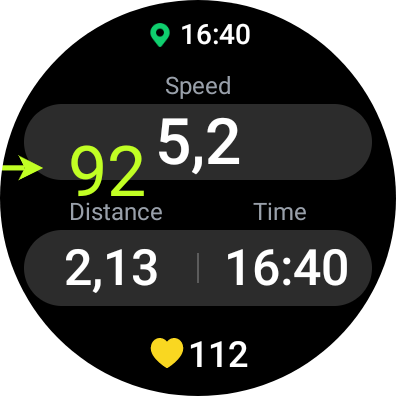
On OnePlus Watch 3 43mm that doesn't work. Floating Glucose is displayed above all apps and even displayed above the app by which you start the workout, but is not visible when the activity is started. They probably use a special non-WearOS way of displaying it. Workout apps like Strava and Google fit are too restrictive, but for running and cycling you can use Ghostracer which allows you to configure the display all kinds of activity variables. Ghostsracer should also work using the watch GPS, but it only works with phone GPS, so you need to carry your phone with you or return the watch to the seller.
I have no personal experience, but others say that Pixel watches work well with Juggluco: https://insulinclub.de/index.php?thread/37012-pixel-watch-beurteilung-von-mir
Here is a list of all WearOS watches that can run Juggluco according to Google Play: https://www.juggluco.nl/JugglucoWearOS/watches.html
Directly connecting with the sensor is reported not to work with OnePlus Watch 2 (OPWWE231): https://github.com/j-kaltes/Juggluco/issues/283
Directly connecting Xiaomi smartwatch 2 can also be problematic:
Juggluco also works with other TicWatches, but has the same problem of Bluetooth being turned off during sleep.