
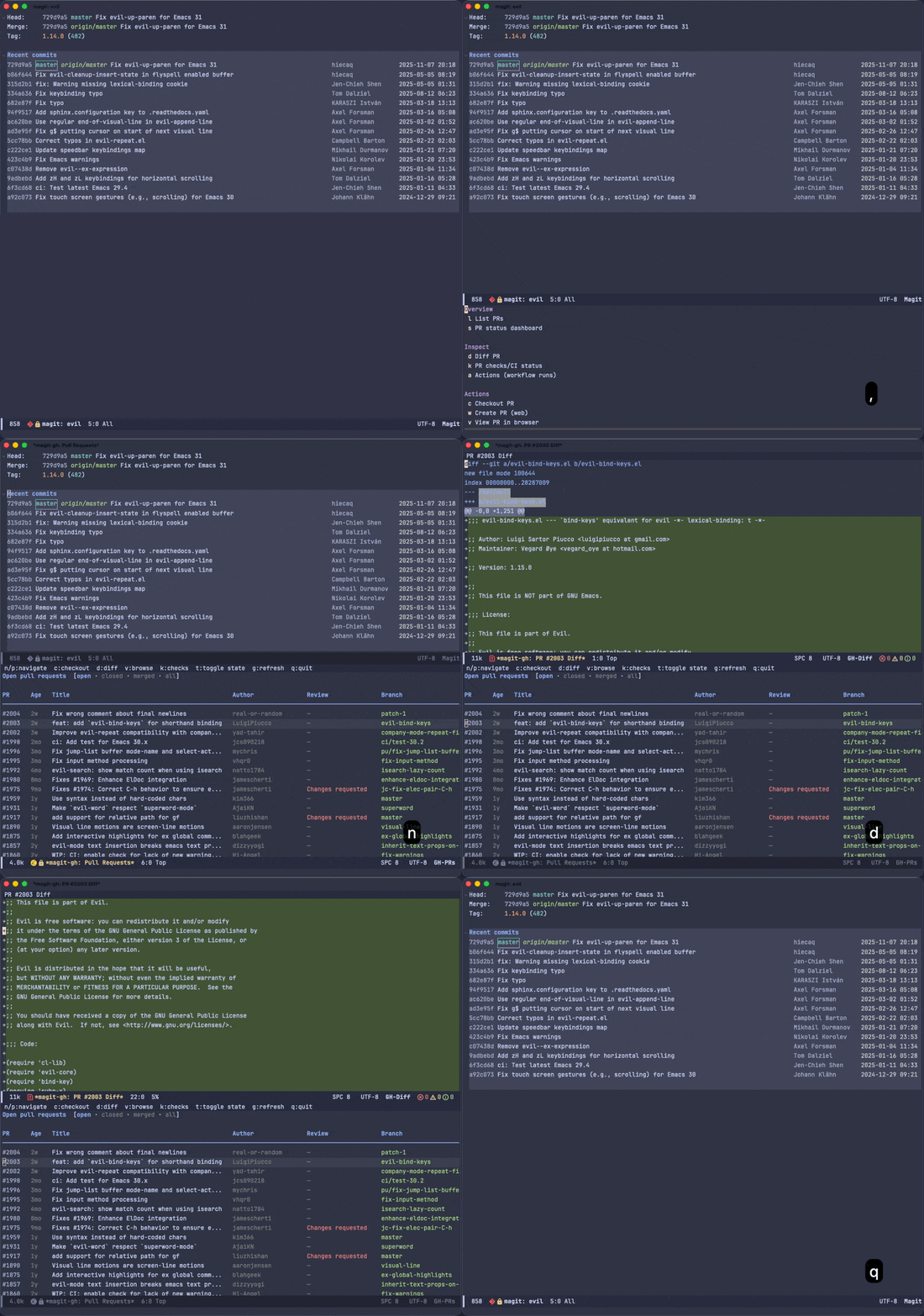
magit-gh is an Emacs package that integrates the GitHub CLI (gh) into Magit. It provides a Transient menu interface to list, checkout, and view pull requests directly from Emacs without leaving your workflow.
Features include:
- List pull requests in a dedicated buffer with review status (toggle between open, closed, merged, and all)
- PR status dashboard showing PRs you created, PRs awaiting your review, and recently merged PRs
- PR checks/CI status with color-coded pass/fail/pending results
- GitHub Actions workflow runs with status, workflow, branch, and event info
- View a PR diff in a dedicated buffer
- Checkout a PR branch with a single keystroke
- Create a new pull request (opens GitHub in the browser)
- View a PR in the browser
- View repository information in a dedicated buffer
- List an owner’s repositories
- Fork, create, and sync repositories
Forge is a fantastic and comprehensive package for interacting with Git forges from within Magit. If you need deep integration – tracking issues, managing pull requests, reading and writing comments, all stored locally – Forge is the right tool. I would highly recommend Forge over this package if that is your use case.
magit-gh takes a different approach. It delegates to the GitHub CLI (gh) for all GitHub interaction, which means:
- No local database – Forge maintains a local SQLite database via
emacsql, which can be tricky to set up (compiling native modules, resolving binary availability issues).magit-ghstores nothing locally. - No token management – Forge requires a GitHub personal access token stored in your
authinfofile (ideally encrypted with GPG).magit-ghpiggybacks ongh auth login, which you may have already configured. - Minimal dependencies – just Magit, Transient, and the
ghCLI.
The trade-off is that magit-gh is far less featureful than Forge. It’s intentionally a lightweight alternative for users who primarily want to list, checkout, and view pull requests without additional setup overhead.
- Emacs 29.1+ (may work on older versions, this minimum version is what I’ve tested at least)
- Magit 4.0.0+
- Transient 0.5.0+
- gh CLI (installed separately, must be authenticated via
gh auth login)
brew install ghsudo dnf install ghFor other operating systems, see the official installation instructions.
After installing, authenticate with your GitHub account:
gh auth loginInstall from MELPA:
M-x package-install RET magit-gh RET
Or with use-package:
(use-package magit-gh
  :ensure t
:after magit)You can access magit-gh from the Magit status menu by typing , or m-x magit-gh.
If you don’t like the , key binding to invoke magit-gh, you can set any custom value you want. Note that the variable must be set before the package loads:
(use-package magit-gh
  :ensure t
  :after magit
  :init
  (setq magit-gh-key ";")) ; Example setting key to ";" instead of the default ","
To increase the number of PRs fetched (default 30):
(use-package magit-gh
  :ensure t
  :after magit
  :custom
  (magit-gh-pr-limit 50))
The Transient menu is organized into Pull Request and Repository commands:
magit-gh
├── Overview
│   ├── l  List PRs
│   └── s  PR status dashboard
├── Inspect
│   ├── d  Diff PR
│   ├── k  PR checks/CI status
│   └── a  Actions (workflow runs)
├── Actions
│   ├── c  Checkout PR
│   ├── w  Create PR (web)
│   └── v  View PR in browser
└── Repository
    ├── i  View repo info
    ├── L  List repos
    ├── o  Open repo in browser
    ├── f  Fork repo
    ├── n  New repo
    └── S  Sync repo
When you list PRs (l), a dedicated buffer opens showing PR number, age, title, author, review status, and branch name. By default it shows open PRs, but you can toggle the state filter with t to cycle through open, closed, merged, and all. The following keybindings are available in this buffer:
| Key | Action |
|---|---|
n | Move to next PR |
p | Move to previous PR |
RET | Checkout the PR at point |
c | Checkout the PR at point |
d | View the diff for the PR at point |
v | Open the PR at point in browser |
k | View CI checks for the PR at point |
t | Toggle state (open/closed/merged/all) |
g | Refresh the PR list |
q | Close the buffer |
The status dashboard (s) shows an overview of your PRs, mirroring gh pr status. It displays three sections: PRs you created, PRs awaiting your review, and recently merged PRs in the repository. All sections show an age column (days since creation), and the “Recently merged” section adds a merged column showing time since merge. The following keybindings are available in this buffer:
| Key | Action |
|---|---|
n | Move to next PR |
p | Move to previous PR |
RET | Checkout the PR at point |
c | Checkout the PR at point |
d | View the diff for the PR at point |
v | Open the PR at point in browser |
k | View CI checks for the PR at point |
g | Refresh the status dashboard |
q | Close the buffer |
View CI check results for a PR (k) in a dedicated buffer. Press k from the transient menu to see checks for the current branch’s PR, or k on a PR row in the list or status buffers. Checks are sorted with failures first, and status is color-coded (green for pass, red for fail, yellow for pending). The following keybindings are available in this buffer:
| Key | Action |
|---|---|
n | Move to next check |
p | Move to previous check |
v | Open the check’s URL in browser |
g | Refresh the checks |
q | Close the buffer |
View GitHub Actions workflow runs (a) in a dedicated buffer. Shows recent runs across the repository with status, workflow name, branch, event trigger, and age. Status is color-coded (green for success, red for failure/cancelled, yellow for in-progress/queued). The following keybindings are available in this buffer:
| Key | Action |
|---|---|
n | Move to next run |
p | Move to previous run |
v | Open the run in browser |
g | Refresh the runs |
q | Close the buffer |
The Repository group wraps the gh repo subcommands. Commands that can act on a repository other than the current one accept an optional [owner/]repo argument: invoke them with a prefix argument (C-u) to be prompted for a target, or run them directly to act on the current repository.
| Key | Action |
|---|---|
i | View repo info (C-u for another repo) |
L | List an owner’s repositories |
o | Open the repo in the browser (C-u for another repo) |
f | Fork the current repo (opens a transient with fork options) |
n | Create a new repository (opens a transient with repo options) |
S | Sync a repository (choose: local clone or remote fork) |
Notes:
- View repo info (
i) opens a dedicated buffer showing visibility, default branch, stars, forks, upstream (for forks), topics, and URLs. - List repos (
L) opens a transient menu for listing repositories. Toggle filters for visibility, primary language, topic, forks vs. sources, archived state, and the result limit, then press the action key to read the owner (defaulting to the current repository’s owner) and display the results. - Fork (
f) opens a transient menu for forking the current repository on GitHub. The menu heading shows the repository directory being forked, and forking asks for confirmation (naming the repository) first, so you always know which repository is targeted. By default the fork is created without cloning it or modifying your local git remotes. Toggle options to clone the fork, add a git remote (--remote, which sets the fork asoriginand renames any existingorigintoupstream), set the name of that remote, rename the fork, create it in an organization, or include only the default branch. - New repo (
n) opens a transient menu for creating a repository. Choose the visibility (defaulting to private) and optionally set a description, home page, gitignore template, or license, and whether to clone the new repository or add a README. Pressing the action key prompts for the repository name (owner/nameor justname). - Sync (
S) prompts to choose between two distinct operations, rather than overloading a single argument likegh repo sync: sync local clone from upstream, which fast-forwards your local clone’s default branch from its parent and touches nothing on GitHub; and sync remote fork on GitHub, which updates your fork’s default branch on GitHub from its parent via the API. The remote sync needs push access, and theworkflowtoken scope when the upstream changes include workflow files (rungh auth refresh -s workflow).
| Key | Action |
|---|---|
v | Open the repository in browser |
o | Open the repository in browser |
g | Refresh the repository info |
q | Close the buffer |
| Key | Action |
|---|---|
n | Move to next repository |
p | Move to previous repository |
RET | View info for the repository at point |
v | Open the repository at point in browser |
o | Open the repository at point in browser |
g | Refresh the repository list |
q | Close the buffer |
| Variable | Default | Description |
|---|---|---|
magit-gh-key | , | Key to bind magit-gh in Magit buffers |
magit-gh-pr-limit | 30 | Maximum number of PRs to fetch |
magit-gh-repo-limit | 30 | Maximum number of repositories to fetch |
- [X] List pull requests (open, closed, merged, all)
- [X] Checkout a pull request
- [X] View a pull request in the browser
- [X] View PR diff
- [X] PR status dashboard (created by you, review requested, recently merged)
- [X] Age and merged columns in PR tables
- [X] PR checks/CI status
- [X] Create a new pull request
- [X] View and monitor workflow runs
- [X] View repository information
- [X] List an owner’s repositories
- [X] Fork, create, and sync repositories
Note: This feature set represents the 1.0 release. I consider the current scope complete and intentionally avoid overlapping with Forge features. If you have ideas for additional functionality, please open an issue to discuss.
Contributions are welcome! If you’d like to help integrate additional gh CLI commands or improve existing functionality, please open a pull request.
Before submitting a PR, please keep in mind that this package is intended to extend Magit with useful GitHub CLI functionality – not to duplicate what Magit already provides. If you’re unsure whether a command is a good fit, feel free to open an issue to discuss it first.
To report bugs or request features, please use the GitHub issue tracker.