This is a mockup of a social media application that allows users to post content and chat with other users. I plan to add more features to this app in the future. The focus is that you have full CRUD functionality for users and their posts. You can message other users and login/logout between users.
** If you notice a long wait time for logging in initially, the long initial login time (around 10 seconds) is likely due to Render's free tier behavior. When using Render's free tier, your backend server goes into a "sleep" mode after 15 minutes of inactivity. When a new request comes in (like a login attempt), the server needs to "wake up" which can take several seconds. This should go away after the initial login. **
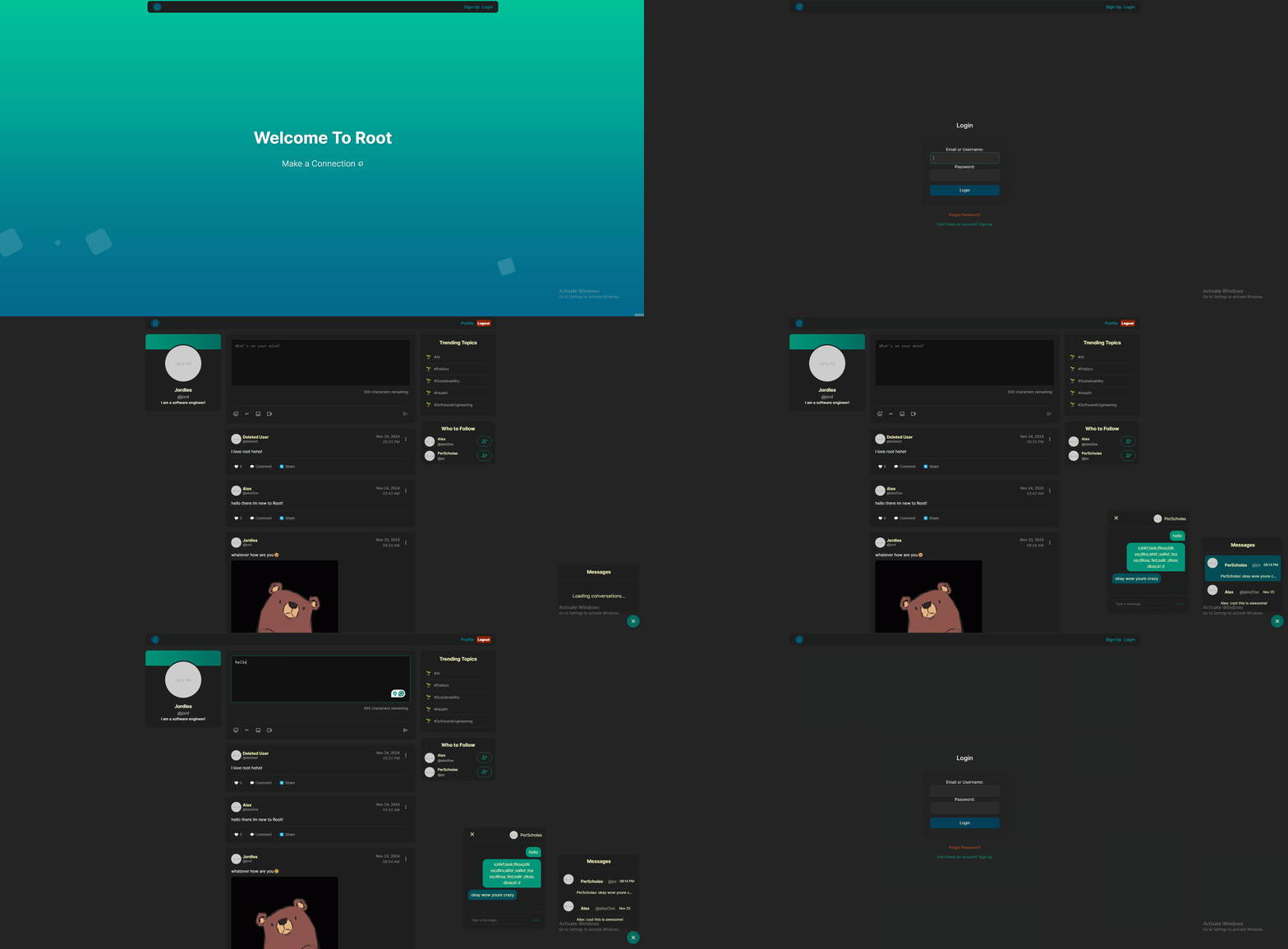
This is a simple wireframe of the early stages of my feed/landing page.
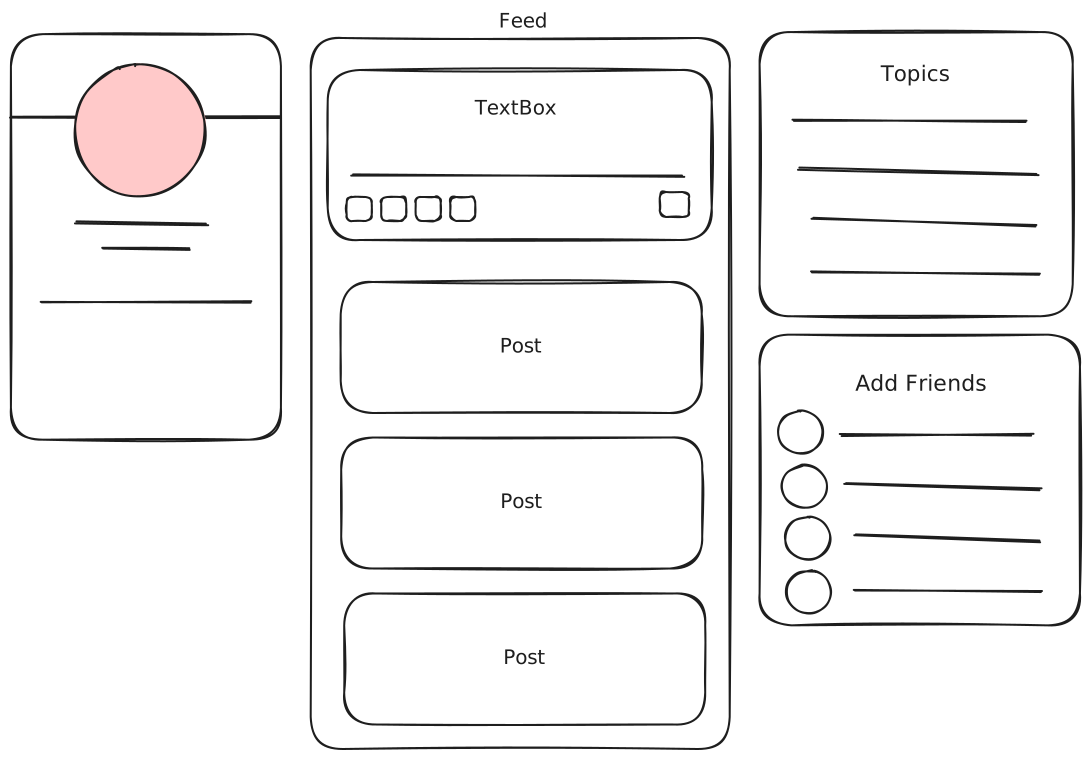
- Create, Login and Edit, Delete User configurations (Pages: Home, Sign Up, Login, Settings)
- Chat and message people
- Main Feed page for posting content with other media features added onto it (Pages: Feed)
- Post, edit, delete content on the feed page, which includes emojis, gifs, images and videos
- Utilizing Cloudinary to store uploaded images and videos, max file size is 500mb.
- Ping our backend server to check if it is online and avoid longer wait time for initial logins.
When trying to combine the frontend and backend together, I learned a lot about how to structure a project. One of the things I was eager to implement was js web tokens, but I unfortunately did not have time to learn and implement them. My authorization is checked through local storage, which definitely not safe or ideal. Other things in my local storage include storing your favorite gifs when using the tenor api to grab gifs from. I did implement nodemailer to send emails to users when they reset their password, which was a really cool and fun challenge. It uses its own token to verify the user through the email link. There are various other new hooks i used from react, and react-router-dom had things like navigate which saved me time to switching between pages.
Password Reset - to implement this functionality I used NodeMailer to send emails to users with a link that they can click on to reset their password. I also used a token to verify the user's email address and prevent unauthorized access.
Reset Token is:
- One-time use only
- Randomly generated using Node's crypto library
- Stored as a hash in the database
- Time-limited (expires in 30 minutes) and will be deleted from the database
Flow:
- User clicks "Forgot Password?" -> Backend verifies email
- Enters email → Backend generates token
- User gets email with reset link
- Clicks link → Enters new password
- Backend verifies token and updates password
| (20%) Project Structure, Standardization, and Convention | Weight | Finished |
|---|---|---|
| Project is organized into appropriate files and directories, following best practices. | 2% | ✅ |
| Project contains an appropriate level of comments. | 2% | ✅ |
| Project is pushed to GitHub, and contains a README file that documents the project, including an overall description of the project. | 5% | ✅ |
| Standard naming conventions are used throughout the project. | 2% | ✅ |
| Ensure that the program runs without errors (comment out things that do not work, and explain your blockers - you can still receive partial credit). | 4% | ✅ |
| Level of effort displayed in creativity, presentation, and user experience. | 5% | ✅ |
| (12%) Core JavaScript | Weight | Finished |
|---|---|---|
| Demonstrate proper usage of ES6 syntax and tools. | 2% | ✅ |
| Use functions and classes to adhere to the DRY principle. | 2% | ✅ |
| Use Promises and async/await, where appropriate. | 2% | ✅ |
| Use Axios or fetch to retrieve data from an API. | 2% | ✅ |
| Use sound programming logic throughout the application. | 2% | ✅ |
| Use appropriate exception handling. | 2% | ✅ |
| (9%) Database | Weight | Finished |
|---|---|---|
| Use MongoDB to create a database for your application. (used mongoose) | 2% | ✅ |
| Apply appropriate indexes to your database collections. | 2% | ✅ |
| able schemas for your data by following data modeling best practices | 2% | ✅ |
| (19%) Server | Weight | Finished |
|---|---|---|
| Create a RESTful API using Node and Express. * For the purposes of this project, you may forgo the HATEOAS aspect of REST APIs. |
7% | ✅ |
| Include API routes for all four CRUD operations. | 5% | ✅ |
| Utilize the native MongoDB driver or Mongoose to interface with your database. | 5% | ✅ |
| 2% |
| (35%) Front-End Development | Weight | Finished |
|---|---|---|
| Use React to create the application’s front-end. | 10% | ✅ |
| Use CSS to style the application. | 5% | ✅ |
| Create at least four different views or pages for the application. | 5% | ✅ |
| Create some form of navigation that is included across the application’s pages, utilizing React Router for page rendering. | 5% | ✅ |
| Use React Hooks or Redux for application state management. | 5% | ✅ |
| Interface directly with the server and API that you created. | 5% | ✅ |
emoji-picker-react - for emoji picker on posts and messages
memo - for preventing unnecessary re-renders when react re-renders media preview because of CreatePost parent re-renders (The difference between these two is that : useRef=> "Keep this value the same between renders" vs memo => "Don't render at all if nothing changed" )
tenor- incorporated gif images into my messages and post functionalities
cloudinary - media storage