A production-grade, serverless three-tier web application built entirely on AWS managed services — no EC2, no containers, no servers to manage.
Live Architecture: S3 + CloudFront → API Gateway → Lambda → DynamoDB


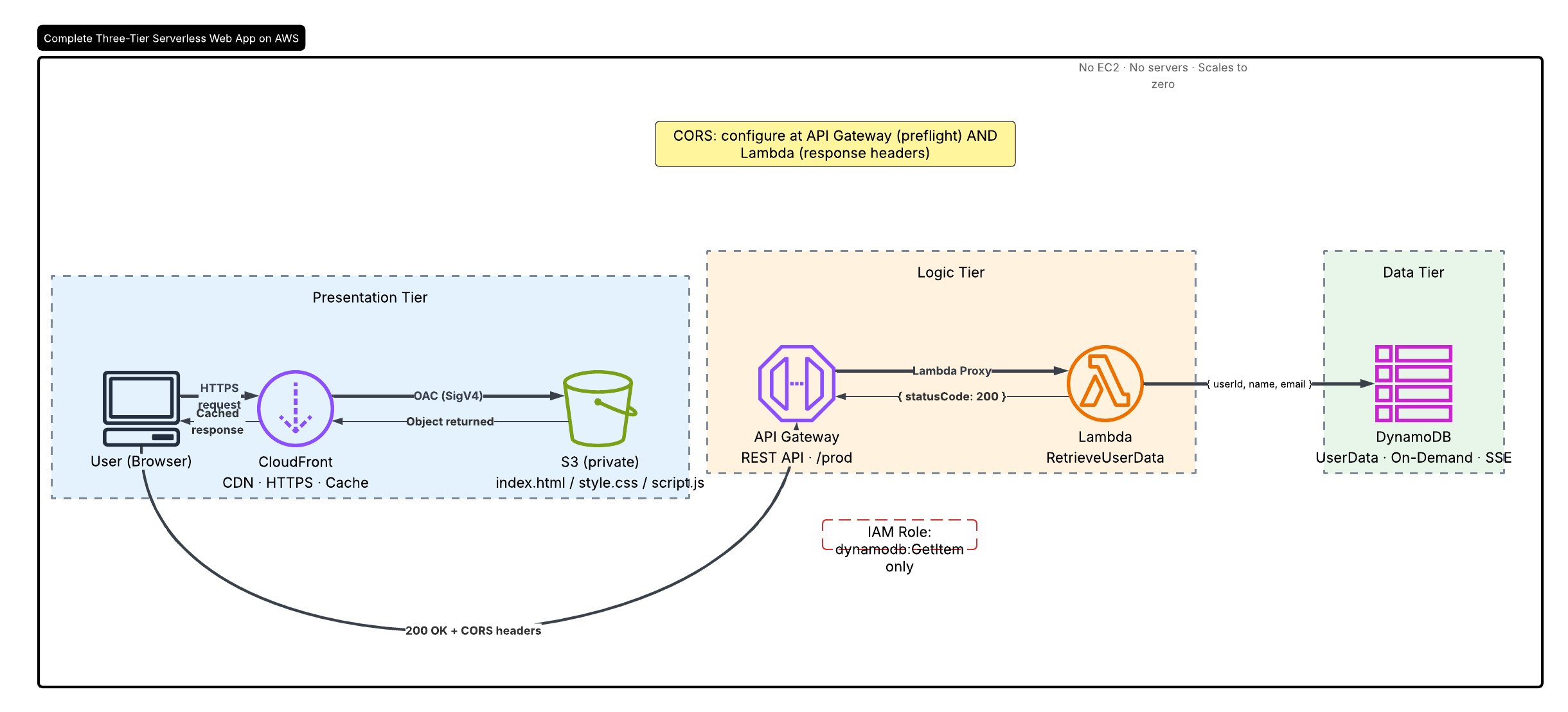
📖 Full walkthrough: 4-part serverless series on Dev.to
⭐ Found this useful? Star the repo — it helps others discover it and motivates the next part of the series.
┌─────────────────────────────────────────────────────────────────┐
│                        PRESENTATION TIER                        │
│                                                                 │
│   Browser  ──►  CloudFront (CDN, HTTPS, edge caching)          │
│                      │  Origin Access Control (OAC / SigV4)    │
│                      ▼                                          │
│              S3 Bucket (private, Block All Public Access ON)    │
│              [index.html · style.css · script.js]               │
└─────────────────────────────────────────────────────────────────┘
                         │  GET /users?userId={id}
                         ▼
┌─────────────────────────────────────────────────────────────────┐
│                          LOGIC TIER                             │
│                                                                 │
│   API Gateway (REST API, /prod stage)                          │
│        │  Lambda Proxy Integration                              │
│        ▼                                                        │
│   Lambda: RetrieveUserData (Node.js 22, ESM)                   │
│        │  Inline IAM policy: dynamodb:GetItem on UserData ARN  │
└─────────────────────────────────────────────────────────────────┘
                         │
                         ▼
┌─────────────────────────────────────────────────────────────────┐
│                          DATA TIER                              │
│                                                                 │
│   DynamoDB: UserData table                                      │
│   Partition key: userId (String)  ·  On-Demand capacity        │
│   Encryption at rest: AWS-managed key (SSE enabled)            │
└─────────────────────────────────────────────────────────────────┘
| Decision | Choice | Why |
|---|---|---|
| S3 access | CloudFront OAC (SigV4) | Bucket stays private; no public ACLs needed |
| API type | API Gateway REST (proxy integration) | Full control of request/response; stage-level throttling |
| Lambda runtime | Node.js 22 ESM | Native ES modules; no bundler required |
| DynamoDB capacity | On-Demand (PAY_PER_REQUEST) | No capacity planning; scales to zero |
| IAM | Custom inline policy | dynamodb:GetItem on the specific table ARN only |
| CORS | Configured at both API Gateway + Lambda | Proxy integration requires headers in the Lambda response |
| IaC | CloudFormation | Single-command full-stack deploy and teardown |
aws-three-tier-serverless/
├── frontend/
│   ├── index.html              # Page markup
│   ├── style.css               # Styling
│   └── script.js               # Fetch logic (update API_URL before uploading)
│
├── backend/
│   └── lambda/
│       ├── index.mjs           # Lambda handler (Node.js ESM)
│       └── package.json
│
├── infrastructure/
│   ├── cloudformation/
│   │   └── three-tier-stack.yaml   # Full stack: S3, CF, API GW, Lambda, DynamoDB, IAM
│   ├── iam/
│   │   └── lambda-execution-policy.json  # Minimal IAM policy (reference)
│   └── s3-bucket-policy.json   # OAC bucket policy (reference)
│
└── docs/
    └── articles/               # Published article series (Dev.to / Medium)
        ├── part-1-cloudfront-s3.md
        ├── part-2-lambda-api-gateway.md
        ├── part-3-dynamodb-iam.md
        └── part-4-full-app-cors.md
The entire stack — S3 bucket, CloudFront distribution, DynamoDB table, Lambda function, API Gateway, and IAM roles — is defined in a single CloudFormation template.
Prerequisites: AWS CLI configured with appropriate permissions.
aws cloudformation deploy \
  --template-file infrastructure/cloudformation/three-tier-stack.yaml \
  --stack-name three-tier-app \
  --capabilities CAPABILITY_NAMED_IAM \
--parameter-overrides ProjectName=three-tier-appaws cloudformation describe-stacks \
--stack-name three-tier-app \
--query "Stacks[0].Outputs" \
--output tableYou will see:
CloudFrontURL— open this in your browserAPIInvokeURL— paste this intofrontend/script.jsasAPI_URLS3BucketName— upload your frontend files here
Open frontend/script.js and replace:
const API_URL = "https://YOUR-API-ID.execute-api.YOUR-REGION.amazonaws.com/prod/users";with the APIInvokeURL from step 2.
aws s3 sync frontend/ s3://YOUR-BUCKET-NAME/aws dynamodb put-item \
--table-name UserData \
--item '{
"userId": {"S": "1"},
"name": {"S": "Test User"},
"email": {"S": "test@example.com"}
}'aws cloudfront create-invalidation \
--distribution-id YOUR-DISTRIBUTION-ID \
--paths "/*"Visit the CloudFrontURL from step 2. Enter 1 in the User ID field and click Get User Data. You should see the DynamoDB item returned as JSON.
# Empty the S3 bucket first (CloudFormation cannot delete non-empty buckets)
aws s3 rm s3://YOUR-BUCKET-NAME --recursive

# Delete the stack
aws cloudformation delete-stack --stack-name three-tier-app- S3 bucket has
BlockPublicAcls,BlockPublicPolicy,IgnorePublicAcls, andRestrictPublicBucketsall set totrue - CloudFront accesses S3 via Origin Access Control (OAC), signing every request with SigV4
- The S3 bucket policy only permits
s3:GetObjectto thecloudfront.amazonaws.comservice principal, conditioned on the exact distribution ARN - CloudFront enforces HTTPS via "Redirect HTTP to HTTPS" viewer protocol policy
- Lambda execution role uses a custom inline policy — not a managed policy
- Permissions:
dynamodb:GetItemscoped to the specificUserDatatable ARN - CloudWatch Logs access scoped to the function's log group prefix
- CORS headers restrict
Access-Control-Allow-Originto the CloudFront domain in production
- DynamoDB table has Server-Side Encryption (SSE) enabled with AWS-managed keys
- No direct internet access to DynamoDB — all reads go through Lambda
- Lambda's IAM role only allows
GetItem— noScan, noQuery, no writes
The frontend (CloudFront domain) and backend (API Gateway domain) are different origins. Both locations must be configured:
API Gateway: Enable CORS on the /users resource. This handles the OPTIONS preflight request.
Lambda response: Every response object must include CORS headers. With Lambda Proxy Integration, API Gateway passes the Lambda response directly — it does not inject headers automatically.
// Every response must include these headers
const CORS_HEADERS = {
  "Access-Control-Allow-Origin": process.env.ALLOWED_ORIGIN,
  "Access-Control-Allow-Methods": "GET,OPTIONS",
  "Access-Control-Allow-Headers": "Content-Type,Authorization",
};
Set ALLOWED_ORIGIN to your CloudFront URL (e.g. https://d1234abcd.cloudfront.net) in the Lambda environment variables. Never use * in production.
This project is documented in a four-part article series published on Dev.to and Medium:
| Part | Title | Read |
|---|---|---|
| 1 | How I Delivered a Static Website Globally with S3 and CloudFront (And the Security Mistake I Almost Made) | Read on Dev.to |
| 2 | Building a Serverless REST API with Lambda and API Gateway: From Zero to OpenAPI Docs | Read on Dev.to |
| 3 | Least-Privilege IAM for Lambda: Why I Replaced the AWS Managed Policy With My Own | Read on Dev.to |
| 4 | Wiring Together a Three-Tier Serverless Web App on AWS (And the CORS Bug That Broke Everything) | Read on Dev.to |
- Serverless architecture — Lambda, API Gateway, DynamoDB, S3, CloudFront
- Security — OAC, least-privilege IAM, SSE, private S3, CORS hardening
- Infrastructure as Code — CloudFormation template covering all five services
- Debugging — CORS, CloudFront cache invalidation, IAM
AccessDeniedresolution - API design — REST API, Lambda proxy integration, OpenAPI documentation, stages
If this project helped you understand secure serverless architecture on AWS, please consider giving it a star. It boosts the repo's visibility and helps more people find a production-grade reference.
Kehinde Abiuwa — AWS Certified Solutions Architect (Professional) | Microsoft AZ-305
- Email: abiuwakehinde96@outlook.com
- LinkedIn · Dev.to