


Generic sensor manager, abstractions and bindings of multiple sensors libraries: Honeywell, Plantower, Panasonic, Sensirion, etc. and CO2 sensors. Also it's handling other environment sensors. This library is for general purpose, but also is the sensors library base of CanAirIO project.
For developers you can also check the complete library documentation here
| Don't forget to star ⭐ this repository |
| Sensor model | UART | I2C | Detection mode | Status |
|---|---|---|---|---|
| Honeywell HPMA115S0 | Yes | --- | Auto | DEPRECATED |
| Panasonic SN-GCJA5L | Yes | Yes | Auto | STABLE |
| Plantower models | Yes | --- | Auto | STABLE |
| Nova SDS011 | Yes | --- | Auto | STABLE |
| IKEA Vindriktning | Yes | --- | Select | STABLE |
| IKEA Vindstyrka | No | Yes | Auto | STABLE |
| Sensirion SPS30 | Yes | Yes | Select / Auto | STABLE |
NOTE:
Panasonic via UART on ESP8266 may need to be selected in detection.
| Sensor model | UART | I2C | Detection mode | Status |
|---|---|---|---|---|
| Sensirion SCD30 | --- | Yes | Auto | STABLE |
| Sensirion SCD4x | --- | Yes | Auto | STABLE |
| Sensirion SEN5x | --- | Yes | Auto | STABLE |
| Sensirion SGP41 | --- | Yes | Auto | TESTING |
| MHZ19 | Yes | --- | Select | STABLE |
| CM1106 | Yes | --- | Select | STABLE |
| SenseAir S8 | Yes | --- | Select | STABLE |
| Device model | Sensors Supported | Status |
|---|---|---|
| Airgradient OpenAir Outdoor | CO2, PM, VOC, NOX, T, H | STABLE |
| M5Stack Air Quality Kit | CO2, PM, VOC, T, H | DEVEL |
| Sensor model | Protocol | Detection mode | Status |
|---|---|---|---|
| AM2320 | i2c | Auto | STABLE |
| SHT31 | i2c | Auto | STABLE |
| AHT10 | i2c | Auto | STABLE |
| BME280 | i2c | Auto | STABLE |
| BMP280 | i2c | Auto | STABLE |
| BME680 | i2c | Auto | STABLE |
| DfRobot SEN0469 NH3 | i2c | Auto | TESTING |
| DFRobot SEN0466 CO | i2c | Auto | TESTING |
| DFRobot SEN0472 O3 | i2c | Auto | TESTING |
| DFRobot SEN0471 NO2 | i2c | Auto | TESTING |
| Geiger CAJOE | GPIO | Select | TESTING |
| NoiseSensor (I2C slave) | I2C | Auto | TESTING |
| DHTxx | TwoWire | Select | DISABLED |
NOTE:
DHT22 is supported but is not recommended. Please see the documentation.
| Platform | Variants | Notes | Status |
|---|---|---|---|
| ESP32 | DevKIt and Similar | (recommended) | STABLE |
| ESP32S2 | LilyGo, Devkit, Lolin | (recommended) | STABLE |
| ESP32S3 | LilyGo, XIAO, Devkit | (recommended) | STABLE |
| ESP32C3 | Devkit, AirGradient, Lolin | (recommended) | STABLE |
| ESP32C6 | XIAO | unstable | DEVEL |
| ESP8266 | 12 | D1MINI tested and similar (old) | STABLE |
| Atmelsam | Seeed Wio Terminal | Only works via i2c on left port | STABLE |
| Arduino | Atmel | Some third party libraries fails | IN PROGRESS |
- Unified variables and getters for all sensors
- Auto UART port selection (Hw, Sw, UART1, UART2, etc)
- Multiple i2c sensors and one UART sensor supported at the same time
- Two I2C channel supported (Wire and Wire1)
- Real time registry of sensor units (see multivariable)
- Get vendor names of all devices detected
- Preselected main stream UART pins from popular boards
- Auto config UART port for Plantower, Honeywell and Panasonic sensors
- Unified calibration trigger for all CO2 sensors
- Unified CO2 Altitude compensation
- Unified temperature offset for CO2 and environment sensors
- Automatic I2C NoiseSensor integration with LAeq, PMI and peak/min tracking on ESP32-C3/S2/S3 (outputs in mV with sensor validation)
- Add support for Kelvin and Fahrenheit on environment and CO2 sensors
- Public access to main objects of each library (full methods access)
- Get unit symbol and name and each sub-sensor
- Get the main group type: NONE, PM, CO2 and ENV.
- Basic debug mode support toggle in execution
Full list of all third party libraries supported here
- Open platformio.ini, a project configuration file located in the root of PlatformIO project.
- Add the following line to the lib_deps option of [env:] section:
hpsaturn/CanAirIO Air Quality Sensors Library@^0.7.7 - Build a project, PlatformIO will automatically install dependencies.
Or via command line:7
pio pkg install --library "hpsaturn/CanAirIO Air Quality Sensors Library@^0.7.7"
sensors.setOnDataCallBack(&onSensorDataOk);   // all data read callback
sensors.init(); // start all sensors andYou can review a full implementation on CanAirIO project firmware, but a little brief is the next:
/// sensors data callback
void onSensorDataOk() {
    Serial.print("PM2.5: " + String(sensors.getPM25()));
    Serial.print(" CO2: "  + String(sensors.getCO2()));
    Serial.print(" CO2H: " + String(sensors.getCO2humi()));
    Serial.print(" CO2T: " + String(sensors.getCO2temp()));
    Serial.print(" H: "    + String(sensors.getHumidity()));
    Serial.println(" T: "  + String(sensors.getTemperature()));
}

/// sensors error callback
void onSensorDataError(const char * msg){
    Serial.println("Sensor read error: "+String(msg));
}

void setup() {

    sensors.setOnDataCallBack(&onSensorDataOk);     // all data read callback
    sensors.setOnErrorCallBack(&onSensorDataError); // [optional] error callback
    sensors.setSampleTime(15);                      // [optional] sensors sample time (default 5s)
    sensors.setTempOffset(cfg.toffset);             // [optional] temperature compensation
    sensors.setCO2AltitudeOffset(cfg.altoffset);    // [optional] CO2 altitude compensation
    sensors.setSeaLevelPressure(1036.25);           // [optional] Set sea level pressure in hpa
    sensors.setDebugMode(false);                    // [optional] debug mode to get detailed msgs
    sensors.detectI2COnly(true);                    // [optional] force to only i2c sensors
    sensors.setTemperatureUnit(TEMPUNIT::KELVIN);   // comment it for Celsius or set Fahrenheit
    sensors.init();                                 // Auto detection to UART and i2c sensors

    // Alternatives only for UART sensors (TX/RX):

    // sensors.init(SENSORS::Auto);                 // Auto detection to UART sensors (Honeywell, Plantower, Panasonic)
    // sensors.init(SENSORS::SGCJA5);               // Force UART detection to Panasonic sensor
    // sensors.init(SENSORS::SSPS30);               // Force UART detection to Sensirion sensor
    // sensors.init(SENSORS::SMHZ19);               // Force UART detection to Mhz14 or Mhz19 CO2 sensor
    // sensors.init(SENSORS::SDS011);               // Force UART detection to SDS011 sensor
    // sensors.init(SENSORS::IKEAVK);               // Force UART detection to IKEA Vindriktning sensor
    // sensors.init(SENSORS::SCM1106);              // Force UART detection to CM1106 CO2 sensor
    // sensors.init(SENSORS::SAIRS8);               // Force UART detection to SenseAirS8 CO2 sensor
    // sensors.init(SENSORS::Auto,PMS_RX,PMS_TX);   // Auto detection on custom RX,TX

    // Also you can access to sub-library objects, and perform for example calls like next:

    // sensors.sps30.sleep()
    // sensors.bme.readPressure();
    // sensors.mhz19.getRange();
    // sensors.scd30.getTemperatureOffset();
    // sensors.aht10.readRawData();
    // sensors.s8.set_ABC_period(period)
    // ...

    delay(500);
}

void loop() {
    sensors.loop();  // read sensor data and show it
}- Library (manufacturer): DFRobot_MultiGasSensor — the PlatformIO dependency is in
unified-lib-deps.inipointing to that repository. - Fixed I²C addresses (group 7):
Sensor Address Reference CO 0x78 SEN0466 O₃ 0x79 SEN0472 NH₃ 0x7A SEN0469 NO₂ 0x7B SEN0471 - Custom addresses: any address can be overridden via
build_flags, e.g.:
build_flags = -D DFROBOT_CO_I2C_ADDR=0x74 - Preheating: the wiki recommends >5 min at power-on (and up to 24 h if the sensor has been idle for a long time).
- Compensation: the library applies its own temperature and pressure compensation using external sensors (BME280, etc.) or the DFRobot's own internal temperature if no external sensor is available.
NoiseSensor auto-detection uses the same I2C bus as the rest of the sensors (Wire) and is available on all boards supported by the sensorlib.
When the NoiseSensor module is detected via I2C on the main bus (Wire), the library exposes dedicated helpers:
getNoise()– instantaneous reading in mVgetNoiseAverage()/getNoisePeak()/getNoiseMin()– LAeq statistics per cycle in mVgetNoiseLegalAverage()/getNoiseLegalMaximum()– legal averages in mVgetNoiseLd()- Day index in dbgetNoiseLe()- Evening index in dbgetNoiseLn()- Night index in dbgetNoiseLden()- Global day-evening-night index in dbgetNoiseL90()- Low noise level in db
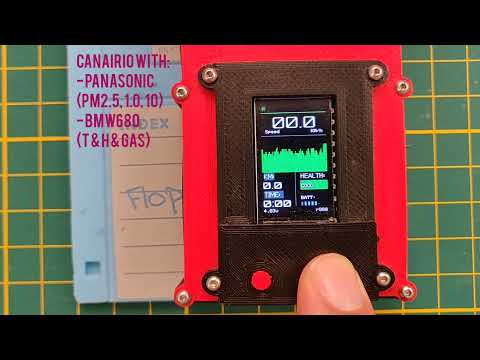
In this demo on two different devices with multiple sensors, you can choose the possible sub sensors units or variables:
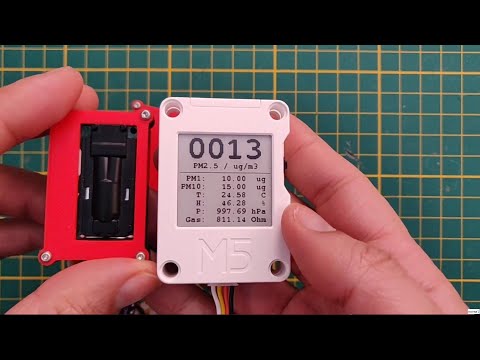
In this demo on a simple sketch you could have a dynamic list of variables of multiple sensor brands:
The last version added new getters to have the current status of each unit of each sensor connected to the device in real time. Also you can retrieve the list of device names and other stuff:
For example:
#include <Arduino.h>
#include <Sensors.hpp>

void printSensorsDetected() {
    uint16_t sensors_count =  sensors.getSensorsRegisteredCount();
    uint16_t units_count   =  sensors.getUnitsRegisteredCount();
    Serial.println("-->[MAIN] Sensors detected count\t: " + String(sensors_count));
    Serial.println("-->[MAIN] Sensors units count  \t: "  + String(units_count));
    Serial.print(  "-->[MAIN] Sensors devices names\t: ");
    int i = 0;
    while (sensors.getSensorsRegistered()[i++] != 0) {
        Serial.print(sensors.getSensorName((SENSORS)sensors.getSensorsRegistered()[i - 1]));
        Serial.print(",");
    }
    Serial.println();
}

void printSensorsValues() {
    Serial.println("\n-->[MAIN] Preview sensor values:");
    UNIT unit = sensors.getNextUnit();
    while(unit != UNIT::NUNIT) {
        String uName = sensors.getUnitName(unit);
        float uValue = sensors.getUnitValue(unit);
        String uSymb = sensors.getUnitSymbol(unit);
        Serial.print("-->[MAIN] " + uName + ": " + String(uValue) + " " + uSymb);
        unit = sensors.getNextUnit();
    }
}

void onSensorDataOk() {
    Serial.println("======= E X A M P L E   T E S T =========");
    printSensorsDetected();
    printSensorsValues();
    Serial.println("=========================================");
}

/******************************************************************************
*  M A I N
******************************************************************************/

void setup() {
    Serial.begin(115200);
    delay(100);
    sensors.setSampleTime(5);                       // config sensors sample time interval
    sensors.setOnDataCallBack(&onSensorDataOk);     // all data read callback
    sensors.setDebugMode(true);                     // [optional] debug mode
    sensors.detectI2COnly(false);                   // disable force to only i2c sensors
    sensors.init();                                 // Auto detection to UART and i2c sensors
}

void loop() {
    sensors.loop();  // read sensor data and show it
}
Units are registered automatically so they are available for multivariable dashboards alongside the rest of the sensors.
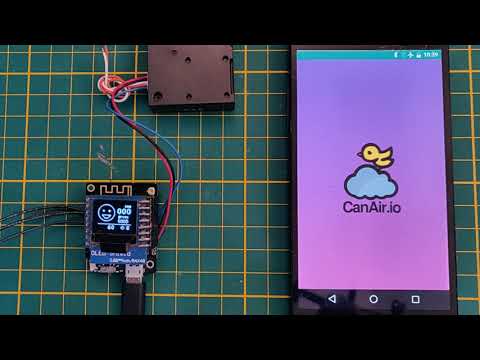
CanAirIO sensorlib auto configuration demo on Youtube
The current version of library supports 3 kinds of wiring connection, UART, i2c and TwoWire, in the main boards the library uses the default pins of each board, but in some special cases the pins are:
The library has pre-defined some UART pin configs, these are selected at compile time. Maybe you don't need to change anything with your board, and maybe the following alternatives work for you:
| Board model | TX | RX | Notes |
|---|---|---|---|
| ESP32GENERIC | 1 | 3 | ESP32 Pio defaults |
| TTGOT7 / ESP32DEVKIT / D1MINI / NODEFINED | 16 | 17 | CanAirIO devices ** |
| TTGO_TDISPLAY | 12 | 13 | |
| M5COREINK | 14 | 13 | |
| TTGO TQ | 18 | 13 | |
| HELTEC | 18 | 17 | |
| WEMOSOLED | 15 | 13 | |
| ESP32PICOD4 | 3 | 1 |
** These pins are used when you compile your project without specifying any build variable or when your board isn't in the list.
Also you could define a custom UART pins in the init() method and select specific sensors model, like this:
sensors.init(SENSORS::SDS011,yourRX,yourTX); // custom RX, custom TX pins.We are using the default pins for each board, sometimes the pins are 21,22, please check your board schematic.
For now we are using it only for DHT sensors on PIN 23. For more info please review the following lines here.
We recommend PlatformIO because it is easier than Arduino IDE. For that, please first install PlatformIO and its command line tools (Windows, macOS and Linux), the pio command, then connect your compatible board to the USB and run the following command:
pio run -e esp32 --target uploadAlso you can see some examples that have platformio.ini files for your project.
Only import the ino file of the sample and install the libraries listed in library.json and this library. Complete list of libraries used here
To run the examples, you first need to install arduino-cli or the Arduino IDE with the libraries referenced in lib_deps in the file platformio.ini, because Arduino doesn't install them automatically like PlatformIO. Then put the CanAirIO sensor library in your library directory, you can download it from the releases section.
Also you need to add the alternative links to support the ESP32 boards:
arduino-cli config initin the .arduino15/arduino-cli.yaml file add:
board_manager:
  additional_urls:
    - https://arduino.esp8266.com/stable/package_esp8266com_index.json
    - https://raw.githubusercontent.com/espressif/arduino-esp32/gh-pages/package_esp32_index.json
From arduino-cli you can run the basic example on an ESP32 board following these steps:
arduino-cli core update-index
arduino-cli core install esp32:esp32:lolin32
arduino-cli compile --fqbn esp32:esp32:lolin32 basic
arduino-cli upload --fqbn esp32:esp32:lolin32:UploadSpeed=115200 -p /dev/ttyUSB0 basic
where basic is the basic example in the examples directory.
If you want to contribute to the code or documentation, consider posting a bug report, feature request, or a pull request.
When creating a pull request, we recommend that you do the following:
- Clone the repository
- Create a new branch for your fix or feature. For example, git checkout -b fix/my-fix or git checkout -b feat/my-feature.
- Run any clang formatter if it is code, for example using the
vscodeformatter. We are using Google style. More info here - Documenting the PR description or code will be great
- Target your pull request to be merged with the
develbranch
Also you can make a donation, become a patron, or buy a device:
- Via Ethereum:
0x1779cD3b85b6D8Cf1A5886B2CF5C53a0E072C108 - Via Liberapay: CanAirIO in LiberaPay
- Buy a device: CanAirIO Bike in Tindie
- Inviting us a coffee
- Auto detection for UART sensors (Honeywell, Panasonic and Plantower)
- Added SPS30 library with auto UART detection
- Disable/enable logs (debug mode flag)
- Added bme280, bmp280, aht10, sht31, am2320 i2c sensors
- Exposed public sub-libraries objects, sps30, aht10, etc.
- Added old DHT sensors
- Added CO2 sensors: MHZ19, SCD30, CM1106 via UART
- Added SDS011 particle meter
- BME680 support
- Added Sensirion SPS30 and Panasonic SN-GCJA5 via i2c
- Enable/Disable UART detection for force only i2c
- Temperature and Altitude compensation
- SenseAir S8 via UART support
- Multivariable selection (getNextUnit(), getUnitName(), etc)
- Two I2C channel supported for M5Stack Devices (M5StickC tested)
- Added CO, NO2 and NH3 sensors
- Added Geiger sensor support
- New IKEA VINDSTYRKA device support
- Sea level setting for Pressure sensors and others
- Support for second UART port
- CanAirIO Device: ESP32 Air quality device for mobile and fixed stations. (PM2.5 and CO2)
- CO2 Gadget: A high-quality CO2 meter with color display. (CO2)
- M5CoreInk Multi Sensor: Wall CO2, T, H, P, Alt sensor with low consumption (30 days)
- (Please add yours)
Thanks to all collaborators and the CanAirIO community for testing and reports. Visit us on Telegram