




Kache is a local-first compiler cache for Rust and C/C++. It stores build outputs by content, reuses them across worktrees, and can copy them to S3-compatible or filesystem remotes.
Built by Kunobi.
Benchmarks · Kache vs sccache · CI setup
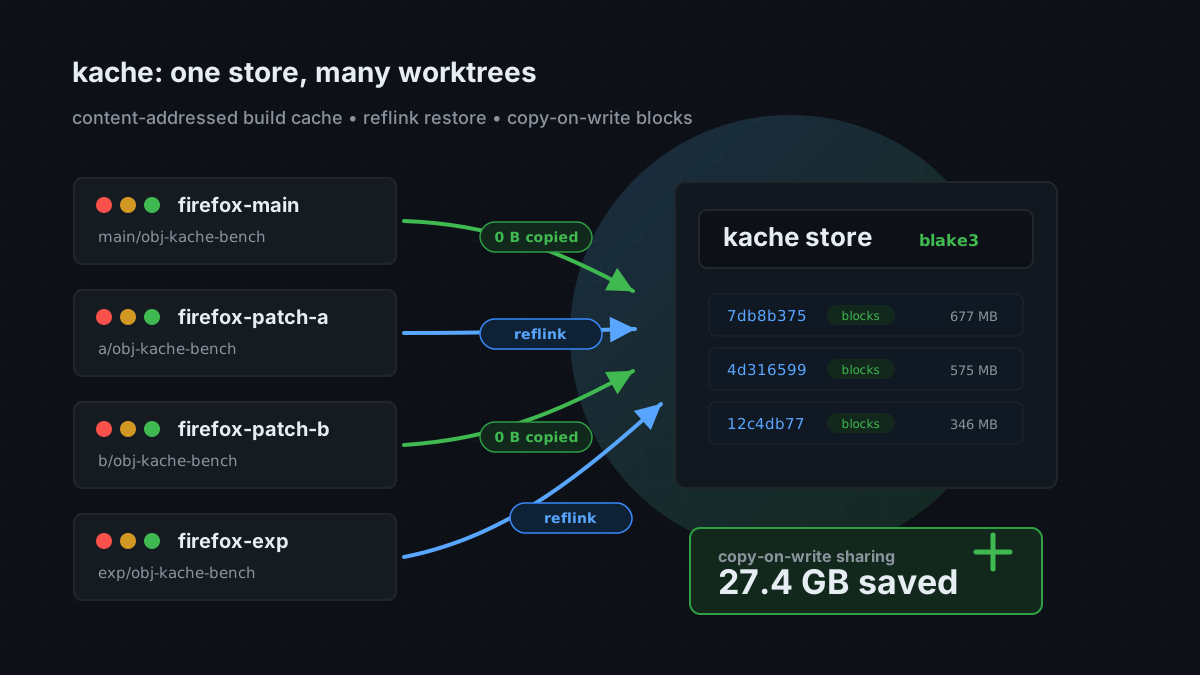
See how Kache shares build outputs across worktrees →
cargo install kache
kache init --check   # print the proposed changes
kache init           # apply them
kache init sets rustc-wrapper in Cargo's config. On Unix it also adds the [env] keys for build-script C and C++. Use kache init --no-service if you want persistent Cargo configuration without an OS service.
Your Cargo commands do not change.
After kache init, build the same revision in two temporary worktrees. Each gets its own target directory, so your existing build outputs stay in place. Use the report to check cache hits and investigate misses.
It also includes a trial without persistent Cargo configuration. That trial enables the Rust wrapper only; native builds need the C/C++ setup.
| Workload | Status | Notes |
|---|---|---|
| Rust libraries and build scripts | Supported | Use RUSTC_WRAPPER=kache or kache init |
| Rust executables | Supported on Linux and macOS | Disabled by default on Windows |
| C and C++ object files | Supported | Build scripts via kache init; other builds via shims or CC/CXX |
| Local storage | Built in | Content-addressed store with garbage collection |
| S3-compatible remote storage | Built in | Includes AWS S3, MinIO, and Cloudflare R2 |
| Filesystem remote storage | Built in | Useful for shared disks and CI volumes |
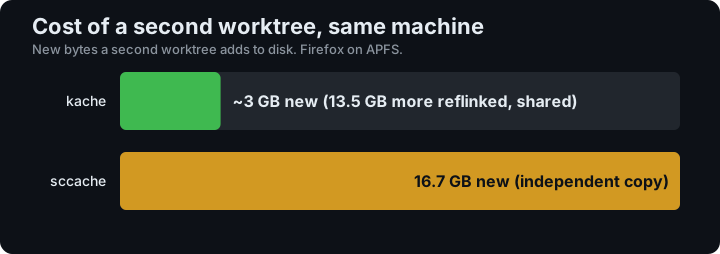
In a Firefox 151 benchmark with Kache 0.7.0 on macOS/APFS, the second worktree added about 3 GB of new data. Read the measurements and methodology →
Need to choose between compiler caches? Read Kache or sccache?.
The scheduled benchmark workflow runs real cold/warm builds of Firefox, LLVM, Substrate, SurrealDB, Lance, OpenDAL, and eza on Linux, compares Firefox with sccache, and exercises Firefox on Windows. It also measures how much of a Firefox build survives a source update.
Each run checks its own measurement validity and uploads reports, traces, and logs for 30 days. Treat timing or hit-rate numbers as evidence only when the individual job succeeds and its benchmark verdict is ok.
See the benchmark setup and report guide →
The official action installs Kache and wires it into the build:
- uses: kunobi-ninja/kache-action@v1

- run: cargo build --locked
See the CI guide for GitHub Actions and shell-based CI examples.
On Unix, install compiler-name shims and put that directory first in PATH. Make, CMake, autotools, and Arch PKGBUILDs that call gcc by name then go through Kache. No CC= edit and no shell wrapper.
kache install-shims
export PATH="$HOME/.local/lib/kache/shims:$PATH"
APT and AUR packages install /usr/lib/kache. Nix packages include the same symlinks in ${kache}/shims and ${kache}/lib/kache; see the Nix configuration example.
kache init can create the user farm; it does not change PATH. For makepkg, put the same assignment in ~/.makepkg.conf. Wrap extra names already on PATH with kache install-shims --from-path.
Kache inspects the real compiler invocation. Unsupported or unsafe invocations pass through. See C and C++.
The default local cache is:
- Linux:
$XDG_CACHE_HOME/kacheor~/.cache/kache - macOS:
~/Library/Caches/kache - Windows:
%LOCALAPPDATA%\kache
Open the configuration editor with kache config, or edit the TOML file directly. A minimal S3-compatible remote looks like this:
[cache.remote]
type = "s3"
bucket = "my-build-cache"
region = "us-east-1"
Credentials come from the standard AWS environment variables or credential chain. See S3 setup and filesystem setup.
kache monitor                 # live build and cache activity
kache stats                   # non-interactive summary
kache doctor                  # setup and integrity checks
kache install-shims           # Unix compiler-name PATH farm
kache why-miss <crate>        # explain the latest miss
kache list                    # inspect cached entries
kache gc                      # enforce cache limits
kache sync                    # pull from and push to the configured remote
kache daemon status           # inspect the background service
Run kache help <command> for exact flags. The command reference covers every top-level command.
- Product page
- Install Kache
- Quick start
- C and C++
- Configuration
- How cache keys work
- Daemon lifecycle
- Benchmarks
For Kubernetes and GitOps, Kunobi Desktop lets you inspect clusters and manage Flux and Argo CD.
- Open a bug report when Kache behaves differently from the documentation.
- Request a feature for a missing compiler, remote backend, or build workflow.
git clone https://github.com/kunobi-ninja/kache.git
cd kache
cargo test --workspace --all-features
See CONTRIBUTING.md before opening a pull request.
Kache is licensed under the Apache License 2.0.