Repository navigation
[feature request] Showing the path above the 2 panels #2805
Description

When one use Nemo with two panels, the path of the two folders are only above the first panel. Users are lost, they never know in which path they are in each panel and one must always click and activate a panel to see the corresponding path.
Even I understand that it's difficult to find the place where to do it, could you show the path above each panel when 2 panels are used ?
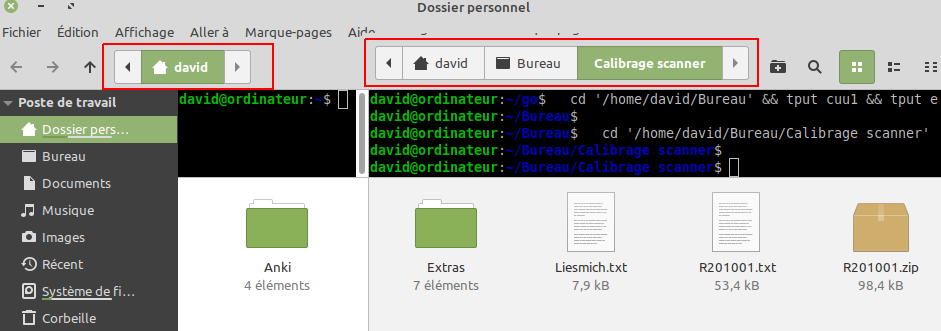
Activation of panel would not be necessary anymore too.
Activity
Jeremy7701 commentedon Aug 12, 2021
The path shown is that of the active or selected panel.
I'd like to see a more distinct background on the two panels.
Jeremy7701 commentedon Aug 12, 2021
One alternative is to open two windows or two (or more) tabs in one window.
InfoLibre commentedon Aug 12, 2021
Not really user friendly too. Why not simply showing the path of each panel, like in all other files managers that have two panels ?
InfoLibre commentedon Sep 5, 2021
In MATE, the path is above the 2 panels, it's great :

JoeJoeTV commentedon Aug 30, 2022
I would also like to have the option to show the path of the second panel. In my opinion, this should just be an option that can be toggled to whatever of the two you prefer.
InfoLibre commentedon May 11, 2025
Please vote on https://github.com/orgs/linuxmint/discussions/917
InfoLibre commentedon Oct 17, 2026
Another solution would be to split the panel horizontally rather than vertically. It would then be easy to display the path above the two panels. And this would make more sense now that we can use tabs within each panel.