
Self-hosted Google search scraper with a real Chrome browser and your own residential proxy.




Quickstart · Output · HTTP API · MCP · Docker · How it works · Options
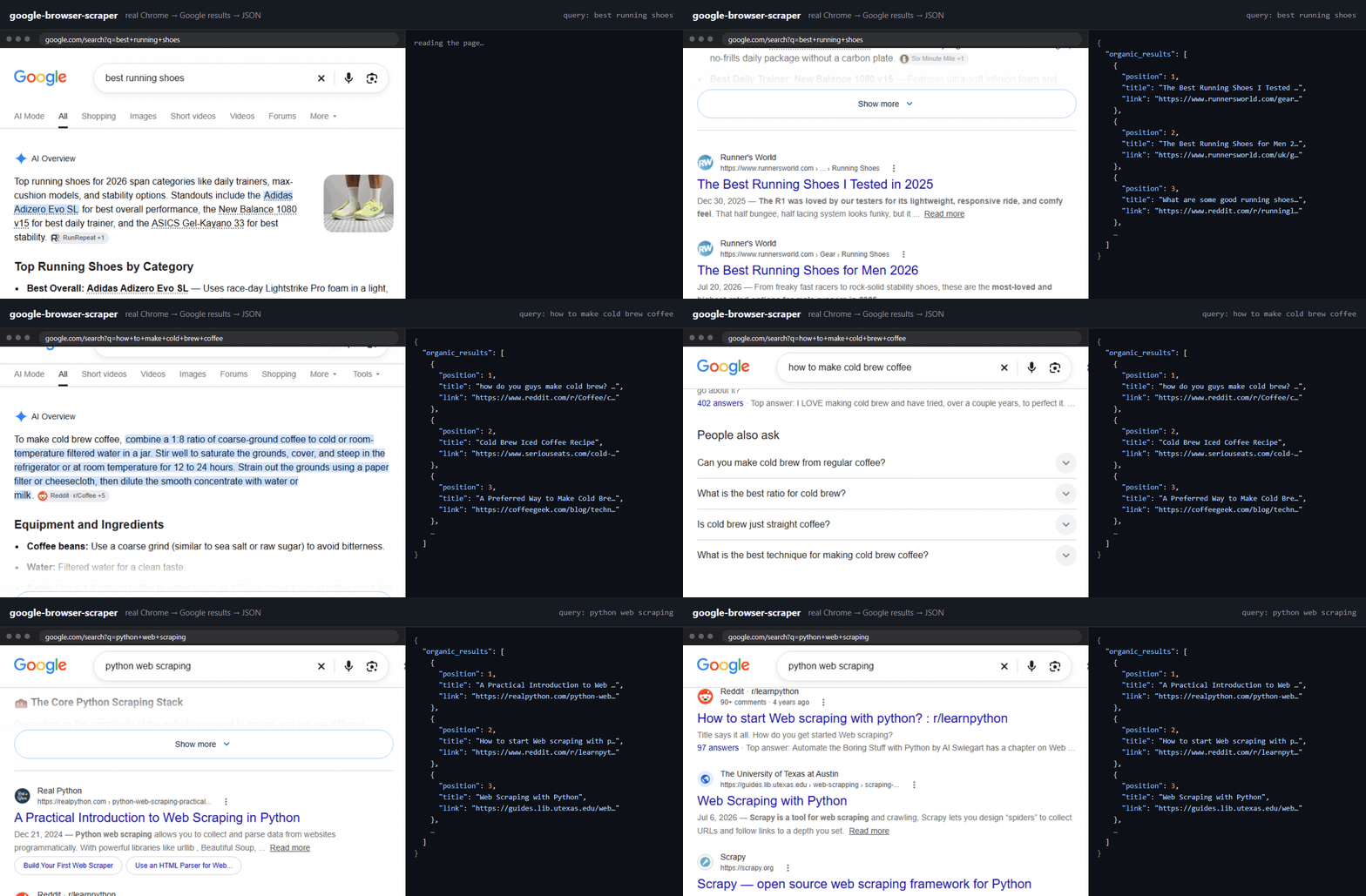
Latest version benchmarks (v0.0.6):
- 100% success rate
- 0.8 MB per search request
- 9 seconds per search request per instance
Scrape Google search results (SERP) with a real Chrome browser and your own residential proxy, and get clean JSON back. Use it as a CLI, a Python library, a local HTTP API, or an MCP server that gives AI agents live Google search.
Plain HTTP is no longer a reliable way to scrape Google: it often expects a browser that runs JavaScript, and a fresh browser on a fresh proxy exit can be refused quickly. This tool takes a browser path instead. It warms a sticky proxy session with ordinary browsing, opens Google's results page for each query in that browser, checks whether Google served results or refused, and writes one JSON record per results page. Captchas, blocks and failures are reported as such, never as "no results".
- Real browser scraping: real Chrome via Patchright, with a warm-up before every new identity
- Bring your own proxy: any residential proxy with sticky sessions, built-in NodeMaven support
- SERP API alternative: JSON with
organic_results,ads,related_questions,related_searches,pagination - Honest failures: captchas and blocks come back labeled, not as empty results
- Cost tracking: bytes per page and cost per 1000 pages in every run summary
- Four ways to run it: CLI, Python library, HTTP API, MCP server for AI agents
- Docker image for self-hosted deployment
- SEO rank tracking and SERP monitoring for your own keywords
- Keyword and competitor research from live Google results
- Web search for AI agents and LLM apps through MCP
- A self-hosted alternative to paid Google search APIs when you already pay for proxies
pip install google-browser-scraper
patchright install chromiumYou need a residential proxy with sticky sessions. Put {session} where
your provider expects a session id in the username:
google-browser-scraper search "best running shoes" \
  --proxy "http://USER-session-{session}:PASS@gate.example.com:7000" \
  -o results.jsonl
The first query takes a few minutes, because a new exit is warmed up first, and the warm-up costs noticeably more traffic than a search. Later queries on the same exit take seconds. A summary of pages served and traffic used, with the hosts that took most of it, is printed at the end of every run.
With NodeMaven residential proxies, the session id is handled for you and the credentials come from the environment:
pip install "google-browser-scraper[nodemaven]"
export NODEMAVEN_LOGIN=... NODEMAVEN_PASSWORD=...
google-browser-scraper search -f queries.txt --nodemaven --country us -o results.jsonl
To cap a run's traffic, --nodemaven-demo creates a sub-user with a traffic limit
from your dashboard API key, shares it across workers, and deletes it when the run
ends (--keep-subuser keeps it). The account needs sub-users enabled. A fresh
warm-up alone uses about 60 MB, so keep the cap well above that:
export NODEMAVEN_API_KEY=...
google-browser-scraper search -f queries.txt --nodemaven-demo --traffic-limit-mb 300 -o results.jsonl
To try it without a proxy, use your own connection:
google-browser-scraper search "best running shoes" --no-proxyGoogle then sees one address for every query, so it starts answering with
captchas sooner than it would across a pool of exits. Those pages come back as
captcha in page_verdict, not as empty results.
From Python:
from google_browser_scraper import ProxyTemplate, Scraper, Settings

proxy = ProxyTemplate("http://USER-session-{session}:PASS@gate.example.com:7000")
for page in Scraper(proxy, Settings(pages=2)).run(["best running shoes"]):
    for result in page.get("organic_results", []):
print(result["position"], result["title"], result["link"])One JSON object per results page:
{
  "search_metadata": {"status": "Success", "page_verdict": "ok"},
  "search_parameters": {"engine": "google", "q": "best running shoes", "page": 1},
  "organic_results": [
    {"position": 1, "title": "...", "link": "https://...", "snippet": "..."}
  ],
  "related_questions": [{"question": "..."}],
  "exit": {"session": "...", "queries_on_exit": 1, "bytes": "..."}
}
The schema uses the field names common to SERP APIs: organic_results, ads,
related_questions, related_searches, pagination and search_metadata, so
simple consumers can often switch with minimal mapping. Knowledge panels,
shopping, images and other special blocks are not parsed.
Each record also has an exit block: which proxy session answered and how many
bytes the page cost. search_metadata.timings says where the page's time went,
in seconds per step (type, load, ready, read, parse, and links, which
overlaps the next query and is not part of total_time_taken). A query that
failed is a record too, with an error. --format csv writes the organic
results as a table, and --price-per-gb adds the cost per 1000 pages to the
summary.
google-browser-scraper serve --nodemaven --country us --prewarm
curl "http://127.0.0.1:8000/search.json?q=best+running+shoes"
Same record format as above. Requests run one at a time on one held identity.
Set GBS_API_KEY to require a key; without one the server only listens on
localhost.
{
  "mcpServers": {
    "google-search": {
      "command": "google-browser-scraper",
      "args": ["mcp", "--nodemaven", "--country", "us", "--prewarm"],
      "env": {"NODEMAVEN_LOGIN": "...", "NODEMAVEN_PASSWORD": "..."}
    }
  }
}
It exposes one tool, google_search(query, pages).
A ready image is published to GitHub Container Registry with every release:
docker run --rm ghcr.io/nodemaven/google-browser-scraper doctor
docker run --rm -p 8000:8000 -e GBS_API_KEY=change-me \
  -e GBS_PROXY='http://USER-session-{session}:PASS@gate.example.com:7000' \
  ghcr.io/nodemaven/google-browser-scraper serve --host 0.0.0.0
To build it yourself: docker build -t google-browser-scraper .
- New identity: a sticky proxy session and a fresh browser profile.
- Warm-up: a few ordinary pages, staying on each for 20-45 seconds.
- Search: each query opens Google's results page directly, which is faster than the search box and skips the autocomplete traffic of typing.
- Check before parsing: the page is classified first, so a captcha or a block is reported as one and never parsed as an empty result.
- Keep or drop: an exit Google answers is reused for the next queries; an exit it refuses is dropped and the query is retried on a new one. If exit after exit is refused, the run stops instead of spending more traffic.
More detail: holding exits, copied cookies, result links, traffic
Holding exits. A served exit is kept for up to 300 queries. Every new exit pays for a warm-up, so a short cap mostly buys more warm-up traffic. Every 50 results pages the browser is restarted on the same profile and exit, which keeps its memory from growing over a long hold. A browser error on a search is retried once on the same exit before the exit is dropped; a network error, running out of memory or a crashed browser drops it at once.
Copying cookies. The command line copies the cookies of the first exit Google serves and starts new exits from that copy, on new sticky sessions, instead of warming each one; all workers share the copy. Google's acceptance follows the cookies more than the address, so a copy usually starts out served and costs a few MB instead of a full warm-up. A copy waits 40-60 seconds after its browser starts before the first search.
Copying the cache. Pages get cheaper as an exit is held, because the
browser cache fills with Google's shared scripts and images. Copies carry that
cache too, so a new exit starts with cheap pages, and the copy is refreshed
from the held exit at each browser restart, when its cache is warm. If two
copies carrying the cache are refused on their first search, the rest of the
run copies cookies only (--no-clone-cache does that from the start).
Result links. Google wraps result links in encrypted /goto redirects.
Each one is resolved with a small request through a separate short-lived proxy
session, a few at a time, in the background while the browser goes on to the
next query. Records still come out in the order each browser searched them.
Traffic. Everything goes through a small local relay that counts bytes per host and blocks a large model download Chrome otherwise makes on every fresh profile.
The defaults come from measurements in proxy-benchmark.
All search options
| Option | Default | What it does |
|---|---|---|
--workers N |
1 | Search on N exits at once, one browser each, from one list of queries |
--max-per-exit N |
300 | Queries before a served exit is retired |
--restart-every N |
50 | Results pages before the browser restarts on the same profile and exit; 0 never |
--clone N |
10 | New exits started from copied cookies; 0 turns copying off |
--clone-max-age |
180 | Minutes copied cookies stay in use |
--clone-refusals N |
1 | Copies refused in a row on their first query that end the copying |
--no-clone-cache |
Copies carry cookies only, not the browser cache | |
--spare N |
0 | Exits warmed in the background so a retired one is replaced at once; each costs a warm-up |
--direct |
all |
Open results pages directly: all, follow-ups (all but an exit's first query), none |
--input |
type |
How a query goes into the search box: type, insert, words |
--gap LOW,HIGH |
2,5 | Seconds between queries on one exit |
--pages N |
1 | Result pages per query |
--format |
jsonl |
jsonl or csv |
--price-per-gb |
Your proxy price, to print the cost per 1000 pages | |
--no-resolve-links |
Keep result links as Google /goto redirects |
|
--save-html DIR |
Keep every page's HTML, gzipped |
google-browser-scraper search --help lists the rest.
Any provider with sticky sessions works through --proxy and a {session}
placeholder. A proxy without one is accepted with a warning: if the exit changes
on every request, warming it does nothing. SOCKS5 needs an IP-whitelisted
endpoint, because Chrome cannot send a SOCKS5 username and password.
google-browser-scraper doctorStarts the browser on a blank page, sends nothing, and reports what a website would see: whether the browser looks headless, whether WebGL works, the screen size. Google answers some machines much less than others, so run this first.
Not a free Google Search API, and not a guarantee that every proxy exit will work. It is a browser-based collector that makes failures explicit, drops exits Google refuses, and tells you what each page cost.
Early. The cloak engine (--engine cloak) is experimental; patchright is
the default.
Google changes its pages often. If results come back empty or wrong, run with
--save-html DIR and open an issue with what you see.
You are responsible for using this within Google's terms and the law where you run it.
An engine joins this tool only after it has been measured on proxy-benchmark. Add it there and run the warm-up ladder against Google:
python scripts/run_ladder.py --engines your-engineThen open a pull request here with the run file. The ladder runs identities with and without the warm-up in the same hours, so the result shows whether the engine actually gets served, not whether it got lucky once.