A command-line tool for Alfen EV charging stations on your local network: discover them, inspect and change every property, back up and restore their configuration, upgrade firmware, and upload a custom splash-screen logo.
A small, clean Python reimplementation of the useful core of Alfen's Windows ACE Service Installer, reverse-engineered from the v4.3.0 binary (and its bundled property catalog and resource blobs) and verified against a live NG910 charger (firmware 7.4.5). No Alfen cloud account is involved — everything happens on your LAN, directly against the charger.
alfenctl ui serves the same code from your own machine: a live dashboard
of what the charger is doing, and a tab for each job the command line does.
Nothing to build, no account, no cloud — one command and a browser tab.
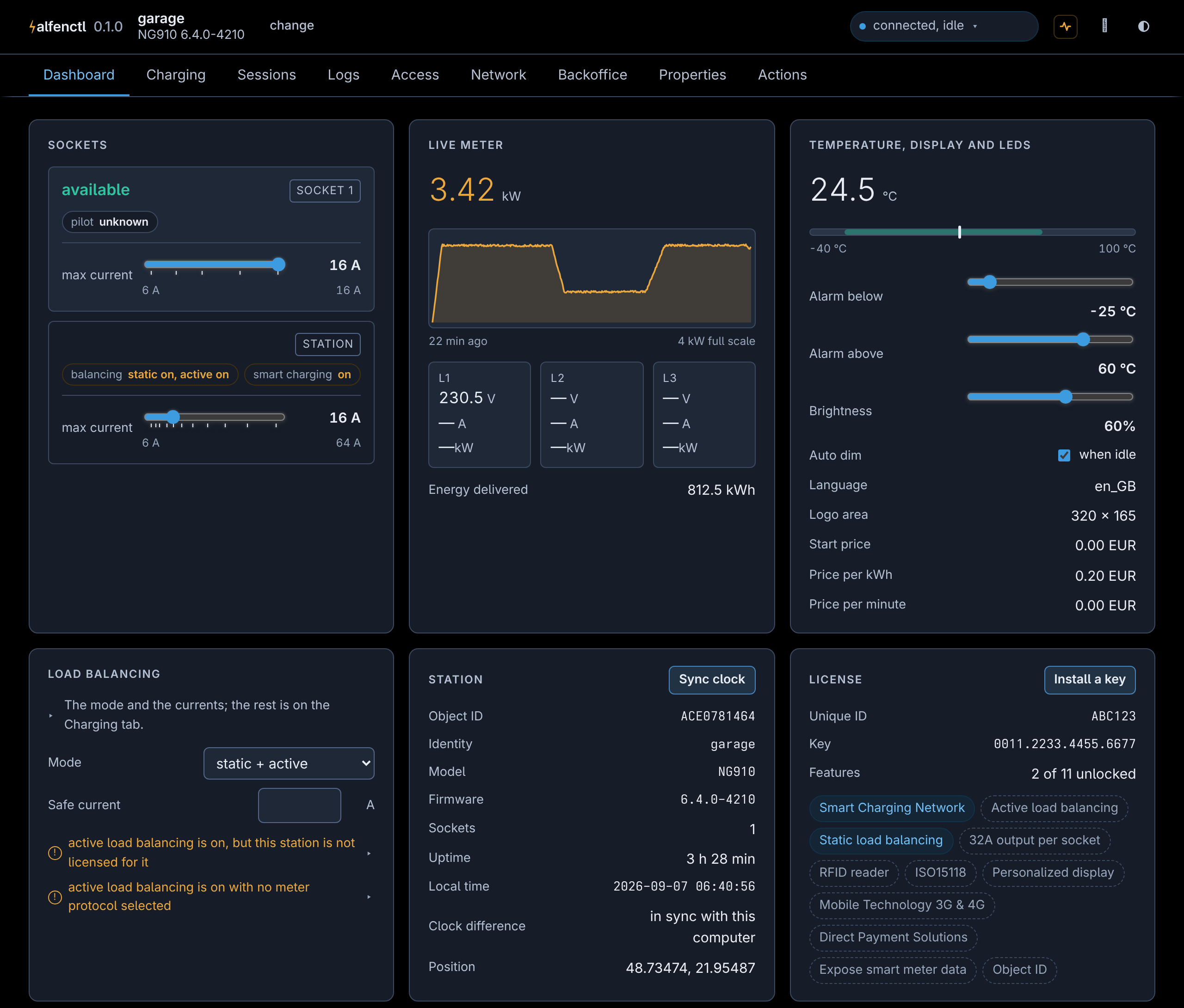
The dashboard, over the demo charger the test suite uses — no real station's identifiers appear in the picture, and the power trace is a scripted session rather than a recording of one. docs/web-ui.md walks through the rest of the tabs.
You need Python 3.10 or newer. If you are not sure you have it, take the first option — it brings its own.
Anywhere, without installing Python first, use uv, a single binary:
$ uv tool install alfenctl
$ alfenctl list
uvx alfenctl list runs it once without installing anything at all, which
is a fair way to see whether it finds your charger.
With a Python you already have, pipx gives the same isolated install:
$ pipx install alfenctlpip install alfenctl works as well, and is the right choice only if you
mean to import alfenctl from your own code; for a command you type, an
isolated install saves you the dependency conflicts.
$ alfenctl list                          # what is on this network
$ alfenctl config init                   # start a settings file
$ alfenctl info --station 192.168.11.42  # ask one charger who it is
alfenctl config init writes a commented alfen.toml and prints where it
went; alfenctl config show says what alfenctl actually read out of it, and
alfenctl config path prints the path alone, for a script. Nothing needs
the file — --host, -u and -p carry the same information on every
command — but writing an address and a password down once is pleasanter
than typing them thirty times.
- Windows. The settings file goes in
%APPDATA%\alfen\alfen.toml. Afteruv tool install, a new terminal (oruv tool update-shell) is what putsalfenctlon yourPATH. - macOS and Linux. The settings file goes in
~/.config/alfen/alfen.toml, or under$XDG_CONFIG_HOMEif you set one. - All three. Discovery is mDNS, so it only finds chargers on the same
network segment, and a host firewall that blocks UDP 5353 will stop it.
--host <ip>needs no discovery and always works.
| Command | What it does |
|---|---|
list |
discover Alfen chargers on the LAN (mDNS) |
info |
show a charger's identity, model, firmware, sockets, board revisions, RFID readers, modem and clock |
config [ACTION] |
show what alfenctl reads from alfen.toml, without the passwords (the default); path prints where it looks; init writes a commented starter file |
ui |
serve the web interface in a browser: a dashboard of what the charger is doing, and tabs mirroring the CLI -- charging (load balancing, profiles, SCN), access (authorization, tags, passwords), network, backoffice, history (sessions and the log), every property, backup/restore/presets, and the actions (--listen, --read-only) |
license [ACTION] |
show licensed features and the key (the default), or set KEY to install a new one |
status |
what the charger is doing right now: socket state, what its screen is showing and any error behind it, which sockets are in service, meter, energy delivered, temperature (--json, --watch [S] to keep it updating) |
current [ACTION] |
show the charging current limits (the default), or set AMPS one — per socket, --station-max for the whole station, or --external for the live request a solar or tariff controller drives |
socket [ACTION] |
show which sockets are in service (the default), or enable/disable one — a read-modify-write of the bit field they share |
brightness [ACTION] |
show the display and LED brightness (the default), or set PERCENT [--auto on|off] |
loadbalancing [ACTION] |
show load balancing and solar charging (the default), or set them: mode, meter protocol, safe current, phase switching, green share; alias lb |
props [PATTERN] |
list all charger properties and values (--json, --cat, glob filter on id/name/title) |
get ID… |
read properties by id (2062_0) or name (sysMaxStationCurrent) |
set ID VALUE |
write one property, with type/range validation and read-only protection |
export [FILE] |
dump properties to JSON or the app's XML settings format, plain or encrypted (--xml/--exml, or a .xml/.exml file name) (<object-id>.json on a terminal, stdout when piped; asks before overwriting an existing file; --pattern/--cat/--writable-only) |
preset [NAME] |
list the presets Alfen publishes — property settings, Modbus meter maps, and several hundred backoffice presets — or apply one; a backoffice preset is a signed blob, so it goes through the firmware channel and needs a reboot (--save, --dry-run) |
import FILE |
apply a JSON dump, with a diff preview, --dry-run, and a confirmation prompt; skips device-bound properties (--force to write them) |
firmware [FILE] |
upgrade firmware — with no file, lists the compatible releases Alfen publishes and lets you pick one (--list, --all); checks compatibility, polls through the reboot, commits |
log |
export the charger's own event log since a date (--since, default today; --all, --range, -n N tail, -g REGEX filter, --type error by kind; default <object-id>.log on a terminal) |
transactions |
export charging sessions and OCPP events (CSV by default, --json/--raw, --since, --socket, --erase), or total them with --summary [month|socket|tag]; alias tx |
logo FILE |
convert an image and upload it as the charger's splash-screen logo (--save FILE writes the package instead) |
tags [ACTION] |
local RFID whitelist: list (the default), add, remove, clear, learn, import, master (a tag that always authorises, no whitelist needed); alias whitelist |
auth [ACTION] |
show who may start a session (the default), or set it: the mode, the two lists, and the offline action the charger stores as two registers; alias authorization |
ocpp [ACTION] |
show the backoffice connection (the default), or set it: URLs, protocol, heartbeat, timeouts, proxy |
password ACTION |
set a new login password, temporary one that expires, recover with the code on the charger, or pin for the Eve Connect app's access PIN |
wifi [ACTION] |
scan for nearby networks (the default; --enable switches the radio on first, without which a scan finds nothing), connect SSID [--psk …] to join one, enable/disconnect for the radio, or ap for the charger's own access point |
network |
where the charger is on the network: Ethernet, Wi-Fi and modem addresses, read-only |
meter-test |
live per-phase readings from an external Modbus TCP/RTU smart meter, for checking its wiring during commissioning (--json) |
meter-map [ACTION] |
custom Modbus register map for a meter the charger does not know by name: show (the default), save FILE, apply FILE |
charging-profiles [ACTION] |
OCPP smart-charging profiles: list (the default), show ID, clear [ID], install-uk (the UK Smart Charging default schedule); alias charging-profile |
direct-start [ACTION] |
let a socket charge despite an installed profile: show (the default), on, off, and the randomised start delay |
scn [ACTION] |
Smart Charging Network membership: status (the default; --peers), create NAME, join NAME, leave |
time [ACTION] |
show the charger's clock and time zone (the default), or sync it to this computer |
secret [ACTION] |
install what properties cannot carry: the OCPP authorization key, proxy password, TLS certificates. list (the default), set NAME [VALUE|FILE] |
calibrate tilt |
store the charger's current position as upright |
reboot |
restart the charger and wait for it to come back (--no-wait, --timeout S) |
cmd WORDS… |
send a command to the charger's own console (the app's Command Window); --list prints what the vendor apps are known to send |
erase TARGET |
erase settings (factory defaults), personal-data, or transactions |
doctor |
one read-only pass over everything the vendor app warns about, across every panel (--json) |
Commands written [ACTION] run their read-only action when you leave the
action out, so alfenctl tags lists the tags and alfenctl scn --peers is
scn status --peers. password and calibrate are deliberately not among
them: every action they have changes something, so each wants to be named.
$ alfenctl list
Found 1 charging station(s):

  OBJECT ID        ADDRESS              PROTO  HOSTNAME
  ace0781464       192.168.11.42:443    https  alfen-ace0781464.local.

$ alfenctl props --station ace0781464 '*current*'
ID      NAME                          VALUE  ACCESS  TITLE
2062_0  sysMaxStationCurrent          25.0   rw      Automat
2128_0  socket1StartCurrent           0.0    rw      Start Current Socket 1
…

$ alfenctl set --station ace0781464 sysMaxStationCurrent 32
2062_0 sysMaxStationCurrent = 32.0

$ alfenctl set --station ace0781464 100A_0 9.9.9
error: 100A_0 (Manufacturer software version) is read-only
Every station command takes the same connection options; ids are always
hexadecimal (2050, 2050_1, 2050sub1), and property names resolve
too. Values are validated before anything is sent — the charger's own type
and access metadata (read-only is access 1) plus the EDS catalog's ranges,
lengths and enumerations (an option's label, e.g. Compact, is accepted for
its stored value).
$ alfenctl list                                    # find the chargers here
$ alfenctl status --station garage --watch         # what one is doing, live
$ alfenctl set sysMaxStationCurrent 20 --station garage
$ alfenctl export garage.json --station garage --writable-only
$ alfenctl firmware --station garage               # pick a release and install it
$ alfenctl ui                                      # all of the above, in a browser
Every command takes --station NAME (from the settings file below), or a
charger's Object ID or IP, or --host <ip> to skip discovery entirely.
So credentials aren't retyped on every invocation, commands read
alfen.toml. alfenctl config init writes a commented one where alfenctl
looks for it (~/.config/alfen/alfen.toml, %APPDATA%\alfen\alfen.toml on
Windows, $XDG_CONFIG_HOME/alfen/alfen.toml if that is set), alfenctl config path prints that location, and --config FILE overrides it.
Top-level keys are defaults, [stations.<name>] tables override per station,
and command-line flags override everything. Unknown keys are rejected, so a
typo can't silently no-op. alfenctl config show prints what was actually
read, with the passwords left out.
username = "admin"               # default credentials
password = "secret"

[stations.garage]                # alfenctl props --station garage
host = "192.168.11.42"

[stations.old]                   # a pre-5.0 charger on HTTP
host = "192.168.11.43"
http = true
username = "cpadmin"
password = "L@0Pa$$"
Without a config entry, --station still works with a charger's Object ID
(serial) or IP, resolved via mDNS discovery; --host IP targets a charger
directly.
- docs/usage.md — one section per job, with the commands to type: firmware, logos, the event log, charging sessions, RFID tags, passwords, presets, meter maps, smart charging networks.
- docs/reference.md — the options every command takes, the exit codes, and the limitations worth knowing.
- docs/web-ui.md — what
alfenctl uishows, and the reasoning behind how it looks. - docs/how-it-works.md — discovery, the charger's HTTP API, the property catalog, the firmware containers, licensing.
- CONTRIBUTING.md — how to run the tests and the linters, and how the code is laid out.
- CHANGELOG.md — what changed, per release.
EUPL-1.2 — see LICENSE, with the carve-outs listed in NOTICE. The source stays open: if you pass the software on, or run a modified version as a network service, you make the source of your changes available to those users too.
This project is not affiliated with, or endorsed by, Alfen B.V. "Alfen" and product names are trademarks of their respective owners. The protocol details were reverse-engineered from the vendor's own installer for interoperability.