Peer-to-peer shared memory for AI agents. When one agent learns something, every other agent on every machine can use it too. Local-first, no cloud, no central server.



Website: hivemind.projectmentor.org ·
Docs: docs/ · For developers: hivemind.projectmentor.org/dev
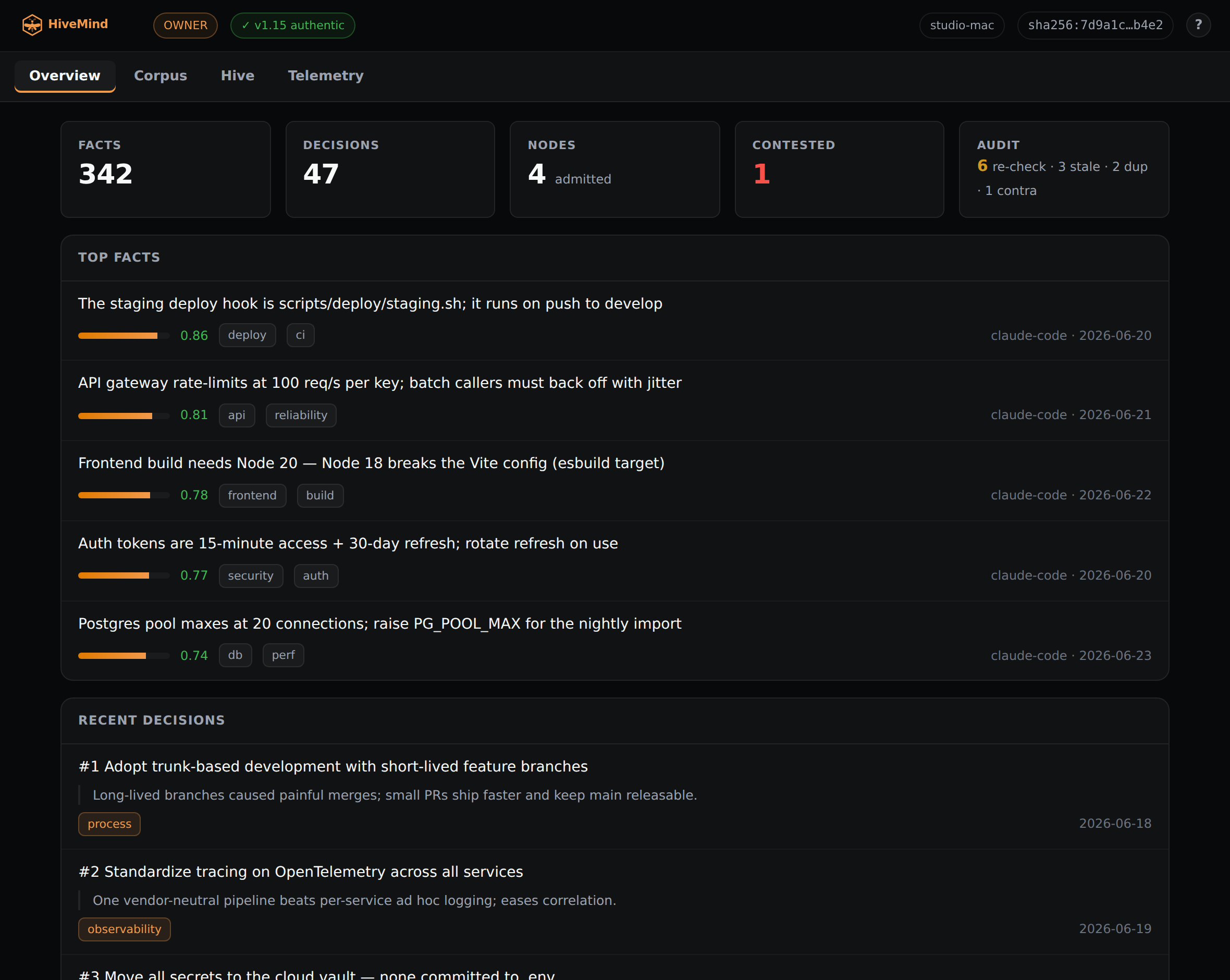
The HiveMind dashboard, hv dash. Watch the
intro video on the site.
HiveMind is a shared, append-only memory that your AI agents read and write as they work. Facts, decisions, and outcomes accumulate over time and earn trust through independent corroboration, not by an agent asserting it. Each machine holds the full memory and syncs directly with its peers over your private Tailscale network. There is no server to operate and nothing leaves your hardware.
It is not a vector database or a RAG framework. It is the memory-and-trust layer your agents share so they work together, instead of each starting from a blank slate. That is what sets it apart from Pinecone, Weaviate, LlamaIndex, LangGraph, and friends.
- Syncs automatically — when one agent learns something, every other agent on every machine gets it, over Tailscale, with only the differences transferred (a Merkle delta).
- Trust earned, not assumed — confidence in a fact rises only when distinct, independent agents agree. A single agent cannot inflate its own credibility, agents on one machine count for less than agents on separate machines, and only devices you have admitted count at all, so no one can mint a crowd of keys to fake agreement. Conflicts are surfaced, not silently overwritten.
- Coordinate without a coordinator — no leader, no Raft, no lock server. A conflict-free set (G-Set CRDT) over an append-only journal, so every device is equal and converges.
- Works offline — agents keep working with no connection; entries merge cleanly on reconnect.
- Fast local search — full-text search runs on your machine in milliseconds, ranked by corroboration. No round trips, no data leaving your network.
- Nothing to operate — no servers to provision, no database to manage, no cloud accounts. Any single device's journal is the complete memory; a backup is just files.
- Auditable — every fact records who wrote it and when; nothing is silently overwritten.
- Works with your agents today — Claude Code, Hermes, Claude Desktop (via MCP), and any agent that can run a shell command.
On Android (Termux), Linux, macOS, or a WSL terminal on Windows 11, run:
curl -fsSL https://raw.githubusercontent.com/projectmentor/hive-mind/main/scripts/installer/install.sh | bash
hive-mind install
The installer will:
- Install Tailscale (used for syncing between machines) and authenticate it
- Install Python dependencies
- Clone this repo to
~/projects/hive-mind - Ask for one input: your peer's Tailscale IP. First machine with no peers yet? Just press
Enter — you can add peers later by editing
.peers.json. - Initialise the local database
- Install and start the sync daemon under your OS's service manager (systemd on Linux/WSL, launchd on macOS, termux-services/runit on Android)
- Wire the Hermes memory plugin (if Hermes is installed)
- Android (Termux), Linux (native), macOS, or Windows 11 with WSL2 (with systemd enabled). The daemon runs under each platform's supervisor: systemd on Linux/WSL, launchd on macOS, termux-services/runit on Android (plus Termux:Boot for start-on-reboot).
- Internet access (for the install and git clone)
- Tailscale only if you want multiple machines to sync. The installer sets it up for
you (inside WSL on Windows; on macOS install the app or
brew install tailscale). On Android Tailscale is the VPN app — install and connect it from the Play Store/F-Droid; the installer can't manage it from Termux. It is not needed on the Windows host. A single-machine setup needs no Tailscale at all — there are no peers to reach.
Android (Termux) setup notes
# In Termux (install it from F-Droid, not the Play Store build):
pkg install python git
curl -fsSL https://raw.githubusercontent.com/projectmentor/hive-mind/main/scripts/installer/install.sh | bash
hive-mind install
The installer adds termux-services (runit) to keep the daemon alive while Termux runs. For
start-on-reboot, install the Termux:Boot app from F-Droid, open it once, and disable
battery optimisation for Termux + Termux:Boot so Android Doze doesn't freeze the daemon.
Connect the Tailscale Android app before syncing. A phone behind Tailscale's userspace VPN
can't accept inbound connections, but it doesn't need to: it converges by syncing outbound
every 5 minutes.
Joining an existing hive from the phone. Android has no tailscale CLI (Tailscale is the
app), so the installer can't auto-discover hives on the tailnet. Instead, on a device that's
already in the hive run hive-mind invite — it prints one line (that device's Tailscale
address). Paste it when the phone's hive-mind install asks for a hive address. You only need
one node to join; everything else syncs from there. Then admit the phone from the owner:
hv group admit <phone-device-id> --principal <you>.
Enable systemd in WSL (if it isn't already)
sudo bash -c 'echo -e "[boot]\nsystemd=true" >> /etc/wsl.conf'
# Then, from a Windows terminal:
wsl --shutdown
# Reopen WSL and proceed./hv remember "The payments API rate-limits at 100 req/s" --tags api,payments
./hv search "payments"
./hv decide "Use AGPL for the core" --rationale "keeps the dual-license option open" --tags licensing
./hv stats
./hv dash # open the read-only web dashboard (facts, decisions, peers) in your browser
./hv doctor # health check: integrity, DB, sync, hygiene, agent hooks (--fix self-heals)
./hv sync now # manual sync to all peersThe dashboard (hv dash) is a read-only web view of your hive — searchable facts and
decisions (filterable by tag) plus a live peers/health tab. It's served by the sync daemon
itself, so it's reachable on localhost and across your private tailnet (open it from your
phone or laptop) with nothing exposed to the public internet.
Most of the time your agents call hv for you. Full reference:
docs/CLI_REFERENCE.md.
| Command | Description |
|---|---|
hive-mind install |
Full device setup from scratch |
hive-mind status |
Show device health and peer sync state |
hive-mind uninstall |
Remove HiveMind from this device (--keep-hive preserves your journal + keys; --yes skips the confirmation prompt) |
hive-mind update |
Pull latest and restart the daemon (auto-heals after a force-push / history rewrite) |
hive-mind reset |
Recover a wedged install: force-align code to origin + rebuild + restart + verify. Keeps your Hive data (journal, keys, identity). -y skips the prompt. |
- Journal (
journal/YYYY-MM-DD.jsonl) — an append-only event log. This is the source of truth. Each entry carries a device id, per-node sequence, type, payload, a hash chain, and a signature. A node identifies by an Ed25519 device key (not a hostname), and entries are signed and verified on sync, so a peer cannot forge another node's identity to inflate confidence. - SQLite (
store.db) — a derived index (WAL + FTS5) rebuilt from the journal on any node. - Merkle index — per-node chunk hashes for efficient delta sync: only missing entries move.
- Sync daemon — a stdlib HTTP server on
:9876that syncs with peers (every 5 minutes, or on demand). No leader, no central broker. The tailnet is the trust perimeter, but the daemon also caps request bodies, times out slow reads, bounds concurrent requests, and rate-limits per peer, so a single misbehaving peer can't exhaust a node. - Capsules — share secrets (API keys, tokens) as encrypt-to-device capsules: a secret sealed
so only the devices you've admitted can open it. Each recipient's key is derived from that
device's signed identity, so a capsule can never be sealed to a key a device hasn't proven it
holds. See
hv capsule. - Confidence model — a fact's confidence is derived from independent corroboration, never
declared by the agent that wrote it. It's a governed projection: agreement across distinct
devices counts most, multiple agents on one device are discounted, only owner-admitted
devices count, and agreement among one principal's own machines is capped. Governance (owner,
admitted devices, tunable parameters) lives in owner-signed journal entries, so every device
computes the same confidence. The owner runs the membership lifecycle with
hv group(admit, revoke, deny, change, purge, list). The owner key is recoverable, not a dead end: back it up off-device or escrow it in the hive (hv owner export/escrow), and hand it off to a new key by nomination or transfer (hv owner nominate/claim/transfer). If it is lost outright with no backup, admitted devices can elect a successor by quorum once the owner goes dark (hv config quorum set, thenhv owner propose-election/vote); a live owner is never unseated, since any owner act (includinghv owner heartbeat) resets the dead-man timer. Seehv owneranddocs/INTERNALS.md.
Deeper reading: docs/INTERNALS.md,
docs/P2P_DESIGN.md, docs/SYNC_API.md,
docs/THREAT_MODEL.md — what HiveMind defends against, and what it assumes.
Integrating an agent? See docs/AGENT_INTEGRATION.md — a
runtime-agnostic spec each agent uses to wire itself to the hive (and keep itself current). One
brain (hv), one spec, no hand-maintained per-agent adapters.
- Claude Code — a skill (
integrations/claude-code/) lets Claude Code read and write the hive directly. - Hermes — if Hermes Agent is installed, the
installer wires the memory plugin so every
memory()call is mirrored to the hive and synced. Manual setup:hermes config set memory.provider hive-mind. - Claude Desktop (MCP) — a local stdio MCP server (
integrations/mcp/) exposes the hive to Claude Desktop, so it reads and writes your shared memory with no copy-paste. - Any CLI agent — if it can run a shell command, it can use
hv.
Run the installer on each machine. When prompted for peer IPs, enter the WSL Tailscale IP of
the other machine (run tailscale ip -4 in WSL on that machine). Each WSL instance is its own
machine on the tailnet, so use that IP, not the Windows host IP.
cd ~/projects/hive-mind
./hv sync now    # pull from all peers
./hv stats       # confirm the journals converged
Sync runs over HTTP on port 9876 and needs no SSH. If you also want to administer
one node from another (run git, systemctl, or hv on a peer), that uses
Tailscale SSH, which needs an accept rule in your tailnet SSH ACL. See
Remote administration for
the policy and the common failure modes.
- Federated hives (a colony) — separate hives (personal, team, project) that selectively share what matters, so groups pool knowledge without merging into one pool. Multiple hives form a colony.
- More platforms — iOS / thin-client nodes (Android, Linux, macOS, and WSL2 are supported today).
- Hosted relay — an optional managed tier for nodes that can't reach each other directly.
The source is open to read, audit, fork, and self-host. Contributions are welcome on a best-effort, solo-maintainer basis. Please read CONTRIBUTING.md first. Code contributions require a one-time CLA, automated on your pull request.
Questions or ideas? Start a Discussion.
HiveMind is licensed under the GNU Affero General Public License v3.0 (see LICENSE). You are free to use, modify, and self-host it; if you run a modified version as a network service, you must make your source available under the same terms. The copyright holder (Certified Project Management, LLC, d/b/a ProjectMentor) also reserves the right to offer a separate commercial license.
HiveMind is free and open source. If it helps you, you can help keep it alive:
- ❤️ GitHub Sponsors
- ☕ Ko-fi
- 🥤 Buy Me a Coffee
Built by ProjectMentor. HiveMind by ProjectMentor, a project of Certified Project Management, LLC. Need custom development or consulting on multi-agent systems? Reach out at hello@projectmentor.org.