Revit posts a bounding-box snapshot to a local ASP.NET Core API. A React / Three.js page polls that API and draws the same elements. Clicks in the browser enqueue commands. The add-in polls the queue and applies them on Revit's UI thread.
Revit add-in                    ASP.NET Core API                 Browser (React + Three.js)
────────────                    ────────────────                 ──────────────────────────
Export / DocumentChanged
  POST /api/geometry     ──►    latest snapshot in memory  ──►   GET /api/geometry/latest (2s)
                                                                     draw boxes, highlight

Click / drag / delete
  GET /api/commands/next ◄──    per-project command queue  ◄──   POST /api/commands
  ExternalEvent + Transaction
Local demo only. Three processes on one machine (localhost:5245). This is a personal learning project, not production software.
Unofficial, not Autodesk work. Independent portfolio project by Mayur Reddy. Not an Autodesk product. Not affiliated with, endorsed by, or sponsored by Autodesk, Inc. Autodesk and Revit are trademarks of Autodesk, Inc.
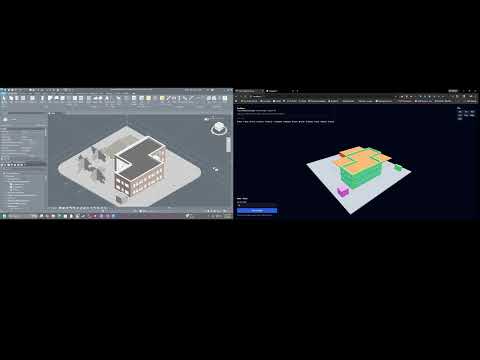
youtube.com/watch?v=9N6vfX0DKNM : Revit on the left, web viewer on the right. Export, selection sync, live DocumentChanged updates, click-to-place boxes.
- Export: world-axis bounding boxes from 13 categories in the active view (whole document only if there is no view)
- Auto-sync:
DocumentChangedstarts a 500 ms debounce, then anExternalEventre-exports - Selection:
Idlingchecks selection every 300 ms. Selected ids ride along on the next snapshot. Viewer outlines them cyan - Properties: Name, Family, Type, Level, Mark, Comments, Length, Area, Volume, wall/floor offsets, phases, and Workset when the model is workshared
- Colors: one hex color per category
| Command | What happens in Revit |
|---|---|
ADD_BOXES |
Creates DirectShape boxes in OST_GenericModel, tagged ApplicationId = "RevitSync" |
MOVE_ELEMENT |
Translates that tagged DirectShape to a new center |
DELETE_ELEMENTS |
Deletes those tagged DirectShapes only |
SELECT_ELEMENTS |
Selection.SetElementIds plus ShowElements (zoom). No transaction |
Move and delete from the web do not apply to ordinary Revit walls, floors, or families.
Walls, Roofs, Floors, Structural Columns, Structural Framing, Structural Foundation, Windows, Doors, Curtain Wall Panels, Curtain Wall Mullions, Stairs, Ramps, Generic Model.
- Geometry is axis-aligned bounding boxes, not meshes, faces, or rooms
- Export with zero primitives does not POST, so the last snapshot stays in the API
- Snapshot and command queue live in process memory. Restart the API and they are gone
- No auth, no TLS on the demo URL, no multi-user, no conflict resolution
- Add-in and viewer hard-code
http://localhost:5245 - Viewer poll: 2 s. Add-in command poll: 1.5 s. Not WebSockets
- The API sends
ETag. The viewer sendsIf-None-Matchand reuses the last snapshot on 304 - DTOs are copied in the add-in, the API, and TypeScript. There is no shared contract package
- Command handler keeps one
Pendingslot. A second dequeue beforeExecutecan drop the first command - Element ids on move/delete/select are parsed with
int.TryParse Generate Column Gridneeds an active crop box and a structural column family- Add-in project is .NET Framework 4.8 targeting Revit 2026 assemblies. Autodesk's official add-in target for Revit 2025/2026 is .NET 8. If the add-in does not load, check that mismatch first. This repo does not retarget it
| Process | Stack |
|---|---|
| Revit add-in | C#, .NET Framework 4.8, Revit API (RevitYear defaults to 2026) |
| Backend | ASP.NET Core 9, in-memory ConcurrentDictionary / ConcurrentQueue, Swagger |
| Frontend | React 19, TypeScript, Three.js (React Three Fiber), TanStack Query, Tailwind CSS |
API and viewer first, then Revit. Everything talks to http://localhost:5245.
cd backend/RevitSync.Api
dotnet run
API: http://localhost:5245 · Swagger: http://localhost:5245/swagger
cd frontend/revit-sync-frontend
npm install
npm run dev
Viewer: http://127.0.0.1:5173 (Vite is pinned to that host and port). http://localhost:5173 also works.
Needs Autodesk Revit 2026 at C:\Program Files\Autodesk\Revit 2026\ (the .csproj references those RevitAPI.dll / RevitAPIUI.dll files). Other years: set RevitYear in the .csproj and copy into that year's Addins folder.
- Open
revit-addin/RevitSync.Addin/RevitSync.Addin.slnin Visual Studio. - Restore NuGet if prompted (
Newtonsoft.Json). - Build the solution. A post-build step copies
RevitSync.Addin.dll,RevitSync.addin, and the ribbon icon into%APPDATA%\Autodesk\Revit\Addins\2026\ - Restart Revit. The RevitSync panel is on the Add-Ins tab.
Manual install: copy revit-addin/RevitSync.Addin/RevitSync.Addin/RevitSync.addin next to the DLL in that Addins folder. The Assembly path is the DLL file name.
Also needed: .NET 9 SDK for the API, Node.js 18+ for the viewer, Visual Studio 2022+ with .NET desktop development for the 4.8 add-in.
- Start API and viewer.
- Open a Revit model that has walls, floors, or roofs in the active view.
- Click Export Geometry on the RevitSync ribbon.
- Open
http://127.0.0.1:5173. Orbit / pan / zoom. Click a box for properties. - Select in Revit highlights and zooms that element.
- Select in Revit. The same box goes cyan in the viewer.
- Click to Place → click the ground plane. A box appears as a DirectShape after the next command poll (~1.5 s) plus the next viewer poll (~2 s).
- Select a web-created box → drag the transform arrows to move, or Delete.
- After the first export, model edits re-export through
DocumentChanged. Generate Column Grid is an optional helper if you have no model yet (needs crop box + a column family).
| Endpoint | Method | What it does |
|---|---|---|
/api/geometry |
POST | Store latest snapshot for projectName |
/api/geometry/latest |
GET | Latest snapshot. Optional ?projectName=. If-None-Match → 304 |
/api/commands |
POST | Enqueue ADD_BOXES, DELETE_ELEMENTS, MOVE_ELEMENT, or SELECT_ELEMENTS |
/api/commands/next |
GET | Dequeue one command. Optional ?projectName=. 204 if empty |
dotnet test backend/RevitSync.Api.Tests/RevitSync.Api.Tests.csproj
cd frontend/revit-sync-frontend && npm run build && npm run lint
The add-in needs Revit assemblies on disk. Visual Studio Build Solution is the check for that project.
MIT © Mayur Reddy
Autodesk and Revit are registered trademarks of Autodesk, Inc. This project is a personal learning exercise and is not an official Autodesk sample or plugin.