


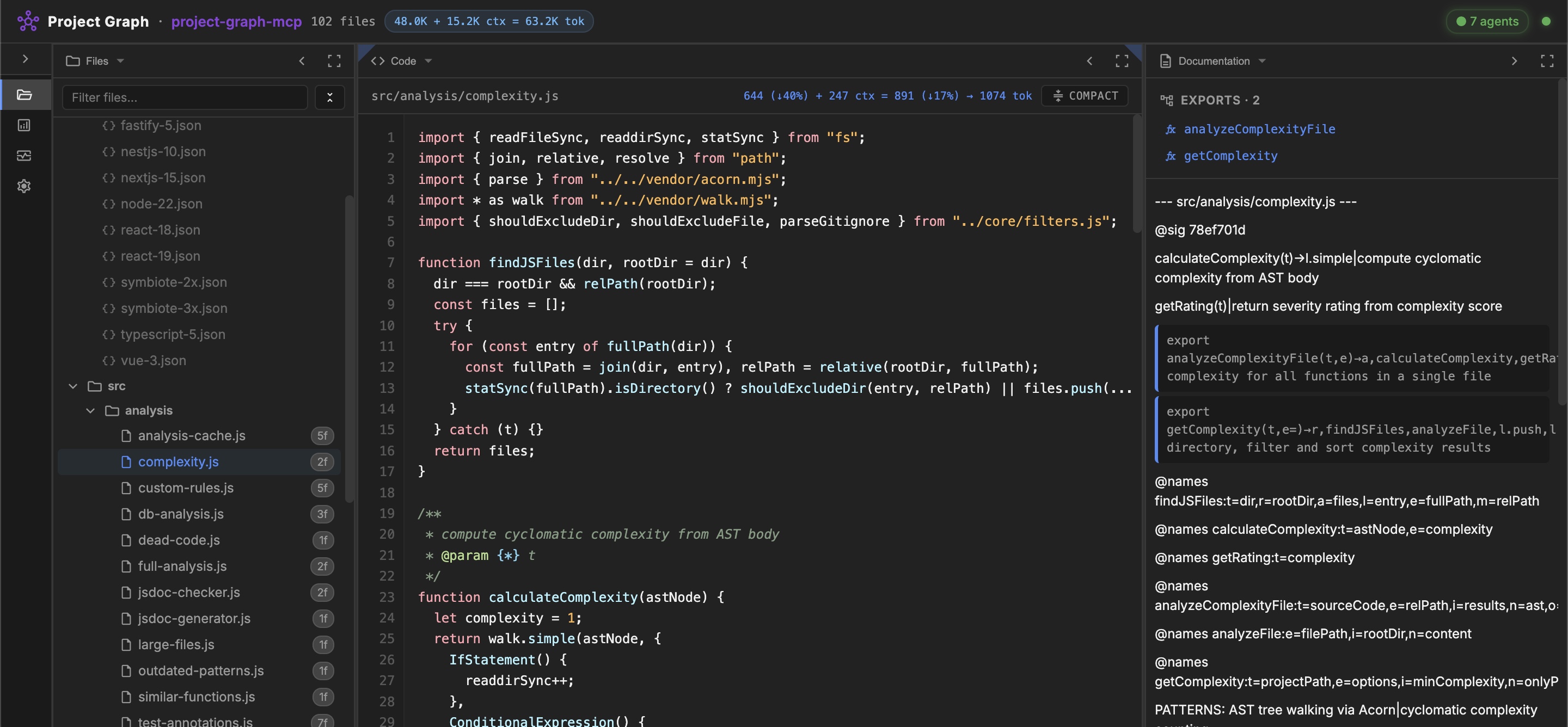
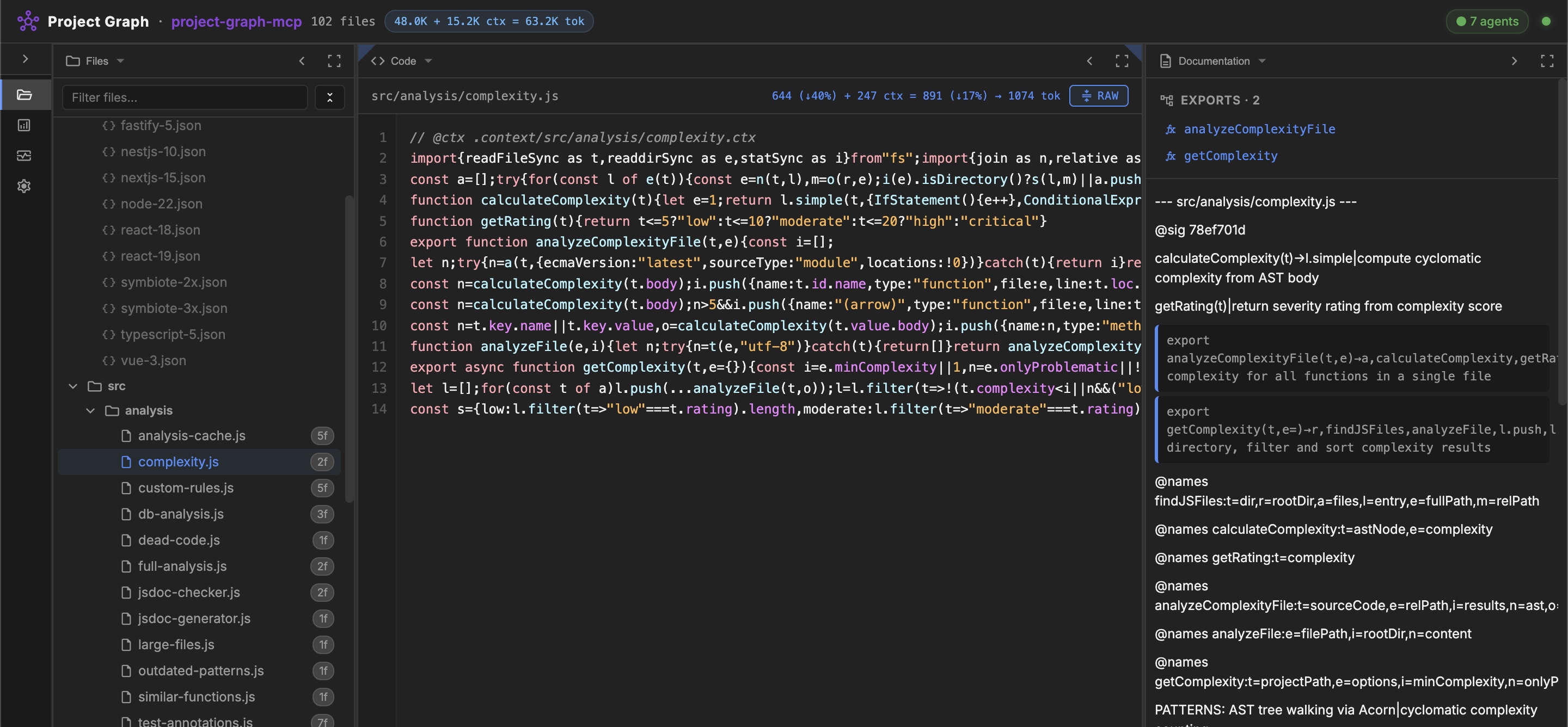
Maximize your AI agent's context window. An MCP server that lets agents read and edit your codebase in compact mode — minified source with all variable names preserved. .ctx documentation is injected only in the focus zone, so agents can start with structure and request implementation detail when needed.
Tip
19 MCP tools, zero config. Add one line to your MCP config and the server downloads itself on the next IDE restart.
- Project Skeleton — compact AST-based JSON graph of files, symbols, and relationships
- Compact Code Mode — project-wide
compact/beautify; agents read and edit minified source while names remain available for restoration - AI Context Layer — one call loads skeleton + docs + compressed files; progressive loading (Overview → Focus)
- Code Quality Analysis — dead code, complexity, duplicates, large files, legacy patterns, JSDoc consistency, Health Score (0-100)
- Multi-Language Parsers — JavaScript (AST/Acorn), TypeScript, Python, Go (regex-based)
- Doc Dialect — auto-generated
.ctxdocumentation with AST signatures, staleness detection, self-enriching@enrichmarkers - Database Analysis — schema extraction from SQL migrations, table usage, dead tables
- Test Checklists — persistent test state in
.ctx.mdfiles, agent-drivenmark_test_passed - Monorepo Support — auto-discovery of sub-projects in
packages/,apps/,services/ - Framework Rules — 11 rulesets (86 rules) for React, Vue, Next.js, Express, NestJS, TypeScript, Node.js, Symbiote.js
- Security — path traversal protection on all operations
Generate the MCP config for your IDE (with correct paths):
npx -y project-graph-mcp configCopy the output JSON into your IDE's MCP config file, then restart.
Where is my MCP config file?
| IDE | Config path |
|---|---|
| Antigravity | ~/.gemini/antigravity/mcp_config.json |
| Gemini CLI | ~/.gemini/settings.json |
| Cursor | .cursor/mcp.json |
| Windsurf | .windsurf/mcp.json |
| Claude Code | Run: claude mcp add project-graph npx -y project-graph-mcp |
See CONFIGURATION.md for all supported IDEs.
Alternative: from source
git clone --recursive https://github.com/rnd-pro/project-graph-mcp
cd project-graph-mcp
npm install
Note: The source checkout no longer needs the former
vendor/symbiote-nodesubmodule.
npx project-graph-mcp skeleton src/       # Project skeleton
npx project-graph-mcp expand SN           # Expand minified symbol
npx project-graph-mcp deps SNG            # Get dependencies
npx project-graph-mcp deadcode src/       # Find unused code
npx project-graph-mcp complexity src/     # Cyclomatic complexity
npx project-graph-mcp analyze src/        # Full health analysis
npx project-graph-mcp compress src/f.js   # Compress file for AI
npx project-graph-mcp docs src/           # Project docs (doc-dialect)
npx project-graph-mcp generate-ctx src/   # Generate .context/ docs
npx project-graph-mcp compact src/ --dry-run  # Compact all files
npx project-graph-mcp mode .              # Show current editing mode
npx project-graph-mcp help # All commandsNote
project-graph-mcp is a pure stdio MCP server — it does not include a web server. For the visual UI (file tree, code viewer, dependency graph, live monitoring, marketplace), install mcp-agent-portal: npx mcp-agent-portal.
Best used as part of mcp-agent-portal — a unified MCP aggregator that combines all RND-PRO servers behind a single config entry:
{
  "mcpServers": {
    "agent-portal": {
      "command": "npx",
      "args": ["-y", "mcp-agent-portal"]
    }
  }
}
Tip
The Portal runs a singleton backend to prevent resource exhaustion when you open multiple IDE windows. It transparently spawns project-graph-mcp as a public child tool server and keeps agent-pool-mcp as its internal execution runtime. One mcp-agent-portal entry replaces separate public configs for child servers.
Also works standalone when you need only project graph tools:
# Generate a config with the correct path for this server:
npx -y project-graph-mcp config
# Or use mcp-agent-portal as the unified orchestration gateway.
Important
Agent workers launched by Agent Portal can use their own project-graph-mcp instance to navigate the codebase independently without blocking the primary orchestrator.
- CONFIGURATION.md — Setup for all supported IDEs
- GUIDE.md — Comprehensive usage guide with all tools
- ARCHITECTURE.md — Source code structure
- AGENT_ROLE.md — Full system prompt for agents
- mcp-agent-portal — Unified MCP aggregator + web dashboard + AI agent runtime
- agent-pool-mcp — Internal execution runtime used by Agent Portal orchestration
- Symbiote.js — Isomorphic Reactive Web Components framework
- JSDA-Kit — SSG/SSR toolkit for modern web applications
MIT © RND-PRO.com
Made with ❤️ by the RND-PRO team