Repository navigation
[Android] A held tap on a Touchable or Pressable in ScrollView does nothing while the keyboard is up #4653
Description

Description
On Android, in gesture-handler's ScrollView with the default keyboardShouldPersistTaps="never", while a React Native TextInput holds the keyboard, a tap on a Touchable or Pressable held past the tap timeout does nothing: the press is dropped as the keyboard-dismissing tap (#4281), yet the keyboard stays up, so the next held tap is dropped again. A quick tap closes the keyboard, and so does every tap on React Native's Pressable in React Native's ScrollView. With delaysChildPressedState={false} on the ScrollView (#4308), in a build where it takes effect (#4652), every tap does nothing, quick ones included.
In never mode React Native's ScrollView takes the touch in the capture phase and blurs the input only on release (ScrollView.js#L1454-L1482). A held button activates while the finger is still down, and its cancelsJSResponder cancel terminates that responder, so no release comes and nothing blurs the input. The press is dropped anyway (Touchable.tsx#L114-L140), since isKeyboardDismissingTap reads only the mode, the keyboard and the focused input (scrollViewInterop.ts#L42-L62). A quick tap activates the button on UP, after the release has blurred the input (#4626); without the pressed-state delay the button activates on touch down, so every tap ends the responder the same way.
Steps to reproduce
- Render the gist's component: a
TextInput, aTouchableand aPressablein gesture-handler'sScrollView, which leaveskeyboardShouldPersistTapsat its default. - Tap the input so the keyboard comes up.
- Hold the
Touchablefor 200 ms withadb shell input swipe <x> <y> <x> <y> 200, then readadb logcat -d -s ReactNativeJS:I: only[scroll view] grantand[scroll view] terminateare logged, with noonPressand no[input] blur, and the keyboard stays up. Holds of 400 ms, and thePressable, read the same, on 3 of 3 holds each. - Tap it with
adb shell input tap <x> <y>:[scroll view] grant,[scroll view] releaseand[input] blurare logged, the keyboard closes, and the press is dropped. - In the example app's Keyboard Should Persist Taps screen in
nevermode, holds on GH Pressable or GH Touchable do the same, while holds on the React Native panel's button close the keyboard every time.
Expected in step 3: the keyboard closes, as in steps 4 and 5.
Actual: the held press logs only the grant and the termination, fires no press and leaves the keyboard up. By hand it shows on a hold of about a second whose finger shifts slightly, as fingers do; a hold the panel reports no move for acts like a quick tap. On a Galaxy S23 (Android 14), the gist's release build, a held press on the Touchable that moves 3 px after the tap timeout (input motionevent DOWN, MOVE, UP over about a second), then a quick tap on it:
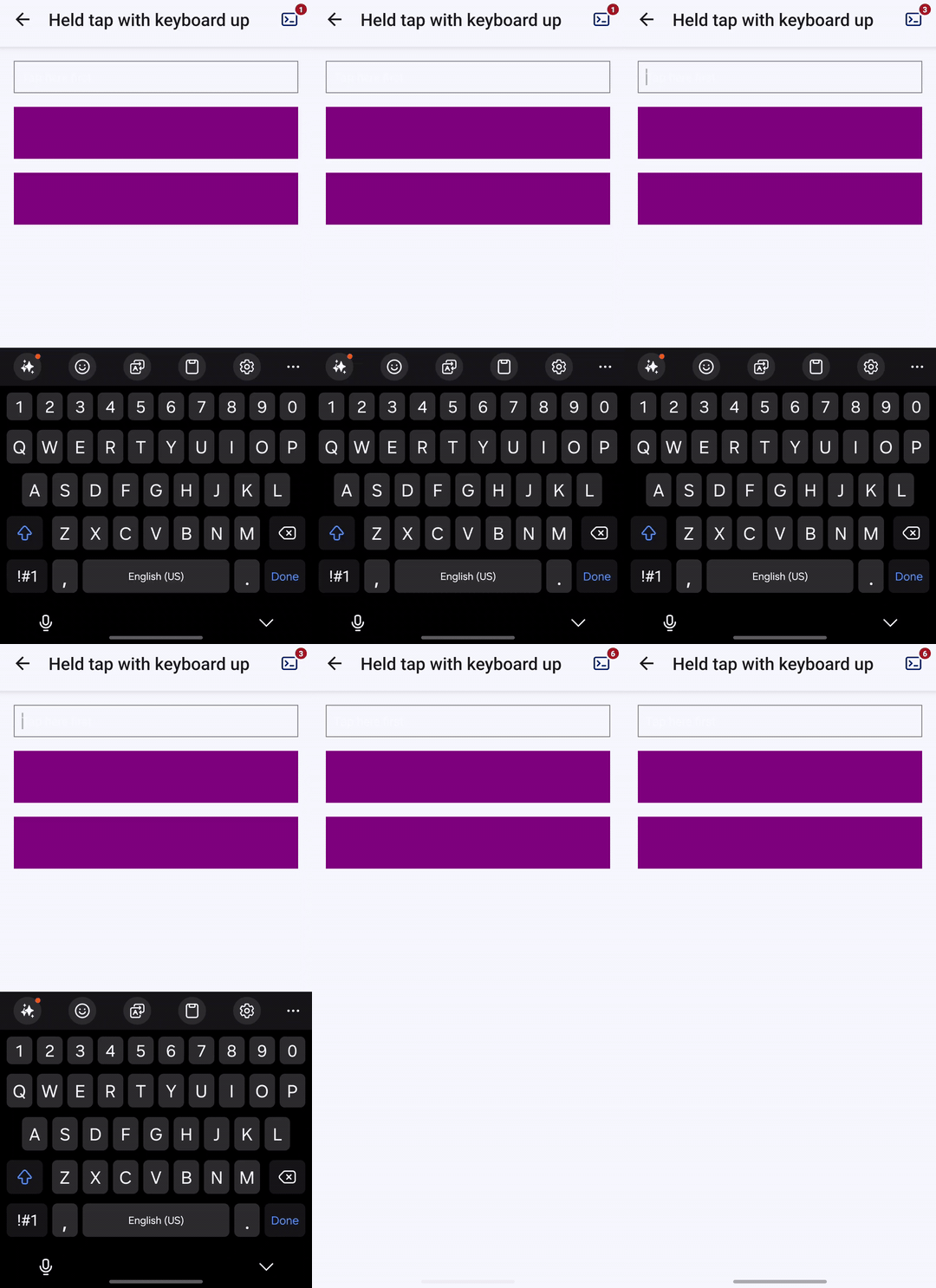
before the hold: keyboard shown
after the held press that shifts: keyboard shown
after the quick tap: keyboard hidden
and what the screen logged, the held press first:
[scroll view] grant
[scroll view] terminate
[scroll view] grant
[scroll view] release
[input] blur
The source video is here, recorded at the variable rate of screenrecord, about 13 frames a second.
With delaysChildPressedState={false} added to that screen's gesture-handler ScrollView, in a build with minification off, a quick tap reads like the hold in step 3: a grant and a termination, and the keyboard stays up.
The screen's never description still says the gesture-handler press fires as well, which #4281 changed.
A link to a Gist, an Expo Snack or a link to a repository based on this template that reproduces the bug.
https://gist.github.com/YevheniiKotyrlo/ea8a1371827b059b73dfc47ba19892de
Gesture Handler version
main at b19e233
React Native version
0.88.0
Platforms
Android
JavaScript runtime
Hermes
Workflow
Using Expo Prebuild or an Expo development build
Build type
Release mode
Device
Android emulator
Device model
API 34 emulator (x86_64, Google APIs), Android 14
Acknowledgements
Yes
Activity
github-actions commentedon Oct 28, 2026
Hey @YevheniiKotyrlo! 👋
The issue doesn't seem to contain a minimal reproduction.
Could you provide a snack, a gist or a link to a GitHub repository that reproduces the problem?
YevheniiKotyrlo commentedon Oct 28, 2026
The body now links a Gist that reproduces this on its own, and the steps follow it: https://gist.github.com/YevheniiKotyrlo/ea8a1371827b059b73dfc47ba19892de
m-bert commentedon Oct 28, 2026
Thanks for the detailed write-up. Is it reproducible "by hand", not using
adb? Unfortunately I was not able to do so.YevheniiKotyrlo commentedon Oct 28, 2026
Yes, with an ordinary press-and-hold of about a second. On a Galaxy S23 (Android 14), four holds by hand, three on the gist's
Touchableand one on itsPressable, each logged only[scroll view] grantand[scroll view] terminate, left the keyboard up and fired no press, and three holds on a RedMagic (Android 16) did the same. The one hold I kept perfectly still, on the RedMagic, did not: its panel reported nothing between down and up, and the hold acted like a quick tap, logging a release and the input's blur and closing the keyboard.That's the condition. The button turns pressed from a timer at the tap timeout, but its handler activates only when the next touch event finds it pressed (
onInterceptTouchEventreturnsisPressed). A held finger reports small moves as it shifts, and the first one after those 100 ms activates the button mid-press, cancelling the scroll view's responder before its release can blur the input. A hold that reports none activates it only on release, so if a hold doesn't show it, rolling the finger slightly while it's down does.adb shell input swiperepeats its point as move events, which is why the adb steps hit it every time.