
9Router - Extended, Pluggable Skill Registry, FREE AI Router & Token Saver
Never stop coding. Save 20-40% tokens with RTK + auto-fallback to FREE & cheap AI models.
Connect All AI Code Tools (Claude Code, Cursor, Antigravity, Copilot, Codex, Gemini, OpenCode, Cline, OpenClaw...) to 40+ AI Providers & 100+ Models.





🚀 Quick Start • 💡 Features • 📖 Documentation • 📖 Setup • 🌐 Website
🇧🇷 Português (Brasil) • 🇻🇳 Tiếng Việt • 🇨🇳 中文 • 🇯🇵 日本語 • 🇷🇺 Русский • 🇹🇭 ไทย • 🇮🇷 فارسی • 🇮🇩 Indonesia • 🇪🇸 Español • 🇫🇷 Français
Stop wasting money, tokens and hitting limits:
- ❌ Subscription quota expires unused every month
- ❌ Rate limits stop you mid-coding
- ❌ Tool outputs (git diff, grep, ls...) burn tokens fast
- ❌ Expensive APIs ($20-50/month per provider)
- ❌ Manual switching between providers
9Router solves this:
- ✅ RTK Token Saver - Auto-compress tool_result content, save 20-40% tokens per request
- ✅ Maximize subscriptions - Track quota, use every bit before reset
- ✅ Auto fallback - Subscription → Cheap → Free, zero downtime
- ✅ Multi-account - Round-robin between accounts per provider
- ✅ Universal - Works with Claude Code, Codex, Cursor, Cline, any CLI tool
┌─────────────┐
│  Your CLI   │  (Claude Code, Codex, OpenClaw, Cursor, Cline...)
│   Tool      │
└──────┬──────┘
       │ http://localhost:20128/v1
       ↓
┌─────────────────────────────────────────────┐
│           9Router (Smart Router)            │
│  • RTK Token Saver (cut tool_result tokens) │
│  • Format translation (OpenAI ↔ Claude)     │
│  • Quota tracking                           │
│  • Auto token refresh                       │
└──────┬──────────────────────────────────────┘
       │
       ├─→ [Tier 1: SUBSCRIPTION] Claude Code, Codex, GitHub Copilot
       │   ↓ quota exhausted
       ├─→ [Tier 2: CHEAP] GLM ($0.6/1M), MiniMax ($0.2/1M)
       │   ↓ budget limit
       └─→ [Tier 3: FREE] Kiro, OpenCode Free, Vertex ($300 credits)

Result: Never stop coding, minimal cost + 20-40% token savings via RTK
⚠️ Important: 9Router Extended is an independent custom fork and does not update via the official upstream npm registry (npm update -g 9router). Use one of the installation methods below:
Install the pre-bundled release package directly:
# Via Bun:
bun add -g https://github.com/thunderkex/9router-extended/releases/latest/download/9router-extended.tgz

# Via NPM:
npm install -g https://github.com/thunderkex/9router-extended/releases/latest/download/9router-extended.tgz --forcenpm install -g git+https://github.com/thunderkex/9router-extended.git#extended# 1. Clone the extended branch
git clone -b extended https://github.com/thunderkex/9router-extended.git
cd 9router-extended
# 2. Install dependencies & build the bundle
npm install
cd cli && npm install && npm run pack:cli
cd ..
# 3. Install globally from the generated tarball
npm install -g ./9router-*.tgzBecause the built-in CLI checks the upstream npm registry, use one of the following methods to update:
# Via Bun:
bun pm cache rm
bun remove -g 9router
bun add -g https://github.com/thunderkex/9router-extended/releases/latest/download/9router-extended.tgz

# Via NPM:
npm install -g https://github.com/thunderkex/9router-extended/releases/latest/download/9router-extended.tgz --forceIf running 9Router as a PM2 background service:
# 1. Update global package (Bun or NPM)
bun pm cache rm && bun add -g https://github.com/thunderkex/9router-extended/releases/latest/download/9router-extended.tgz
# (or with npm: npm install -g https://github.com/thunderkex/9router-extended/releases/latest/download/9router-extended.tgz --force)

# 2. Restart and save PM2 state
pm2 restart 9router --update-env
pm2 saveIf developing locally or pulling the latest commit directly from Git:
# 1. Pull latest changes
git pull

# 2. Rebuild app & CLI package bundle
npm install
npm run build
cd cli && npm run pack:cli && cd ..

# 3. Reinstall globally
bun add -g ./9router-*.tgz
# (or with npm: npm install -g ./9router-*.tgz)

# 4. Restart service (if using PM2)
pm2 restart 9router --update-env && pm2 save
💡 Browser Cache: After updating, perform a hard refresh (
Ctrl + F5/Shift + Reload) onhttp://localhost:20128/dashboard/extendedto load the newly compiled frontend chunks immediately.
# Verify extended version is installed
9router --version
# Output: 0.5.65-extended (or latest version)

# Interactive start (Terminal UI & Web Dashboard)
9router

# Run in Background / System Tray (Silent mode, skips upstream update check)
9router --tray --skip-update- 🌐 Dashboard:
http://localhost:20128 - 🧩 9Router Extended Hub:
http://localhost:20128/dashboard/extended - 🔌 OpenAI-Compatible API:
http://localhost:20128/v1
9Router includes built-in OS startup automation directly from the tray or during 1-click update:
9router --tray --skip-update- Windows: Registers
%APPDATA%\Microsoft\Windows\Start Menu\Programs\Startup\9router.vbsto launch silently in the system tray on boot. - macOS: Registers
~/Library/LaunchAgents/com.9router.autostart.plist. - Linux: Registers
~/.config/autostart/9router.desktop.
No extra process managers required. Manage status anytime via dashboard or tray menu.
# ⚡ For Bun (clear cache & reinstall latest):
bun pm cache rm
bun remove -g 9router
bun add -g https://github.com/thunderkex/9router-extended/releases/latest/download/9router-extended.tgz

# 📦 For NPM:
npm install -g https://github.com/thunderkex/9router-extended/releases/latest/download/9router-extended.tgz --prefer-online

# 🌿 For Live Git Branch:
npm install -g git+https://github.com/thunderkex/9router-extended.git#extendedIf you made modifications to the source code locally and want to install your updated version:
# In the project root:
npm run build
cd cli && npm run pack:cli
cd ..

# Install local package:
bun remove -g 9router
bun add -g ./9router-*.tgz
# (or with npm: npm install -g ./9router-*.tgz)
💡 Interactive Updates: When you run
9routerin terminal, it automatically checks for new releases and gives you a 1-click update option directly in the interactive menu.💡 Applying Updates to Dashboard:
- Restart Server: If 9Router is currently running in the background/tray, restart it so the updated runtime bundle is loaded.
- Browser Cache: After updating, perform a hard refresh (
Ctrl + F5/Shift + Reload) on the Web Dashboard (http://localhost:20128/dashboard) to load the newly compiled frontend chunks immediately.
- Open Dashboard → Providers
- Click Connect on Kiro AI (~50 credits/month free: Claude 4.5 + GLM-5 + MiniMax) or OpenCode Free (no auth).
Point your AI coding tools to 9Router:
Claude Code / Codex / OpenClaw / Cursor / Cline / Antigravity:
  Endpoint: http://localhost:20128/v1
  API Key: [copy from 9router dashboard]
  Model: kr/claude-sonnet-4.5 # Or any combo/alias configured
That's it! All requests are now routed, compressed with Token Savers, and enhanced with 9Router Extended dynamic skills.

🇻🇳 Tiếng Việt Tiết kiệm chi phí LLM cho OpenClaw với 9Router by Mì AI |

🇵🇰 اردو / हिन्दी 9Router + Claude Code FREE Unlimited Setup by Build AI With Hamid |
🇺🇸 English 9Router + Claude Code FREE Setup by Build AI With Hamid |

🇺🇸 English 9Router + Claude Code FREE Setup by Build AI With Hamid |

🇺🇸 English Claude Code FREE Forever — Unlimited Models by Build AI With Hamid |
🇺🇸 English Claude CLI Free Setup with 9Router 🚀 by CodeVerse Soban |

🇻🇳 Tiếng Việt Cài Đặt OpenClaw Free Từ A-Z + 9Router by Mai Gia |
🇺🇸 English FREE OpenClaw + Claude Opus 4.6 by Build AI With Hamid |

🇮🇩 Indonesia Koding 24 Jam Anti Rate Limit! Hemat Token AI 65% | Tutorial Quick Setup 9Router 🚀 by Krisswuh |

🇮🇩 Indonesia Cara Deploy 9Router di Hugging Face GRATIS Non-Stop! | Alternatif VPS RAM 16GB by Krisswuh |

🇮🇷 Persian-فارسی این شکلی از هر API ای استفاده کن برای هوش مصنوعی by Matin SenPai |

🇻🇳 Tiếng Việt Hướng Dẫn Setup OpenClaw + 9Router: Tạo Bot Zalo AI Tự Động Từ A-Z by tuanminhhole |
🎬 Made a video about 9Router? Submit a Pull Request adding your video to this section — we'll merge it!
9Router works seamlessly with all major AI coding tools:
 Claude-Code |
 OpenClaw |
 Codex |
 OpenCode |
 Cursor |
 Antigravity |
 Cline |
 Continue |
 Droid |
 Roo |
 Copilot |
 Kilo Code |
 OpenDesign |
 jcode |
 Grok Build |
 Devin CLI |
 DeepSeek TUI |
 Qwen Code |
|
Claude-Code |
Antigravity |
Codex |
 GitHub |
Cursor |
 Kimchi |
 Kiro AI Claude 4.5 + GLM-5 + MiniMax 50 credits/month free |
OpenCode Free No auth • Auto-fetch models Free (model list varies) |
 Vertex AI Gemini 3 Pro + GLM-5 + DeepSeek $300 credits free |
Note: iFlow, Qwen Code and Gemini CLI free tiers were discontinued in 2026. Use Kiro / OpenCode Free / Vertex instead.
Kiro AI moved to a paid model in Sep 2025 — the free tier is now capped at 50 credits/month (plus 500 trial credits for new accounts in the first 30 days). Paid tiers: Pro $20/mo (1,000 credits), Pro+ $40/mo (2,000), Pro Max $100/mo (5,000), Power $200/mo (10,000). OpenCode Free model list fluctuates over time (some models free only for limited promos) — subject to change without notice. Vertex AI: the $300 free credit for new GCP accounts is still valid, but since Mar 2026 the Gemini API endpoint no longer consumes these credits — call the Vertex AI Studio endpoint instead.
 OpenRouter |
 GLM |
 Kimi |
 MiniMax |
 OpenAI |
 Anthropic |
|
Gemini |
 DeepSeek |
 Groq |
 xAI |
 Mistral |
 Perplexity |
 Together AI |
 Fireworks |
 Cerebras |
 Cohere |
 NVIDIA |
 SiliconFlow |
...and 20+ more providers including Nebius, Chutes, Hyperbolic, and custom OpenAI/Anthropic compatible endpoints
For speech and embeddings served from your own machine — whisper.cpp, faster-whisper, Speaches, Kokoro-FastAPI, openedai-speech, llama.cpp/llama-server, vLLM, Infinity, text-embeddings-inference, or anything else that speaks the OpenAI shape.
| Provider | Endpoint used | Typical server |
|---|---|---|
| Self-hosted STT | /v1/audio/transcriptions |
whisper.cpp, faster-whisper |
| Self-hosted TTS | /v1/audio/speech |
Kokoro-FastAPI, openedai-speech |
| Self-hosted Embedding | /v1/embeddings |
llama-server, vLLM, Infinity |
Every other speech provider is a named cloud service with a fixed endpoint. These three read their address from each connection, so one provider can front several machines and load-balance across them like any other.
Set it on the connection as providerSpecificData.baseUrl:
| Provider | Give it | Result |
|---|---|---|
| Self-hosted STT | the full URL — http://host:8080/v1/audio/transcriptions |
used as-is |
| Self-hosted TTS | the server root — http://host:8880 |
+ /v1/audio/speech |
| Self-hosted Embedding | the OpenAI base, /v1 included — http://host:8080/v1 |
+ /embeddings |
Mind the
/v1on embeddings. The adapter appends/embeddings, sohttp://host:8080resolves tohttp://host:8080/embeddingsand misses the OpenAI route — llama-server answers 501. Give it the same base URL an OpenAI client would use. A full.../v1/embeddingsis also accepted, so a value pasted from acurlexample works too.
The API key is not checked by most local servers, but the field must be non-empty:
it is what gives the connection a credentials record, and baseUrl lives there.
Any placeholder works.
Self-hosted Embedding has no cloud fallback by design — a connection saved
without a baseUrl is reported as a configuration error rather than quietly
falling back to api.openai.com, which would send your input text and API key to
a third party under a provider named "Self-hosted".
| Feature | What It Does | Why It Matters |
|---|---|---|
| 🚀 RTK Token Saver (RTK ⭐40K) | Compress tool outputs (git diff, grep, ls, tree...) before sending to LLM |
Save 20-40% input tokens per request |
| ✂️ Token Trimmer & Dedup | Schema-aware sliding-window trimming + paragraph prompt deduplication | Prevents context overflows & redundant tokens |
| ⚡ Session Skill Deduplication | Tracks injected skill prompts per conversation session; skips reinjection on follow-ups | Saves 15-30% context tokens on multi-turn chats |
| 🧠 Headroom Token Saver (Headroom) | 1-Click pip auto-setup, multi-port conflict avoidance & auto-detect /v1/compress proxy |
Zero-config context compression |
| 🪨 Caveman Mode (Caveman ⭐52K) | Inject caveman-speak prompt → LLM replies terse, technical substance preserved | Save up to 65% output tokens |
| 🐴 Ponytail (Ponytail) | Inject "lazy senior dev" prompt → LLM writes minimal, YAGNI-first code (Lite/Full/Ultra) | Fewer output tokens, less refactoring |
| 📐 Auto Plan-Then-Code | Automatic two-stage pipeline: architectural planning via Plan Combo + code execution with Code Combo | Zero extra tokens on simple tasks, structured code on large tasks |
| 🧩 9Router Extended & Skills | Dynamic prompt injection, pre-route/post-response hooks, and agent tool registry |
Infinitely customizable |
| 🌐 OpenRouter Live Model Sync | Query OpenRouter live catalog, filter models, and import with custom vision/reasoning caps | Instant access to newly released models |
| 🛡️ Dashboard Guard & Security | Unified auth gateway, strict loopback checks on admin APIs, and safe tunnel isolation | Protects API keys and sensitive settings |
| ⚡ Routing Health & Circuit Breaker | In-memory EMA latency tracking ( |
Instant auto-failover, zero dead calls |
| 🎯 Smart Auto-Combos & Fallback | Score-ranked fallback recommendations: Subscription → Cheap → Free | Never stop coding, zero downtime |
| 📊 Real-Time Quota & Latency Tracking | Live token count, reset countdown, and SSE latency push stream (/api/health/latency-stream) |
Maximize subscription value & visibility |
| 🛡️ Actionable Proxy Diagnostics | Standard OpenAI errors enriched with structured codes & recovery hints (error.diagnostic) |
Zero-guesswork troubleshooting |
| 🔄 Format Translation | OpenAI ↔ Claude ↔ Gemini ↔ Cursor ↔ Kiro ↔ Vertex | Works with any CLI tool |
| 👥 Multi-Account Support | Multiple accounts per provider | Load balancing + redundancy |
| 🔄 Auto Token Refresh | OAuth tokens refresh automatically | No manual re-login needed |
| 🎨 Custom Combos | Create unlimited model combinations | Tailor fallback to your needs |
| 📝 Request Logging | Debug mode with full request/response logs | Troubleshoot issues easily |
| 💾 Cloud Sync | Sync config across devices | Same setup everywhere |
| 📊 Usage Analytics | Track tokens, cost, trends over time | Optimize spending |
| 🌐 Deploy Anywhere | Localhost, VPS, Docker, Cloudflare Workers | Flexible deployment options |
| 🔄 Extended In-App Update Engine | Direct GitHub Releases sync, update badge, and 1-click update command assistance | Always stay updated on the latest fork release |
Set X-9Router-Token-Saver: off to bypass all token savers for one chat request.
📖 Feature Details
🚀 RTK Token Saver
Tool outputs (git diff, grep, find, ls, tree, log dumps...) often eat 30-50% of your prompt budget. RTK detects them and applies smart, lossless compression before the request hits the LLM:
-
Filters:
git-diff,git-status,grep,find,ls,tree,dedup-log,smart-truncate,read-numbered,search-list -
Auto-detect: No config needed — RTK peeks the first 1KB of each
tool_resultand picks the right filter. - Safe by design: If a filter fails, throws, or makes output bigger, RTK silently keeps the original text. Errors never break your request.
- Universal: Works across all formats (OpenAI, Claude, Gemini, Cursor, Kiro, OpenAI Responses) because it runs before any format translation.
- Default ON: Toggle anytime in Dashboard → Endpoint settings.
Without RTK: 47K tokens sent to LLM
With RTK:    28K tokens sent to LLM   (40% saved · same context · same answer)
✂️ Token Trimmer & Deduplication
For ultra-long agent conversations that approach provider context windows:
-
Sliding-Window Trimmer: Preserves the initial system message and the last 3 turns, safely evicting older middle turns while strictly maintaining
tool_useandtool_resultpair integrity so tool call IDs are never orphaned. - Prompt Paragraph Dedup: Deduplicates identical prompt paragraphs injected multiple times across different skill layers.
- Configurable: Toggle and set token budgets in Dashboard → Settings → Token Saver.
🧠 Headroom Token Saver (1-Click Auto Setup & Multi-Port Auto Detect)
Headroom is an external context compression proxy. 9Router calls Headroom's /v1/compress endpoint to compress large prompt contexts before forwarding to LLM providers:
Client → 9Router → Headroom /v1/compress → 9Router → provider
⚡ 1-Click Auto Install (Zero-Config)
In Dashboard → Token Saver → Headroom:
-
⚡ 1-Click Auto Setup: Automatically discovers your local Python (
$\ge 3.10$ ) environment, executespip install "headroom-ai[proxy]", launches the daemon, and enables compression in one click. - � Auto-Start on Boot: Automatically re-spawns the Headroom proxy process on 9Router startup / restart when enabled.
-
�🔄 Smart Port Conflict Avoidance: If port
8787is occupied by another app, 9Router automatically probes and binds to the next available port (8788,8789...) with zero manual config. - 📡 Auto-Detect Port Radar: Click "Auto-Detect Port" in the Headroom modal to scan active instances running on ports 8787–8791 and instantly sync your proxy URL.
🛠️ Manual Local / Docker Setup (Optional)
# Manual Python install & start:
pip install "headroom-ai[proxy]"
headroom proxy --port 8787

# Docker sidecar examples:
http://headroom:8787            # Same Docker network
http://host.docker.internal:8787 # Running on host
💡 Fail-Open Safety: If Headroom is stopped or encounters an error, 9Router fails open automatically and forwards the uncompressed request directly without breaking your session.
🐴 Ponytail (Lazy Senior Dev)
Ponytail injects a "lazy senior dev" system prompt into every request, biasing the LLM toward minimal, YAGNI-first code — deletion over addition, stdlib over new deps, one-liners over abstractions. Adapted from DietrichGebert/ponytail.
- Lite — Build what's asked, name the lazier alternative.
- Full — YAGNI ladder enforced: stdlib → native → existing deps → one-liner → minimal code.
- Ultra — YAGNI extremist: deletion first, ship the one-liner, challenge the rest of the requirement in the same response.
Without Ponytail: verbose code, extra abstractions, "just in case" scaffolding
With Ponytail:    shortest working diff, no unrequested abstractions, fewer tokens
Never trades away: input validation, error handling that prevents data loss, security, accessibility, or anything explicitly requested. Enable in Dashboard → Endpoint → Ponytail. Stacks with Caveman (output terseness) and RTK (input compression).
🎯 Smart 3-Tier Fallback
Create combos with automatic fallback:
Combo: "my-coding-stack"
  1. cc/claude-opus-4-6        (your subscription)
  2. glm/glm-4.7               (cheap backup, $0.6/1M)
  3. if/kimi-k2-thinking       (free fallback)

→ Auto switches when quota runs out or errors occur
📊 Real-Time Quota Tracking
- Token consumption per provider
- Reset countdown (5-hour, daily, weekly)
- Cost estimation for paid tiers
- Monthly spending reports
🔄 Format Translation
Seamless translation between formats:
- OpenAI ↔ Claude ↔ Gemini ↔ Cursor ↔ Kiro ↔ Vertex ↔ Antigravity ↔ Ollama ↔ OpenAI Responses
- Your CLI tool sends OpenAI format → 9Router translates → Provider receives native format
- Works with any tool that supports custom OpenAI endpoints
👥 Multi-Account Support
- Add multiple accounts per provider
- Auto round-robin or priority-based routing
- Fallback to next account when one hits quota
🔄 Auto Token Refresh
- OAuth tokens automatically refresh before expiration
- No manual re-authentication needed
- Seamless experience across all providers
🎨 Custom Combos
- Create unlimited model combinations
- Mix subscription, cheap, and free tiers
- Name your combos for easy access
- Share combos across devices with Cloud Sync
📝 Request Logging
- Enable debug mode for full request/response logs
- Track API calls, headers, and payloads
- Troubleshoot integration issues
- Export logs for analysis
💾 Cloud Sync
- Sync providers, combos, and settings across devices
- Automatic background sync
- Secure encrypted storage
- Access your setup from anywhere
Cloud Runtime Notes
- Prefer server-side cloud variables in production:
-
BASE_URL(internal callback URL used by sync scheduler) -
CLOUD_URL(cloud sync endpoint base)
-
-
NEXT_PUBLIC_BASE_URLandNEXT_PUBLIC_CLOUD_URLare still supported for compatibility/UI, but server runtime now prioritizesBASE_URL/CLOUD_URL. - Cloud sync requests now use timeout + fail-fast behavior to avoid UI hanging when cloud DNS/network is unavailable.
📊 Usage Analytics
- Track token usage per provider and model
- Cost estimation and spending trends
- Monthly reports and insights
- Optimize your AI spending
💡 IMPORTANT - Understanding Dashboard Costs:
The "cost" displayed in Usage Analytics is for tracking and comparison purposes only. 9Router itself never charges you anything. You only pay providers directly (if using paid services).
Example: If your dashboard shows "$290 total cost" while using Kiro free models, this represents what you would have paid using paid APIs directly. Your actual cost = $0 (Kiro free tier: ~50 credits/mo).
Think of it as a "savings tracker" showing how much you're saving by using free models or routing through 9Router!
🌐 Deploy Anywhere
- 💻 Localhost - Default, works offline
- ☁️ VPS/Cloud - Share across devices
- 🐳 Docker - One-command deployment
- 🚀 Cloudflare Workers - Global edge network
| Tier | Provider | Cost | Quota Reset | Best For |
|---|---|---|---|---|
| 🚀 TOKEN SAVER | RTK (built-in) | FREE | Always on | Save 20-40% tokens on EVERY request |
| 💳 SUBSCRIPTION | Claude Code (Pro/Max) | $20-200/mo | 5h + weekly | Already subscribed |
| Codex (Plus/Pro) | $20-200/mo | 5h + weekly | OpenAI users | |
| GitHub Copilot | $10-19/mo | Monthly | GitHub users | |
| Cursor IDE | $20/mo | Monthly | Cursor users | |
| 💰 CHEAP | GLM-5.1 / GLM-4.7 | $0.6/1M | Daily 10AM | Budget backup |
| MiniMax M2.7 | $0.2/1M | 5-hour rolling | Cheapest option | |
| Kimi K2.5 | $9/mo flat | 10M tokens/mo | Predictable cost | |
| 🆓 FREE | Kiro AI | $0 | 50 credits/mo | Claude 4.5 + GLM-5 + MiniMax free (paid tiers above) |
| OpenCode Free | $0 | Varies* | No auth, auto-fetch models (list changes over time) | |
| Vertex AI | $300 credits | New GCP accounts | Gemini 3 Pro + DeepSeek + GLM-5 (use Vertex AI Studio endpoint for free credits) |
💡 Pro Tip: RTK + Kiro AI + OpenCode Free combo = $0 cost + 20-40% token savings!
9Router features a dedicated 9Router Extended hub and a manifest-driven Skill Registry that makes it infinitely extensible with community rules, design guidelines, agent CLI modules, and dynamic prompt interpolations.

| Category | Location in Dashboard | Included Modules | Functionality |
|---|---|---|---|
| ⚡ Token Saver | Dashboard → Token Saver |
RTK, Headroom, Caveman Mode, Ponytail, Watermarks Remover, PXPIPE, Token Trimmer | Native, pre-configured input/output token compression & prompt hygiene. |
| ✨ 9Router Extended | Dashboard → 9Router Extended |
Hermes Agent Toolkit, Taste Skill, MCP Inspector, Graphify, Commit Lint, Human Handwritten, & Custom User Skills | Pluggable community rules, persistent agent memory sync, aesthetic guidelines, dynamic sliders, and agent tools. |
| 🔀 ECC & Local Skill Router | Dashboard → 9Router Extended |
TF-IDF Skill Classifier, Local Smart Routing, Auto Dynamic Prompt Routing | Local TF-IDF classifier routing user intent to matched ECC and local skills (taste-skill, commit-lint, ponytail) with independent thresholding and trace observability. |
| 🧠 Hermes Memory Bridge | Dashboard → 9Router Extended |
Hermes Agent Persistent Store Sync | Reads/writes MEMORY.md and USER.md (\n§\n delimited), auto-injects persistent notes into chat completions, and async auto-saves user preferences across sessions. |
| 🌐 OpenRouter Live Model Sync | Dashboard → Providers → [Provider] |
Live OpenRouter Catalog Query & Import | Live modal search and filtering across the OpenRouter catalog with automatic vision & reasoning capability configuration. |
| ⚡ Session Prompt Dedup | Automatic Chat Engine |
Multi-Turn Skill Prompt Cache | Tracks injected skill prompts per conversation session and skips redundant reinjection on follow-up turns, cutting prompt bloat by 15-30%. |
| 🛡️ Dashboard Guard & Security | Network & API Gateway |
Unified Auth & Loopback Gateway | Enforces strict loopback checks on management APIs (LOCAL_ONLY_PATHS) and isolates private endpoints during tunnel usage. |
| 🔄 Extended Release Hub | Dashboard → Sidebar |
In-App GitHub Release Sync | Dedicated update check targeting GitHub releases with update notification badges and 1-click update commands. |
Any skill with "hook": "system-prompt" can define dynamic configuration parameters in its manifest.json.
{
  "id": "taste-skill",
  "name": "Taste Skill",
  "category": "prompt-injection",
  "hook": "system-prompt",
  "config_schema": [
    {
      "key": "design_variance",
      "type": "slider",
      "label": "Design Variance",
      "min": 1,
      "max": 10,
      "default": 5
    },
    {
      "key": "motion_intensity",
      "type": "slider",
      "label": "Motion Intensity",
      "min": 1,
      "max": 10,
      "default": 5
    }
  ]
}-
Interactive Dashboard Controls: In
Dashboard → 9Router Extended, each parameter is rendered with a modernConfigSliderwith real-time gradient tracking, snap presets (Min,Low,Default,High,Max), and live value badges. -
Instant State Persistence: Adjusting a slider writes its exact value directly to the 9Router SQLite database in real-time.
-
Template Variable Interpolation: In your skill's
prompt.txtorprompt.md, you can use{key_name}placeholders:Dynamic Configuration: - Design Variance: {design_variance} / 10 * [1-3]: Minimal, conservative structure. * [4-7]: Balanced, modern anti-slop design (Standard). * [8-10]: Highly expressive, bespoke editorial typography. - Motion Intensity: {motion_intensity} / 10 * [1-3]: Reduced motion, subtle opacity transitions. * [4-7]: Smooth interactive micro-hover physics. * [8-10]: Dynamic fluid choreographies and spring animations.
-
Runtime Prompt Injection: When a request is dispatched to any provider (Claude, OpenAI, Gemini, Codex, Cursor, etc.), 9Router automatically replaces
{design_variance}and{motion_intensity}with your active slider numbers before injecting into the system prompt. -
Automatic Fallback: If your prompt does not contain
{key_name}placeholders, 9Router automatically appends anActive Configuration:block with every slider key and scale to ensure the model always respects your settings.
You can create new skills directly from Dashboard → 9Router Extended → Create Custom Skill / Rule:

- System Prompt / Rule Injector (
system-prompt): Injects custom rules, style guides, or security directives with dynamic sliders. - Agent CLI Tool (
install-cli): Integrates external CLI tools (e.g. MCP packages) with 1-click Install/Uninstall management. - 1-Click Starter Templates: Pre-configured templates for UI Design Taste, Security & Privacy Guard, and MCP Tools.
- Live Manifest Inspector: Preview the generated
manifest.jsonbefore saving.
- Local TF-IDF Intent Matching: Fast in-memory classification matches user prompt intent to community ECC skills and local skills (
taste-skill,commit-lint,ponytail) without external network calls. - Smart Local Skill Routing: Topic-specific local skills activate only when the user prompt exceeds their individual relevance threshold (configurable via dynamic sliders or switched to "Always" in settings).
- Dynamic Skill Injection: Injects matched skill instructions at request time based on relevance threshold and max-skills limit.
- Trace Observability: Injects headers/metadata (
x-9r-ecc-skills,x-9r-ecc-scores,x-9r-local-skills) and logs triggered rules for full inspection in request traces. - 1-Click Sync: Sync bundled and imported ECC skills straight from the extended dashboard.
- Persistent Memory Storage: Connects directly with Hermes Agent memory directory (
%LOCALAPPDATA%\hermes\memories\or~/.hermes/memories/), managingMEMORY.md(agent notes, ~2200 char budget) andUSER.md(user profile/preferences, ~1375 char budget). - Format Integrity: Preserves Hermes section delimiter (
\n§\n) and applies sliding-window eviction with deduplication when char limits are exceeded. - Dynamic Context Injection: Automatically injects user preferences and agent notes into the system prompt across OpenAI, Claude, and Gemini formats via
open-sse/rtk/systemInject.js. - Async Background Learning: Detects explicit preferences, instructions, and rules in chat completions and saves them automatically to Hermes disk memory in the background without adding request latency.
- Automatic Health & Latency Probing: Real-time probing across active connections to evaluate model availability and response latency.
- Kind-Aware Filtering: Probing automatically isolates chat/LLM endpoints (
kind: "llm"), skipping embeddings, audio, and image models during chat combo generation. - Cross-Connection Deduplication: Merges model variants across duplicate accounts, prioritizing active and lowest-latency endpoints.
- Smart Fallback Tiers: Generates balanced multi-tier combos (e.g.
Tier 1: Subscription / High-Quality→Tier 2: Fast & Cheap→Tier 3: Free / High-Quota Fallback).
9Router Extended allows you to query the live OpenRouter model catalog directly from the provider details page:
- Live Model Discovery: Click "Fetch OpenRouter Models" in
Dashboard → Providers → [Provider]to open an interactive search and filtering modal (FetchOpenRouterModelsModal). - Rich Metadata & Filtering: Filter models by name, ID, context window length, pricing (prompt/completion), and capability flags.
- Custom Capabilities Upsert: Automatically sets or customizes vision and reasoning capabilities (
AddCustomModelModal) with stored values persisting in SQLite. - Live
/v1/modelsAPI Resolution: Dynamically imported models are exposed immediately via/v1/modelsand/api/v1/modelswithout requiring a server restart.
To prevent token waste in extended conversational workflows:
- Per-Session Skill Tracking: 9Router Extended maintains an in-memory session cache (
cache.js,chat.js) that records which skill prompts have been injected into a given conversation session. - Redundant Prompt Stripping: Subsequent turns in the same chat session skip re-injecting static skill system prompts, eliminating thousands of wasted tokens per turn while keeping the model context focused.
- Zero Configuration: Enabled automatically across all streaming, non-streaming, and OpenAI/Claude translation pipelines.
For secure local and remote deployments:
- Unified Dashboard Guard (
dashboardGuard.js): Centralizes all request authentication, dashboard session validation, and tunnel access control. - Loopback-Only Route Protection (
LOCAL_ONLY_PATHS): Administrative routes that execute process spawns or installations (/api/headroom/*,/api/pxpipe/*,/api/skills/install,/api/plugins/hermes/*) strictly verify loopback/local request origin to prevent remote code execution over exposed endpoints. - Tunnel Gating: When exposing 9Router via Cloudflare Tunnels or Tailscale, administrative and internal API routes are protected unless explicitly enabled.
9Router Extended provides a full collection of drop-in skills with standardized YAML frontmatter for instant integration with Claude Code, Cursor, Antigravity, OpenClaw, and custom agents:
| Skill | Description | Location / Drop-in Link |
|---|---|---|
9router |
Core router entry and setup skill | SKILL.md |
9router-chat |
Text & code completion routing | SKILL.md |
9router-image |
Multimodal image generation | SKILL.md |
9router-video |
Video generation (Grok Imagine) | SKILL.md |
9router-tts |
Text-to-speech audio synthesis | SKILL.md |
9router-stt |
Speech-to-text audio transcription | SKILL.md |
9router-embeddings |
High-performance text embeddings | SKILL.md |
9router-web-fetch |
Clean URL-to-Markdown web fetch | SKILL.md |
9router-web-search |
Live web search querying | SKILL.md |
hermes-toolkit |
Persistent memory bridge (MEMORY.md, USER.md) |
SKILL.md |
taste-skill |
Anti-AI-slop design & motion variance sliders | SKILL.md |
ponytail |
Lazy senior dev YAGNI coding injector | SKILL.md |
caveman |
Ultra-terse output compression | SKILL.md |
human-commit |
Direct, natural Git commit message formatting | SKILL.md |
human-handwritten |
Anti-slop authentic prose and writing style | SKILL.md |
watermarks-remover |
Zero-width unicode & metadata cleaner | SKILL.md |
9Router Billing Reality:
✅ 9Router software = FREE forever (open source, never charges)
✅ Dashboard "costs" = Display/tracking only (not actual bills)
✅ You pay providers directly (subscriptions or API fees)
✅ FREE providers stay FREE (Kiro ~50 credits/mo, OpenCode Free, Vertex $300 credits = $0 within free-tier limits) — note iFlow/Qwen/Gemini CLI free tiers were discontinued in 2026
❌ 9Router never sends invoices or charges your card
How Cost Display Works:
The dashboard shows estimated costs as if you were using paid APIs directly. This is not billing - it's a comparison tool to show your savings.
Example Scenario:
Dashboard Display:
• Total Requests: 1,662
• Total Tokens: 47M
• Display Cost: $290

Reality Check:
• Provider: Kiro (free tier: ~50 credits/mo)
• Actual Payment: $0.00
• What $290 Means: Amount you SAVED by using free models!
Payment Rules:
- Subscription providers (Claude Code, Codex): Pay them directly via their websites
- Cheap providers (GLM, MiniMax): Pay them directly, 9Router just routes
- FREE providers (iFlow, Kiro, Qwen): Genuinely free forever, no hidden charges
- 9Router: Never charges anything, ever
Problem: Quota expires unused, rate limits during heavy coding
Solution:
Combo: "maximize-claude"
  1. cc/claude-opus-4-7        (use subscription fully)
  2. glm/glm-5.1               (cheap backup when quota out)
  3. kr/claude-sonnet-4.5      (free emergency fallback)

Monthly cost: $20 (subscription) + ~$5 (backup) = $25 total
vs. $20 + hitting limits = frustration
Problem: Can't afford subscriptions, need reliable AI coding
Solution:
Combo: "free-forever"
  1. kr/claude-sonnet-4.5      (Claude 4.5 free via Kiro, ~50 credits/mo)
  2. kr/glm-5                  (GLM-5 free via Kiro)
  3. oc/<auto>                 (OpenCode Free, no auth)

Monthly cost: $0
Quality: Production-ready models + RTK saves 20-40% tokens
Problem: Deadlines, can't afford downtime
Solution:
Combo: "always-on"
  1. cc/claude-opus-4-7        (best quality)
  2. cx/gpt-5.5                (second subscription)
  3. glm/glm-5.1               (cheap, resets daily)
  4. minimax/MiniMax-M2.7      (cheapest, 5h reset)
  5. kr/claude-sonnet-4.5      (free via Kiro, ~50 credits/mo)

Result: 5 layers of fallback = zero downtime
Monthly cost: $20-200 (subscriptions) + $10-20 (backup)
Problem: Need AI assistant in messaging apps (WhatsApp, Telegram, Slack...), completely free
Solution:
Combo: "openclaw-free"
  1. kr/claude-sonnet-4.5      (Claude 4.5 free)
  2. kr/glm-5                  (GLM-5 free)
  3. kr/MiniMax-M2.5           (MiniMax free)

Monthly cost: $0
Access via: WhatsApp, Telegram, Slack, Discord, iMessage, Signal...
📊 Why does my dashboard show high costs?
The dashboard tracks your token usage and displays estimated costs as if you were using paid APIs directly. This is not actual billing - it's a reference to show how much you're saving by using free models or existing subscriptions through 9Router.
Example:
- Dashboard shows: "$290 total cost"
- Reality: You're using Kiro free models (~50 credits/mo)
- Your actual cost: $0.00
- What $290 means: Amount you saved by using free models instead of paid APIs!
The cost display is a "savings tracker" to help you understand your usage patterns and optimization opportunities.
💳 Will I be charged by 9Router?
No. 9Router is free, open-source software that runs on your own computer. It never charges you anything.
You only pay:
- ✅ Subscription providers (Claude Code $20/mo, Codex $20-200/mo) → Pay them directly on their websites
- ✅ Cheap providers (GLM, MiniMax) → Pay them directly, 9Router just routes your requests
- ❌ 9Router itself → Never charges anything, ever
9Router is a local proxy/router. It doesn't have your credit card, can't send invoices, and has no billing system. It's completely free software.
🆓 Are FREE providers really unlimited?
Mostly! The current FREE providers (Kiro, OpenCode Free, Vertex) are genuinely free, but free tiers have limits:
These are free services offered by those respective companies:
- Kiro AI: ~50 credits/month free (plus 500 trial credits for new accounts in the first 30 days) via AWS Builder ID / Google / GitHub OAuth. Paid tiers available above that.
- OpenCode Free: No-auth passthrough proxy, models auto-fetched from
opencode.ai/zen/v1/models. The free model list fluctuates over time (some models free only for limited promos) — subject to change without notice. - Vertex AI: $300 free credits for new Google Cloud accounts (90 days). Since Mar 2026 the Gemini API endpoint no longer consumes these credits — use the Vertex AI Studio endpoint instead.
9Router just routes your requests to them - there's no "catch" or future billing from 9Router itself. They're truly free services, and 9Router makes them easy to use with fallback support.
Discontinued free tiers (no longer recommended):
- ❌ iFlow: Was free unlimited, now changed to paid (2026)
- ❌ Qwen Code: Free OAuth tier fully discontinued by Alibaba on 2026-04-15
- ❌ Gemini CLI: Service fully shut down by Google on 2026-06-18 (replaced by the closed-source Antigravity CLI). Discontinued — do not use.
💰 How do I minimize my actual AI costs?
Free-First Strategy:
-
Start with 100% free combo:
1. kr/glm-5 (GLM-5 free via Kiro, ~50 credits/mo)
2. OpenCode Free models (no auth, auto-fetched)
3. Vertex AI Gemini 3 Pro (using the Vertex AI Studio endpoint with $300 credits)
Cost: $0/month (within Kiro's free credit cap; OpenCode/Vertex subject to their free-tier limits)
-
Add cheap backup only if you need it:
4. glm/glm-4.7 ($0.6/1M tokens)Additional cost: Only pay for what you actually use
-
Use subscription providers last:
- Only if you already have them
- 9Router helps maximize their value through quota tracking
Result: Most users can operate at $0/month using only free tiers!
📈 What if my usage suddenly spikes?
9Router's smart fallback prevents surprise charges:
Scenario: You're on a coding sprint and blow through your quotas
Without 9Router:
- ❌ Hit rate limit → Work stops → Frustration
- ❌ Or: Accidentally rack up huge API bills
With 9Router:
- ✅ Subscription hits limit → Auto-fallback to cheap tier
- ✅ Cheap tier gets expensive → Auto-fallback to free tier
- ✅ Never stop coding → Predictable costs
You're in control: Set spending limits per provider in dashboard, and 9Router respects them.
🔐 Subscription Providers (Maximize Value)
Dashboard → Providers → Connect Claude Code
→ OAuth login → Auto token refresh
→ 5-hour + weekly quota tracking

Models:
  cc/claude-opus-4-7
  cc/claude-opus-4-6
  cc/claude-sonnet-4-6
  cc/claude-haiku-4-5-20251001
Pro Tip: Use Opus for complex tasks, Sonnet for speed. 9Router tracks quota per model!
Dashboard → Providers → Connect Codex
→ OAuth login (port 1455)
→ 5-hour + weekly reset

Models:
  cx/gpt-5.5
  cx/gpt-5.4
  cx/gpt-5.3-codex
cx/gpt-5.2-codexDashboard → Providers → Connect GitHub
→ OAuth via GitHub
→ Monthly reset (1st of month)
Models:
gh/gpt-5.4
gh/claude-opus-4.7
gh/claude-sonnet-4.6
gh/gemini-3.1-pro-preview
gh/grok-code-fast-1Dashboard → Providers → Connect Cursor
→ OAuth login
→ Monthly subscription
Models:
cu/claude-4.6-opus-max
cu/claude-4.5-sonnet-thinking
cu/gpt-5.3-codex💰 Cheap Providers (Backup)
GLM-5.1 / GLM-4.7 (Daily reset, $0.6/1M)
- Sign up: Zhipu AI
- Get API key from Coding Plan
- Dashboard → Add API Key:
- Provider:
glm - API Key:
your-key
- Provider:
Use: glm/glm-5.1, glm/glm-5, glm/glm-4.7
Pro Tip: Coding Plan offers 3× quota at 1/7 cost! Reset daily 10:00 AM.
MiniMax M2.7 (5h reset, $0.20/1M)
- Sign up: MiniMax
- Get API key
- Dashboard → Add API Key
Use: minimax/MiniMax-M2.7, minimax/MiniMax-M2.5
Pro Tip: Cheapest option for long context (1M tokens)!
Kimi K2.5 ($9/month flat)
- Subscribe: Moonshot AI
- Get API key
- Dashboard → Add API Key
Use: kimi/kimi-k2.5, kimi/kimi-k2.5-thinking
Pro Tip: Fixed $9/month for 10M tokens = $0.90/1M effective cost!
🆓 FREE Providers (Recommended)
Kiro AI (Claude 4.5 + GLM-5 + MiniMax FREE)
Dashboard → Connect Kiro
→ AWS Builder ID, AWS IAM Identity Center, Google, or GitHub
→ Unlimited usage

Models:
  kr/claude-sonnet-4.5
  kr/claude-haiku-4.5
  kr/glm-5
  kr/MiniMax-M2.5
  kr/qwen3-coder-next
  kr/deepseek-3.2
Pro Tip: Best free option for Claude. No API key, no payment, fully unlimited.
OpenCode Free (No auth, auto-fetch models)
Dashboard → Connect OpenCode Free
→ No login required (passthrough proxy)
→ Models auto-fetched from opencode.ai/zen/v1/models
Pro Tip: Fastest setup. Just connect and start coding.
Vertex AI ($300 free credits for new GCP accounts)
Dashboard → Connect Vertex AI
→ Upload Google Cloud Service Account JSON
→ Enable Vertex AI API in your GCP project

Models:
  vertex/gemini-3.1-pro-preview
  vertex/gemini-3-flash-preview
  vertex/gemini-2.5-flash

Vertex Partner (Anthropic / DeepSeek / GLM / Qwen via Vertex):
  vertex-partner/glm-5-maas
  vertex-partner/deepseek-v3.2-maas
  vertex-partner/qwen3-next-80b-a3b-thinking-maas
Pro Tip: New Google Cloud accounts get $300 credits free for 90 days. Plenty for daily coding.
🎨 Create Combos
Example 1: Maximize Subscription → Cheap Backup
Dashboard → Combos → Create New

Name: premium-coding
Models:
  1. cc/claude-opus-4-7 (Subscription primary)
  2. glm/glm-5.1 (Cheap backup, $0.6/1M)
  3. minimax/MiniMax-M2.7 (Cheapest fallback, $0.20/1M)

Use in CLI: premium-coding

Monthly cost example (100M tokens):
  80M via Claude (subscription): $0 extra
  15M via GLM: $9
  5M via MiniMax: $1
  Total: $10 + your subscription
Example 2: Free-Only (Zero Cost)
Name: free-combo
Models:
  1. kr/claude-sonnet-4.5 (Claude 4.5 free via Kiro, ~50 credits/mo)
  2. kr/glm-5 (GLM-5 free via Kiro)
  3. vertex/gemini-3.1-pro-preview ($300 free credits)

Cost: $0 forever (+ 20-40% token savings via RTK)!
🔧 CLI Integration
Settings → Models → Advanced:
  OpenAI API Base URL: http://localhost:20128/v1
  OpenAI API Key: [from 9router dashboard]
  Model: cc/claude-opus-4-7
Or use combo: premium-coding
Edit ~/.claude/config.json:
{
  "anthropic_api_base": "http://localhost:20128/v1",
  "anthropic_api_key": "your-9router-api-key"
}export OPENAI_BASE_URL="http://localhost:20128"
export OPENAI_API_KEY="your-9router-api-key"
codex "your prompt"Option 1 — Dashboard (recommended):
Dashboard → CLI Tools → OpenClaw → Select Model → Apply
Option 2 — Manual: Edit ~/.openclaw/openclaw.json:
{
  "agents": {
    "defaults": {
      "model": {
        "primary": "9router/kr/claude-sonnet-4.5"
      }
    }
  },
  "models": {
    "providers": {
      "9router": {
        "baseUrl": "http://127.0.0.1:20128/v1",
        "apiKey": "sk_9router",
        "api": "openai-completions",
        "models": [
          {
            "id": "kr/claude-sonnet-4.5",
            "name": "Claude Sonnet 4.5 (Kiro Free)"
          }
        ]
      }
    }
  }
}
Note: OpenClaw only works with local 9Router. Use
127.0.0.1instead oflocalhostto avoid IPv6 resolution issues.
Provider: OpenAI Compatible
Base URL: http://localhost:20128/v1
API Key: [from dashboard]
Model: cc/claude-opus-4-7
🚀 Deployment
VPS Deployment
# Clone and install
git clone https://github.com/decolua/9router.git
cd 9router
npm install
npm run build

# Configure
export JWT_SECRET="your-secure-secret-change-this"
export INITIAL_PASSWORD="your-password"
export DATA_DIR="/var/lib/9router"
export PORT="20128"
export HOSTNAME="0.0.0.0"
export NODE_ENV="production"
export NEXT_PUBLIC_BASE_URL="http://localhost:20128"
export NEXT_PUBLIC_CLOUD_URL="https://9router.com"
export API_KEY_SECRET="endpoint-proxy-api-key-secret"
export MACHINE_ID_SALT="endpoint-proxy-salt"

# Start
npm run start

# Or use PM2
npm install -g pm2
pm2 start npm --name 9router -- start
pm2 save
pm2 startup
Docker
Published images (multi-platform linux/amd64 + linux/arm64):
- Docker Hub:
decolua/9router - GHCR:
ghcr.io/decolua/9router
Quick start (use published image):
docker run -d \
  --name 9router \
  -p 20128:20128 \
  -v "$HOME/.9router:/app/data" \
  -e DATA_DIR=/app/data \
  decolua/9router:latest
→ Open http://localhost:20128
Build from source (dev):
git clone https://github.com/decolua/9router.git
cd 9router/app
docker build -t 9router .
docker run -d --name 9router -p 20128:20128 \
  -v "$HOME/.9router:/app/data" -e DATA_DIR=/app/data 9router
Container defaults:
PORT=20128HOSTNAME=0.0.0.0
Useful commands:
docker logs -f 9router
docker restart 9router
docker stop 9router && docker rm 9router
docker pull decolua/9router:latest   # update to latest
Data persistence: $HOME/.9router/db/data.sqlite on host ↔ /app/data/db/data.sqlite in container.
Environment Variables
| Variable | Default | Description |
|---|---|---|
JWT_SECRET |
Auto-generated (~/.9router/jwt-secret) |
JWT signing secret for dashboard auth cookie (override to share across instances) |
INITIAL_PASSWORD |
123456 |
First login password when no saved hash exists |
DATA_DIR |
~/.9router |
Main app data location (SQLite at $DATA_DIR/db/data.sqlite) |
PORT |
framework default | Service port (20128 in examples) |
HOSTNAME |
framework default | Bind host (Docker defaults to 0.0.0.0) |
NODE_ENV |
runtime default | Set production for deploy |
BASE_URL |
http://localhost:20128 |
Server-side internal base URL used by cloud sync jobs |
CLOUD_URL |
https://9router.com |
Server-side cloud sync endpoint base URL |
NEXT_PUBLIC_BASE_URL |
http://localhost:3000 |
Backward-compatible/public base URL (prefer BASE_URL for server runtime) |
NEXT_PUBLIC_CLOUD_URL |
https://9router.com |
Backward-compatible/public cloud URL (prefer CLOUD_URL for server runtime) |
API_KEY_SECRET |
endpoint-proxy-api-key-secret |
HMAC secret for generated API keys |
MACHINE_ID_SALT |
endpoint-proxy-salt |
Salt for stable machine ID hashing |
ENABLE_REQUEST_LOGS |
false |
Enables request/response logs under logs/
|
AUTH_COOKIE_SECURE |
false |
Force Secure auth cookie (set true behind HTTPS reverse proxy) |
REQUIRE_API_KEY |
false |
Enforce Bearer API key on /v1/* routes (recommended for internet-exposed deploys) |
HTTP_PROXY, HTTPS_PROXY, ALL_PROXY, NO_PROXY
|
empty | Optional outbound proxy for upstream provider calls |
SEARXNG_URL |
http://localhost:8888/search |
Endpoint for the built-in unauthenticated SearXNG web-search provider |
Notes:
- Lowercase proxy variables are also supported:
http_proxy,https_proxy,all_proxy,no_proxy. -
.envis not baked into Docker image (.dockerignore); inject runtime config with--env-fileor-e. - On Windows,
APPDATAcan be used for local storage path resolution. -
INSTANCE_NAMEappears in older docs/env templates, but is currently not used at runtime.
Runtime Files and Storage
- Main app state:
${DATA_DIR}/db/data.sqlite(SQLite — providers, combos, aliases, keys, settings, usage history) - Auto backups:
${DATA_DIR}/db/backups/ - Optional request/translator logs:
<repo>/logs/...whenENABLE_REQUEST_LOGS=true - Both
${DATA_DIR}and~/.9routerresolve to the same location in a Docker container — the symlink/root/.9router -> /app/datais created at build time.
View all available models
Claude Code (cc/) - Pro/Max:
cc/claude-opus-4-7cc/claude-opus-4-6cc/claude-sonnet-4-6cc/claude-sonnet-4-5-20250929cc/claude-haiku-4-5-20251001
Codex (cx/) - Plus/Pro:
cx/gpt-5.5cx/gpt-5.4cx/gpt-5.3-codexcx/gpt-5.2-codexcx/gpt-5.1-codex-max
GitHub Copilot (gh/):
gh/gpt-5.4gh/claude-opus-4.7gh/claude-sonnet-4.6gh/gemini-3.1-pro-previewgh/grok-code-fast-1
Cursor (cu/) - Subscription:
cu/claude-4.6-opus-maxcu/claude-4.5-sonnet-thinkingcu/gpt-5.3-codexcu/kimi-k2.5
GLM (glm/) - $0.6/1M:
glm/glm-5.1glm/glm-5glm/glm-4.7
MiniMax (minimax/) - $0.2/1M:
minimax/MiniMax-M2.7minimax/MiniMax-M2.5
Kimi (kimi/) - $9/mo flat:
kimi/kimi-k2.5kimi/kimi-k2.5-thinking
Kiro (kr/) - Free (~50 credits/month, paid tiers above):
kr/claude-sonnet-4.5kr/claude-haiku-4.5kr/glm-5kr/MiniMax-M2.5kr/qwen3-coder-nextkr/deepseek-3.2
OpenCode Free (oc/) - FREE no-auth:
- Auto-fetched from
opencode.ai/zen/v1/models
Vertex AI (vertex/) - $300 free credits:
vertex/gemini-3.1-pro-previewvertex/gemini-3-flash-previewvertex/gemini-2.5-flashvertex-partner/glm-5-maasvertex-partner/deepseek-v3.2-maas
"Language model did not provide messages"
- Provider quota exhausted → Check dashboard quota tracker
- Solution: Use combo fallback or switch to cheaper tier
Rate limiting
- Subscription quota out → Fallback to GLM/MiniMax
- Add combo:
cc/claude-opus-4-7 → glm/glm-5.1 → kr/claude-sonnet-4.5
OAuth token expired
- Auto-refreshed by 9Router
- If issues persist: Dashboard → Provider → Reconnect
High costs
- Enable RTK in Dashboard → Endpoint settings (default ON, saves 20-40% tokens)
- Check usage stats in Dashboard
- Switch primary model to GLM/MiniMax
- Use free tier (Kiro, OpenCode Free, Vertex) for non-critical tasks
Dashboard opens on wrong port
- Set
PORT=20128andNEXT_PUBLIC_BASE_URL=http://localhost:20128
First login not working
- Check
INITIAL_PASSWORDin.env - In development, default fallback password is
123456. ⚠️ Production Guard: InNODE_ENV=production, 9Router refuses to boot ifINITIAL_PASSWORDis123456or unset. Set a strong password in your.envbefore deploying.
Proxy Error Diagnostics (error.diagnostic)
- All proxy errors conform to standard OpenAI error payloads, enriched with
error.diagnostic.code,error.diagnostic.hint, anderror.diagnostic.providerfor instant debugging without log-diving.
No request logs under logs/
- Set
ENABLE_REQUEST_LOGS=true
- Runtime: Node.js 20+
- Framework: Next.js 16
- UI: React 19 + Tailwind CSS 4
- Database: SQLite (better-sqlite3 / node:sqlite / sql.js fallback)
- Streaming: Server-Sent Events (SSE)
- Auth: OAuth 2.0 (PKCE) + JWT + API Keys
POST http://localhost:20128/v1/chat/completions
Authorization: Bearer your-api-key
Content-Type: application/json

{
  "model": "cc/claude-opus-4-6",
  "messages": [
    {"role": "user", "content": "Write a function to..."}
  ],
  "stream": true
}GET http://localhost:20128/v1/models
Authorization: Bearer your-api-key
→ Returns all models + combos in OpenAI format- Website: 9router.com
- GitHub: github.com/decolua/9router
- Issues: github.com/decolua/9router/issues
Thanks to all contributors who helped make 9Router better!
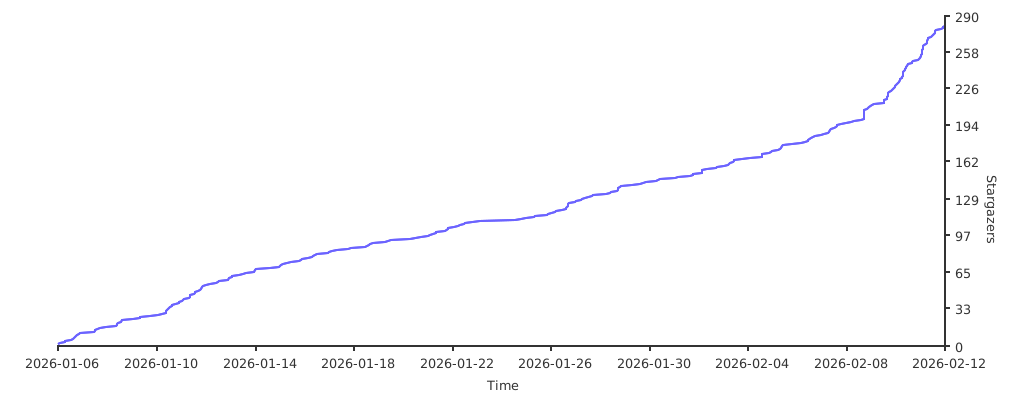
OmniRoute — A full-featured TypeScript fork of 9Router. Adds 36+ providers, 4-tier auto-fallback, multi-modal APIs (images, embeddings, audio, TTS), circuit breaker, semantic cache, LLM evaluations, and a polished dashboard. 368+ unit tests. Available via npm and Docker.
Built on the shoulders of giants:
- 9Router by @decolua — the original open-source AI router and web dashboard that serves as the foundation for 9Router Extended. Huge respect and gratitude to decolua and all upstream contributors!
- CLIProxyAPI — original Go implementation that inspired the JavaScript port.
- RTK
— Rust token-saver. 9Router ports its compression pipeline to JS → −20-40% input tokens on every request.
- Caveman
by @JuliusBrussee — viral "why use many token when few token do trick". 9Router adapts its prompt → −65% output tokens.
- Ponytail
by @DietrichGebert — "lazy senior dev" skill. 9Router injects its YAGNI-first ladder → fewer tokens, less code, shorter diffs.


Huge thanks to these authors — without their work, 9Router's features wouldn't exist. ⭐ them on GitHub!
MIT License - see LICENSE for details.