Quick start
ℹ️ In case an error occurs when running the salomon.sh script, you may run the compatibility check script for details.
This is a short and simple usage example for getting started with Salomon.
Inside the samples sub-directory you can find the file foobar.log containing these lines
2014-04-02 01:04:16 Starting foobar service
2014-04-02 01:04:17 Reading config file
2014-04-02 01:04:17 Warning: Config file 'foobar.cfg' not found
2014-04-02 01:04:18 Notice: Using fallback config file instead
2014-04-02 01:04:19 Configuration has been loaded successfully
2014-04-02 01:04:20 Running process #1
2014-04-02 01:04:24 Running process #2
2014-04-02 01:04:28 Running process #3
2014-04-02 01:04:32 Running process #4
2014-04-02 01:04:33 Error while running process #4
2014-04-02 01:04:34 Warning: At least one process has failed
2014-04-02 01:04:36 Stopping foobar service
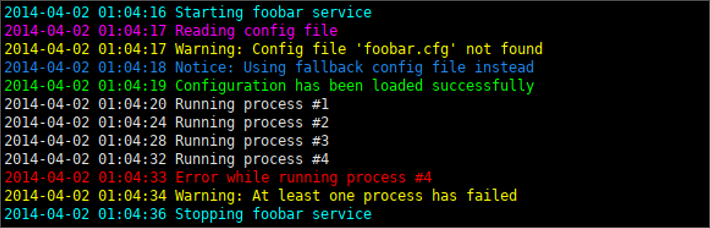
and let us assume that you want to highlight its contents as follows:
Lines containing the term ...
-
noticein light blue, -
startin light cyan, -
stopalso in light cyan, -
successin light green, -
readin light purple, -
errorin light red and -
warnin yellow.
Create a file with the following content:
lightblue       notice
lightcyan       start
lightcyan       stop
lightgreen      success
lightpurple     read
lightred        error
yellow          warn
Save it as log_colors.cfg into the colors sub-directory.
Now, you can simply execute the following command
./salomon.sh --analyze --color-file log_colors.cfg --input-file samples/foobar.logor alternatively the short form
./salomon.sh --analyze -c log_colors.cfg -i samples/foobar.logto get the requested result:
The analyze mode (--analyze) used above will simply output the log file as it is when executing the command. If you want to follow the log file contents to instantly see when there are new entries, you may use the monitor mode (--monitor) instead.