



Rewire Claude Code's local state when your project folder moves.
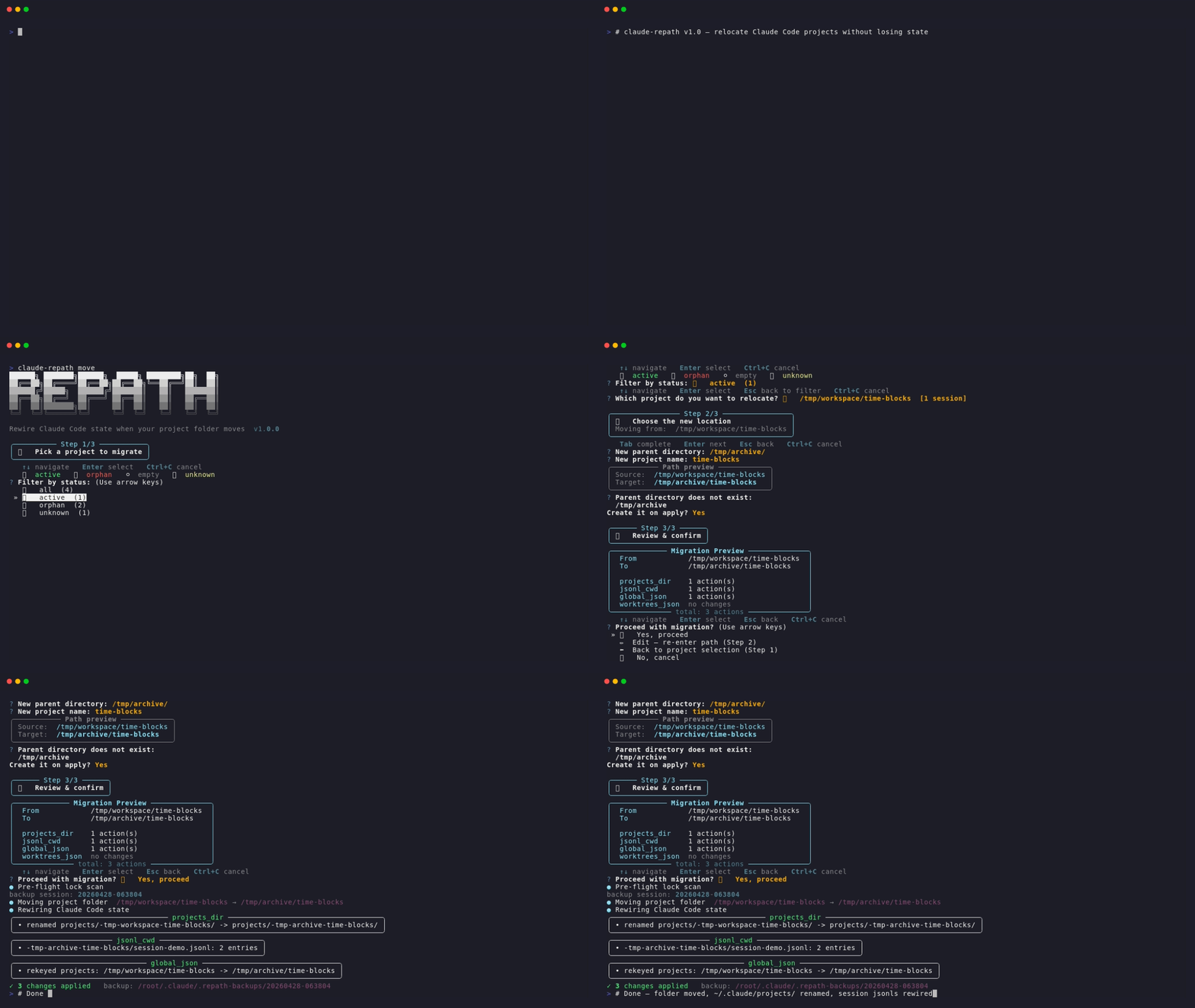
When you move or rename a project directory, Claude Code loses track of its sessions, memory, todos, and worktrees — because the absolute path is hardcoded in four different places. claude-repath patches all of them in one shot.
Claude Code stores per-project state under ~/.claude/projects/<encoded-cwd>/, where the folder name is derived from the project's absolute path. Moving the project folder breaks:
~/.claude/projects/<encoded>/— the encoded folder name no longer matches~/.claude/projects/<encoded>/*.jsonl— each session file has"cwd"hardcoded inside~/.claude.json— theprojectskey is indexed by absolute path- Git worktree sub-projects — each has its own encoded folder AND internal
cwdfields
Anthropic has no official migration command (as of 2026-04), and existing community tools cover at most 6 of the needed layers. claude-repath aims to handle all of them, with special care for Windows paths and worktrees.
Pick whichever matches your workflow — they're all equivalent:
| Method | Command | When to use |
|---|---|---|
| uvx (zero-install) | uvx --from claude-repath claude-repath <subcommand> |
Try or use without installing — uv caches it transparently |
| pipx (global CLI) | pipx install claude-repath |
Daily use, isolated from system Python |
| pip (in a venv) | pip install claude-repath |
Already inside a project venv |
💡 First time? Run
uvx --from claude-repath claude-repath --version— no commitment, just see if it works on your box. Upgrade later withuvx --refresh ….
In addition to the CLI, this repo ships a Claude Code plugin so your AI assistant can recognize symptoms — "I moved my project and Claude forgot everything", "sessions gone after rename", "~/.claude/projects has the old folder name" — and suggest claude-repath automatically, without you having to remember the tool's name.
From inside Claude Code:
/plugin marketplace add xPeiPeix/claude-repath
/plugin install claude-repath@claude-repath-marketplace
Or, from any terminal (uses the open skills.sh ecosystem — Claude Code, Cursor, Codex, and ~40 more agents):
npx skills add xPeiPeix/claude-repathThe plugin only ships a skill (a ~200-line guidance document). It does not bundle the CLI — you still install that via uvx/pipx/pip above, or let the skill guide Claude to run it via uvx on first use.
# INTERACTIVE mode — pick from a list, no path typing needed
claude-repath move

# Explicit mode — preview changes first (ALWAYS recommended)
claude-repath move D:\dev_code\time-blocks D:\dev_code\Life\time-blocks --dry-run

# Actually perform the migration (auto-backs-up first)
claude-repath move D:\dev_code\time-blocks D:\dev_code\Life\time-blocks

# Broader scan — also rewrite cross-project references (use with care)
claude-repath move <old> <new> --scope broad

# Override pre-flight lock check (still bounded by OS-level runtime locks
# — see --force note in Safety section). v0.4.1+ uses atomic os.rename, so
# a runtime lock now fails loudly with the source directory intact; previously
# shutil.move could half-succeed on Windows.
claude-repath move <old> <new> --force

# If you already moved the folder manually, just rewire state
claude-repath rewire D:\dev_code\time-blocks D:\dev_code\Life\time-blocks

# Health check a project's Claude Code state
claude-repath doctor D:\dev_code\time-blocks

# List all projects Claude Code knows about
claude-repath list

# Roll back a previous migration
claude-repath rollback 20260419-155331Legend: ✅ fully handled ·
| # | Layer | Status |
|---|---|---|
| 1 | Physical project folder (mv) |
✅ |
| 2 | ~/.claude/projects/<encoded>/ directory name |
✅ |
| 3 | .jsonl session files — inline "cwd" fields |
✅ |
| 4 | ~/.claude.json — projects key |
✅ |
| 5 | Worktree-derived project folders (auto-discovered) | ✅ |
| 6 | ~/.claude/git-worktrees.json (if present) |
✅ |
| 7 | Python .venv/ / venv/ — rebuild after move (why & how) |
|
| 8 | node_modules/ — rebuild after move (why & how) |
|
| 9 | Chromium Local Storage/leveldb entries (Desktop app) |
🔍 |
⚠️ rows:movephysically relocates these directories, but their internal binaries/shims embed absolute paths and stop working until you rebuild with the original package manager.claude-repathdetects them pre-flight and prints a non-blocking warning — see Known limitations for the exact rebuild commands.
- Pre-flight lock check (v0.4+): scans every running process via
psutilfor any that have acwdinside the target directory or a file open under it, and hard-refuses the migration with exit code 1 if any are found. Reports PID, process name, and specific lock reason (shellcd, IDE, editor, etc.). Overridable with--force/-f. - Atomic physical move (v0.4.1+): even when the pre-flight check misses a lock (elevated processes invisible to
psutil, TOCTOU races, transient AV-scanner or Windows-Search-indexer locks), the physical folder move uses a bareos.renameinstead ofshutil.move— no silentcopytree + rmtreedowngrade. Result: onWinError 32/5the move fails loudly with exit code 1 and the source directory is guaranteed intact for retry; the previous half-migration failure mode (target complete, source half-deleted) is now impossible. Cross-volume moves fall back torobocopy /MOVE(Windows) orshutil.move(Unix). - Dry-run by default logic: destructive commands require either
--dry-runpreview first or explicit confirmation. Dry-run also previews the pre-flight lock report without blocking. - Auto-backup: every mutation is snapshotted to
~/.claude/.repath-backups/<timestamp>/. - Running-Claude warning: soft heads-up if any
claudeCLI process is detected holding state files (complements the hard pre-flight check above). - Rollback:
claude-repath rollback <timestamp>restores a previous snapshot.
Some directories inside a project embed absolute paths at creation time,
and no amount of careful copying fixes that — they must be rebuilt after the
move. claude-repath move detects the most common offenders and prints a
warning (non-blocking) so you know what to rebuild:
| Directory | Why it breaks | How to rebuild |
|---|---|---|
Python .venv/ / venv/ |
Windows Scripts/*.exe trampolines hard-code the path to python.exe; Unix scripts use #!/abs/path shebangs |
uv sync / pip install -e . / poetry install — whichever your project uses |
node_modules/ |
.bin/*.cmd shims (Windows) and pnpm symlinks may contain absolute paths |
npm ci / pnpm install / yarn install |
claude-repath does not run the rebuild for you — every package manager
has its own command and auto-running any of them without your consent can
clobber lockfiles, pull unexpected versions, or take a long time with no
progress feedback. The warning tells you what needs attention; you run the
right command.
Other directories with similar issues (target/ for Rust debug builds,
vendor/bundle/ for Ruby Bundler, etc.) are currently not detected —
flag them via a GitHub issue if you hit problems.
| OS | CLI state (~/.claude/) |
Desktop state (Local Storage/leveldb) |
|---|---|---|
| Windows 11 (Git Bash / PowerShell / cmd) | ✅ auto-migrated | 🔍 diagnosed |
| macOS | ✅ auto-migrated | 🔍 diagnosed |
| Linux | ✅ auto-migrated | 🔍 diagnosed |
Windows paths with drive letters (D:\...) and backslashes are first-class — they were the primary motivation for writing this tool. The path matcher accepts both \ and / separators and automatically aligns with ~/.claude.json's forward-slash-stored keys.
Claude Code Desktop stores additional session state in Chromium's Local Storage LevelDB:
- Windows:
%LOCALAPPDATA%\claude\Local Storage\leveldb\ - macOS:
~/Library/Application Support/claude/Local Storage/leveldb/ - Linux:
~/.config/claude/Local Storage/leveldb/
claude-repath doctor reports whether this directory exists on your machine but does not migrate it automatically — Desktop's Chromium leveldb format is intentionally out of scope (the schema is private to Anthropic and shifts between Desktop releases, so any auto-migration would be brittle to maintain). If you use Desktop exclusively and move a project, the Desktop UI's "recent projects" list may show a stale path. Remedy: open the new folder via Desktop's File menu to re-register it.
At the time of writing (April 2026) there is no official Anthropic
migration command. A handful of community tools exist — claude-repath
is designed to close their gaps:
| Tool | Layers covered | Windows | Worktrees | ~/.claude.json |
Separator tolerance |
|---|---|---|---|---|---|
| arak-git/claude-code-project-mover-py | 6 | ✅ | partial | ✅ | partial |
| justinstimatze/claude-mv | 9 | ❌ | ❌ | ✅ | ❌ |
| lovstudio/cc-mv (npm) | 4 | ? | ❌ | ❌ | ❌ |
| skydiver/claude-code-project-mover | 2 | ❌ | ❌ | ❌ | ❌ |
| claude-repath | 6 + rollback | ✅ | ✅ auto | ✅ | ✅ both |
# Clone & enter
git clone https://github.com/xPeiPeix/claude-repath.git
cd claude-repath

# Install with uv (creates .venv, installs typer + dev deps)
uv sync --all-groups

# Run tests
uv run pytest

# Lint
uv run ruff check

# Run CLI locally
uv run claude-repath --help
Layout:
src/claude_repath/
├── cli.py              # typer app (move/rewire/doctor/list/rollback)
├── migrate.py          # orchestrator
├── tui.py              # wizard picker + project discovery
├── locks.py            # pre-flight psutil lock detection (v0.4+)
├── encoder.py          # path → folder-name encoding
├── backup.py           # manifest-based backup & LIFO rollback
├── platform_paths.py   # per-OS Desktop state paths (Win/macOS/Linux)
├── utils.py            # shared path rewrite helpers
└── layers/
    ├── projects_dir.py    # ~/.claude/projects/<encoded>/ renaming
    ├── jsonl_cwd.py       # .jsonl cwd field rewriting
    ├── global_json.py     # ~/.claude.json projects key
    └── worktrees_json.py  # ~/.claude/git-worktrees.json
- v1.0.0 (current) — Interactive pickers for
rollback/doctor+ shell-completion auto-install. Both commands previously hard-required a positional argument (rollback <timestamp>meant copy-pasting an encoded folder name fromlist-backups;doctor <path>required typing the absolute project path). v1.0.0 makes the argument optional and a no-args invocation launches a TUI picker matchingmove's v0.3.0 wizard style.rollback's picker lists every backup directory under~/.claude/.repath-backups/newest-first, each annotated with a humanized date (2026-04-27 15:30:12) parsed from theYYYYMMDD-HHMMSSdirectory name plus the manifest's entry count (or[unreadable]for corrupted manifests so one bad backup never aborts the picker).doctor's picker reusespick_project(status filter → orphan detection → conflict markers) but suppresses theStep 1/3wizard banner and filters out<unknown: ...>placeholder rows so the synthetic string never reachesMigrationContextas if it were a real path.add_completion=Trueflipped on the typer app exposesclaude-repath --install-completion(auto-detects bash / zsh / fish / PowerShell and writes the script into the appropriate rc file) and--show-completion(dumps the script to stdout for manual inspection).pick_projectgains keyword-onlywizard_step/title/prompt/exclude_unknownparameters so non-wizard callers opt out of the step banner without forking the picker._read_manifest_entry_counthardens against three previously-unhandled corruption modes: non-dict JSON root (json.loads("[]")returns a list,data.get("entries")was raisingAttributeError), missingentrieskey, and non-UTF-8 bytes (Path.read_text(encoding="utf-8")raisesUnicodeDecodeError, aValueErrorsubclass not in the original(OSError, JSONDecodeError)tuple). Newtests/test_cli.pyadds 8 typer-CliRunner smoke tests pinning theArgument(None, ...)change against future regressions — particularly the v0.5.1 "PyPI code right but--versionwrong" footgun, now caught bytest_version_matches_init. - v0.9.2 — Pre-flight lock scan no longer "looks hung" on Windows.
find_locks_on_pathsparallelizes the per-process inspection viaThreadPoolExecutor(max_workers = min(32, cpu_count * 4)); psutil'sproc.cwd()/proc.open_files()release the GIL on every syscall so plain threads fan out cleanly, compressing 200+ processes × per-handle type-query latency from "10–60 s perceived hang" into single-digit seconds.cli.pyadditionally emits a permanent● Pre-flight lock scanstage marker plus aconsole.statusspinner before the scan so the phase is visible in scrollback (matching v0.9.1's● Moving project folder/● Rewiring Claude Code statemarkers)._inspect_processnow catchespsutil.ZombieProcess(Linux/macOS unreaped children) andOSErrorat every entry point, including the leadingproc.infoaccess — a single transient/procread failure no longer aborts the whole batch viapool.map.pool.shutdown(wait=True, cancel_futures=True)keeps Ctrl+C latency bounded by the slowest in-flightopen_files()call instead of the full process queue. Step 2's Esc-at-name now calls a new_erase_prev_lines(2)helper before re-entering the parent prompt, so repeated Esc cycles overwrite the prior questionary transcript rows in place instead of stacking a growing column. The helper writes tosys.stderr(matching prompt_toolkit's default) and on Windows gates emission onWT_SESSION/TERM_PROGRAM/TERMenv-var hints or an explicitGetConsoleModecheck for theENABLE_VIRTUAL_TERMINAL_PROCESSINGbit — legacycmd.exewithout VT processing is silently skipped instead of rendering literal?[F?[2Kgarbage.TERM=dumb/unknownhonored as opt-out. - v0.9.1 — Single-confirmation migration flow. Step 2's trailing "Confirm the new location?" action menu was collapsed into Step 3's Proceed menu — both previously confirmed the same decision (one over a path, one over the same path plus a plan-count breakdown), which felt like redundant friction.
prompt_new_pathnow returns as soon as parent + name are filled (plus the parent-creation confirm when the parent is missing), and the Step 3 menu absorbs the displaced navigation: ✅ Yes, proceed / ✏️ Edit — re-enter path (Step 2) / ⬅️ Back to project selection (Step 1) / ❌ No, cancel. Also adds explicit stage markers during migration (● Moving project folder/● Rewiring Claude Code stateprinted before each phase) — Rich'sconsole.statusspinner is live-redrawn and leaves no scrollback trace, so on larger moves users saw a silent gap and suspected a hang. The●lines stay visible both during and after execution._step_bannergains a leading blank line for steps > 1 so the Step 3 Panel doesn't abut the tail of Step 2's path-preview output. - v0.9.0 — Interactive picker now disambiguates duplicate-
cwdrows. When two project folders under~/.claude/projects/record the samecwdvalue (classic case: a WSL-launched session at/mnt/d/dev_codeencodes as-mnt-d-dev-code/but its.jsonlentries carryD:\dev_code\xfrom a later--add-dir/ cwd switch, colliding with the nativeD--dev-code-x/folder), previously-identical picker rows now gain a dim-yellow⚠ from: <folder>suffix so you can tell which~/.claude/projects/<encoded>/each row lives in. Collision detection scopes to the currently-visible filter bucket — a row visible in isolation stays clean. - v0.8.2 — Esc still took ~1 s despite v0.8.1 zeroing
timeoutlen. Root cause: prompt_toolkit has two escape-timers onApplication; v0.8.1 only loweredtimeoutlen(multi-key binding wait) but leftttimeoutlen(terminal escape-sequence detection) at the 500 ms default, and the single-Esc path actually hits the latter. Settingttimeoutlen = 0.01too makes Esc fire on keydown (~10 ms). Localized via temporary debug instrumentation (CLAUDE_REPATH_DEBUG=1hook), removed post-fix. - v0.8.1 — Hotfix pass over v0.8.0: Esc now fires faster (was stuck behind prompt_toolkit's 500 ms escape-timeout despite the
eager=Truebinding — needed to zero outApplication.timeoutlentoo); crash at Step 1a when the filter prompt returned an empty string (KeyError: '') fixed by routing it through the same_ask_with_backtranslator; Step-2 banner no longer stacks vertically every time the user cycles through the Edit option (moved the_step_banner+_help_barcalls out of the inner while loop). - v0.8.0 — Esc = Back shortcut throughout the wizard. Esc at Step 1b's project list returns to the status filter. Esc at Step 2's parent input jumps to Step 1; Esc at the name input loops back to parent (retaining it). Esc at any action menu is equivalent to choosing its "Back" item. Cross-platform — prompt_toolkit's Escape recognition works identically on Windows / macOS / Linux. The help bar in every step now shows
Esc backfor discoverability. - v0.7.0 — Interactive wizard gains status filter + bidirectional navigation. Step 1 now opens with a status-bucket menu (🟢 active / 🔴 orphan / ⚪ empty / ❓ unknown / 📋 all, each with counts), so machines with dozens of projects don't force you to paginate through everything to find one. Step 2 adds a live Source→Target path preview plus an action menu — Continue / ✏️ Edit (re-enter with defaults retained) / ⬅️ Back to Step 1 / ❌ Cancel. Step 3 similarly gains a Back option so you can hop back to Step 2 if the plan preview reveals a surprise, instead of Ctrl+C-ing out and restarting. Cursor defaults to
activefor daily-use flow. - v0.6.0 — Pre-flight lock check is now project-scoped instead of global. Previously every migration panel-warned on every
claude.exerunning on the box (10+ unrelated PIDs on multi-project machines, all noise). The check now scans the source project folder plus~/.claude/projects/<encoded-source>/— catching only Claude Code sessions actually operating on this project, and closing a prior blind spot where a session actively writing the source project's.jsonlstate could be stepped on mid-migration. Unrelated Claude Code windows are correctly ignored. New public APIfind_locks_on_paths(paths)inclaude_repath.locks; the old globaldetect_claude_processes()and_warn_running_claude()soft-warning are removed. - v0.5.0 — Interactive TUI picker visual overhaul: grayscale
REPATHASCII splash banner (figletansi_shadow, per-line#f0f0f0→#404040truecolor gradient), wizard-step icons (📋 pick / 📍 locate / 🚀 confirm), and per-row project-status icons with colored session counts. New 🔴 orphan detection surfaces projects whose resolvedcwdno longer exists on disk — the primary migration candidate — so you can see at a glance which projects actually needclaude-repath. Sort precedenceactive > orphan > empty > unknownkeeps daily-driver projects at the top, orphans visible just below. New dependency:pyfiglet>=1.0. - v0.4.2 — Pre-flight warning for path-sensitive subdirectories (
.venv/venvwithpyvenv.cfg,node_modules). Non-blocking heads-up beforemove: lists what will need rebuilding at the new location and the per-ecosystem rebuild command, but does not auto-rebuild (auto-running random package managers is risky). Newenv_warn.pymodule, new Known limitations section in the README, SKILL.md Edge cases entry so the Claude Code agent can warn users before they runmove. - v0.4.1 — Atomic
os.renamereplacesshutil.movefor the physical folder move;EXDEVcross-volume fallback usesrobocopy /MOVEon Windows. Eliminates the Windows half-migration failure mode (source half-deleted + target complete) that the v0.4 pre-flight check could only prevent, not recover from. NewPhysicalMoveErrorwith actionable recovery message.--forcehelp text clarifies it cannot bypass OS-level runtime locks. - v0.4 — Pre-flight lock check (psutil-based scan of running processes for
cwd/open_filesunder the target path, hard-refusing unless--forceis passed); Claude Code plugin distribution (installable as a single-plugin marketplace, ships a skill that lets Claude recognize rename symptoms and recommend the tool automatically); TUI picker sorts<unknown>and zero-session projects to the bottom. - v0.3 — Wizard-style TUI with three-step flow (pick / locate / preview), two-stage path input (parent directory + project name) with Tab-completion, per-layer change counts in a Rich preview panel, and a live spinner during apply.
- v0.2 — Interactive TUI picker,
--scope narrow|broadflag, Desktop Local Storage diagnostic, cross-platform path handling (Win/macOS/Linux).
MIT